
вступ
Thank you for choosing the Renkforce RF-SBS-500 2D Wired Barcode Scanner. This device is designed for efficient and reliable scanning of both 1D and 2D barcodes from various surfaces, including paper and smartphone screens. Its omnidirectional scanning capability and hands-free operation make it suitable for a wide range of applications. This manual provides essential information for the proper setup, operation, and maintenance of your scanner.
Інструкції з техніки безпеки
- Не піддавайте сканер впливу екстремальних температур, вологості або прямих сонячних променів.
- Уникайте падіння сканера та сильних ударів.
- Не намагайтеся розбирати або модифікувати сканер. Це призведе до анулювання гарантії.
- Keep the scanning window clean to ensure optimal performance. Use a soft, dry cloth.
- Ensure the USB cable is connected securely to prevent accidental disconnection.
Вміст упаковки
- Renkforce RF-SBS-500 2D Wired Barcode Scanner
- Integrated USB-A Cable
- Посібник користувача (цей документ)
Налаштування
Follow these steps to set up your Renkforce RF-SBS-500 barcode scanner:
- Розпакуйте сканер: Обережно вийміть сканер з упаковки.
- Підключення до комп'ютера: Plug the integrated USB-A cable from the scanner into an available USB port on your desktop or laptop computer.
- Встановлення драйвера: The scanner is typically plug-and-play. Your operating system (Windows, macOS, Linux) should automatically detect and install the necessary drivers. Wait for the installation to complete.
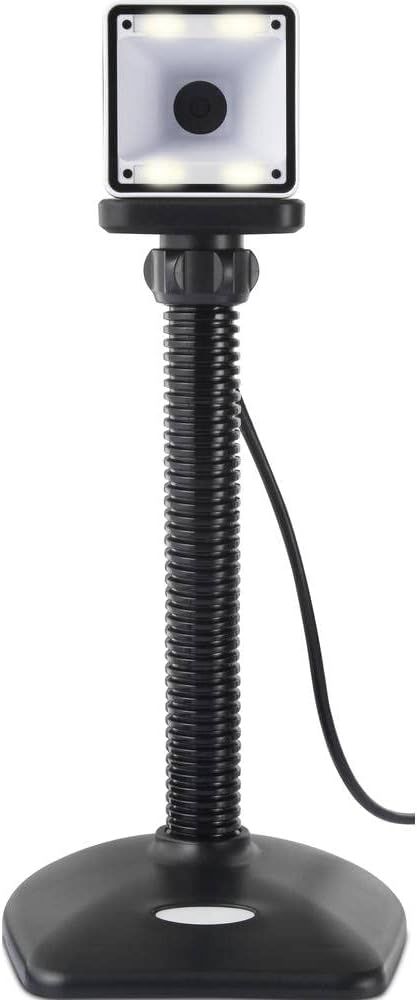
- Розміщення: Place the scanner on a stable, flat surface. The flexible neck allows for adjustment of the scanning head angle for optimal positioning.

Робота зі сканером
The Renkforce RF-SBS-500 is designed for ease of use with its omnidirectional and hands-free capabilities.
- Увімкнення: Once connected via USB, the scanner will power on automatically. The LED indicators on the scanner head may illuminate briefly.
- Сканування штрих-коду: Position the barcode within the scanning area of the scanner head. The scanner will automatically detect and read the barcode.
- Візуальний і звуковий зворотній зв'язок: Upon successful scanning, the integrated buzzer will emit a short beep, and the LED display on the scanner will flash or change color, indicating a successful read.
- Всеспрямоване читання: The scanner can read barcodes regardless of their orientation, eliminating the need to align the barcode precisely.
- Hands-Free Mode (Presentation Mode): The scanner operates continuously in a presentation mode, allowing you to simply pass items with barcodes in front of the scanning window without pressing any buttons. This saves time and improves workflow efficiency.
- Підтримувані штрих-коди: The scanner supports both 1D (e.g., EAN, UPC, Code 39) and 2D (e.g., QR Code, Data Matrix, PDF417) barcode types.
Технічне обслуговування
Правильне обслуговування забезпечує довговічність та оптимальну продуктивність вашого сканера.
- Очищення вікна сканування: Регулярно протирайте вікно сканування м’якою тканиною без ворсу. Для стійкого бруду злегкаampПротріть тканину водою або м’яким неабразивним засобом для чищення. Не розпилюйте засіб для чищення безпосередньо на сканер.
- Генеральне прибирання: Wipe the exterior of the scanner with a dry or slightly damp тканина. Уникайте використання агресивних хімікатів або абразивних матеріалів.
- Зберігання: Коли сканер не використовується, зберігайте його в чистому, сухому місці, подалі від прямих сонячних променів та екстремальних температур.
Усунення несправностей
Якщо у вас виникли проблеми зі сканером, зверніться до наступних поширених проблем та способів їх вирішення:
| проблема | Можлива причина | Рішення |
|---|---|---|
| Сканер не вмикається. | USB cable not connected properly or faulty USB port. | Ensure the USB cable is firmly connected to both the scanner and the computer. Try a different USB port. |
| Сканер не зчитує штрих-коди. | Barcode damaged, scanning window dirty, or incorrect barcode type. | Check the barcode for damage. Clean the scanning window. Ensure the barcode type is supported (1D/2D). Adjust the distance and angle of the barcode to the scanner. |
| No beep or LED feedback after scanning. | Barcode not read successfully. | Refer to the "Scanner does not read barcodes" solution. If the issue persists, contact support. |
| Відскановані дані відображаються неправильно. | Keyboard layout mismatch or software issue. | Ensure your computer's keyboard layout matches the expected output. Test with a simple text editor. |
If the problem persists after trying these solutions, please contact Renkforce customer support.
Технічні характеристики
| Особливість | Специфікація |
|---|---|
| Номер моделі | РФ-4679568 |
| Можливість сканування | 1D та 2D штрих-коди |
| Технологія підключення | USB-A (дротовий) |
| Швидкість сканування | 60 зображень за секунду |
| Режим сканування | Omnidirectional, Hands-free (Presentation Mode) |
| Зворотній зв'язок | Integrated Buzzer, LED Display |
| Сумісні пристрої | Desktop Computer, Laptop, Smartphone (via appropriate adapter if needed) |
| Розміри (Д x Ш x В) | 150 х 5.2 х 5.2 см |
| Вага товару | 102 грамів |
| Джерело живлення | Харчування від порту USB |
| Країна походження | Німеччина |
Гарантія та підтримка
Renkforce products are manufactured to high-quality standards and come with a standard warranty. Please refer to your purchase documentation or the Renkforce official webна сайті, щоб дізнатися про конкретні гарантійні умови, що застосовуються до вашого регіону.
For technical support, troubleshooting assistance, or warranty claims, please contact Renkforce customer service. Contact details can typically be found on the Renkforce webсайті або на упаковці вашого продукту.