
1. Вступ
Thank you for choosing the IROAD X5 Dash Cam. This device is designed to record your driving journey in Full HD, providing crucial evidence in case of an incident. It features front and rear cameras, Wi-Fi connectivity for smartphone access, a G-Sensor for impact detection, and advanced driver assistance systems (ADAS). Please read this manual carefully before installation and operation to ensure proper use and optimal performance.

Figure 1: IROAD X5 Dash Cam (Front and Rear Units)
2. Продукт закінчивсяview
2.1 Вміст упаковки
- Main Unit (Front Camera)
- Задня камера
- Ключ Wi-Fi
- IROAD Genuine 16GB MicroSD Card
- Монтажний кронштейн
- Constant Power Cable (3m)
- Rear Camera Connection Cable (6m)
- Інструкція з експлуатації (цей документ)
- Spare Double-sided Tape
2.2 Основні характеристики
- Dual Full HD Recording: Front and rear cameras record in 1920x1080P at 30fps.
- Широкий Viewкут нахилу: Поле 140° view як для передньої, так і для задньої камери.
- G-сенсор: 3-axis acceleration sensor for automatic impact detection and event recording.
- З'єднання Wi-Fi: Connect to your smartphone via Wi-Fi for live view, playback, and settings adjustment.
- ADAS (Advanced Driver Assistance System): Includes Lane Departure Warning, Front Vehicle Departure Warning, and Forward Collision Warning.
- Various Recording Modes: Continuous, Impact, Parking, and Motion Detection recording.
- Нічне бачення: Enhanced recording quality in low-light conditions.
- Аудіозапис: On/Off selectable.
3. Налаштування
3.1 Встановлення карти MicroSD
- Переконайтеся, що відеореєстратор вимкнено.
- Locate the MicroSD card slot on the main unit.
- Insert the provided 16GB MicroSD card into the slot until it clicks into place. Ensure the correct orientation.
3.2 Встановлення передньої камери
- Очистіть ділянку лобового скла, де ви плануєте встановити камеру.
- Attach the mounting bracket to the front camera.
- Peel off the protective film from the double-sided tape on the bracket.
- Mount the front camera on the windshield, ideally behind the rearview дзеркало, що забезпечує чітке view of the road. Press firmly for secure adhesion.

Figure 2: IROAD X5 Front Camera
3.3 Встановлення задньої камери
- Clean the rear window area.
- Attach the rear camera to the rear window using the double-sided tape, ensuring a clear view.
- Connect the rear camera to the main unit using the provided 6m rear camera connection cable. Route the cable neatly along the vehicle's interior trim.
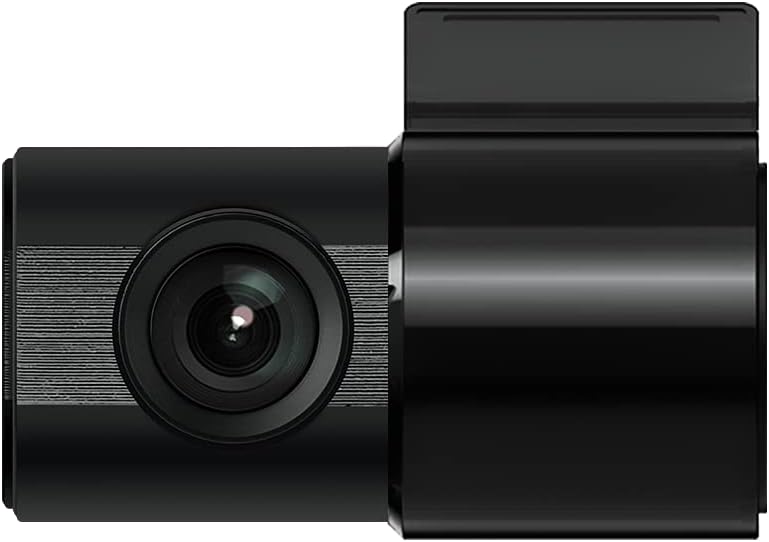
Figure 3: IROAD X5 Rear Camera
3.4 Підключення живлення
- Connect the constant power cable to the main unit's power input port.
- Connect the other end of the power cable to your vehicle's power source (e.g., OBDII port for general and hybrid vehicles, if using the optional OBDII power cable, or fuse box for constant power). Consult a professional for hardwiring if unsure.
3.5 Wi-Fi Dongle Connection (Optional)
If your model requires an external Wi-Fi dongle, insert it into the designated USB port on the main unit. This enables Wi-Fi connectivity for smartphone app control.
4. Інструкція з експлуатації
4.1 Automatic Power On/Off
The IROAD X5 Dash Cam will automatically power on and begin recording when your vehicle's ignition is turned on. It will power off automatically when the ignition is turned off.
4.2 Режими запису
- Безперервне записування: The dash cam continuously records while driving. Older files are overwritten by new ones when the MicroSD card is full.
- Impact Recording: When the G-Sensor detects a sudden impact or collision, the dash cam automatically saves the current recording segment as an event file, що запобігає його перезапису.
- Запис паркування: When the vehicle is parked and the ignition is off, the dash cam enters parking mode. It records events triggered by motion detection or impacts.
- Запис виявлення руху: In parking mode, the camera records when motion is detected in its field of view.
4.3 Функції ADAS
The IROAD X5 includes Advanced Driver Assistance Systems to enhance driving safety:
- Попередження про виїзд зі смуги руху (LDWS): Попереджає вас, якщо ваш автомобіль виїжджає за межі своєї смуги руху.
- Попередження про виїзд транспортного засобу попереду (FVDW): Повідомляє вас, коли транспортний засіб попереду починає рух з місця.
- Forward Collision Warning (FCWS): Warns you of a potential collision with a vehicle ahead.
These features can be configured via the IROAD smartphone application.
4.4 Запис звуку
Audio recording is enabled by default. You can toggle this feature on or off through the IROAD smartphone application settings.
4.5 Using the IROAD App (Wi-Fi)
- Download the "IROAD" app from your smartphone's app store.
- Увімкніть відеореєстратор.
- On your smartphone, go to Wi-Fi settings and connect to the IROAD dash cam's Wi-Fi network (SSID and password can be found in the app or on the device label).
- Open the IROAD app to access live view, recorded videos, and adjust settings.
5. Технічне обслуговування
5.1 Керування картками MicroSD
It is recommended to format the MicroSD card regularly (e.g., once a month) to maintain optimal recording performance and prevent data corruption. This can be done through the IROAD smartphone app or by removing the card and formatting it on a computer.
5.2 Очищення лінз
Periodically clean the front and rear camera lenses with a soft, dry cloth to ensure clear video quality. Avoid using abrasive cleaners.
5.3 оновлень мікропрограми
Check the official IROAD website or the IROAD app for available firmware updates. Keeping your dash cam's firmware up-to-date ensures the latest features and bug fixes.
6. Вирішення проблем
| проблема | Можлива причина / рішення |
|---|---|
| Відеореєстратор не вмикається. | Check power cable connection. Ensure vehicle ignition is on. Verify fuse in power cable or vehicle's fuse box. |
| No recording or recording stops. | MicroSD card may be full or corrupted. Format the MicroSD card. Ensure the card is inserted correctly. |
| Проблеми з підключенням до Wi-Fi. | Ensure Wi-Fi dongle is properly connected (if applicable). Restart the dash cam and your smartphone. Check Wi-Fi settings on your phone. |
| Погана якість відео. | Clean camera lenses. Ensure protective film is removed from lenses. Check recording resolution settings in the app. |
| ADAS warnings are inaccurate. | Ensure the camera is properly calibrated and mounted centrally. Environmental factors (heavy rain, fog) can affect performance. |
7. Технічні характеристики
| Особливість | Специфікація |
|---|---|
| Поле в View (Передній/Задній) | 140° |
| Resolution (Front/Rear) | Full HD 1920x1080P |
| Frame Rate (Front/Rear) | 30 кадрів/с |
| Режими запису | Continuous, Impact, Parking, Motion Detection |
| Функції ADAS | Lane Departure Warning, Front Vehicle Departure Warning, Forward Collision Warning |
| G-сенсор | 3-осьовий датчик прискорення |
| Аудіозапис | On/Off selectable |
| Споживана потужність | 2.6 Вт |
| Робоча температура | -30°C до 75°C |
| Носії для запису | MicroSD Card (16GB included) |
| Розміри основного блоку | 90 x 40 x 30 мм |
| Вага основного блоку | 60г |
| Підключення | Wi-Fi |
| Тип дисплея | LCD (4 inch, if applicable, though product description implies no screen on main unit) |
| Спосіб монтажу | Клей |
8. Гарантія та підтримка
For warranty information, technical support, or service inquiries, please refer to the warranty card included with your product or visit the official IROAD webсайт. Зберігайте чек про покупку як підтвердження покупки для гарантійних претензій.