

1. Вступ
Thank you for choosing the Gewiss ICON 11 kW Type 2 EV Charger. This manual provides essential information for the safe and efficient installation, operation, and maintenance of your electric vehicle charging station. Please read this manual thoroughly before installation and use, and retain it for future reference.
2. Інформація про безпеку
Важливі інструкції з безпеки:
- Installation must be performed by qualified personnel in accordance with all local and national electrical codes and regulations.
- Do not attempt to open, disassemble, repair, or modify the charger. This may cause damage, electric shock, or fire.
- Ensure the power supply is disconnected before any installation or maintenance procedures.
- Тримайте дітей подалі від зарядної станції під час роботи.
- Do not use the charger if it is damaged, wet, or shows signs of malfunction.
- The charger is designed for electric vehicle charging only. Do not use it for other purposes.
3. Продукт закінчивсяview
The Gewiss ICON EV Charger is a wall-mounted charging point designed for electric vehicles, offering 11 kW power output with a Type 2 socket. It features AUTOSTART DLM (Dynamic Load Management) for free use and optimized energy consumption, along with Bluetooth connectivity for configuration and session logging.
Ключові характеристики:
- AUTOSTART DLM: Enables automatic charging upon vehicle connection and dynamic load management to balance power consumption with other household loads.
- Розетка типу 2: Compliant with IEC 62196-1 and IEC 62196-2 standards for Mode 3 charging. Designed for single-hand connection and disconnection without a cover, maintaining IP55 protection.
- Міцна конструкція: Made from UV-resistant technopolymer, offering IP55 ingress protection and IK10 impact resistance.
- Світлодіодний індикатор стану: A light bar indicates the charger's status: Green (available), Blue (charging), Red (out of service).
- Захист від струму витоку: Includes protection against continuous leakage currents exceeding 6 mA.
- Configurable Power: Power output can be configured via an internal selector.
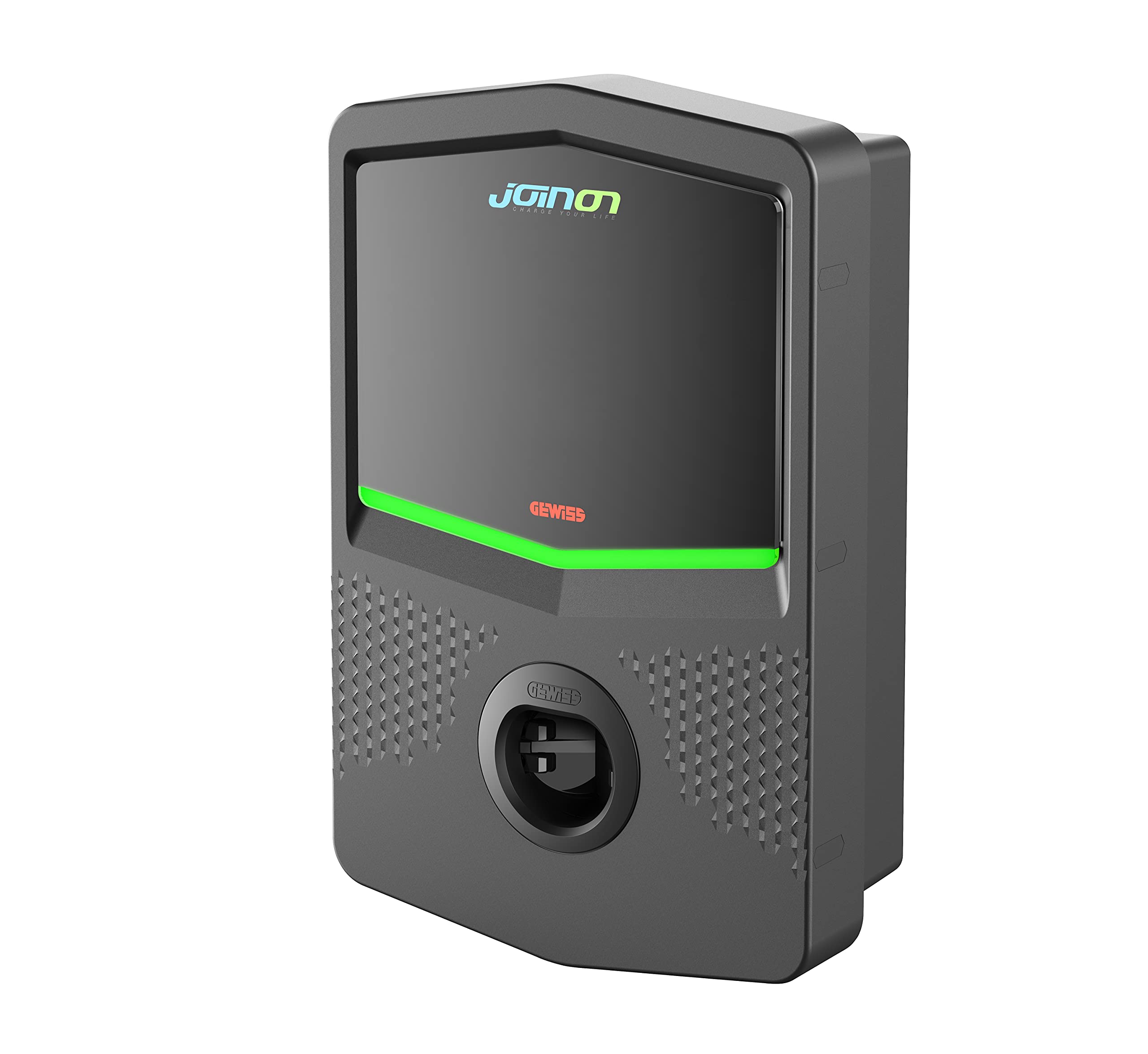
Зображення 1: Фронт view of the Gewiss ICON 11 kW Type 2 EV Charger. This image displays the sleek design of the wall-mounted unit, highlighting the Type 2 charging socket and the integrated LED status indicator bar.
4. Налаштування
The Gewiss ICON EV Charger is designed for wall mounting. Professional installation by a certified electrician is mandatory to ensure safety and compliance with electrical standards.
Кроки встановлення (короткий опис - детальніше див. повний посібник з встановлення):
- Вибір сайту: Choose a suitable wall location, considering proximity to the electrical panel and the vehicle's parking position. Ensure the surface is stable and can support the charger's weight (7 kg).
- Відключення живлення: Ensure the main power supply to the installation area is completely disconnected before proceeding.
- Монтаж: Securely mount the charger to the wall using appropriate fasteners. The enclosure features 1/4 turn screw opening and hinges for access.
- Електричне підключення: Connect the charger to the electrical supply. This involves wiring the power input and ensuring proper grounding. The charger requires protection against continuous leakage currents of more than 6 mA.
- Конфігурація живлення: Adjust the internal selector to set the desired power output, if necessary, according to your electrical installation capacity.
- Dynamic Load Management (DLM): If utilizing the DLM feature, ensure proper connection and configuration to monitor household loads and adjust charging power dynamically.
- Конфігурація Bluetooth: Use the Bluetooth connection for initial setup, configuration, and to retrieve charging session data.
- Відновлення живлення: Once all connections are secure and verified, restore power to the unit.
5. Інструкція з експлуатації
The Gewiss ICON EV Charger is designed for user-friendly operation with its AUTOSTART feature.
Charging Your Electric Vehicle:
- Connect the Vehicle: Plug the Type 2 charging cable from your electric vehicle into the Type 2 socket on the Gewiss ICON charger. The design allows for single-hand connection.
- AUTOSTART Function: The charger will automatically detect the connected vehicle and initiate the charging process. The LED indicator will change to blue, signifying that charging is in progress.
- Dynamic Load Management (DLM): If configured, the DLM system will continuously monitor your household's total power consumption and adjust the charging power to your EV to prevent exceeding your main electrical supply capacity.
- Монітор статусу зарядки: Observe the LED indicator for the charging status:
- Зелений: Charger is available and ready for use.
- Синій: Charging is active.
- Червоний: Charger is out of service or has an error. Refer to the Troubleshooting section.
- Кінець заряджання: Once your vehicle is fully charged or you wish to stop charging, disconnect the cable from your vehicle first, then from the charger. The LED indicator will return to green.
6. Технічне обслуговування
Regular maintenance ensures the longevity and optimal performance of your Gewiss ICON EV Charger.
- Прибирання: Clean the exterior of the charger periodically with a soft, damp тканину. Не використовуйте абразивні засоби для чищення, розчинники або агресивні хімікати. Перед чищенням переконайтеся, що зарядний пристрій вимкнено.
- Огляд: Regularly inspect the charging cable and the Type 2 socket for any signs of wear, damage, or corrosion. If any damage is found, discontinue use and contact qualified service personnel.
- Умови навколишнього середовища: The charger is designed for outdoor use with IP55 protection. However, avoid prolonged exposure to extreme weather conditions if possible.
- Оновлення прошивки: Перевірте виробника website or app (if applicable) for any available firmware updates to ensure your charger has the latest features and security enhancements.
7. Вирішення проблем
If you encounter issues with your Gewiss ICON EV Charger, refer to the following common troubleshooting steps:
| проблема | Можлива причина | Рішення |
|---|---|---|
| Світлодіод зарядного пристрою червоний | Out of service, internal error, or fault detected. | Disconnect the vehicle, then disconnect and reconnect the charger's power supply (e.g., via circuit breaker). If the issue persists, contact qualified service personnel. |
| Charging does not start (LED Green) | Cable not properly connected, vehicle not ready to charge, or power supply issue. | Ensure the charging cable is securely plugged into both the charger and the vehicle. Check your vehicle's charging settings. Verify the charger has power. |
| Charging is slow or intermittent | DLM actively reducing power, vehicle limitation, or power supply fluctuation. | Check other active loads in your household if DLM is enabled. Consult your vehicle's manual for charging limitations. Ensure stable power supply. |
| Проблеми з підключенням Bluetooth | Out of range, interference, or app issue. | Ensure your device is within range of the charger. Restart the app and your device's Bluetooth. |
For issues not listed here or if problems persist, please contact Gewiss customer support or a certified electrician.
8. Технічні характеристики
| Особливість | Специфікація |
|---|---|
| Номер моделі | GWJ3103A |
| Виробник | GEWISS |
| Потужність зарядки | 11 кВт |
| Тип розетки | Type 2 (IEC 62196-1, IEC 62196-2) |
| Режим зарядки | Режим 3 |
| особливості | AUTOSTART, Dynamic Load Management (DLM), Bluetooth connectivity |
| Захист від проникнення (IP) | IP55 |
| Impact Resistance (IK) | IK10 |
| Робоча температура | від -25°C до +50°C |
| матеріал | UV-resistant Technopolymer |
| Розміри (Д x Ш x В) | 43.5 х 28.3 х 13.8 см |
| вага | 7 кг |
| Захист від струму витоку | Protection against >6 mA DC leakage currents |
| Колір | Темно-сірий |
| Атестація | IEC |
9. Гарантія та підтримка
For warranty information, please refer to the documentation provided with your purchase or contact your local Gewiss distributor or customer service. Gewiss is committed to providing high-quality products and support.
For technical assistance, troubleshooting beyond this manual, or spare parts inquiries, please contact Gewiss customer support through their official website or your point of purchase. Please have your model number (GWJ3103A) and purchase details ready when contacting support.