
SIMOLIO SM-824D1
Інструкція користувача цифрових бездротових навушників для телевізора SIMOLIO SM824D1
Model: SM-824D1
вступ
This manual provides detailed instructions for the setup, operation, and maintenance of your SIMOLIO SM824D1 Digital Wireless TV Headphones. Please read this manual thoroughly before using the product to ensure proper functionality and to maximize your listening experience.
The SIMOLIO SM824D1 system includes a wireless headset and a transmitter. It is designed to provide clear audio from your TV or other audio sources directly to your ears, featuring balance and tone controls for personalized sound, and a long-range 2.4GHz wireless connection.
Вміст упаковки
Будь ласка, перевірте наявність усіх предметів у вашій упаковці:
- SIMOLIO SM824D1 Wireless Headset
- SIMOLIO SM824D1 Transmitter
- Audio Cables (Optical, RCA, 3.5mm)
- Адаптер живлення
- USB-кабель для зарядки
- Extra Soft Ear Tips
- Decompression Hanger Loops
- Посібник користувача англійською мовою (цей документ)
- Spare Lithium-Ion Battery

Image: Contents of the SIMOLIO SM824D1 package, showing the headset, transmitter, audio cables, power adapter, USB cable, extra ear tips, and hanger loops.
Налаштування
1. Живлення передавача
- Connect the power adapter to the transmitter's 'Power In' port.
- Підключіть адаптер живлення до настінної розетки.
2. Connecting to Your TV/Audio Source
The SIMOLIO SM824D1 supports Digital Optical, RCA, and 3.5mm audio outputs. Choose the appropriate cable based on your TV or audio source's available ports.

Image: Compatibility chart for TV audio outputs (Digital Optical, 3.5mm, RCA) with SIMOLIO models.
- Цифрове оптичне з'єднання: Use the optical cable. Connect one end to your TV's 'Digital Optical Audio Out' port and the other end to the 'OPTICAL IN' port on the transmitter. Важливо: For optical connections, you MUST set your TV's audio output format to PCM. Refer to your TV's settings menu.
- З'єднання RCA: Use the RCA audio cable (red and white plugs). Connect the red plug to the TV's 'Audio Out R' and the white plug to 'Audio Out L'. Connect the other end to the 'AUDIO IN' port on the transmitter.
- Аудіороз'єм 3.5 мм: Use the 3.5mm audio cable. Connect one end to your TV's headphone jack or 'Audio Out' port and the other end to the 'AUDIO IN' port on the transmitter.
Only one audio cable connection is required. For TVs with only coaxial or HDMI ARC ports, an additional audio converter/extractor may be needed (not included).

Зображення: Задня частина view of the transmitter, highlighting the input ports and audio mode switches.
3. Заряджання гарнітури
The headset uses a rechargeable Lithium-Ion battery. A spare battery is also included and can be charged in the transmitter.
- Переконайтеся, що передавач увімкнено.
- To charge the headset, place it into the charging slots on the transmitter. Ensure the front of the headset faces the front of the transmitter.
- To charge the spare battery, open the charging compartment on the transmitter and insert the battery.
- Charging typically takes about 3 hours. The indicator light on the headset will show charging status.

Image: Instructions for charging the headset and spare battery using the transmitter.
Інструкція з експлуатації
Елементи керування гарнітурою
Зображення: Оверview of the headset's controls and features.
- Увімкнення/вимкнення живлення: Slide the switch to turn the headset on or off.
- Регулювання гучності: Use the 'VOL' dial to adjust the listening volume.
- Контроль балансу: Use the 'BAL' dial to adjust the volume balance between the left and right ears. This is useful for individuals with different hearing sensitivities in each ear.
- Особистий звук Amplifier Button: Press this button to activate the ambient sound listener function, allowing you to hear nearby conversations without removing the headset. The indicator light will turn red when active.
Елементи керування передавачем
- OFF/MONO/STEREO Switch: Select 'STEREO' for Hi-Fi sound quality or 'MONO' for clearer TV dialogue, especially beneficial for speech clarity.
- TONE Selector (TREBLE/NORMAL/BASS): Adjust the audio tone to your preference. 'TREBLE' enhances high frequencies, 'BASS' enhances low frequencies, and 'NORMAL' provides a balanced sound.
Носіння гарнітури
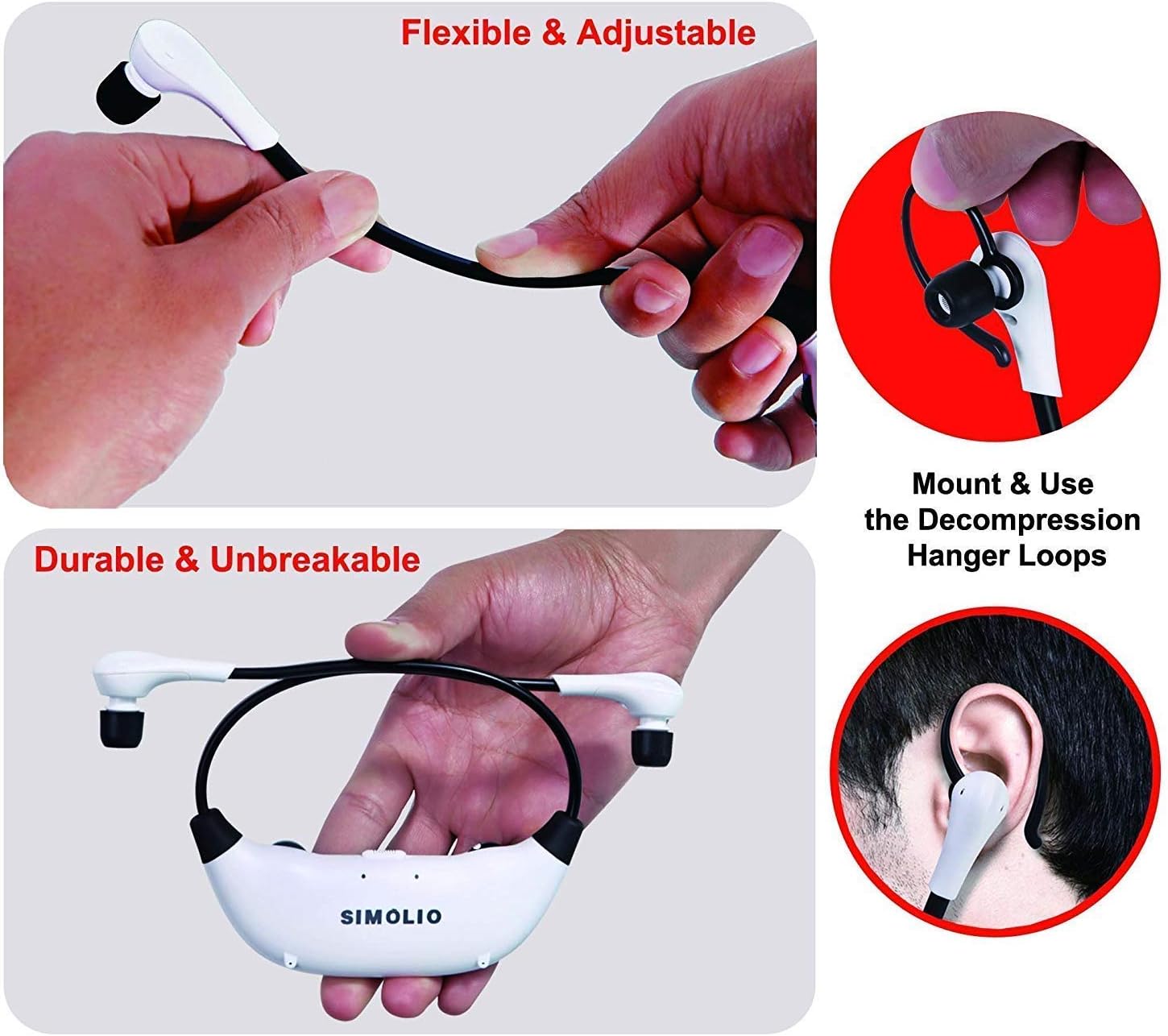
The headset features flexible and adjustable arms with memory stainless steel strips for a comfortable fit. Super-soft memory foam eartips and decompression hanger loops are included for enhanced comfort.

Image: Visual guide on adjusting the headset for comfort and using the hanger loops.
Технічне обслуговування
Догляд за акумулятором
- Always fully charge the battery before first use.
- When not in use, store the headset on the transmitter to keep it charged.
- The included spare battery can be swapped out for continuous use.
прибирання
- Wipe the headset and transmitter with a soft, dry cloth.
- The ear-tips feature an anti-dust mesh. Clean gently if dust accumulates.
- Уникайте використання агресивних хімікатів або абразивних засобів для чищення.
Зберігання
- Зберігайте пристрій у прохолодному, сухому місці, подалі від прямих сонячних променів та екстремальних температур.
Усунення несправностей
| проблема | Можлива причина | Рішення |
|---|---|---|
| Ні звуку, ні низької гучності |
|
|
| Спотворення звуку або статика |
|
|
| Гарнітура не заряджається |
|
|

Image: Recommended TV audio settings for optimal performance.

Image: Guidance on optimizing audio signal strength from TV and cable box.
Технічні характеристики
- Назва моделі: SM-824D1
- Технологія підключення: Бездротовий (РЧ)
- Технологія бездротового зв'язку: РЧ (2.4 ГГц)
- Роз'єм для навушників: 3.5-мм роз'єм (для входу на передавач)
- Сумісні пристрої: TVs with Digital Optical, RCA, or 3.5mm Audio Outputs
- Тип управління: Button Control, Push Button, Dial
- Час зарядки: Приблизно 3 години
- Термін служби батареї: Up to 6 Hours (depending on usage)
- Вага товару: 0.54 Kilograms (headset and transmitter)
- матеріал: пластик
- Noise Control Features: шумозаглушення
- Особливість: Microphone Included (for ambient sound ampліфікація)
- Виробник: Сімоліо
Інформація про безпеку
УВАГА:
- These RF products are not recommended for individuals with pacemakers. Please consult your physician before use if you have a pacemaker.
- Уникайте тривалого прослуховування на високій гучності, щоб запобігти пошкодженню слуху.
Гарантія та підтримка
For warranty information or technical assistance, please refer to the warranty card included with your product or visit the official SIMOLIO website. You may also contact SIMOLIO customer support directly via the contact information provided on their webсайті або в документації до вашого продукту.
For connectivity questions, you can send a picture of your TV's jack panel to support@simolio.com for confirmation.
Ask a question about this manual
Ask about setup, troubleshooting, compatibility, parts, safety, or missing instructions. Manuals+ will review the question and use this page’s manual context to help answer it.