
1. Вступ
The Magewell Ultra Encode SDI (Model 53050) is a versatile live stream encoder designed for professional AV applications. It supports high-quality H.264, H.265 (HEVC), and NDI|HX encoding, along with multiple streaming protocols. This manual provides detailed instructions for setting up, operating, maintaining, and troubleshooting your Ultra Encode SDI device.
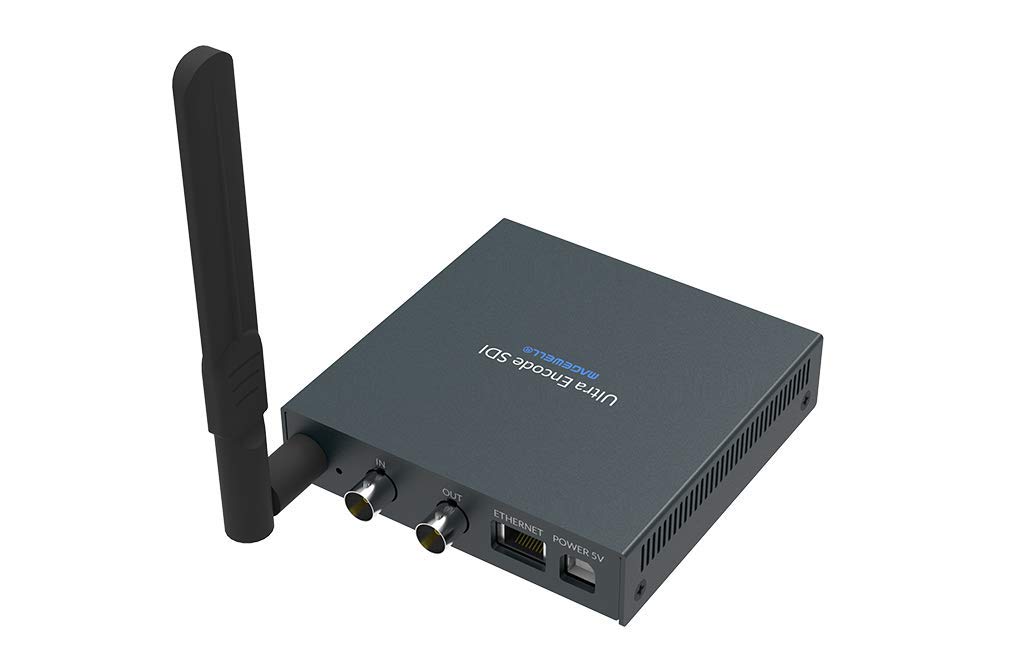
Figure 1.1: Magewell Ultra Encode SDI (Model 53050) device.
2. Вміст упаковки
Please verify that all items listed below are included in your package. If any items are missing or damaged, contact your vendor or Magewell support.
- Magewell Ultra Encode SDI (Model 53050) Unit
- Power Adapter (with regional plugs)
- USB 2.0 Type B cable
- Антена Wi-Fi
- T-bracket
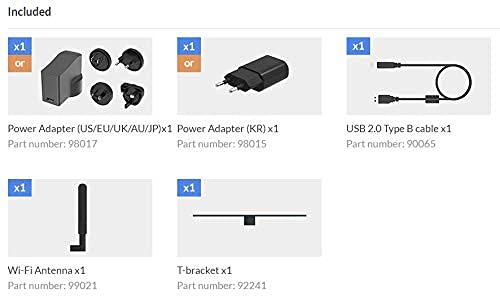
Figure 2.1: Included accessories with the Ultra Encode SDI.
3. Продукт закінчивсяview
The Ultra Encode SDI features various ports and indicators for connectivity and status monitoring. Familiarize yourself with these components before setup.
3.1 Front/Side Panel

Figure 3.1: Front/Side panel with audio ports, status LEDs, and USB port.
- ЛІНІЙНИЙ ВИХІД: Аудіо вихід 3.5 мм.
- РЯД: Аудіовхід 3.5 мм.
- Світлодіод PWR: Індикатор живлення.
- IN LED: Input signal status.
- ЖИВИЙ світлодіод: Streaming status.
- Світлодіод ETH: Ethernet connection status.
- Світлодіод Wi-Fi: Статус підключення Wi-Fi.
- ОПЦІЯ: USB port for optional accessories or configuration.
3.2 Задня панель

Figure 3.2: Rear panel with video, network, and power connections.
- IN (SDI): SDI/3G video input.
- OUT (SDI): SDI/3G loop-through output.
- ETHERNET: Порт RJ45 для дротового мережевого підключення.
- POWER 5V: Порт введення живлення.
3.3 Схема порту

Figure 3.3: Comprehensive port and indicator diagram.
4. Налаштування
Follow these steps to set up your Magewell Ultra Encode SDI device.
4.1 Фізичні з'єднання
- Підключіть живлення: Plug the provided power adapter into the ЖИВЛЕННЯ 5В port on the rear panel and then into a power outlet. The PWR LED on the front panel should illuminate.
- Connect Video Input: Connect your SDI/3G video source to the IN (SDI) port on the rear panel. If you need to loop the signal through, connect a cable from the OUT (SDI) port to your monitoring device.
- Підключіть аудіо (додатково): If using analog audio, connect your audio source to the ЛІНІЙНИЙ ВХІД port and your audio monitoring device to the ЛІНІЙНИЙ ВИХІД порт.
- Підключити мережу:
- Провідний: Connect an Ethernet cable from your network router or switch to the ETHERNET port on the rear panel. The ETH Світлодіод повинен світитися.
- Бездротовий: Screw the provided Wi-Fi antenna onto the antenna socket. You will configure the Wi-Fi connection via the web інтерфейс. The Wi-Fi LED will indicate connection status.
4.2 Початкова конфігурація (Web Інтерфейс)
The Ultra Encode SDI is configured via a webінтерфейс на основі . Щоб отримати до нього доступ:
- Ensure your computer is on the same network as the Ultra Encode SDI.
- Use a network scanning tool or check your router's connected devices list to find the IP address of the Ultra Encode SDI. Alternatively, some devices may have a default IP or a discovery tool.
- Відкрийте a web browser and enter the device's IP address in the address bar.
- Log in using the default credentials (refer to the device's quick start guide or Magewell documentation for default username and password).
- Від web interface, you can configure network settings (including Wi-Fi), video/audio input parameters, encoding settings, and streaming destinations.
5. Інструкція з експлуатації
The Ultra Encode SDI offers flexible encoding and streaming capabilities.
5.1 Параметри кодування
- The device supports H.264 and H.265 (HEVC) video encoding. Select the desired codec and adjust parameters such as bitrate (up to 16Mbps), resolution, and frame rate via the web інтерфейс.
- Audio encoding options are also available for optimal quality and compatibility.
5.2 Streaming Protocols
The Ultra Encode SDI supports various streaming protocols:
- RTMP/RTMPS: Commonly used for live streaming to platforms like YouTube, Facebook, and Twitch. Configure the server URL and stream key in the web інтерфейс.
- HLS: HTTP Live Streaming for adaptive bitrate delivery.
- SRT: Secure Reliable Transport protocol for low-latency, high-quality video transport over unreliable networks.
- НДІ|ГХ: NewTek's NDI|HX encoding for IP production workflows. Enable and configure NDI|HX output in the web інтерфейс.
5.3 Configurable Presets
The device includes configurable presets for easy streaming to popular platforms:
- Access the presets section in the web інтерфейс.
- Select a platform (e.g., Facebook, Twitch, YouTube) and enter your stream key or login details as prompted.
- Activate the preset to begin streaming.
6. Технічне обслуговування
Proper maintenance ensures the longevity and optimal performance of your Ultra Encode SDI.
- Прибирання: Використовуйте м’яку суху тканину для очищення зовнішньої частини пристрою. Уникайте рідких засобів для чищення або абразивних матеріалів.
- Вентиляція: Переконайтеся, що пристрій розміщено в добре провітрюваному приміщенні, щоб запобігти перегріванню. Не блокуйте вентиляційні отвори.
- Оновлення прошивки: Periodically check the Magewell official website for firmware updates. Updating the firmware can provide new features, performance improvements, and bug fixes. Follow the instructions provided by Magewell for safe firmware updates.
- Зберігання: Якщо пристрій не використовується протягом тривалого часу, зберігайте його в прохолодному, сухому місці, подалі від прямих сонячних променів та екстремальних температур.
7. Вирішення проблем
У цьому розділі розглядаються поширені проблеми, з якими ви можете зіткнутися.
- Немає живлення:
- Переконайтеся, що адаптер живлення надійно підключений до пристрою та справної розетки.
- Переконайтеся, що адаптер живлення є правильним, що постачається з пристроєм.
- Без відеовходу:
- Check the SDI cable connection between the source and the device's IN (SDI) порт.
- Confirm the video source is active and outputting a compatible SDI signal.
- Перевірте IN Статус світлодіода.
- Немає мережевого підключення:
- For wired connection, ensure the Ethernet cable is properly connected and the ETH LED is active.
- For Wi-Fi, ensure the antenna is attached, and Wi-Fi settings are correctly configured in the web interface. Check the Wi-Fi Світлодіодний.
- Verify your network router is functioning correctly.
- Немає доступу Web Інтерфейс:
- Ensure your computer is on the same network as the encoder.
- Verify the IP address of the encoder.
- Спробуйте очистити кеш браузера або скористатися іншим браузером.
- Streaming Issues (Buffering, Disconnections):
- Перевірте швидкість та стабільність вашого інтернет-з’єднання.
- Reduce the encoding bitrate in the web interface if your network bandwidth is limited.
- Verify streaming server URL and stream key are correct.
- Перевірте НАЖИВО Статус світлодіода.
For further assistance, refer to the Magewell support webабо зв’яжіться з їхньою командою технічної підтримки.
8. Технічні характеристики
| Особливість | Специфікація |
|---|---|
| Бренд | Меджвелл |
| Модель | 53050 |
| Розміри продукту | 10.5 х 10.6 х 2.5 см |
| Вага товару | 596 г (0.6 кілограма) |
| Відео вхід | SDI/3G Input |
| Відеовихід | SDI/3G Loop |
| Аудіо вхід | Line-In (3.5mm) |
| Аудіовихід | Line-Out (3.5mm) |
| Формати кодування | H.264, H.265 (HEVC), NDI|HX |
| Максимальний бітрейт | До 16 Мбіт/с |
| Протоколи потокового передавання | RTMP, RTMPS, HLS, SRT |
| Підключення до мережі | Ethernet (RJ45), Wi-Fi (802.11ac) |
| Джерело живлення | 12 вольт (постійний струм) |
| Сумісні пристрої | Laptop (for configuration) |
| Особливості | Wireless connectivity, Configurable presets for streaming platforms |
9. Гарантія та підтримка
For information regarding product warranty, technical support, and service, please refer to the official Magewell website or contact your authorized Magewell dealer. Keep your purchase receipt as proof of purchase for warranty claims.
Magewell Official Webсайт: www.magewell.com


