
вступ
Thank you for choosing the Opal Selfie Stick OP-Sel-BT-01. This manual provides essential information for the safe and effective use of your device. Please read it thoroughly before operation and retain it for future reference.
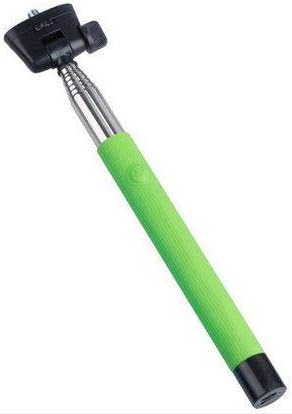
малюнок 1: The Opal Selfie Stick OP-Sel-BT-01 in green, showing its extendable arm, phone holder, and comfortable grip.
Особливості продукту
- колір: Зелений
- Основний матеріал: сталь
- Максимальна вантажопідйомність: 500 г
- Підключення: Бездротовий (Bluetooth)
- Сумісні системи: Android 3.0 і вище, iOS 4.0 і вище
Налаштування
- Розгорніть селфі-палку: Gently pull the phone holder section upwards to extend the stick.
- Adjust Phone Holder: Відкрийте телефон клamp and securely place your smartphone within it. Ensure the phone is centered and stable. The clamp is designed to hold various phone sizes.
- Увімкнення: Locate the power button (if applicable, usually on the handle) and press it to turn on the selfie stick. An indicator light may illuminate.
Інструкція з експлуатації
Bluetooth-парування
- Ensure the selfie stick is powered on and in pairing mode (indicator light may flash rapidly).
- На своєму смартфоні перейдіть до Налаштування > Bluetooth.
- Увімкніть Bluetooth та здійсніть пошук доступних пристроїв.
- Select "Opal OP-Sel-BT-01" or a similar name from the list of devices.
- Once paired, the indicator light on the selfie stick may turn solid or turn off, indicating a successful connection.
Зйомка фотографій/відео
- Відкрийте програму камери вашого смартфона.
- Витягніть палицю для селфі на потрібну довжину.
- Position your phone for the desired shot.
- Press the shutter button on the selfie stick handle to capture a photo or start/stop video recording.
Технічне обслуговування
- Прибирання: Протріть селфі-палицю м’якою сухою тканиною. Не використовуйте абразивні засоби для чищення або розчинники.
- Зберігання: Store the device in a cool, dry place away from direct sunlight and extreme temperatures. Retract the stick fully before storage.
- Догляд за акумулятором: If the selfie stick has a rechargeable battery, ensure it is charged periodically even when not in use to maintain battery health.
Усунення несправностей
| проблема | Можлива причина | Рішення |
|---|---|---|
| Не вдається підключити телефон | Selfie stick not in pairing mode; Bluetooth off on phone; battery low. | Ensure stick is on and in pairing mode. Turn phone's Bluetooth off/on. Charge the selfie stick. |
| Shutter button not working | Not paired; camera app settings. | Verify successful Bluetooth pairing. Check camera app settings for volume button shutter control. |
| Phone not stable in clamp | Phone not centered; clamp not fully secured. | Re-position phone to be centered. Ensure clamp is firmly gripping the phone. |
Технічні характеристики
- модель: OP-Sel-BT-01
- Бренд: Опал
- колір: Зелений
- Основний матеріал: сталь
- Максимальна вантажопідйомність: 500 г
- Підключення: Бездротовий (Bluetooth)
- Підтримувані операційні системи: Android 3.0+, iOS 4.0+
- ASIN: B091DBB122
- Перша доступна дата: 30 березня 2021 р
Гарантія та підтримка
For information regarding warranty coverage or technical support, please refer to the documentation included with your purchase or visit the official Opal webсайт. Конкретні гарантійні умови можуть відрізнятися залежно від регіону та продавця.
Інформація про безпеку
- Не піддавайте пристрій впливу екстремальних температур, вологи або прямих сонячних променів протягом тривалого часу.
- Зберігати в недоступному для дітей місці.
- Не намагайтеся розбирати або модифікувати пристрій. Це може призвести до анулювання гарантії та пошкодження.
- Ensure your phone is securely fastened in the clamp before extending the stick.