
1. Продукт закінчивсяview
The TEKMAGIC W60-OUS-WT is a robust digital watch designed for various activities, including swimming, snorkeling, and scuba diving, with a water resistance rating of 10 ATM (up to 100 meters). It features a clear digital display and multiple functions to assist with daily timekeeping and sports activities.
Key features include precise time, date, and day display, a chronograph (stopwatch), countdown timer, dual time zone functionality, alarm clock, hourly chime, and an electro luminescent backlight for visibility in low light conditions. The watch is also shock resistant and comes with a comfortable TPU band.

Зображення 1.1: спереду view of the TEKMAGIC W60-OUS-WT digital watch, showcasing its robust design and digital display with water splashes, indicating its water-resistant nature.
2. Функції кнопок
Familiarize yourself with the watch buttons to operate its various functions:
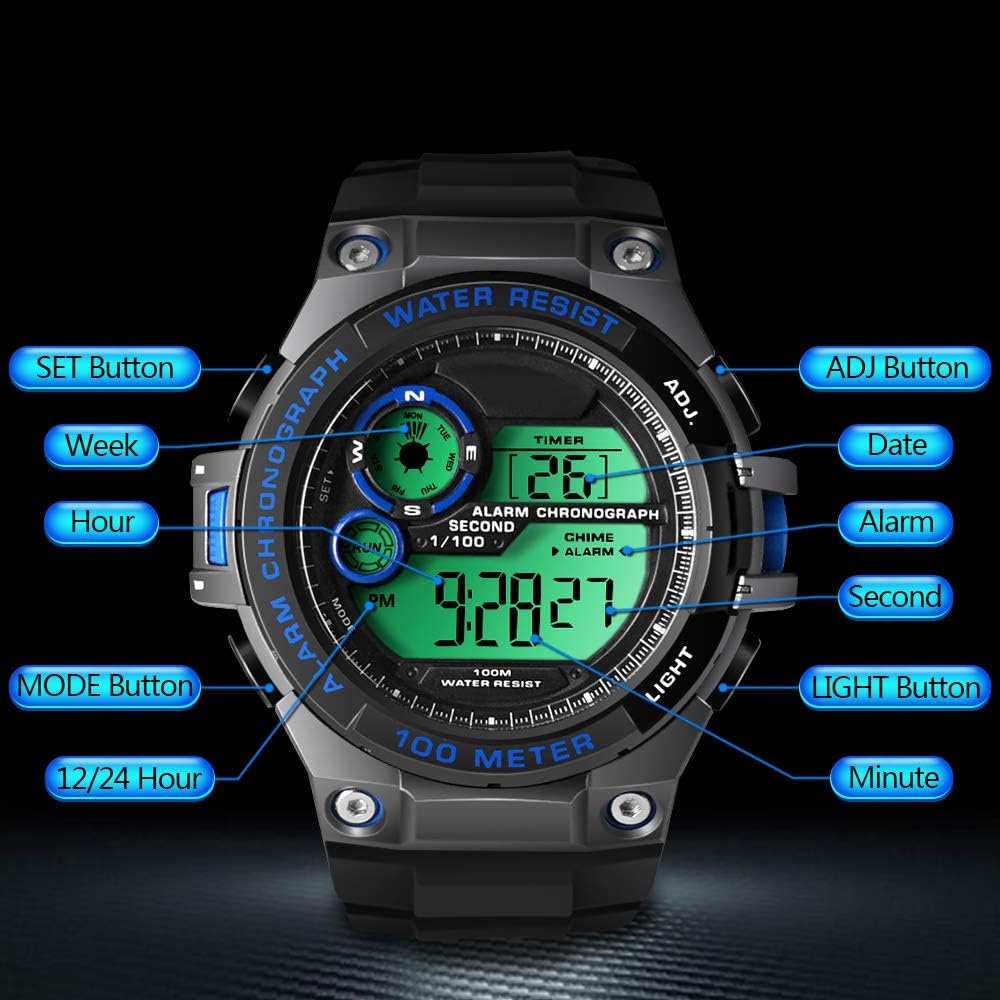
Image 2.1: Diagram illustrating the button layout and their respective functions on the TEKMAGIC W60-OUS-WT watch. Buttons include SET, MODE, 12/24 Hour, ADJ, Date, Alarm, Second, Light, and Minute.
- Кнопка SET: Використовується для входу в режими налаштування та підтвердження вибору.
- Кнопка ADJ: Used to adjust values during setting modes.
- Кнопка MODE: Cycles through different operational modes (Time, Chronograph, Countdown, Alarm, Dual Time).
- Кнопка LIGHT: Activates the electro luminescent backlight.
- 12/24 Hour Button: Перемикає між 12-годинним та 24-годинним форматами часу.
3. Початкове налаштування
3.1 Встановлення часу та дати
- У режимі відліку часу натисніть і утримуйте НАБІР кнопку , доки секунди не почнуть блимати. Це означає, що ви перебуваєте в режимі налаштування.
- Натисніть РЕЖИМ button to cycle through the setting options: Seconds → Hours → Minutes → Year → Month → Day.
- Використовуйте ПРИСЛ button to increase the flashing value. For seconds, pressing ПРИСЛ скине їх до 00.
- Після того, як усі параметри налаштовано, натисніть кнопку НАБІР кнопку ще раз, щоб вийти з режиму налаштування.
3.2 12/24-годинний формат
У режимі відліку часу натисніть кнопку 12 / 24 година кнопку для перемикання між 12-годинним (з індикатором AM/PM) та 24-годинним форматами часу.
4. Операційні функції
4.1 Режим відліку часу
This is the default mode, displaying the current time (hour, minute, second), date, and day of the week.
4.2 Режим хронографа (секундоміра)
Щоб скористатися функцією секундоміра:
- Натисніть РЕЖИМ button repeatedly until 'CHRONO' or 'STW' appears on the display.
- Натисніть ПРИСЛ кнопку, щоб запустити секундомір.
- Натисніть ПРИСЛ знову натисніть кнопку, щоб призупинити/відновити.
- To reset the stopwatch, ensure it is paused, then press the НАБІР кнопку.

Image 4.1: The TEKMAGIC watch displaying the stopwatch function, with a runner in the background, illustrating its use for timing sports activities.
4.3 Режим таймера зворотного відліку
Щоб встановити та використовувати таймер зворотного відліку:
- Натисніть РЕЖИМ button repeatedly until 'TIMER' or 'CD' appears.
- Натисніть і утримуйте НАБІР кнопку, доки не почнуть блимати години.
- Використовуйте РЕЖИМ кнопку, щоб вибрати години, хвилини або секунди, а потім ПРИСЛ кнопку, щоб налаштувати значення.
- Прес НАБІР щоб підтвердити час зворотного відліку.
- Прес ПРИСЛ щоб розпочати або призупинити зворотний відлік.
- Коли зворотний відлік досягне нуля, пролунає сигнал тривоги.
4.4 Alarm Clock and Hourly Звонок
Щоб встановити будильник:
- Натисніть РЕЖИМ button repeatedly until 'ALARM' appears.
- Натисніть і утримуйте НАБІР кнопку, доки не почнуть блимати цифри годин.
- Використовуйте ПРИСЛ кнопку, щоб встановити годину, потім натисніть РЕЖИМ to select minutes and use ПРИСЛ to set them.
- Прес НАБІР щоб підтвердити час будильника.
- Натисніть ПРИСЛ button in Alarm Mode to toggle the alarm ON/OFF. An alarm icon will appear when activated.
Щоб активувати/деактивувати hourlдзвінок, натисніть НАБІР button in Alarm Mode. A chime icon will appear when activated.

Image 4.2: The TEKMAGIC watch displaying its alarm and calendar functions, with visual cues for waking up and checking dates.
4.5 Dual Time Zone
The watch allows you to set a second time zone:
- Натисніть РЕЖИМ button repeatedly until 'DUAL TIME' or 'DT' appears.
- Натисніть і утримуйте НАБІР кнопку, доки не почнуть блимати цифри годин.
- Використовуйте ПРИСЛ кнопку, щоб встановити годину, потім натисніть РЕЖИМ to select minutes and use ПРИСЛ to set them.
- Прес НАБІР to confirm the dual time zone setting.

Image 4.3: The TEKMAGIC watch displaying its dual time zone feature, superimposed over an image of a bridge and a rock formation, suggesting travel and global timekeeping.
4.6 Підсвічування
Натисніть СВІТЛО button to illuminate the display for a few seconds, enhancing visibility in dark environments.

Image 4.4: The TEKMAGIC watch with its backlight activated, shown in a dimly lit setting, highlighting its visibility feature.
4.7 Water Resistance (100m / 10 ATM)
This watch is designed to withstand water pressure up to 100 meters (10 ATM), making it suitable for swimming, snorkeling, and recreational scuba diving. It is important to note the following:
- Не використовуйте кнопки під водою. Operating buttons while submerged can compromise the watch's water resistance.
- Уникайте контакту годинника з гарячою водою, парою або екстремальними перепадами температур, оскільки це може пошкодити ущільнювачі.
- Промийте годинник прісною водою після контакту з солоною водою, щоб запобігти корозії.

Image 4.5: The TEKMAGIC watch displayed in an underwater scuba diving scene, emphasizing its suitability for deep-water activities.
Video 4.1: A demonstration of the TEKMAGIC watch being submerged in water, showcasing its water resistance capabilities. The watch remains functional and readable while wet.
5. Технічне обслуговування
5.1 Очищення
Регулярно протирайте годинник м’якою ганчіркоюamp cloth. For stubborn dirt, use a mild soap solution and rinse thoroughly with fresh water. Ensure the watch is completely dry before storage.
5.2 Заміна батареї
The watch uses a CR2025 battery, which typically lasts 1.5 to 2 years. When the display becomes dim or functions become erratic, it may be time to replace the battery. Battery replacement should ideally be performed by a qualified watch technician to ensure proper sealing and maintain water resistance.
5.3 Зберігання
Store the watch in a cool, dry place away from direct sunlight and extreme temperatures. Avoid exposing it to strong magnetic fields.
6. Вирішення проблем
- Дисплей порожній або тьмяний: Перевірте акумулятор. Якщо заряд акумулятора низький, замініть його.
- Кнопки не реагують: Ensure the watch is not in a locked mode (if applicable, though this model does not specify one). Try a soft reset by allowing the battery to drain completely and then replacing it, or consult a technician.
- Вода всередині годинника: Негайно зверніться до фахівця для огляду та ремонту, щоб запобігти подальшому пошкодженню. Не намагайтеся сушити годинник самостійно.
- Неправильний час/дата: Re-enter the time and date settings as described in Section 3.1.
7. Технічні характеристики

Image 7.1: Visual representation of the TEKMAGIC watch's dimensions, including case diameter (55mm), case thickness (18mm), band width (22mm), total length (258mm), and wrist circumference range (160mm-215mm).
| Особливість | Специфікація |
|---|---|
| Номер моделі | W60-OUS-WT |
| Глибина водонепроникності | 100 м (10 банкомати) |
| Рух | цифровий |
| Точність часу | ±30 секунд на місяць |
| Код батареї | CR2025 |
| Термін служби акумулятора | 1.5 до 2 років |
| Матеріал вікна циферблата | Високопрозора смола |
| Матеріал корпусу годинника | ABS пластик |
| Колір циферблата | Black + Gray + Blue |
| Діаметр корпусу | 55 мм |
| Товщина корпусу | 18 мм |
| Watchband Material | TPU Band |
| Колір стрічки | чорний |
| Тип застібки | Пряжка-штифт |
| Ширина стрічки | 22 мм |
| Maximum Wrist Circumference | 215 мм |
| Minimum Wrist Circumference | 160 мм |
| Вага продукту | 62г |
8. Гарантія та підтримка
For warranty information, technical support, or service inquiries, please refer to the documentation included with your purchase or contact TEKMAGIC customer service directly. Keep your proof of purchase for warranty claims.