
вступ
This manual provides detailed instructions for the installation, operation, and maintenance of your DeLOCK USB Type-C to 2.5 Gigabit LAN Adapter (Model 66645). Please read this manual thoroughly before using the device to ensure proper functionality and to prevent damage.
Продукт закінченийview
The DeLOCK USB Type-C to 2.5 Gigabit LAN Adapter expands your PC or notebook with a network interface via a USB Type-C port. It is also compatible with Thunderbolt 3 interfaces. This adapter supports NBASE-T technology, allowing data transfer speeds of 1 Gbps and 2.5 Gbps over standard network cables, automatically negotiating the best possible transfer rate.

Image: DeLOCK 2.5 Gigabit LAN Adapter in its retail packaging.
The adapter features a SuperSpeed USB (USB 3.2 Gen 1) Type-C male connector for connecting to your host device and a 2.5 Gigabit LAN RJ45 female port for network cable connection. The compact design ensures portability and ease of use.
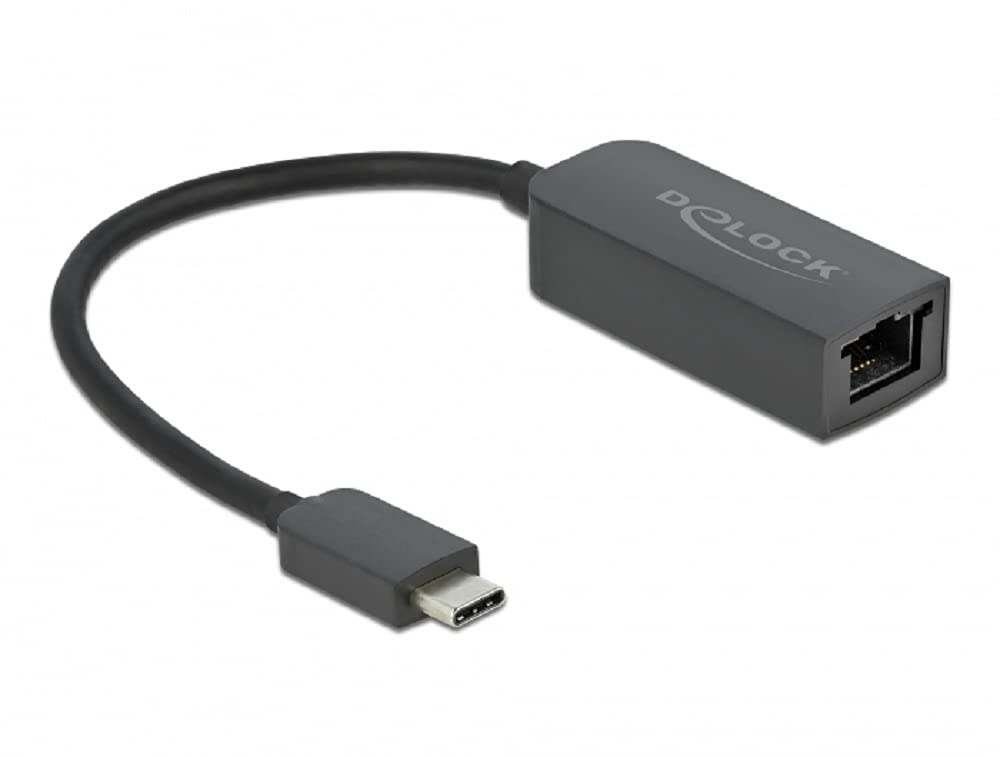
Image: Diagram illustrating the USB Type-C male connector, the 16 cm cable, and the 2.5 Gigabit LAN RJ45 female jack of the DeLOCK adapter.
Інструкції з налаштування
- Підключення до хост-пристрою: Plug the USB Type-C male connector of the DeLOCK adapter into an available USB Type-C port on your PC or notebook. Ensure the port supports USB 3.2 Gen 1 or Thunderbolt 3 for optimal performance.
- Підключення до мережі: Connect a standard RJ45 Ethernet network cable from your router, modem, or network switch to the 2.5 Gigabit LAN RJ45 female port on the DeLOCK adapter.
- Встановлення драйвера: In most modern operating systems (Windows 10/11, macOS, Linux), the adapter is plug-and-play and drivers will install automatically. If prompted, allow the system to install necessary drivers. If automatic installation fails, visit the official Delock webсайт для завантаження драйверів, спеціально для моделі 66645.
- Перевірте підключення: Once connected, check your operating system's network settings to confirm that the new network adapter is recognized and has established a connection.
Експлуатація адаптера
After successful setup, the DeLOCK adapter functions as a standard wired network interface. Your operating system will automatically detect and utilize it for internet and local network access. The NBASE-T technology will automatically negotiate the highest possible speed (up to 2.5 Gbps) supported by your network infrastructure and cable quality.
- Ensure your network cable is securely connected to both the adapter and your network device.
- For optimal performance, use Cat5e or higher-rated Ethernet cables.
- Monitor your system's network activity indicators to confirm data transmission.
Технічне обслуговування
The DeLOCK USB Type-C to 2.5 Gigabit LAN Adapter requires minimal maintenance.
- Прибирання: Use a soft, dry cloth to clean the exterior of the adapter. Avoid using liquid cleaners or solvents.
- Зберігання: Коли адаптер не використовується, зберігайте його в прохолодному сухому місці подалі від прямих сонячних променів і екстремальних температур.
- Обробка: Avoid bending or twisting the cable excessively, and do not apply undue force when connecting or disconnecting the adapter.
Усунення несправностей
- Немає мережевого підключення:
- Ensure the adapter is firmly plugged into the USB Type-C port.
- Verify the Ethernet cable is securely connected to both the adapter and the network device.
- Перезавантажте комп’ютер та мережеве обладнання (маршрутизатор/модем).
- Check your operating system's network settings to ensure the adapter is enabled.
- Try a different USB Type-C port on your device.
- Перевірте з іншим кабелем Ethernet.
- Низька швидкість з'єднання:
- Ensure your network infrastructure (router, switch, cables) supports 2.5 Gigabit Ethernet.
- Use Cat5e or Cat6 Ethernet cables for optimal performance.
- Update the adapter's drivers from the official Delock webсайт, якщо є.
- Check for other network activity or bandwidth-intensive applications running on your device.
- Адаптер не розпізнано:
- Ensure your USB Type-C port is functional.
- Try connecting the adapter to another computer to rule out a device-specific issue.
- Manually install drivers from the Delock webсайт, якщо автоматична інсталяція не вдалася.
- Check your device manager (Windows) or system information (macOS/Linux) for any unrecognized devices or driver conflicts.
Технічні характеристики
| Номер моделі: | 66645 |
| Роз'єми: | 1 x SuperSpeed USB (USB 3.2 Gen 1) USB Type-C male 1 x 2.5 Gigabit LAN RJ45 female |
| Чіпсет: | Realtek RTL8156 |
| Швидкість передачі даних: | Ethernet up to 10 Mbps (half/full duplex) Fast Ethernet up to 100 Mbps (half/full duplex) Gigabit Ethernet up to 1000 Mbps (half/full duplex) NBASE-T up to 2.5 Gbps (half/full duplex) |
| Специфікація USB: | SuperSpeed USB - 5Gbps |
| особливості: | Підтримка Auto MDI-X (автоматичне визначення стандартного або перехресного мережевого кабелю) NBASE-T technology for 1Gbps and 2.5Gbps speeds |
| Апаратний інтерфейс: | Ethernet, Thunderbolt, USB, USB Type C |
| Сумісні пристрої: | Настільний комп'ютер, ноутбук |
| колір: | чорний |
| Розміри продукту: | 5.51 x 4.72 x 1.18 дюймів |
| Вага товару: | 1.76 унції (50 грама) |
Гарантія та підтримка
For warranty information and technical support, please refer to the documentation included with your purchase or visit the official Delock webсайт. Зазвичай там можна знайти ресурси підтримки, відповіді на поширені запитання та контактну інформацію служби підтримки клієнтів.