
ASUS TUF GAMING B560M-PLUS WIFI
Інструкція користувача материнської плати ASUS TUF Gaming B560M-PLUS WiFi
Model: TUF GAMING B560M-PLUS WIFI | Brand: ASUS
1. Вступ
This manual provides comprehensive instructions for the installation, operation, and maintenance of your ASUS TUF Gaming B560M-PLUS WiFi Motherboard. Please read this manual thoroughly before using the product to ensure proper setup and optimal performance. This motherboard is designed for 24/7 unparalleled performance with upgraded power delivery and comprehensive cooling options to fuel the latest Intel 11th gen CPUs. It also provides faster memory and storage.
2. Продукт закінчивсяview
The ASUS TUF Gaming B560M-PLUS WiFi is a Micro ATX gaming motherboard featuring the LGA1200 socket, supporting Intel 11th/10th Gen processors. It includes PCIe 4.0 support, dual M.2 slots, 8+1 power stages, 2.5Gb LAN, and WiFi 6 connectivity.

малюнок 2.1: З верху до низу view of the ASUS TUF Gaming B560M-PLUS WiFi Motherboard, showcasing the CPU socket, RAM slots, PCIe slots, and various headers.
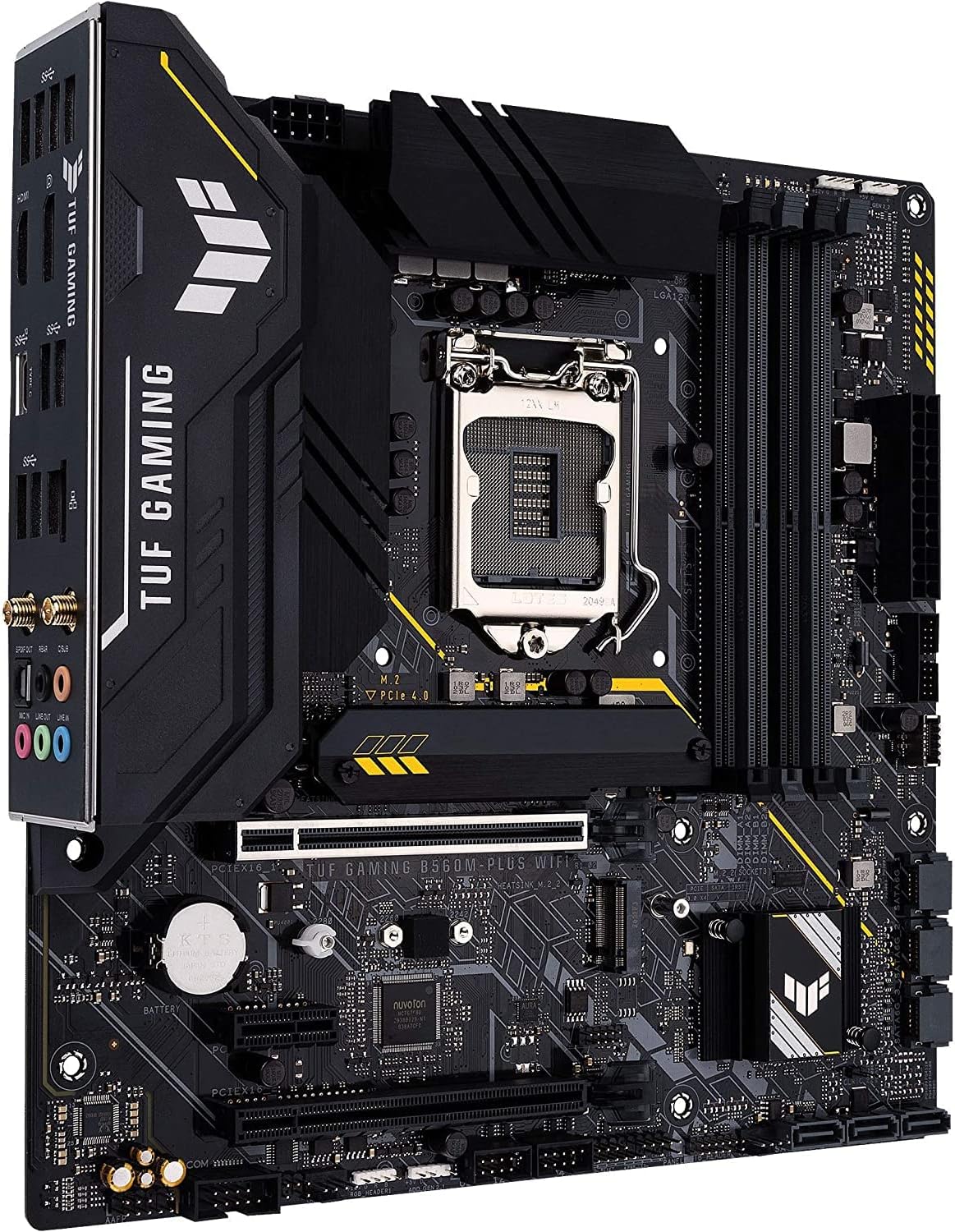
малюнок 2.2: Під кутом view of the motherboard, highlighting the I/O shield, VRM heatsinks, and the overall compact Micro ATX form factor.

малюнок 2.3: A different angled perspective of the motherboard, showing the M.2 slots and the chipset heatsink.

малюнок 2.4: Close-up of the rear I/O panel, detailing the USB ports, HDMI, DisplayPort, Ethernet, Wi-Fi antenna connectors, and audio jacks.
3. Ключові характеристики
- Роз'єм Intel LGA 1200: Готовий до процесорів Intel Core 11-го покоління.
- Enhanced power solution: 8+1 power stages, 6-layer PCB, ProCool socket, and durable capacitors for stable power delivery.
- Комплексне охолодження: VRM heatsink, flexible M.2 heatsink, PCH heatsink, hybrid fan headers and Fan Xpert 2+.
- Next-gen connectivity: PCIe 4.0, Realtek 2.5Gb Ethernet, Intel Wi-Fi 6, rear USB 3.2 Gen 2, front USB 3.2 Gen 1 Type-C and Thunderbolt 4 support.
- Two-way AI Noise-Cancelation: Reduce background noise from the microphone and audio output for crystal-clear communication in games or video conferences.
4. Налаштування та встановлення
Proper installation is crucial for the stability and performance of your system. Always ensure your power supply is disconnected before handling components.
4.1. Контрольний список перед інсталяцією
- Ensure you have a compatible CPU (Intel 10th or 11th Gen LGA1200).
- Підготуйте необхідні інструменти: хрестову викрутку, антистатичний браслет.
- Prepare your PC case and power supply.
4.2. Встановлення материнської плати
- Install the CPU into the LGA1200 socket, aligning the triangular markers. Secure the retention arm.
- Apply thermal paste to the CPU and install the CPU cooler.
- Install DDR4 RAM modules into the DIMM slots, ensuring they click into place. Refer to the motherboard manual for preferred slot configuration for dual-channel memory.
- Mount the motherboard into the PC case using standoffs and screws.
- Підключіть 24-контактний роз'єм живлення ATX та 8-контактний роз'єм живлення процесора від блока живлення до материнської плати.
- Install M.2 SSDs into the M.2 slots and secure them.
- Встановіть відеокарту в основний слот PCIe x16.
- Connect front panel headers (power button, reset button, USB, audio) according to the motherboard's pinout diagram.
- Connect SATA drives (if any) to the SATA ports.
- Connect case fans to the fan headers.
5. Operating the Motherboard (BIOS/UEFI)
BIOS (базова система вводу/виводу) або UEFI (уніфікований розширюваний інтерфейс прошивки) – це перше програмне забезпечення, яке запускається під час увімкнення комп’ютера. Воно ініціалізує апаратні компоненти та завантажує операційну систему.
5.1. Доступ до BIOS/UEFI
Щоб увійти до утиліти налаштування BIOS/UEFI, натисніть Видалити ключ або F2 key during the Power-On Self-Test (POST) phase, immediately after turning on your computer.
5.2. Key BIOS/UEFI Settings
- Порядок завантаження: Configure the sequence in which the system attempts to boot from storage devices.
- XMP Profile: Enable Extreme Memory Profile for optimal RAM performance.
- Контроль вентилятора: Adjust fan speeds and curves for optimal cooling and noise levels.
- Конфігурація зберігання: Set SATA mode (AHCI, RAID) and manage M.2 devices.
- Оновлення мікропрограми: Update the BIOS/UEFI firmware for improved compatibility and performance. Refer to the ASUS support website for the latest firmware and update procedures.
6. Технічне обслуговування
Регулярне технічне обслуговування допомагає продовжити термін служби вашої материнської плати та забезпечити стабільну роботу.
- Видалення пилу: Періодично очищайте материнську плату та компоненти від пилу за допомогою стисненого повітря. Переконайтеся, що система вимкнена та відключена від мережі.
- Оновлення BIOS/UEFI: Keep your BIOS/UEFI firmware updated to the latest version from the official ASUS webсайт для забезпечення сумісності та покращення продуктивності.
- Оновлення драйверів: Install the latest drivers for your motherboard's chipset, LAN, Wi-Fi, and audio from the ASUS support page.
- Управління кабелем: Переконайтеся, що внутрішні кабелі акуратно прокладені, щоб покращити потік повітря та запобігти його засміченню.
7. Вирішення проблем
У цьому розділі розглядаються поширені проблеми, з якими можна зіткнутися під час використання вашої материнської плати.
7.1. Немає живлення / Немає завантаження
- Перевірте підключення живлення: Переконайтеся, що 24-контактний кабель живлення ATX та 8-контактний кабель живлення процесора надійно підключені до материнської плати та блока живлення.
- Verify PSU: Test the power supply unit (PSU) with another system or a PSU tester.
- Перевстановіть компоненти: Reseat RAM modules, graphics card, and CPU.
- Очистити CMOS: Зверніться до інструкції з експлуатації вашої материнської плати, щоб отримати інструкції щодо очищення CMOS, що може вирішити проблеми завантаження, спричинені неправильними налаштуваннями BIOS.
7.2. Нестабільність системи / Збої
- Перевірте температури: Слідкуйте за температурою процесора та графічного процесора, щоб переконатися, що вона знаходиться в безпечних робочих межах. Перегрів може спричинити нестабільність.
- Тест пам'яті: Run a memory diagnostic tool (e.g., MemTest86) to check for RAM errors.
- Проблеми з драйверами: Ensure all drivers are up-to-date and correctly installed.
- Налаштування BIOS/UEFI: Reset BIOS/UEFI to default settings if you have made recent changes.
7.3. Периферійний пристрій не виявлено
- Перевірте підключення: Ensure the peripheral is properly connected to the correct port.
- Встановити драйвери: Install the necessary drivers for the peripheral.
- Налаштування BIOS/UEFI: Check if the port or controller for the peripheral is enabled in the BIOS/UEFI.
8. Технічні характеристики
| Категорія | Специфікація |
|---|---|
| Бренд | ASUS |
| Серія | TUF GAMING B560M-PLUS WIFI |
| Номер моделі | TUF GAMING B560M-PLUS WIFI |
| Гніздо ЦП | LGA 1200 |
| Сумісні процесори | Intel 11th Gen / 10th Gen Core Processors, Intel Celeron |
| Тип чіпсета | Intel B560 |
| Технологія оперативної пам'яті | DDR4 |
| Швидкість пам'яті | До 5000 МГц (розгін) |
| Місткість пам'яті (макс.) | 128 ГБ |
| Бездротовий тип | 802.11a/b/g/n/ac, 802.11ax (Wi-Fi 6) |
| Розміри продукту (ДxШxВ) | 10.83 x 10.83 x 2.66 дюймів |
| Вага товару | 1.32 фунта |
| Дата першої доступності | 8 лютого 2021 р |
9. Гарантія та підтримка
For warranty information, technical support, and the latest drivers and BIOS updates, please visit the official ASUS support website. You can also refer to the official user guides for more detailed information.
- Офіційна підтримка ASUS: ASUS Official Support Page
- Інструкція користувача (PDF): Завантажити посібник користувача
- Посібник користувача (PDF): Завантажити посібник користувача
For further assistance, please contact ASUS customer service.
Ask a question about this manual
Ask about setup, troubleshooting, compatibility, parts, safety, or missing instructions. Manuals+ will review the question and use this page’s manual context to help answer it.