
вступ
The Sharkoon Skiller SGK30 is a mechanical gaming keyboard designed for performance and durability. It features customizable RGB lighting, N-Key rollover, and a 1000Hz polling rate for responsive gameplay and typing. This manual provides essential information for setting up, operating, and maintaining your keyboard.

Image: Sharkoon Skiller SGK30 Mechanical Gaming Keyboard banner displaying the product name and type.
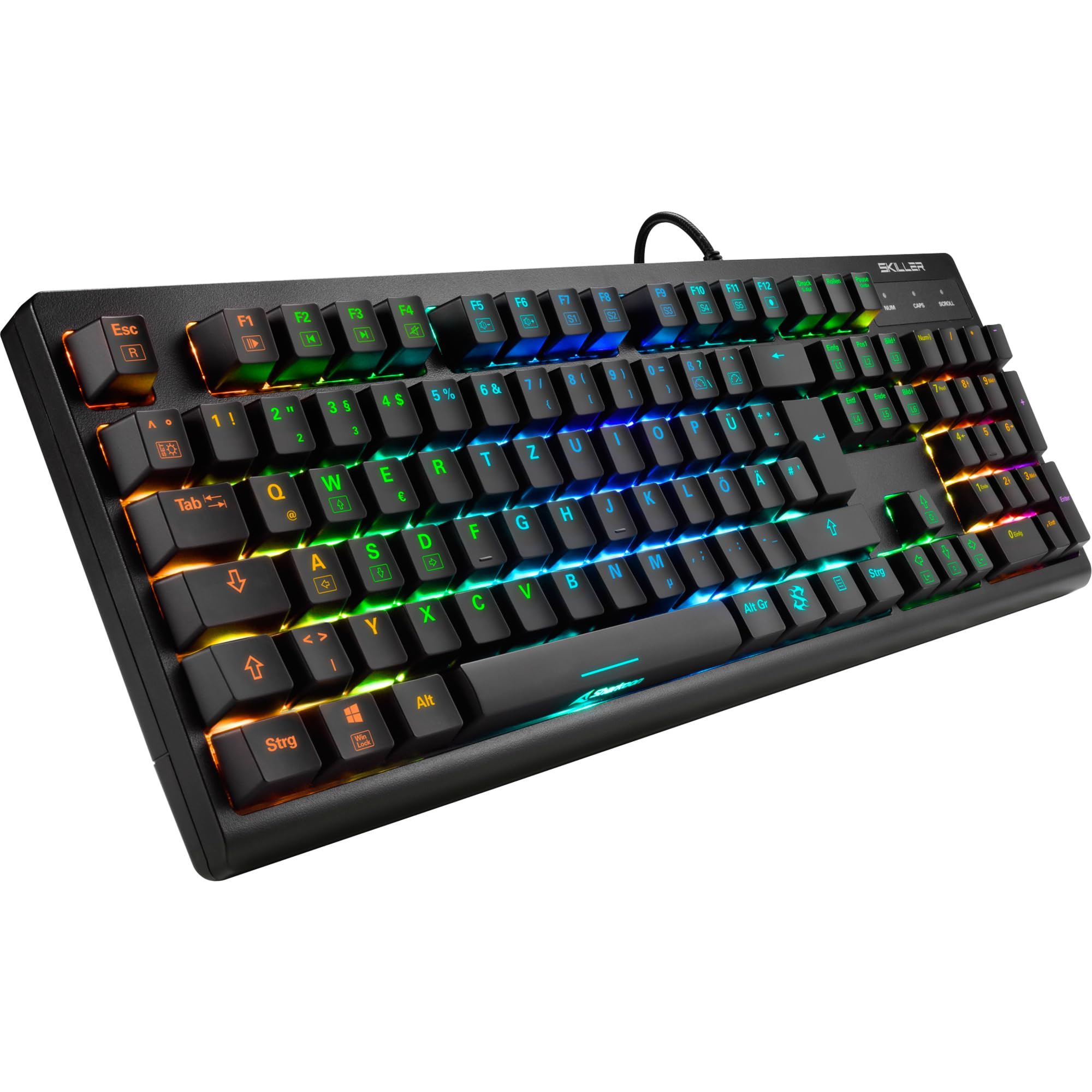
Зображення: Зверху вниз view of the Sharkoon Skiller SGK30 mechanical gaming keyboard, showcasinйого повне компонування та яскраве RGB-підсвічування.
Продукт закінченийview відео
Відео: Офіційний продукт завершеноview of the Sharkoon Skiller SGK30 Mechanical Gaming Keyboard, demonstrating its features, RGB lighting effects, and mechanical switches.
Налаштування
Follow these steps to set up your Sharkoon Skiller SGK30 keyboard:
- Розпакуйте клавіатуру: Carefully remove the keyboard and the included USB cable from its packaging.
- Підключення до комп'ютера: Plug the Micro USB end of the cable into the keyboard's port and the standard USB-A end into an available USB port on your computer.
- Встановлення драйвера: The keyboard is plug-and-play. Your operating system (Windows 10 or later recommended) should automatically detect and install the necessary drivers.
- Встановлення програмного забезпечення (додатково): For advanced customization of RGB lighting and key assignments, download the official Sharkoon software from the manufacturer's webсайт.

Image: The Sharkoon Skiller SGK30 keyboard positioned on a desk, ready for connection.
Інструкція з експлуатації
Основні ключові функції
The Sharkoon Skiller SGK30 features a standard layout with additional function keys accessible via the FN ключ.
- FN + F1-F12: Access multimedia controls (e.g., play/pause, volume up/down, mute).
- FN + клавіша Windows: Блокування/розблокування клавіші Windows для запобігання випадковим натисканням під час гри.
- N-Key Rollover: All keys are registered simultaneously, ensuring every keystroke is detected, even during rapid input.
Управління освітленням RGB
The keyboard offers extensive RGB lighting customization. Use the following combinations to adjust lighting effects:
- FN + Insert/Home/Page Up/Delete/End/Page Down: Cycle through various pre-programmed lighting effects.
- FN + Arrow Keys (Up/Down): Adjust brightness levels of the lighting.
- FN + Arrow Keys (Left/Right): Налаштуйте швидкість динамічних світлових ефектів.
- Custom Illumination: Use the dedicated software for advanced per-key lighting customization.

Зображення: Крупний план view of the keyboard keys highlighting the adjustable RGB illumination capabilities.
Налаштування програмного забезпечення
For advanced settings, macro programming, and detailed RGB customization, download and install the Sharkoon Skiller SGK30 software from the official Sharkoon webсайт. Програмне забезпечення дозволяє вам:
- Створіть та збережіть власний освітлювальний професіоналfiles.
- Program macros for specific keys.
- Перепризначити функції клавіш.

Image: A screenshot showing the graphical user interface of the Sharkoon Skiller SGK30 customization software, illustrating various options for lighting and key remapping.
Технічне обслуговування
Правильне обслуговування забезпечує довговічність та продуктивність вашої клавіатури:
- Прибирання: Use a soft, dry cloth to wipe the surface of the keyboard. For deeper cleaning, use compressed air to remove dust and debris from between the keycaps.
- Зняття ковпачка клавіш: If necessary, keycaps can be carefully removed using a keycap puller (not included) for thorough cleaning of the switches. Reinstall keycaps by pressing them firmly onto the switch stems.
- Уникайте рідин: Не піддавайте клавіатуру впливу рідин. У разі розливання рідин негайно від’єднайте клавіатуру та дайте їй повністю висохнути перед повторним підключенням.
- Зберігання: Зберігайте клавіатуру в прохолодному, сухому місці, подалі від прямих сонячних променів та екстремальних температур.

Зображення: Крупний план view of the mechanical switches on the Sharkoon Skiller SGK30 keyboard, illustrating their design for durability and ease of maintenance. Note: This model is available with Red switches, while the image shows Blue switches.
Усунення несправностей
If you encounter issues with your Sharkoon Skiller SGK30 keyboard, refer to the following common solutions:
| проблема | Можлива причина | Рішення |
|---|---|---|
| Клавіатура не відповідає | Нещільне USB-з'єднання, несправний USB-порт, проблема з драйвером. |
|
| RGB-підсвічування не працює або працює неправильно | Lighting settings incorrect, software conflict. |
|
| Ключі не реєструються | Пил/сміття під ковпачком клавіші, несправний перемикач. |
|
Технічні характеристики
| Особливість | Деталь |
|---|---|
| Бренд | Шаркун |
| Номер моделі | 4044951030026 |
| Тип клавіатури | Механічна ігрова клавіатура |
| Тип перемикача | Red Switch (Blue switches are also available for this model series) |
| Підключення | Micro USB |
| Швидкість опитування | 1000 Гц |
| N-Key Rollover | Підтримується |
| RGB освітлення | Налаштовуваний RGB |
| Операційна система | Windows 10 (and compatible with other Windows versions) |
| Розміри (ДxШxВ) | 44 х 14.4 х 3.5 см |
| вага | 867 г |
Що в коробці
The Sharkoon Skiller SGK30 package includes:
- Sharkoon Skiller SGK30 Mechanical Gaming Keyboard
- USB кабель
Гарантія та підтримка
Щоб отримати інформацію про гарантію та технічну підтримку, зверніться до офіційного сайту Sharkoon. webсайт або зверніться до місцевого продавця. Зберігайте чек про покупку для гарантійних випадків.
Примітка: Характеристики та характеристики продукту можуть бути змінені без попереднього повідомлення.