
1. Продукт закінчивсяview
The KAIDI KD-763 is a wired gaming headset designed for use with the PlayStation 4 (PS4) console and other compatible devices with a 3.5mm audio jack. It features over-ear cups for immersive sound, a rotary microphone for clear communication, and an inline volume control for convenient audio adjustments. The headset also includes an LED lighting effect, typically powered via a USB connection.
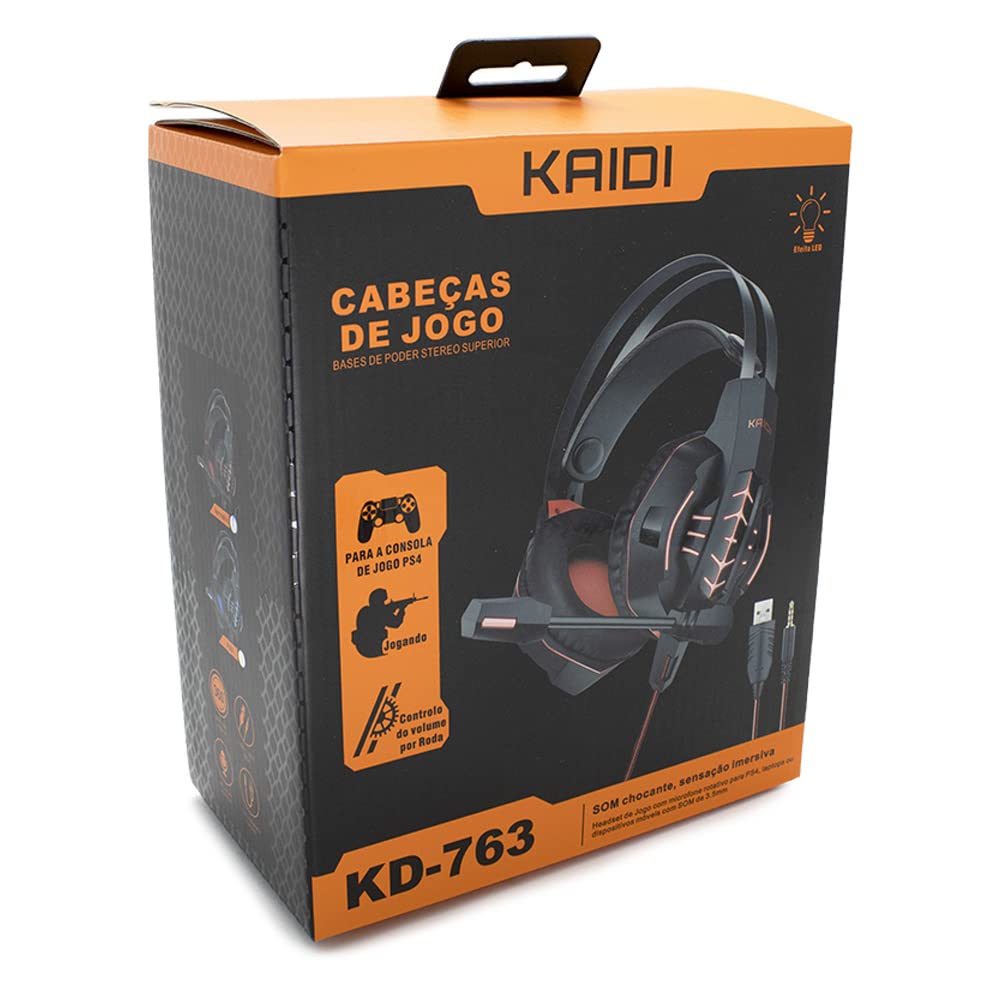
малюнок 1.1: The KAIDI KD-763 PS4 Gaming Headset packaging, showing the headset, its features, and compatibility with PS4.
2. Інформація про безпеку
- Уникайте тривалого прослуховування на високій гучності, щоб запобігти пошкодженню слуху.
- Не піддавайте гарнітуру впливу екстремальних температур, вологості або прямих сонячних променів.
- Тримайте гарнітуру подалі від води та інших рідин.
- Не намагайтеся розбирати або модифікувати гарнітуру. Це може призвести до анулювання гарантії та пошкодження.
- Clean the headset with a soft, dry cloth only.
- Зберігати в недоступному для дітей місці.
3. Вміст упаковки
Будь ласка, перевірте вміст упаковки після відкриття. Якщо будь-які елементи відсутні або пошкоджені, зверніться до продавця.
- KAIDI KD-763 Gaming Headset
- Посібник користувача (цей документ)
4. Посібник із налаштування
- Connect to PS4 Controller: Locate the 3.5mm audio jack on your PS4 controller. Insert the 3.5mm connector from the KD-763 headset firmly into this port.
- Powering LED Lights (Optional): If your headset features LED lighting, connect the USB connector from the headset to an available USB port on your PS4 console or a compatible USB power adapter. The LED lights will illuminate once connected.
- Налаштування розміру гарнітури: Extend or retract the headband to ensure the earcups sit comfortably and securely over your ears. The over-ear design should fully enclose your ears for optimal sound isolation.
- Позиція мікрофона: Adjust the flexible rotary microphone boom to a position near your mouth for clear voice pickup. Ensure it is not obstructing your vision.
- Configure PS4 Audio Settings:
- Перейти до Налаштування > Пристрої > Аудіопристрої on your PS4.
- встановити Пристрій введення to "Headset (Controller)".
- встановити Вихідний пристрій to "Headset (Controller)".
- встановити Вихід на навушники to "All Audio" for full game and chat sound.
- Налаштувати Регулювання гучності (навушники) на комфортний рівень.
5. Інструкція з експлуатації
5.1. Регулювання гучності
The KD-763 headset features an inline volume control wheel located on the cable. Rotate the wheel upwards to increase the volume and downwards to decrease it. Adjust to a comfortable listening level.
5.2. Використання мікрофона
The microphone is designed to capture your voice clearly. Ensure it is positioned correctly near your mouth. If your PS4 audio settings are configured correctly, your voice will be transmitted to other players in online games or chat parties.
To mute the microphone, check if there is a physical mute switch on the inline control. If not, you can mute the microphone through your PS4's quick menu (hold the PS button on your controller).
6. Технічне обслуговування
- Прибирання: Use a soft, dry, lint-free cloth to wipe the earcups and headband. Do not use liquid cleaners or abrasive materials.
- Зберігання: Коли гарнітура не використовується, зберігайте її в чистому, сухому місці, подалі від прямих сонячних променів та екстремальних температур. Уникайте заплутування кабелю.
- Догляд за кабелем: Do not pull on the cable to disconnect the headset. Always grasp the plug. Avoid bending or twisting the cable excessively.
7. Вирішення проблем
- Немає звуку або гучність низька:
- Ensure the 3.5mm jack is fully inserted into the PS4 controller.
- Check the inline volume control wheel on the headset cable and turn it up.
- Verify PS4 audio settings (Налаштування > Пристрої > Аудіопристрої) are correctly configured for the headset.
- Test the headset with another device (e.g., smartphone) to rule out a headset issue.
- Мікрофон не працює:
- Переконайтеся, що штанга мікрофона розташована правильно.
- Check PS4 audio settings (Налаштування > Пристрої > Аудіопристрої) to ensure Пристрій введення is set to "Headset (Controller)".
- Confirm the microphone is not muted via an inline switch or the PS4 quick menu.
- Якщо можливо, перевірте мікрофон за допомогою іншої програми або пристрою.
- Не працюють світлодіодні лампи:
- Переконайтеся, що USB-роз'єм надійно підключено до порту USB з живленням.
- Спробуйте інший USB-порт.
8. Технічні характеристики
| Бренд: | КАЙДІ |
| модель: | КД-763 |
| Тип гарнітури: | Over-ear (Circumaurais) |
| Імпеданс: | 32 Ом |
| Чутливість: | 110 дБ |
| Підключення: | Дротовий (3.5-мм аудіороз'єм + USB для світлодіодного підсвічування) |
| Сумісні пристрої: | Gaming Consoles (e.g., PS4), devices with 3.5mm audio jack |
| Конкретне використання: | Ігри |
| Тип управління: | Inline Volume Control Wheel |
| Мікрофон: | Rotary/Swivel |
| Світлодіодний ефект: | Yes (USB powered) |
9. Гарантія та підтримка
KAIDI products are designed and manufactured to the highest quality standards. For information regarding warranty coverage, terms, and conditions, please refer to the warranty card included with your purchase or visit the official KAIDI webсайт.
For technical support, troubleshooting assistance, or to inquire about replacement parts, please contact KAIDI customer service through their official channels. Contact information can typically be found on the product packaging or the official KAIDI webсайт.