
Naztech 15350
Naztech Xpods PRO True Wireless Noise Cancelling Earbuds
Модель: 15350
Brand: Naztech
вступ
The Naztech Xpods PRO are advanced true wireless noise-cancelling earbuds designed for an immersive audio experience and clear communication. Featuring HD sound, touch controls, and IPX4 water resistance, these earbuds are suitable for various activities, including sports and daily use. They come with a wireless charging case for extended playtime and convenient recharging.

Image: Naztech Xpods PRO earbuds, charging case, and product packaging, highlighting key features like 25 hours play time and touch controls.
Налаштування
Що в коробці
- Чохол для бездротової зарядки
- Зарядний кабель USB-C
- 6 Sets of Silicone Ear Tips (3 sizes, 2 colors)
Зарядка навушників і футляра
Before first use, fully charge the Xpods PRO and their charging case. The case can be charged via the included USB-C cable or a Qi-compatible wireless charging pad.
- Зарядка через USB-C: Підключіть кабель USB-C до порту зарядки на корпусі та до джерела живлення.
- Бездротова зарядка: Place the charging case on a Qi-compatible wireless charging pad. Ensure the case is properly aligned for charging.
A 10-minute quick charge provides approximately 1 hour of playback. A full charge offers up to 5 hours of playtime for the earbuds, with the charging case providing an additional 20 hours, totaling 25 hours of playtime.
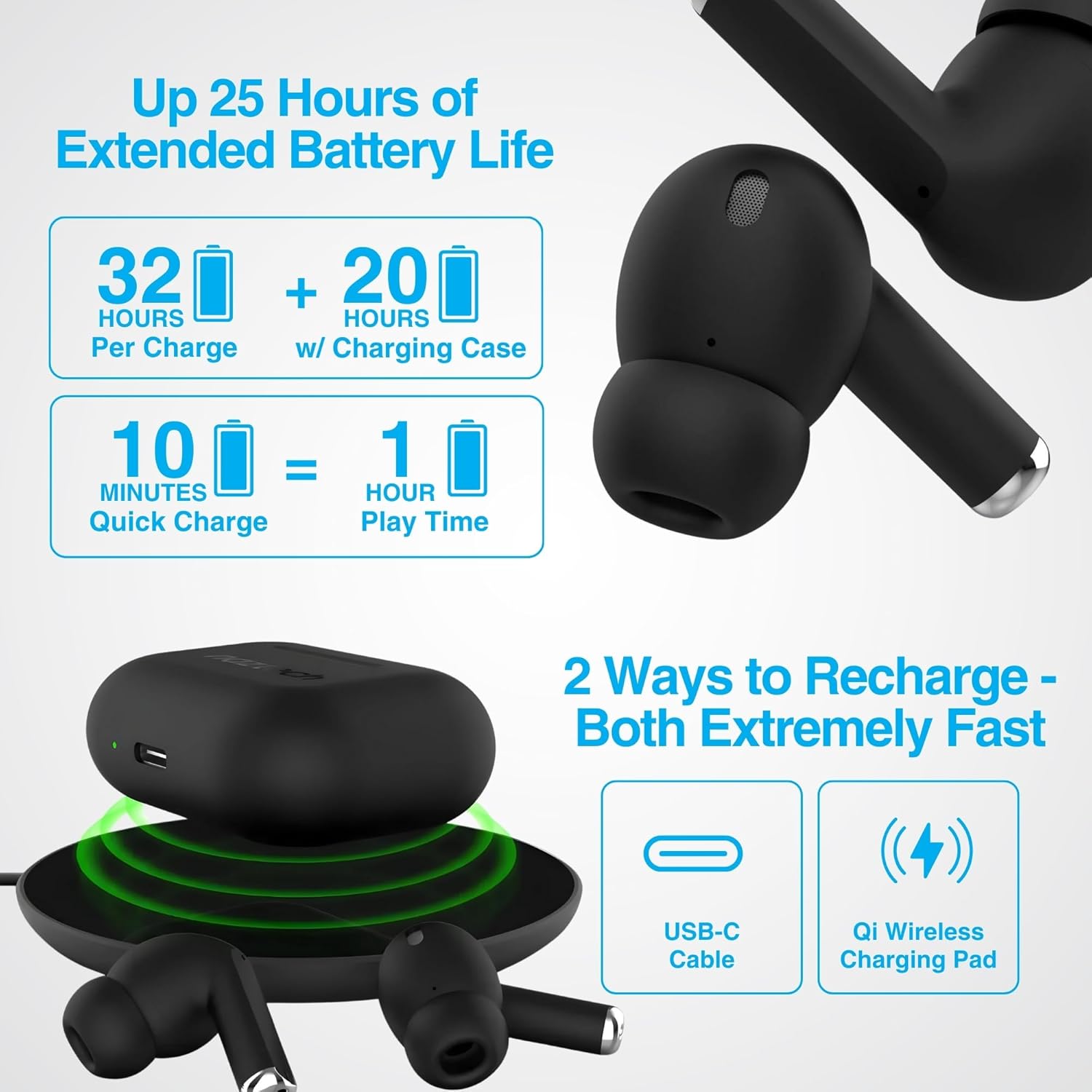
Image: Illustration showing USB-C and Qi wireless charging options for the Naztech Xpods PRO case, along with battery life indicators.
Підключення до пристрою
- Переконайтеся, що навушники заряджені.
- Відкрийте зарядний футляр. Навушники автоматично перейдуть у режим сполучення.
- На вашому пристрої (смартфоні, планшеті тощо) перейдіть до налаштувань Bluetooth та увімкніть Bluetooth.
- Select "NAZTECH Xpods PRO" from the list of available devices.
- Після підключення ви почуєте звукове підтвердження, і навушники будуть готові до використання.
The Xpods PRO feature Bluetooth 5.0 for stable connectivity up to 33 feet (10 meters) and auto-pair technology for seamless re-connection with previously paired devices.

Image: A smartphone screen showing the "NAZTECH Xpods PRO" listed in Bluetooth settings, demonstrating universal compatibility with various devices.
Інструкція з експлуатації
Сенсорне керування
The Xpods PRO feature intuitive touch sensor controls on each earbud for easy management of audio playback and calls.
| Дія | КОНТРОЛЬ |
|---|---|
| Відтворення/призупинення музики | Один раз торкніться будь-якого навушника |
| Наступний трек | Двічі торкніться правого навушника |
| Попередній трек | Двічі торкніться лівого навушника |
| Відповісти/закінчити виклик | Один раз торкніться будь-якого навушника |
| Відхилити виклик | Натисніть і утримуйте будь-який навушник протягом 2 секунд |
| Активуйте голосовий помічник | Потрійне торкання будь-якого навушника |

Image: Diagram illustrating the touch control functions on the Naztech Xpods PRO earbuds.
Носіння навушників
For optimal sound quality and a secure fit, choose the silicone ear tips that best suit your ear canal. The Xpods PRO come with 6 sets of silicone ear tips in 3 sizes and 2 colors to ensure a comfortable and noise-isolating fit.

Image: Naztech Xpods PRO earbuds shown with various silicone ear tip sizes, emphasizing customizable fit.
шумозаглушення
The Xpods PRO feature Passive Noise Cancellation through their closed-system design, which helps to immerse you in music by preserving low-frequency bass richness and reducing ambient noise. Dual microphones with advanced voice capture technology filter out wind and background noise for clear conversations.

Image: A person using Naztech Xpods PRO, illustrating the clear call quality and passive noise cancellation features.
Технічне обслуговування
прибирання
To maintain optimal performance and hygiene, regularly clean your Xpods PRO earbuds and charging case. Use a soft, dry, lint-free cloth to wipe down the surfaces. For ear tips, you may gently wipe them with a slightly damp тканиною та дайте їм повністю висохнути, перш ніж знову прикріплювати.
Avoid using abrasive materials, solvents, or harsh chemicals, as these can damage the product.
Водонепроникність (IPX4)
The Naztech Xpods PRO are rated IPX4 water-resistant, meaning they are protected against splashing water from any direction. This makes them suitable for workouts and light rain. However, they are not designed for submersion in water or exposure to pressurized water jets. Do not use them while swimming or showering.

Image: A person wiping sweat from their face, indicating the IPX4 water-resistant rating of the Naztech Xpods PRO for active use.
Зберігання
When not in use, store your Xpods PRO in their charging case to protect them from dust, dirt, and physical damage. Store the case and earbuds in a cool, dry place away from extreme temperatures and direct sunlight.
Усунення несправностей
If you encounter issues with your Naztech Xpods PRO, refer to the following common solutions:
Навушники не сполучаються або не підключаються
- Перевірте батарею: Переконайтеся, що навушники та зарядний футляр достатньо заряджені.
- Повторна пара: Turn off Bluetooth on your device, place earbuds back in the case, close and reopen the case. Then, re-enable Bluetooth on your device and try pairing again.
- Забути пристрій: On your device's Bluetooth settings, "forget" or "unpair" the "NAZTECH Xpods PRO" and then attempt to pair from scratch.
- Відстань: Ensure your device is within the 33ft (10m) Bluetooth range.
- Перешкоди: Відійдіть від інших бездротових пристроїв, які можуть створювати перешкоди.
Sound Quality Issues (e.g., Static, Low Volume)
- Чисті навушники: Ensure the mesh filters and ear tips are clean and free of debris.
- Придатність вушних насадок: Experiment with different sized silicone ear tips to ensure a proper seal in your ear canal, which significantly impacts sound quality and bass response.
- Якість джерела: Переконайтеся, що джерело аудіо (музика file, стрімінговий сервіс) має високу якість.
- Гучність пристрою: Перевірте рівні гучності як на підключеному пристрої, так і на навушниках.
Проблеми із зарядкою
- Перевірка кабелю: Ensure the USB-C cable is securely connected to both the case and the power source. Try a different USB-C cable and power adapter if available.
- Бездротова панель: If using wireless charging, ensure the case is correctly positioned on the charging pad and the pad is powered on.
- Розміщення навушників: Ensure the earbuds are correctly seated in the charging case, making proper contact with the charging pins.
Технічні характеристики
| Особливість | Деталь |
|---|---|
| Назва моделі | NAZTECH Xpods PRO |
| Номер моделі товару | 15350 |
| Технологія підключення | Бездротовий зв'язок (Bluetooth 5.0) |
| Дальність бездротового зв'язку | До 33 футів / 10 м |
| Тип управління | Сенсорний екран (керування медіа) |
| Контроль шуму | Пасивне шумопоглинання |
| Рейтинг водонепроникності | IPX4 |
| Загальний час гри | До 25 годин (з зарядним футляром) |
| Earbud Playtime (per charge) | До 5 годин |
| Швидка зарядка | 10 min charge for 1 hour playback |
| Інтерфейс зарядки | USB-C, бездротова зарядка Qi |
| Включені компоненти | USB-C Charging Cable, 6 Sets of Silicone Ear Tips, Wireless Charging Case |
| матеріал | пластик |
| Розміри продукту | 2.39 x 1.81 x 0.91 дюймів |
| Вага товару | 4.4 унції |
Гарантія та підтримка
Naztech products are designed for quality and performance. While specific warranty details are not provided in this manual, Naztech generally backs its products with warranties. For detailed warranty information, product support, or technical assistance, please visit the official Naztech webсайт або зверніться безпосередньо до служби підтримки клієнтів.
Ви можете знайти більше інформації та ресурсів підтримки, відвідавши Naztech Store on Amazon або їх посадова особа webсайт.
Ask a question about this manual
Ask about setup, troubleshooting, compatibility, parts, safety, or missing instructions. Manuals+ will review the question and use this page’s manual context to help answer it.