
вступ
This manual provides detailed instructions for the installation, operation, and maintenance of your EKEN V7 HD 1080P Smart WiFi Video Doorbell. Please read this manual thoroughly before using the product to ensure proper functionality and safety. Keep this manual for future reference.
Вміст упаковки
Перевірте, чи всі перелічені нижче предмети входять до вашої упаковки. Якщо будь-які предмети відсутні або пошкоджені, зверніться до служби підтримки клієнтів.

Image: The EKEN V7 Video Doorbell, two blue rechargeable batteries, and a dual-slot battery charger. These are the primary components included in the package.
- EKEN V7 HD 1080P Smart WiFi Video Doorbell
- Rechargeable Batteries (2 pcs)
- Зарядний пристрій
- Монтажний кронштейн
- Монтажні гвинти та анкери для стіни
- Посібник користувача (цей документ)
Продукт закінченийview
The EKEN V7 Video Doorbell is a smart security device designed to provide real-time video monitoring and two-way audio communication with visitors at your door. It features 1080P Full HD resolution, night vision, and a wide-angle lens for comprehensive coverage.

Зображення: спереду view of the EKEN V7 Video Doorbell, showing the camera lens, motion sensor, and illuminated doorbell button.
Ключові характеристики:
- Відео Full HD 1080P: Clear video streaming and recording.
- 166° Wide-angle Lens: Широке поле view to cover your entryway.
- Нічне бачення: Infrared LEDs for clear visibility in low-light conditions.
- Двостороннє аудіо: Speak and listen to visitors remotely via the mobile app.
- Виявлення руху PIR: Alerts you to movement at your door.
- Стійкий до погодних умов: Розроблений, щоб витримувати різні погодні умови.
- З’єднання Wi-Fi 2.4G: Connects to your home network for remote access.
- Тривалий термін служби батареї: Efficient power consumption for extended use.
- Хмарне сховище: Optional cloud service for video recording storage.

Image: An infographic highlighting the key features of the EKEN V7 Video Doorbell, such as 1080P Full HD, PIR Motion Detection, Night Vision, 166° Wide-angle Camera Lens, Long Battery Life, and 7 Days Free Cloud Service.

Image: A visual representation comparing the doorbell's view during the day (color) and at night (monochrome infrared), demonstrating the 166-degree wide-angle lens.
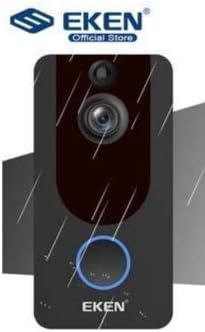
Image: The EKEN V7 Video Doorbell depicted with rain effects, illustrating its weather-resistant design suitable for outdoor installation.
Налаштування
1. Заряджання акумуляторів
- Insert the two rechargeable batteries into the provided battery charger.
- Підключіть зарядний пристрій до джерела живлення.
- Allow the batteries to charge fully before first use. The indicator light on the charger will change when charging is complete.
2. Встановлення дверного дзвінка
- Оберіть відповідне місце біля дверей, забезпечивши чіткий view та хороший сигнал Wi-Fi.
- Використовуйте монтажний кронштейн як шаблон для позначення отворів для свердління на стіні.
- Просвердліть отвори та вставте анкери до стіни, якщо необхідно.
- Закріпіть монтажний кронштейн на стіні за допомогою наданих гвинтів.
- Insert the charged batteries into the doorbell unit.
- Attach the doorbell unit to the mounting bracket, ensuring it clicks securely into place.
3. Підключення до Wi-Fi та налаштування програми
- Download the official EKEN doorbell app from your smartphone's app store (iOS or Android).
- Відкрийте застосунок і створіть обліковий запис або увійдіть у систему.
- Follow the in-app instructions to add your new doorbell device. This typically involves scanning a QR code on the doorbell or manually entering its ID.
- Connect the doorbell to your 2.4GHz Wi-Fi network. Ensure your phone is also connected to the same 2.4GHz network during setup.
- Після підключення ви зможете view live video, receive notifications, and adjust settings through the app.
Інструкція з експлуатації
Жити View і двостороннє аудіо
- Open the EKEN app on your smartphone.
- Select your doorbell from the device list to access the live video feed.
- To speak to a visitor, tap the microphone icon in the app. To listen, ensure the speaker icon is enabled.

Image: A user communicating with a delivery person at their door using the EKEN V7 Video Doorbell's two-way audio feature through the mobile application.
Сповіщення про виявлення руху
- When motion is detected, the doorbell will send a push notification to your smartphone.
- Торкніться сповіщення, щоб view the live feed or recorded event.
- Adjust motion sensitivity settings within the app to minimize false alerts.
Запис і відтворення відео
- The doorbell automatically records video when motion is detected or the doorbell button is pressed.
- Recorded videos are stored in the cloud (subscription may be required after initial free period) or on a local SD card (if supported and installed).
- Access and playback recorded events through the app's history or event log.

Image: The EKEN V7 Video Doorbell shown next to a smartphone displaying a live 1080P Full HD video feed, illustrating remote monitoring capabilities.
Технічне обслуговування
- Прибирання: Обережно протріть об'єктив камери та поверхню дзвінка м'якою тканиноюamp тканиною. Уникайте абразивних засобів для чищення або розчинників.
- Керування батареєю: Recharge batteries when the app indicates low power. For optimal performance, consider having a spare set of charged batteries.
- Оновлення прошивки: Regularly check the app for available firmware updates for your doorbell. Updates can improve performance and add new features.
- Wi-Fi підключення: Ensure your Wi-Fi router is functioning correctly and the doorbell has a strong signal for uninterrupted operation.
Усунення несправностей
- Дверний дзвінок не підключається до Wi-Fi:
- Ensure your Wi-Fi network is 2.4GHz. The doorbell does not support 5GHz networks. Check Wi-Fi password and signal strength. Try resetting the doorbell and your router.
- Немає сповіщень про виявлення руху:
- Verify that motion detection is enabled in the app settings. Adjust sensitivity levels. Ensure the doorbell's view не перешкоджає.
- Погана якість відео або затримка:
- Check your Wi-Fi signal strength at the doorbell's location. Move the router closer or consider a Wi-Fi extender. Ensure your internet connection is stable.
- Двосторонній аудіозв'язок не працює:
- Check microphone and speaker permissions for the app on your smartphone. Ensure the doorbell's microphone and speaker are not obstructed.
- Дверний дзвінок не вмикається:
- Ensure batteries are fully charged and correctly inserted. If using wired power, check connections.
Технічні характеристики
| Особливість | Деталь |
|---|---|
| Бренд | ЕКЕН |
| Модель | V7 |
| Роздільна здатність запису відео | 1080p Full HD |
| Технологія фотосенсора | CMOS |
| Технологія підключення | Wi-Fi (лише 2.4 ГГц) |
| Особливості | Night Vision, Two-Way Audio, PIR Motion Detection, Weather Resistant |
| Стабілізація зображення | немає |
| Довідка виробника | Ia-112 |
| ASIN | B08PMXWFF3 |
| Перша доступна дата | 17 грудня 2020 р |
Гарантія та підтримка
For warranty information and technical support, please refer to the official EKEN website or contact their customer service directly. Details regarding specific warranty periods and support channels are typically provided with your purchase documentation or on the manufacturer's webсайт.
Guaranteed software updates until: Unknown.