
вступ
This manual provides essential instructions for the proper use and maintenance of your Vikefon Type C Charging and Data Cable. This 1-meter cable is designed for efficient charging and high-speed data transfer between your Type C enabled devices and compatible power sources or computers.

Image: The Vikefon Type C Charging and Data Cable, featuring a standard USB-A connector on one end and a reversible USB-C connector on the other.
Особливості продукту
- USB Connector Quality: Ensures reliable charging and high-speed data transmission.
- Вихідна потужність: Supports up to 5V, 3 Amp для швидкої зарядки.
- Універсальна сумісність: Fully compatible with all Type C mobile devices for fast charging and syncing.
- Reversible USB Type-C Connector: Allows for quick and easy connections in any orientation.
- Міцний дизайн: Features intricate nylon braiding for enhanced durability and longevity, outlasting standard cables.
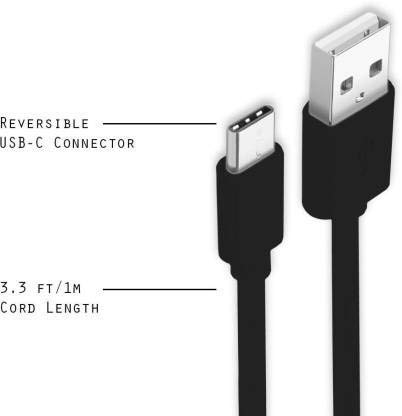
Image: A diagram illustrating the reversible nature of the USB-C connector and the cable's 1-meter (3.3 ft) cord length.
Налаштування
- Визначте сполучники: The cable has a standard USB-A connector on one end and a smaller, oval-shaped USB Type-C connector on the other.
- Підключення до джерела живлення/комп'ютера: Insert the USB-A end of the cable into a compatible USB port on a wall adapter, power bank, car charger, or computer.
- Підключення до пристрою: Insert the USB Type-C end into the charging/data port of your smartphone, tablet, or other Type C enabled device. The USB Type-C connector is reversible, so it can be inserted in either orientation.
- Перевірте підключення: Переконайтеся, що обидва кінці надійно підключені. Ваш пристрій має показувати, що він заряджається або підключений для передачі даних.
Інструкція з експлуатації
Зарядка вашого пристрою
- Connect the USB-A end of the cable to a compatible USB power adapter (e.g., wall charger, car charger, power bank).
- Connect the USB Type-C end to your device's charging port.
- Ensure the power adapter is plugged into a live power outlet. Your device should begin charging.
Передача даних
- Connect the USB-A end of the cable to a USB port on your computer.
- Connect the USB Type-C end to your device.
- On your device, you may receive a prompt asking to allow data access or to select a USB connection mode (e.g., "File Transfer," "MTP"). Select the appropriate option to enable data transfer.
- Your device should appear as a removable drive or media device on your computer, allowing you to transfer files.
Технічне обслуговування
- Правильне поводження: Always grasp the connector head when plugging or unplugging the cable. Avoid pulling directly on the cable itself to prevent damage to the internal wires.
- Уникайте згинання: Do not excessively bend or crimp the cable, especially near the connectors, as this can cause internal wire breakage.
- Зберігання: Store the cable in a clean, dry place away from extreme temperatures and direct sunlight. Avoid tangling the cable.
- Прибирання: If necessary, gently wipe the cable and connectors with a dry, soft cloth. Do not use liquids or abrasive cleaners.

Зображення: Крупний план view highlighting the durable metal heads of the Vikefon Type C cable connectors, designed for anti-oxidation and corrosion resistance.
Усунення несправностей
- Пристрій не заряджається:
- Переконайтеся, що обидва кінці кабелю надійно підключені.
- Переконайтеся, що адаптер живлення працює належним чином і підключений до розетки.
- Спробуйте використати інший адаптер живлення або порт USB.
- Перевірте зарядний порт вашого пристрою на наявність будь-яких забруднень або пошкоджень.
- Повільна зарядка:
- Ensure you are using a power adapter that supports fast charging (e.g., 3A output).
- Close any unnecessary background applications on your device.
- Без передачі даних:
- Confirm the cable is properly connected to both your device and computer.
- On your device, check the notification panel for USB options and select "File Transfer" or "MTP."
- Спробуйте підключитися до іншого USB -порту на комп’ютері.
- Restart both your device and computer.
Технічні характеристики
| Особливість | Деталь |
|---|---|
| Бренд | Vikefon |
| Назва моделі | Тип С |
| Номер моделі | Тип C 0129 |
| Тип роз'єму | USB типу C (чоловічий-чоловічий) |
| Тип кабелю | USB |
| Сумісні пристрої | Laptop, PC, Smartphone (e.g., Xiaomi Redmi 8A, Poco M2, Poco M2 Pro, Samsung, Motorola, Lenovo, Lava, Sony, HTC, LG, Karbonn, Maxx) |
| Особливості | Charging Wire, Durable, High Data Transfer Rate, High Quality, Long Length |
| Швидкість передачі даних | До 0.48 гігабіт за секунду (480 Мбіт/с) |
| Технологія підключення | USB |
| Специфікація Met | ISO |
| колір | чорний |
| Форма предмета | Круглий |
| Outer Material Type | Rubber (with Nylon Braiding) |
| Довжина кабелю | 1 метр |
Гарантія та підтримка
Specific warranty details for the Vikefon Type C Charging and Data Cable are not provided in this manual. For information regarding warranty coverage, returns, or technical support, please refer to the product packaging or contact the manufacturer directly through their official channels.