
1. Вступ
Welcome to the Xtrfy M42 RGB Ultra-Light Gaming Mouse user manual. The Xtrfy M42 is engineered for high performance and comfort, featuring an ultra-light design, state-of-the-art components, and an adjustable symmetrical shape. This manual will guide you through the setup, operation, customization, and maintenance of your new gaming mouse.

Figure 1.1: Xtrfy M42 RGB Ultra-Light Gaming Mouse (Miami Blue edition)
2. Вміст упаковки
Перевірте наявність усіх елементів у вашій упаковці:
- Xtrfy M42 RGB Ultra-Light Gaming Mouse
- Two sizes of interchangeable mouse shells
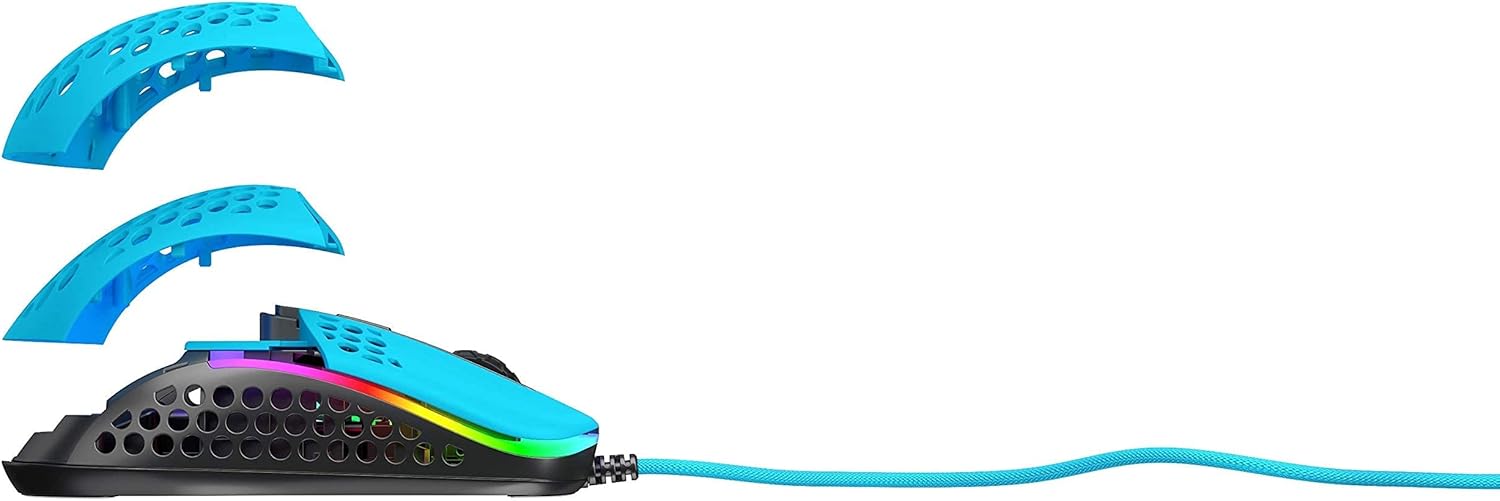
Figure 2.1: Xtrfy M42 with interchangeable top shells
3. Налаштування
Follow these steps to set up your Xtrfy M42 gaming mouse:
- Підключіть мишку: Plug the USB connector of the Xtrfy M42 mouse into an available USB port on your computer.
- Встановлення драйвера: The mouse is plug-and-play and typically does not require additional driver software. Your operating system will automatically detect and install the necessary drivers.
- Початковий тест: Move the mouse and click the buttons to ensure it is functioning correctly.

Figure 3.1: Xtrfy M42 connected via USB cable
4. Інструкція з експлуатації
The Xtrfy M42 offers various functions for an optimized gaming experience.
4.1 Основні функції
- Клацніть лівою кнопкою миші: Кнопка основної дії.
- Клацніть правою кнопкою миші: Кнопка додаткової дії.
- Колесо прокрутки: Scrolls content up or down. Can also be clicked for a middle-click function.
- Бічні кнопки: Typically used for forward/backward navigation or custom in-game commands.
4.2 Налаштування DPI
The Xtrfy M42 features a Pixart 3389 sensor, allowing for precise DPI (Dots Per Inch) adjustments. The DPI button, usually located behind the scroll wheel, cycles through preset DPI levels. Refer to the Xtrfy website for specific DPI steps and corresponding LED indicators.
4.3 RGB-підсвічування
The mouse features customizable RGB lighting. All settings for LED effects, brightness, and color selection are controlled directly on the mouse, without the need for software. Consult the Xtrfy website or product packaging for specific button combinations to adjust RGB settings.
4.4 Частота опитування
The polling rate, which determines how often the mouse reports its position to the computer, can typically be adjusted on gaming mice. Information on adjusting the polling rate for the M42 can be found on the official Xtrfy support page.
5. Налаштування
The Xtrfy M42 is designed with an adjustable symmetrical shape to accommodate various grip styles (palm, claw, fingertip) and hand sizes. This is achieved through interchangeable parts.
5.1 Changing Mouse Shells
The mouse comes with two different sized top shells. To change the shell:
- Gently detach the currently installed top shell from the mouse body.
- Align the desired new top shell with the mouse body and press it firmly until it clicks into place.
This allows you to modify the mouse's hump height and overall feel for optimal comfort and control.
Figure 5.1: Illustration of interchangeable mouse shells
6. Технічне обслуговування
Proper maintenance ensures the longevity and performance of your Xtrfy M42 gaming mouse.
6.1 Очищення миші
- Від’єднайте мишу від комп’ютера перед чищенням.
- Використовуйте м’яку, суху тканину без ворсу, щоб протерти поверхню миші.
- Для стійкого бруду злегкаampПротріть тканину водою або м’яким миючим розчином. Уникайте агресивних хімікатів.
- Use compressed air to clear dust from the holes in the shell and around buttons.
6.2 Caring for PTFE Skates
The M42 features 100% PTFE skates for smooth glide. Keep the mouse pad and the underside of the mouse clean to prevent debris from accumulating on the skates, which can affect glide performance. Avoid scratching or damaging the skates.

Figure 6.1: Underside of the Xtrfy M42 mouse, highlighting the PTFE skates
7. Вирішення проблем
If you encounter issues with your Xtrfy M42 mouse, try the following solutions:
- Миша не реагує:
- Переконайтеся, що кабель USB надійно під’єднано до комп’ютера.
- Спробуйте підключити мишу до іншого USB-порту.
- Перезавантажте комп'ютер.
- Tracking Issues (Jittery or No Movement):
- Протріть оптичний датчик на нижній стороні миші м’якою сухою тканиною.
- Переконайтеся, що ви використовуєте мишу на відповідній поверхні (наприклад, килимку для миші). Уникайте поверхонь із високим рівнем відбиття або прозорих поверхонь.
- RGB-підсвічування не працює:
- Check if the RGB lighting has been turned off via the on-mouse controls.
- Переконайтеся, що миша правильно підключена та отримує живлення.
For further assistance, refer to the Xtrfy official support resources.
8. Технічні характеристики
| Особливість | Деталь |
|---|---|
| Номер моделі | M42 |
| датчик | Pixart 3389 Optical |
| Перемикачі | Pro player-optimized, rated for 20 million clicks |
| вага | Приблизно 2.08 унцій (59 грамів) |
| Розміри (Д x Ш x В) | 4.65 x 2.48 x 1.5 дюйми (11.8 x 6.3 x 3.8 см) |
| Підключення | USB |
| Ковзани | 100% PTFE with rounded edges |
| освітлення | Налаштовуваний RGB |
| Форма | Adjustable Symmetrical (with interchangeable parts) |
9. Гарантія та підтримка
The Xtrfy M42 RGB Ultra-Light Gaming Mouse is covered by a manufacturer's warranty. For detailed warranty information, including terms and conditions, please refer to the warranty card included with your product or visit the official Xtrfy webсайт.
For technical support, frequently asked questions, or to download the latest firmware (if applicable), please visit the Xtrfy support page: