
1. Вступ
Thank you for choosing the XTUGA AM6 4/6-Channel Audio Mixer. This professional mixing console is designed for a variety of audio applications, including home music production, live webcasting, and karaoke (K-song). It features Bluetooth connectivity, USB recording capabilities, 48V phantom power for condenser microphones, and integrated effects. Please read this manual thoroughly to understand the mixer's functions and ensure optimal performance.
2. Вміст упаковки
Будь ласка, перевірте упаковку на наявність наступних предметів:
- 1 x XTUGA AM6 Audio Mixer
- 1 x USB кабель
- 1 x адаптер живлення/зарядний пристрій
- 1 х посібник користувача
3. Особливості продукту
The XTUGA AM6 mixer offers a range of features to enhance your audio experience:
- 4-Channel/6-Channel Mixing Console: Features two mono channels and one stereo tape channel.
- USB Recording & Playback: Direct recording to USB or computer, and playback of MP3, FLAC, etc.
- Підключення Bluetooth: Wireless connection for mobile devices within 4-8 meters (without obstruction).
- Фантомне живлення 48 В: Integrated phantom power for condenser microphones.
- Built-in Effects Processor: Includes Delay and Repeat effects.
- Sound Card Function: Acts as an external sound card when connected to a computer via USB.
- Низький рівень шуму: Ensures clear audio on all microphone inputs.
- Регульовані елементи керування: Gain, 2-band EQ (high/low), signal level, main output, headphone volume, and effect parameters.
- Dedicated Headphone Output: With independent volume control for monitoring.
- Кілька варіантів введення: Supports 6.5mm phone type and RCA type connectors for line-level instruments.
- Компактний і портативний: Can be powered directly via PC USB, mobile power bank, or AC/DC adapter.
4. Налаштування
4.1 Підключення живлення
Connect the provided power adapter to the mixer's power input and then to a suitable power outlet. Alternatively, the mixer can be powered via a USB connection to a computer or a mobile power bank.
4.2 Вхідні підключення
Підключіть аудіоджерела до відповідних вхідних каналів:
- Мікрофони: Use XLR (card head) or 6.5mm jack connectors for microphone inputs. For condenser microphones requiring phantom power, ensure the 48V phantom power is activated (see Section 5.2).
- Лінійні інструменти: Use 6.5mm phone type or RCA type connectors for instruments like electronic keyboards or other audio equipment.

4.3 Вихідні підключення
- Основний результат: Connect the main output (L/R) to your ampживильний пристрій, активні динаміки або інтерфейс запису.
- Вихід для навушників: Connect your headphones to the dedicated headphone jack for monitoring. Adjust the headphone volume using its dedicated control.
5. Інструкція з експлуатації
5.1 Базове мікшування аудіо
Each input channel features controls for gain, high/low EQ, and signal level. Adjust these to achieve the desired sound for each input. Use the main output level control to set the overall volume.
Фантомне живлення 5.2 48 В
To use condenser microphones, activate the 48V phantom power. Locate the 48V switch on the mixer and press it. Ensure condenser microphones are connected before activating phantom power to prevent damage to other equipment.

5.3 Підключення Bluetooth
Щоб підключити мобільний пристрій через Bluetooth:
- Переконайтеся, що міксер увімкнено.
- Switch the MP3 function to BT (Bluetooth) mode. The display will indicate Bluetooth pairing mode.
- On your mobile device, search for available Bluetooth devices and select "XTUGA AM6" (or similar name).
- Після підключення ви можете бездротово передавати аудіо зі свого пристрою на мікшер.

5.4 Запис та відтворення через USB
5.4.1 Recording to Computer
The mixer can function as a sound card for your computer:
- Підключіть мікшер до комп'ютера за допомогою USB-кабелю, що входить до комплекту.
- Switch the mixer's MP3 function to PC mode. The display will show "PC".
- On your computer, select the mixer as the audio input/output device in your recording software (e.g., GoldWave).
- You can now record audio from the mixer to your computer and play background music from your computer through the mixer.


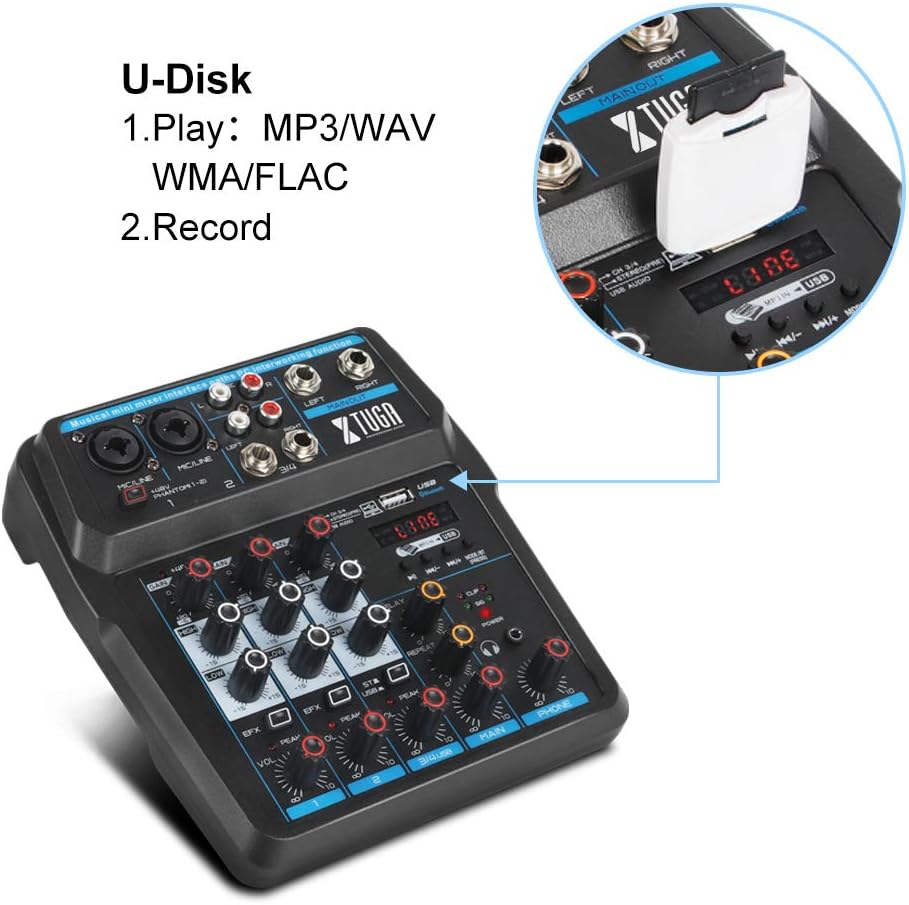
5.4.2 U-Disk (USB Drive) Playback and Recording
Insert a USB flash drive into the USB port on the mixer:
- Відтворення: The mixer can play MP3, WAV, WMA, FLAC, and other audio formats directly from the U-Disk. Use the MP3 function keys to control playback.
- Запис: You can also record directly to the U-Disk. Refer to the mixer's display and controls for recording functions.
5.5 Процесор ефектів
The mixer includes built-in Delay and Repeat effects. Use the dedicated controls to adjust the effect parameters, such as echo repeat frequency and time interval, to achieve your desired sound.
6. Технічне обслуговування
To ensure the longevity and optimal performance of your XTUGA AM6 mixer:
- Прибирання: Використовуйте м’яку суху тканину для очищення поверхні міксера. Уникайте використання рідких засобів для чищення або розчинників.
- Зберігання: Зберігайте міксер у прохолодному, сухому місці, подалі від прямих сонячних променів, екстремальних температур та високої вологості.
- Обробка: Поводьтеся з міксером обережно. Уникайте його падіння та сильних ударів.
- Вентиляція: Забезпечте належну вентиляцію навколо міксера, щоб запобігти перегріванню.
7. Вирішення проблем
If you encounter issues with your XTUGA AM6 mixer, refer to the following common problems and solutions:
- Немає живлення: Ensure the power adapter is securely connected and the power outlet is functional. Try a different USB power source if using USB power.
- Немає вихідного звуку: Check all cable connections (inputs, main output, headphones). Verify that gain controls, channel levels, and the main output level are turned up. Ensure the correct input source is selected (e.g., LINE, BT, PC, USB).
- Мікрофон не працює: For condenser microphones, ensure 48V phantom power is activated. Check microphone cable connections. Verify microphone gain and channel level.
- Проблеми з підключенням Bluetooth: Ensure the mixer is in BT mode and discoverable. Turn off and on Bluetooth on your mobile device. Ensure no other devices are connected to the mixer via Bluetooth.
- USB Recording/Playback Problems: Ensure the mixer is in PC or USB mode as appropriate. Check USB cable connection to the computer or U-Disk insertion. Verify computer audio settings if recording to PC.
- Спотворений звук: Reduce input gain or channel levels to prevent clipping (indicated by peak LEDs). Check cable quality.
If the problem persists, please contact XTUGA customer support for further assistance.
8. Технічні характеристики
| Особливість | Специфікація |
|---|---|
| Бренд | Xtuga |
| Модель | AM4 |
| Кількість каналів | 4 (also described as 4/6-channel) |
| Технологія підключення | Допоміжний, Bluetooth, USB |
| Джерело живлення | Провідний електричний |
| томtage | 48 вольт (для фантомного живлення) |
| Номер деталі виробника | AM |
| UPC | 784124158778 |
9. Гарантія та підтримка
XTUGA products are designed for reliability and performance. For warranty information, technical support, or service inquiries, please refer to the warranty card included with your product or visit the official XTUGA webсайт. Зберігайте чек про покупку як підтвердження покупки для будь-яких гарантійних претензій.