
1. Більшеview
The FUERS G95 is an advanced GSM/WIFI dual-network smart home alarm system designed to provide comprehensive security for your property. It supports both 2.4GHz Wi-Fi and standard GSM SIM cards, offering flexible connectivity options. The system integrates with the Tuya Smart APP (Smart Life) and is compatible with Amazon Alexa and Google Assistant for convenient voice control.
This manual provides detailed instructions for setting up, operating, and maintaining your FUERS G95 alarm system.
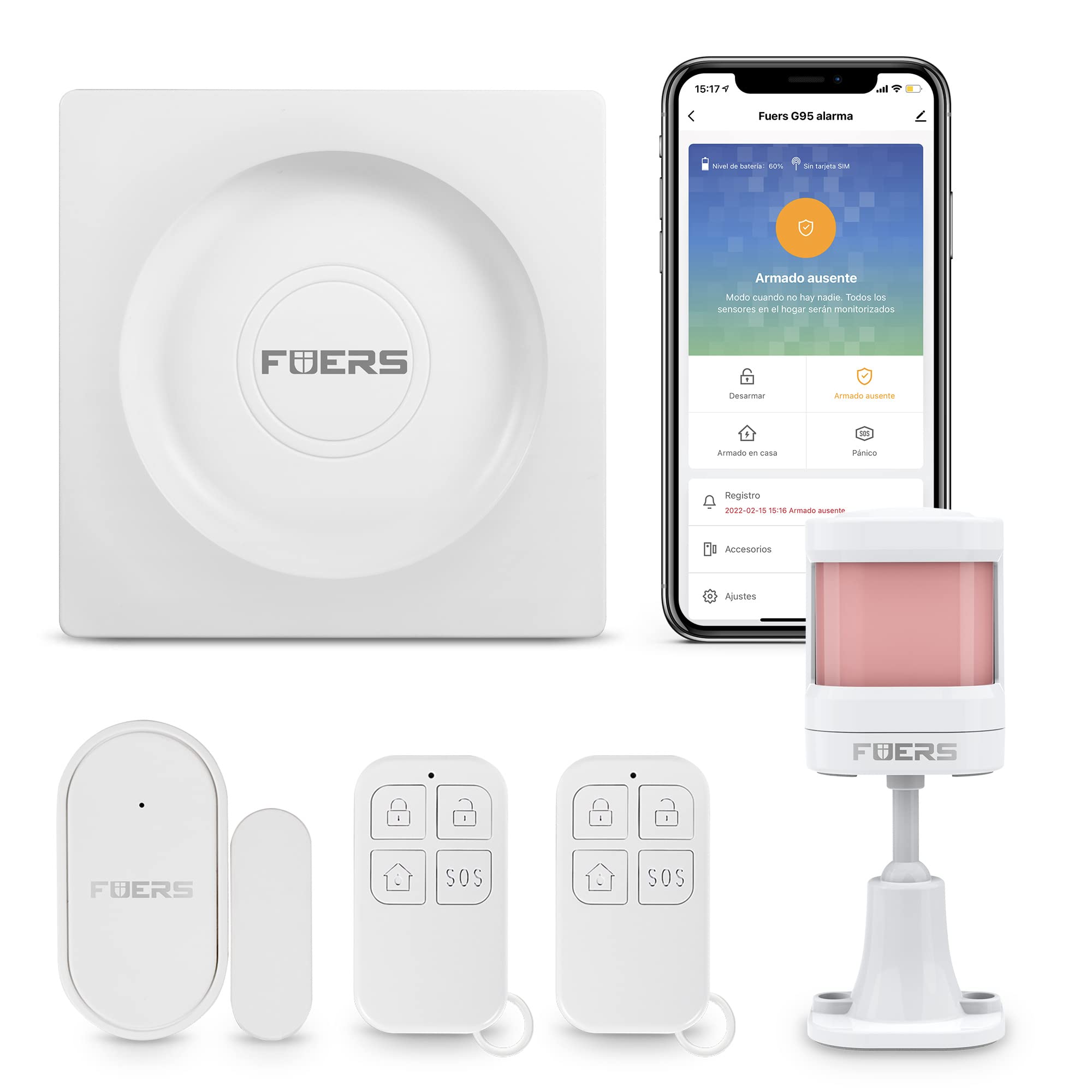
2. Вміст упаковки
Перевірте наявність усіх предметів у вашій упаковці:
- 1 x FUERS G95 Alarm Host (GSM SIM card not included)
- 1 x Wireless Pet-Immune Infrared Detector (PIR Motion Sensor)
- 1 x Wireless Door/Window Sensor
- 2 x Пульти дистанційного керування
- 1 x EU Power Plug
3. Компоненти системи
The FUERS G95 system includes various components for comprehensive security:
- Хост сигналізації: The central unit that manages all sensors and communicates alerts.
- ІЧ-датчик руху (P20): Detects movement within its range, designed to be pet-immune to reduce false alarms.
- Датчик дверей/вікна (D30): Triggers an alarm when a protected door or window is opened.
- Remote Control (R10): Allows for convenient arming, disarming, and emergency functions.
- Додаткові аксесуари: The system supports additional wired sirens, wireless indoor/outdoor sirens, smart plugs, and indoor cameras.


4. Посібник із налаштування
4.1 Встановлення SIM -карти
The FUERS G95 uses a Micro SIM card for GSM functionality. Ensure the SIM card is active and has sufficient credit for calls and SMS.
- Locate the SIM card slot on the side or back of the alarm host.
- Insert the Micro SIM card into the slot with the metal contacts facing down, ensuring it clicks into place.
- Do not force the SIM card. If it does not fit, verify it is a Micro SIM and oriented correctly.

4.2 Увімкнення
- Підключіть наданий адаптер живлення до головного пристрою сигналізації та вставте його в розетку.
- The system will power on automatically. Wait for the indicator lights to stabilize.
4.3 App Installation and Pairing (Tuya Smart / Smart Life)
The FUERS G95 system is controlled via the Tuya Smart or Smart Life mobile application.
- Завантажте додаток «Tuya Smart» або «Smart Life» з магазину додатків вашого смартфона (Google Play Store для Android, Apple App Store для iOS).
- Зареєструйте новий обліковий запис або увійдіть, якщо у вас вже є обліковий запис.
- У додатку натисніть «Додати пристрій» або значок «+».
- Select "Security & Video Surveillance" > "Alarm (Wi-Fi)" or search for "G95".
- Follow the on-screen instructions to connect the alarm host to your 2.4GHz Wi-Fi network. Ensure your phone is connected to the same 2.4GHz Wi-Fi network during pairing.


4.4 Adding Sensors and Remotes
The system supports up to 100 sensors and 10 remote controls.
- In the Tuya Smart app, navigate to the G95 alarm system interface.
- Select "Accessories" or "Sensors" to enter the pairing mode.
- Activate the sensor (e.g., open a door/window for a door sensor, press the button on a remote, or trigger the PIR motion sensor). The alarm host will confirm successful pairing.
- You can customize the name and zone type for each added sensor within the app.
5. Інструкція з експлуатації
5.1 Постановка та зняття з охорони
You can arm or disarm the system using the remote control, the mobile app, or via SMS/phone call.
- Рука: Activates all sensors. Any triggered sensor will initiate an alarm.
- Зняти з охорони: Deactivates all sensors, allowing free movement without triggering an alarm.
- Домашня рука: Activates perimeter sensors (e.g., door/window sensors) while allowing movement within the home (e.g., motion sensors are disarmed).
5.2 Типи зон
The G95 supports 6 types of defense zones, configurable via the app:
- Нормальний: Негайно спрацьовує сигнал тривоги при активації.
- Затримка: Provides a delay before triggering the alarm, allowing time to disarm the system upon entry.
- 24 години: Always active, even when the system is disarmed (e.g., for smoke detectors).
- Головна: Active only when the system is in Home Arm mode.
- 24-Hour Silent: Triggers a silent alarm (notifications only, no siren) 24/7.
- Додому із затримкою: Active in Home Arm mode with an entry delay.
5.3 Сповіщення про тривогу
Коли спрацьовує сигналізація, система виконає такі дії:
- Sound the siren.
- Automatically dial up to 5 pre-set phone numbers sequentially.
- Send SMS notifications to pre-set numbers.
- Send push notifications to the Tuya Smart app.


5.4 Голосове керування (Alexa/Google Home)
Integrate your FUERS G95 with Amazon Alexa or Google Home for hands-free control:
- Ensure your G95 is successfully paired with the Tuya Smart app.
- Відкрийте додаток Alexa або Google Home.
- Увімкніть навичку/послугу «Tuya Smart» або «Розумне життя».
- Link your Tuya Smart account to Alexa/Google Home.
- Discover devices. You can now use voice commands to arm or disarm your system.
5.5 Timed Arm/Disarm
Schedule automatic arming and disarming times through the Tuya Smart app for daily routines.

6. Ключові характеристики
- Подвійне мережеве підключення: Supports both 2.4GHz Wi-Fi and GSM SIM cards for reliable communication.
- Розширена підтримка зон: Up to 100 wireless defense zones with customizable types (Normal, Delay, 24-Hour, Home, 24-Hour Silent, Home with Delay).
- Багатомовна підтримка: The system supports 11 international languages, configurable via the Tuya Smart app.
- Пульт дистанційного керування: Arm, disarm, and manage settings via phone calls, SMS, or the Tuya Smart app.
- Інтеграція розумного будинку: Сумісний з Amazon Alexa та Google Assistant для голосового керування.
- Екстрена функція: One-key emergency button in the app triggers immediate siren and notifications.
- Sensor Naming: Customize names for each sensor (e.g., "Front Door," "Living Room PIR") for clear notifications.
- Timed Arm/Disarm: Schedule automatic security routines.
- Low Battery Reminders: Receive app notifications for low battery levels on connected sensors.
- Харчуванняtage Захист: Built-in rechargeable lithium battery provides backup power for 4-6 hours.
- Door/Window Unclosed Reminder: Prevents arming if doors or windows are left open, indicating which zones are affected.
- Alarm Log Review: Review alarm events and sensor status logs within the app.
- Сімейний доступ: Share control of the alarm system with family members through the app.

7. Технічне обслуговування
7.1 Battery Low Reminders
The system monitors the battery levels of connected sensors and the main alarm host. You will receive notifications via the Tuya Smart app when a sensor's battery is low, prompting you to replace it.

7.2 Очищення
Wipe the alarm host and sensors with a soft, dry cloth. Do not use liquid cleaners or abrasive materials.
7.3 Резервне живлення
The built-in rechargeable battery provides backup power. Ensure the alarm host is regularly connected to power to keep the internal battery charged.
8. Вирішення проблем
- Система не підключається до Wi-Fi: Ensure your Wi-Fi network is 2.4GHz. The system does not support 5GHz Wi-Fi. Check Wi-Fi password and signal strength.
- SIM-картку не виявлено: Verify the SIM card is a Micro SIM, correctly inserted, and active. Ensure it has credit for calls/SMS.
- Датчики не сполучаються: Ensure the alarm host is in pairing mode in the app. Activate the sensor correctly (e.g., open/close for door sensor, trigger for PIR).
- Хибні тривоги: Check sensor placement. For PIR detectors, ensure they are not facing direct sunlight, heat sources, or areas with pets if not pet-immune. Adjust zone types as needed (e.g., use "Home Arm" or "Delay" zones).
- Немає сповіщень додатків: Check your phone's notification settings for the Tuya Smart/Smart Life app. Ensure the app has background data access and is not restricted by power-saving modes.
- Голосове керування не працює: Confirm the Tuya Smart/Smart Life skill is enabled and linked in your Alexa/Google Home app. Ensure device discovery is complete.
9. Технічні характеристики
| Особливість | Специфікація |
|---|---|
| Бренд | Палива |
| Номер моделі | FUERS-G95 |
| Технологія підключення | Wireless (Wi-Fi 2.4GHz, GSM) |
| Джерело живлення | Battery (Rechargeable Lithium) / AC Power |
| Сумісні пристрої | Smartphone (Tuya Smart / Smart Life App), Amazon Alexa, Google Assistant |
| Тип сповіщення | Audio (Siren) and Motion (App/SMS/Call Notification) |
| Спосіб контролю | Remote Control, Smartphone App, SMS, Voice Control |
| Рівень шуму (сирена) | 85 децибели |
| Підтримувані датчики | Up to 100 wireless sensors (door/window, PIR motion) |
| Supported Remote Controls | До 10 пультів дистанційного керування |
| Склад батареї | Alkaline (for sensors), Lithium (for main unit backup) |
10. Гарантія та підтримка
For warranty information, technical support, or any inquiries regarding your FUERS G95 alarm system, please refer to the official FUERS website or contact their customer service directly. Contact details are typically found on the product packaging or the manufacturer's official support page.
Зберігайте підтвердження покупки для гарантійних претензій.