
1. Вступ
Thank you for choosing the XTUGA ES USB/MP3/Bluetooth Professional Audio Mixer. This manual provides essential information for the safe and efficient operation of your mixer. Please read it thoroughly before use and retain it for future reference.
The XTUGA ES series mixers (ES802/ES1202) are designed for professional audio applications, offering features such as USB/MP3 playback and recording, Bluetooth connectivity, built-in digital effects, and +48V phantom power for condenser microphones. Its ultra-thin design and robust metal chassis make it suitable for various environments, including DJ setups, stage performances, and recording studios.
2. Техніка безпеки
- Джерело живлення: Використовуйте лише зазначений адаптер живлення. Переконайтеся, що гучністьtage відповідає вашому місцевому джерелу живлення.
- Вентиляція: Не блокуйте вентиляційні отвори. Забезпечте достатній потік повітря навколо пристрою, щоб запобігти перегріву.
- Вода і вологість: Do not expose the mixer to rain, moisture, or any liquids. Do not place objects filled with liquids on the mixer.
- Джерела тепла: Keep the mixer away from heat sources such as radiators, heat registers, stoves, or other apparatus (including ampліфікатори), які виробляють тепло.
- Прибирання: Clean only with a dry cloth. Disconnect the power before cleaning.
- Обслуговування: Не намагайтеся самостійно обслуговувати цей виріб. Зверніть усі послуги до кваліфікованого обслуговуючого персоналу.
- Заземлення: Забезпечте належне заземлення, щоб запобігти ураженню електричним струмом.
- Управління кабелем: Захищайте шнури живлення від наступання на них або їх защемлення, особливо біля вилок, розеток та місць їх виходу з пристрою.
3. Продукт закінчивсяview
The XTUGA ES series mixer features a compact, durable design with a comprehensive set of controls for versatile audio mixing. It includes multiple input channels, a 3-band equalizer per channel, built-in digital effects, and various connectivity options.

малюнок 3.1: Фронт view of the XTUGA ES Series Professional Audio Mixer, showing all input channels, faders, EQ knobs, and the central control panel with USB/MP3 display.
Ключові характеристики:
- Канали: Available in 8 or 12 mono channel configurations with stereo inputs.
- попередньоampліферів: High-quality microphone preampліферів.
- Вирівнювання: 3-band EQ on each mono channel for precise tone shaping.
- Підключення: USB/MP3 playback and recording, Bluetooth function for wireless audio streaming.
- Фантомне живлення: +48V phantom power for condenser microphones.
- Цифрові ефекти: Built-in digital effects processor.
- Моніторинг: Headphone monitoring and dual 12-band main level display.
- Міцний дизайн: Ultra-thin metal chassis for durability and portability.
4. Налаштування
4.1 Підключення живлення
- Ensure the mixer's power switch is in the "OFF" position.
- Підключіть наданий адаптер живлення до входу живлення мікшера.
- Підключіть адаптер живлення до відповідної розетки змінного струму.
- Turn the mixer's power switch to "ON". The power indicator will illuminate.
4.2 Вхідні підключення
The mixer supports various input sources:
- Мікрофони: Connect microphones to the XLR inputs (MIC) on each channel. For condenser microphones requiring phantom power, ensure the +48V button is activated (see Section 5.2).
- Пристрої лінійного рівня: Connect instruments, keyboards, or other line-level devices to the 1/4" TRS/TS LINE inputs on each channel.
- Стерео входи: Use the dedicated stereo input channels for devices like CD players or external media players.
4.3 Вихідні підключення
- Основний результат: Підключіть основні динаміки або amplifier to the MAIN L/R outputs (XLR or 1/4" TRS).
- Вихід для навушників: Підключіть навушники до виходу PHONES для моніторингу.
- AUX-відправлення: Use the AUX SEND output to connect to external effects processors or monitor speakers.
4.4 Підключення до комп'ютера (USB)
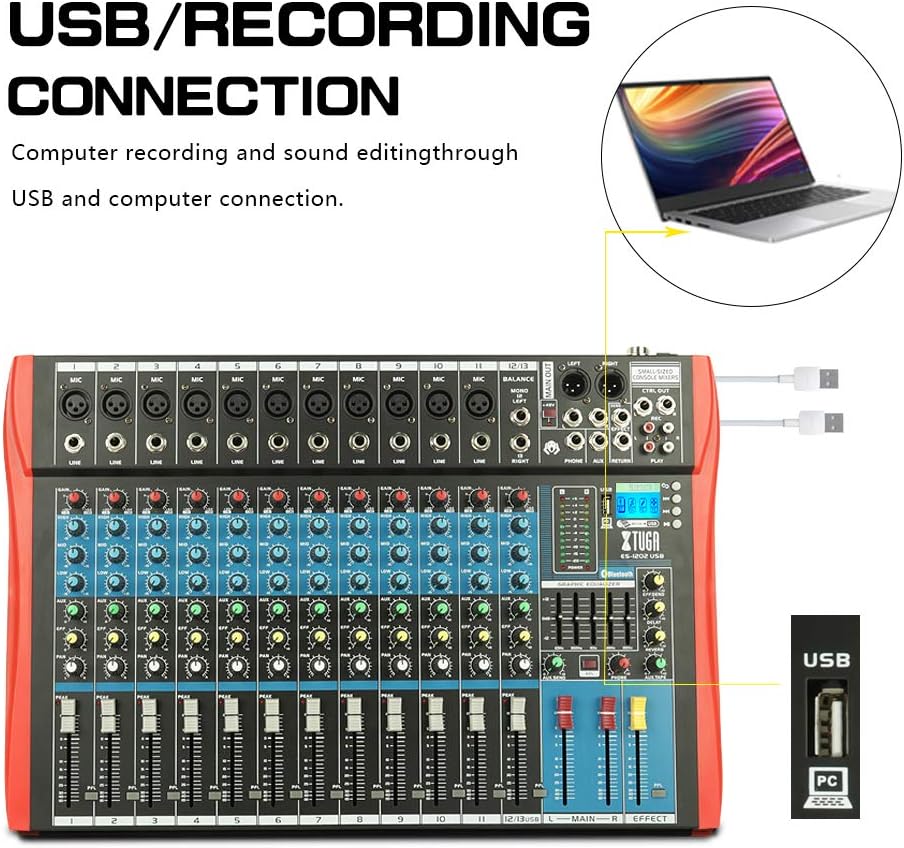
малюнок 4.1: Diagram illustrating the USB connection for computer recording and sound editing. Connect the mixer's USB port to your computer using a standard USB cable.
To use the mixer with a computer for recording or playback:
- Connect a USB cable from the mixer's USB port to an available USB port on your computer.
- The mixer will typically be recognized as a standard audio device. No special drivers are usually required for basic functionality.
- Select the mixer as your input/output device in your computer's sound settings or digital audio workstation (DAW) software.
5. Інструкція з експлуатації
5.1 Елементи керування каналом
- ПІДИМОК: Adjusts the input sensitivity for each channel. Set this to achieve a strong signal without clipping (the PEAK LED should only flash occasionally).
- Еквалайзер (ВИСОКІ, СЕРЕДНІ, НИЗЬКІ): 3-смуговий еквалайзер для формування тону кожного каналу.

малюнок 5.1: Visual representation of the 3-band EQ frequency response curves. The HIGH band boosts/cuts above 12kHz, the MID band sweeps from 250Hz to 6kHz, and the LOW band boosts/cuts below 80Hz.
- ВИСОКИЙ: Adjusts frequencies above 12 kHz (±15 dB).
- MID: Adjusts frequencies between 150 Hz and 3.5 kHz (±15 dB). This is a sweepable mid-range control.
- НИЗЬКИЙ: Adjusts frequencies below 80 Hz (±15 dB).
- ЕФЕКТ: Sends a portion of the channel signal to the built-in effects processor.
- ПАН: Adjusts the stereo position of the channel signal (left to right).
- CHANNEL FADER: Controls the output level of each individual channel to the main mix.
- Піковий світлодіод: Illuminates when the input signal is too high, indicating potential clipping. Reduce the GAIN if this LED lights up frequently.
5.2 +48V Phantom Power
The mixer provides +48V phantom power for condenser microphones. To activate:
- Ensure all channel faders and the main fader are set to their minimum positions.
- Connect your condenser microphone(s) to the XLR inputs.
- Press the +48V PHANTOM POWER button. An indicator light will confirm activation.
- Gradually raise the channel faders and main fader to the desired levels.
Caution: Do not activate phantom power when dynamic microphones or other devices not requiring +48V are connected, as this may cause damage.
5.3 Підключення Bluetooth

малюнок 5.2: Close-up of the Bluetooth and MP3 control panel, showing the digital LCD display and control buttons.
Щоб підключити пристрій Bluetooth:
- Press the "MODE" button on the MP3 player section until "Bluetooth" is selected on the digital display.
- On your mobile phone, tablet, or other Bluetooth-enabled device, search for available Bluetooth devices.
- Select "XTUGA MIXER" (or similar name) from the list to pair.
- Once paired, you can play audio from your device through the mixer.
5.4 Відтворення та запис USB/MP3
The mixer supports U-DISK MP3 playback and direct recording to a USB drive.
- Відтворення MP3: Вставте флеш-накопичувач USB з MP3 files into the USB port. The mixer will automatically detect and begin playing the files. Use the control buttons (PLAY/PAUSE, PREV, NEXT) on the MP3 player section to navigate.
- Запис: To record the main mix to a USB drive, ensure a formatted USB drive is inserted. Press the "REC" button on the MP3 player section to start recording. Press it again to stop.
5.5 Цифрові ефекти
The mixer includes a built-in digital effects processor. Use the "EFFECT" knob on each channel to send signal to the effects. The main "EFFECT" fader controls the overall level of the effects return to the main mix. Adjust the effect type and parameters using the dedicated controls in the effects section.
5.6 Моніторинг
Connect headphones to the PHONES jack to monitor the main mix. The PHONES level knob controls the headphone volume. The main LED meters provide a visual indication of the main output level.

малюнок 5.3: Close-up of the main LED level meters, showing output levels for Left (L) and Right (R) channels, along with the USB and PC connection ports.
6. Технічне обслуговування
- Прибирання: Regularly wipe the mixer's surface with a soft, dry, lint-free cloth. Do not use abrasive cleaners, solvents, or waxes.
- Зберігання: When not in use for extended periods, store the mixer in a cool, dry place, away from direct sunlight and extreme temperatures. Cover the unit to protect it from dust.
- Догляд за кабелем: Уникайте надмірного згинання або скручування кабелів. Від’єднуйте кабелі, тягнучи за штекер, а не за сам кабель.
7. Вирішення проблем
| проблема | Можлива причина | Рішення |
|---|---|---|
| Немає звуку |
|
|
| Спотворений звук |
|
|
| Bluetooth не підключається |
|
|
| USB/MP3 not playing or recording |
|
|
8. Технічні характеристики
| Особливість | Специфікація |
|---|---|
| Бренд | Xtuga |
| Модель | ES802/1202 |
| Кількість каналів | 8 or 12 (depending on model) |
| Технологія підключення | Допоміжний, Bluetooth, USB |
| Джерело живлення | Провідний електричний |
| АЧХ | Microphone line input to any output: ±1.5 dB, 20 Hz ~ 20 KHz |
| Повне гармонійне спотворення + шум | Sensitivity -30dB, Mix output +14dBu <0.02% @ 1 KHz or EQ (stereo input) |
| Crosstalk (1 KHz) | Channel mute > 90 dB, Fader off > 90 dB, AUX send port closed > 83 dB |
| Mono EQ (Q(MF): 1.5) | Low: 80Hz ± 15dB, Mid (sweepable): 150Hz-3.5KHz ± 15dB, High: 12 KHz ± 15 dB |
| Stereo EQ (Q(MF): 0.8) | Low: 80Hz ± 15dB, Mid: 720Hz ± 15dB, High: 12KHz ± 15dB |
| Споживана потужність | Менше 35 Вт |
| Робоча температура | від 5°C до +40°C |
| Аудіо вхід | XLR, Line, and Digital Inputs |
| UPC | 784124158662 |
| GTIN | 784124158662 |
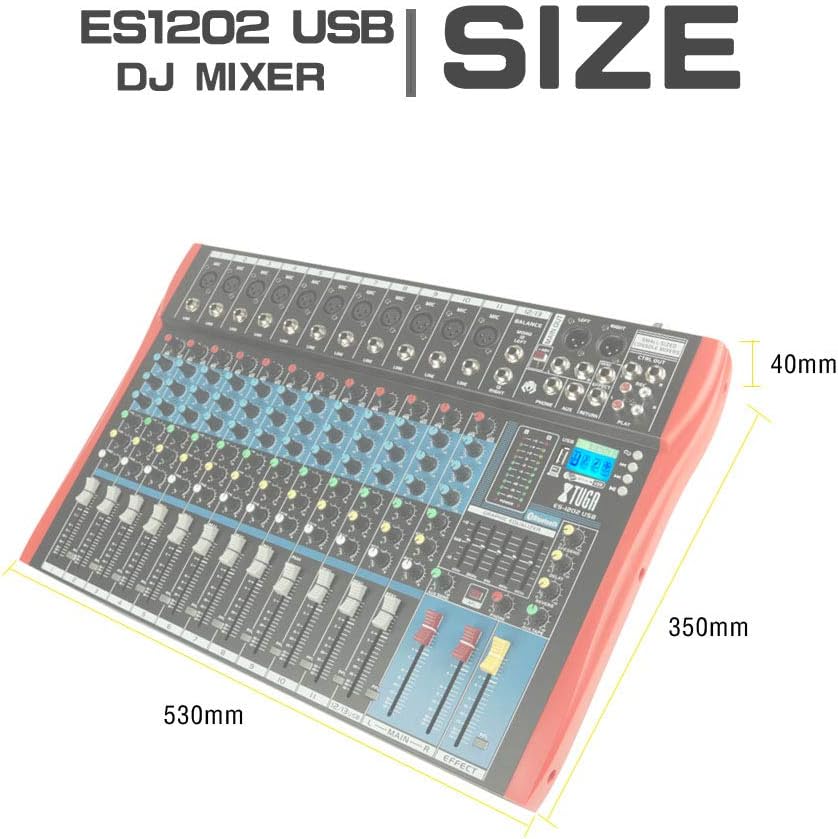
малюнок 8.1: Dimensions of the XTUGA ES1202 USB Mixer, showing approximate measurements of 530mm (width), 350mm (depth), and 40mm (height).
9. Гарантія та підтримка
9.1 Інформація про гарантію
XTUGA products are designed and manufactured to high-quality standards. For specific warranty terms and conditions, please refer to the warranty card included with your product or contact your local XTUGA distributor or retailer. Keep your proof of purchase for warranty claims.
9.2 Підтримка клієнтів
If you encounter any issues or have questions regarding your XTUGA ES USB/MP3/Bluetooth Professional Audio Mixer that are not covered in this manual, please contact XTUGA customer support or your authorized dealer for assistance. Please have your model number (ES802/1202) and purchase information ready when contacting support.