
1. Вступ
Thank you for choosing Senso Wireless Earbuds. These True Wireless Stereo (TWS) earphones are designed for an active lifestyle, featuring a secure fit, high-quality audio, and sweatproof construction. This manual will guide you through the setup, operation, and maintenance of your new earbuds.
2. Що в коробці
- Senso Wireless Earbuds (Left and Right)
- Портативний зарядний футляр
- USB-кабель для зарядки
- Посібник користувача
- Різні розміри вушних насадок
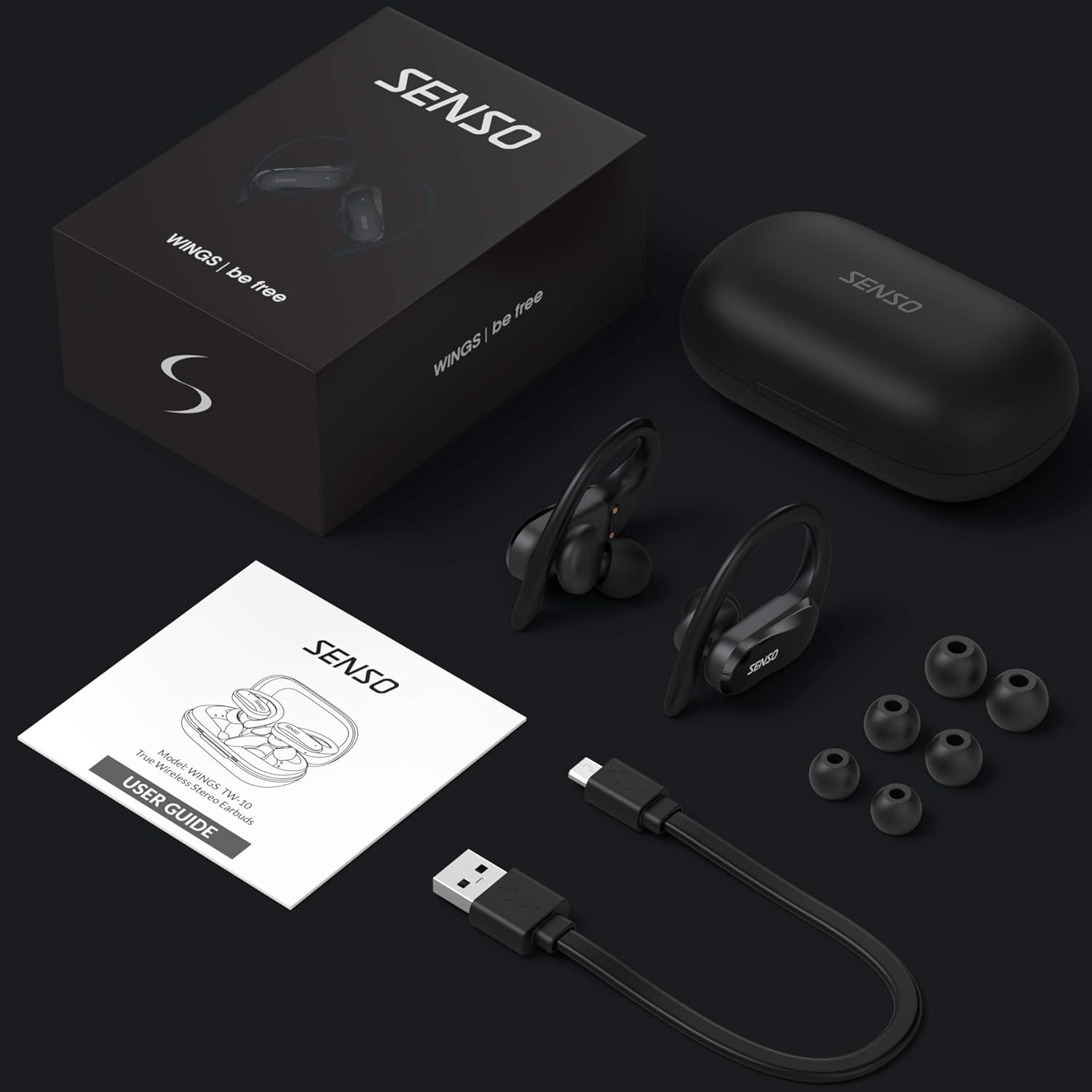
Image: The Senso Wireless Earbuds packaging, displaying the earbuds, charging case, user guide, USB charging cable, and various ear tip sizes.
3. Продукт закінчивсяview
The Senso Wings TW10 earbuds are designed for comfort and performance, featuring advanced audio technology and a durable build.

Зображення: Вибух view of the earbud, illustrating the 13mm dynamic driver responsible for delivering premium sound quality with intense bass and dynamic range.

Зображення: Детальний view of the earbud's internal circuitry, emphasizing the Bluetooth 5.0 chipset and CVC 8.0 Noise Cancellation Technology for stable connection and clear audio.

Image: Two scenarios demonstrating the earbuds' versatility: one earbud in use for mono mode (e.g., driving) and both earbuds for dual mode (e.g., binaural calls).

Image: The earbuds are shown resisting water splashes, indicating their IPX6 waterproof rating, suitable for sweat, water, and rain.
4. Налаштування
4.1 Заряджання навушників та футляра
Before first use, fully charge the earbuds and the charging case. Place the earbuds into the charging case. Connect the USB charging cable to the case and a power source. The indicator lights on the case will show the charging status.
4.2 Початкове сполучення
- Переконайтеся, що ваші навушники заряджені.
- Відкрийте зарядний футляр. Навушники автоматично увімкнуться та перейдуть у режим сполучення.
- На вашому пристрої (смартфоні, планшеті тощо) увімкніть Bluetooth.
- шукати available Bluetooth devices and select "SENSO Wings TW10" from the list.
- Once connected, you will hear an audio prompt, and the earbud indicator lights will change.

Image: The earbuds are shown connecting to a smartphone, demonstrating the simple and fast pairing process upon removal from the charging case.
Video: An official product video demonstrating the features and setup of the Senso WINGS Ultra Durable Premium Audio Wireless Earbuds.
5. Інструкція з експлуатації
5.1 Носіння навушників
Place the earbuds in your ears and adjust the ear hooks for a secure and comfortable fit. The 60-degree twist lock system ensures they stay in place during physical activity.

Image: A user demonstrating the secure fit of the earbuds with the 60-degree twist lock system, ideal for sports and exercise.
5.2 Основні елементи керування
The earbuds feature touch-sensitive controls for media playback and call management. Refer to the detailed user guide included in the box for specific touch commands for functions such as play/pause, skip track, answer/end call, and voice assistant activation.
5.3 Mono or Dual Mode
You can use either earbud independently (mono mode) or both together (dual mode) for a stereo audio experience. This flexibility allows for awareness of your surroundings when needed.
5.4 Функції виклику
Each earbud is equipped with a microphone, enabling binaural calls for clear communication. Use the touch controls to answer, end, or reject calls.
6. Технічне обслуговування
6.1 Очищення
- Регулярно протирайте навушники та зарядний футляр м’якою, сухою тканиною без ворсу.
- Зніміть вушні насадки та помийте їх м’яким милом і водою, потім ретельно висушіть перед тим, як знову прикріпити.
- Уникайте використання абразивних засобів чи розчинників.
6.2 Зберігання
- Зберігайте навушники в футлярі для зарядки, коли вони не використовуються, щоб захистити їх і підтримувати заряд.
- Зберігайте пристрій у прохолодному, сухому місці, подалі від екстремальних температур та прямих сонячних променів.
7. Вирішення проблем
7.1 Проблеми зі сполученням
- Переконайтеся, що обидва навушники повністю заряджені.
- Вимкніть Bluetooth на своєму пристрої, а потім знову його ввімкніть.
- Забудьте пристрій зі списку Bluetooth і спробуйте знову підключитися.
- If only one earbud connects, try resetting the earbuds (refer to the full user guide for specific reset instructions).
7.2 Немає звуку або низька гучність
- Перевірте рівні гучності як на пристрої, так і на навушниках.
- Переконайтеся, що навушники правильно розміщені у вухах.
- Очистіть динаміки навушників та амбушури від будь-якого сміття.
7.3 Проблеми із заряджанням
- Переконайтеся, що зарядний кабель надійно підключений як до корпусу, так і до джерела живлення.
- Переконайтеся, що зарядні контакти на навушниках та всередині кейса чисті та не засмічені.
- Спробуйте інший зарядний кабель або адаптер живлення.
8. Технічні характеристики
| Особливість | Деталь |
|---|---|
| Назва моделі | Wings TW10 |
| Технологія підключення | Bluetooth 5.0, бездротовий зв'язок |
| Технологія бездротового зв'язку | Bluetooth |
| Контроль шуму | Активне шумозаглушення |
| Рівень водонепроникності | Водонепроникний (IPX6) |
| Термін служби батареї (навушники) | 8 години |
| Загальний час відтворення (з кейсом) | До 30 годин |
| Розмір звукового драйвера | 10 міліметрів |
| Імпеданс | 32 Ом |
| Тип управління | Управління медіа |
| Спосіб контролю | Дистанційний |
| Розташування вуха | Вухо |
| Форм-фактор | Вухо |
| матеріал | Силікон |
| Вага товару | 7 унції |

Image: The earbuds and charging case illustrating the extended playtime: 6 hours for the earbuds and up to 30 hours total with the portable charging case.
9. Гарантія та підтримка
Senso offers a standard warranty for its products. Additionally, you may be eligible for an extended warranty.
9.1 Розширена гарантія
To convert to a two-year extended warranty, visit www.sensoshop.com/warranty. This must be claimed within 7 days of receiving your product.
9.2 Підтримка клієнтів
For any product-related issues or inquiries, please contact Senso customer support. Details can be found on the warranty card included in your product packaging or on the official Senso webсайт.