
1. Вступ
This manual provides detailed instructions for the DEVMO DC 12V 5A PWM 4-Wire PC CPU Fan Thermostat Speed Controller Board, model HW-585. It covers setup, operation, specifications, and troubleshooting to ensure optimal performance and longevity of your device. Please read this manual thoroughly before installation and operation.
2. Продукт закінчивсяview
The DEVMO HW-585 is a DC 12V PWM fan speed controller designed for PC CPU fans and other compatible 4-wire fans. It features automatic temperature control, allowing fans to adjust their speed based on detected temperatures, and includes a stall alarm function for enhanced system monitoring.
Ключові характеристики:
- Робочий випtage: 12 В постійного струму.
- Circuit load capacity: Maximum output current of 5A per channel, with a maximum bus current of 9A.
- Board dimensions: 50mm (length) x 43mm (width) x 13mm (height).
- Temperature probe parameters: 50K B=3950.
- Output range: First channel 20%-100% or 40%-100% (when TFL=ON); Second and third channels 10%-100%.
- Minimum speed for stall alarm: 700-800 rpm.
Компоненти:
The package includes the main controller board, a temperature probe, and a buzzer.

Image 1: DEVMO HW-585 Fan Controller Board with included temperature probe and buzzer. This image displays the complete kit, showing the main circuit board, the temperature sensor with its white connector, and the buzzer with its black and red wires.

Зображення 2: Кутовий view of the DEVMO HW-585 Fan Controller Board. This perspective highlights the various connectors and components on the board, including the blue screw terminal for power input, the white fan headers, and the red DIP switch block.
3. Інструкції з налаштування
Follow these steps to set up your DEVMO HW-585 fan controller:
- Підключення живлення: Connect a DC 12V power supply to the blue screw terminal labeled "-12V+" on the board. Ensure correct polarity.
- Підключення вентилятора: Connect your 4-wire PWM fans to the white headers labeled FAN1, FAN2, and FAN3.
- Датчик температури: Connect the included temperature probe to the dedicated white connector on the board. Position the probe in the area where temperature monitoring is required (e.g., near a CPU heatsink).
- Підключення зумера: Connect the buzzer to the connector labeled "BEEP". This will enable audible alarms for fan stall conditions.
- Конфігурація DIP-перемикача: Configure the DIP switches (labeled 1-5) according to your desired operating parameters. Refer to the "Operating Instructions" section for detailed settings.
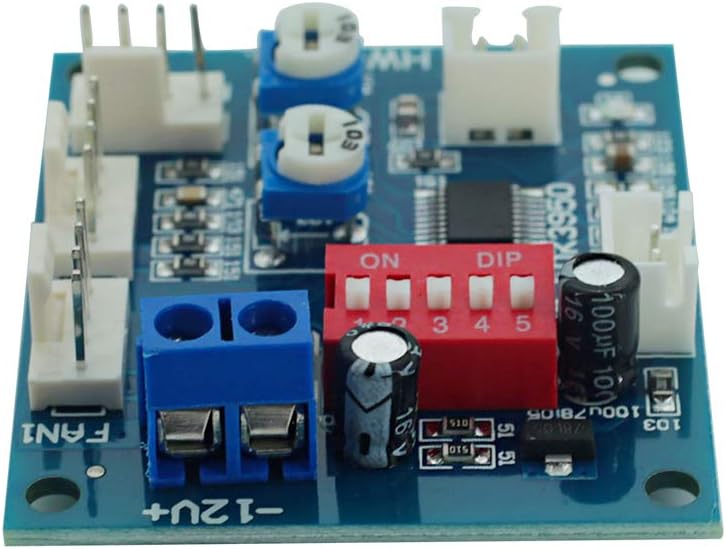
Зображення 3: Крупний план view of the DEVMO HW-585 board, focusing on the red DIP switch block and the various connectors. This image is useful for identifying the TFL, TP1, TP2, BF1, and BF2 switch positions, as well as the fan and power input headers.
4. Інструкція з експлуатації
The DEVMO HW-585 controller's behavior is configured using the 5-position DIP switch block. Each switch controls a specific function:
Функції DIP-перемикачів:
- TFL (Switch 1): Controls the minimum PWM setting for FAN1.
- ON: FAN1 minimum PWM is 40%.
- ВИМКНЕНО: FAN1 minimum PWM is 20%.
- TP1, TP2 (Switches 2, 3): These switches, used in conjunction with the temperature probe, define the temperature control zones (accelerating temperature and full-speed temperature).
TP1 TP2 Accelerating Temperature Full Speed Temperature ВИМКНЕНО ВИМКНЕНО 35°C 45°C ON ВИМКНЕНО 40°C 55°C ВИМКНЕНО ON 50°C 70°C ON ON 60°C 90°C When the detected temperature is below the accelerating temperature, the fan will operate at its minimum rotation speed. When the temperature exceeds the full-speed temperature, the fan will operate at full speed. Between these two temperatures, the fan speed will gradually increase.
- BF1, BF2 (Switches 4, 5): These switches activate the stall alarm function for FAN1 and FAN2 respectively. If a fan connected to a corresponding open channel (ON) stops rotating, the controller will trigger an alarm with sound (via the buzzer) and light (via an onboard LED). The alarm will automatically clear once the fan resumes rotation.
- ON: Stall alarm enabled for the corresponding fan.
- ВИМКНЕНО: Stall alarm disabled for the corresponding fan.
5. Технічні характеристики
- Бренд: DEVMO
- модель: HW-585
- Робочий випtage: 12 В постійного струму
- Max Output Current (per channel): 5A
- Max Bus Current: 9A
- Board Dimensions (LxWxH): 50 мм x 43 мм x 13 мм (1.97 x 1.69 x 0.51 дюйми)
- Positioning Hole Spacing: 44 мм х 37 мм
- Датчик температури: 50K B=3950 (typical error 3-5%)
- FAN1 Output Range: 20%-100% (TFL=OFF) or 40%-100% (TFL=ON)
- FAN2/FAN3 Output Range: 10%-100%
- Minimum Speed for Stall Alarm: 700-800 об / хв
- Тип дисплея: LED (for alarm indication)
- Вага товару: Приблизно 1.13 унції (0.03 кілограма)
- колір: Blue (PCB)
6. Технічне обслуговування
The DEVMO HW-585 fan controller is designed for reliable operation with minimal maintenance. To ensure continued performance:
- Тримати в чистоті: Periodically inspect the board for dust accumulation. If necessary, gently clean with a soft brush or compressed air. Ensure power is disconnected before cleaning.
- Перевірте підключення: Regularly verify that all power, fan, temperature probe, and buzzer connections are secure. Loose connections can lead to intermittent operation or malfunction.
- Умови навколишнього середовища: Operate the controller within its specified temperature and humidity ranges to prevent damage. Avoid exposure to moisture or extreme temperatures.
7. Вирішення проблем
If you encounter issues with your DEVMO HW-585 controller, consider the following troubleshooting steps:
- No Fan Movement:
- Verify the 12V DC power supply is correctly connected and providing power.
- Ensure fans are properly connected to the FAN headers.
- Check DIP switch settings (TFL, TP1, TP2) to ensure the fan is not set to a very low minimum speed or a high temperature threshold that has not been met.
- Test fans directly with a 12V source to confirm they are functional.
- Fan Stall Alarm (Buzzer/LED):
- If the alarm activates, check the fan connected to the corresponding channel (FAN1 for BF1, FAN2 for BF2).
- Ensure the fan is not obstructed and can rotate freely.
- Verify the fan's RPM is above the minimum stall alarm threshold (700-800 rpm).
- If the alarm is unwanted, set the corresponding BF1 or BF2 DIP switch to OFF.
- Incorrect Temperature Response:
- Ensure the temperature probe is securely connected and positioned correctly to measure the desired temperature.
- Review the TP1 and TP2 DIP switch settings to confirm the correct temperature zones are selected.
- Check the temperature probe for any physical damage.
- Переривчаста робота:
- Перевірте всю проводку на наявність нещільних з'єднань або пошкоджень.
- Ensure the power supply is stable and provides sufficient current for all connected fans.
8. Гарантія та підтримка
For warranty information or technical support regarding your DEVMO HW-585 fan controller, please refer to the product's purchase documentation or contact DEVMO customer service directly through the retailer where the product was purchased. Please have your product model number (HW-585) and purchase details available when contacting support.