
меросс MSS560
Meross Smart Dimmer Switch (MSS560) User Manual
Модель: MSS560
вступ
The Meross Smart Dimmer Switch (MSS560) is designed to provide intelligent control over your lighting. This single-pole dimmer switch allows you to remotely control, dim, and schedule your lights using the Meross app, Apple HomeKit, Amazon Alexa, or Google Assistant. It requires a neutral wire for installation and operates on a 2.4GHz Wi-Fi network.
Інформація про безпеку
- Необхідний нейтральний дріт: Ensure your electrical box has a neutral wire (typically white) before installation. If unsure, consult a qualified electrician.
- Вимкніть перед встановленням: Always turn off power at the circuit breaker before installing or servicing the switch to prevent electrical shock.
- Single Pole Setup Only: This switch is designed for single pole configurations only. It is not compatible with 3-way or multi-way switch setups.
- Сумісність ламп: Works with non-smart dimming bulbs. Maximum wattage: 400W for incandescent (INC), 150W for CFL & LED bulbs. Do not use with smart bulbs.
- Вимога до Wi-Fi: Supports 2.4GHz Wi-Fi networks only. 5GHz Wi-Fi is not supported. No hub is required.
- Вогнестійкий матеріал: The switch housing is made of PC+ABS fire-retardant material for safety.
- Захист від перевантаження: Certified by FCC/ETL, the device includes protection against electrical overload.
Що в коробці
- Meross Smart Dimmer Switch (MSS560)
- Посібник із швидкого встановлення
- Дріт Гайки
- Монтажні гвинти
- Faceplate (standard size)
Налаштування
Контрольний список перед встановленням
- Verify your electrical box has a neutral wire (white).
- Ensure you have a 2.4GHz Wi-Fi network.
- Confirm your setup is single pole (not 3-way).
- Check bulb compatibility (non-smart dimmable LED/CFL/INC).

Image: Diagram illustrating the necessity of a neutral wire and compatible bulb types (LED, CFL, INC) with wattage limits, and incompatibility with smart bulbs.

Image: Important notes on switch compatibility, including single pole setup, 2.4GHz Wi-Fi, neutral wire, and non-smart dimming bulb support.
Установка обладнання
- Вимкніть живлення: Знайдіть автоматичний вимикач і вимкніть живлення вимикача, який ви замінюєте. Переконайтеся, що живлення вимкнено за допомогою регулятора гучності.tagтестер.
- Зняти старий вимикач: Carefully remove the faceplate and unscrew the existing switch from the electrical box. Pull the switch outward without touching any wires.
- Визначення проводів: Identify the Live (black/red), Load (brown/black), Neutral (white), and Ground (green/bare copper) wires. Label them if necessary.
- Підключити новий комутатор: Use the provided wire nuts to connect the corresponding wires of the Meross Smart Dimmer Switch to your home's electrical wires. Ensure all connections are secure.
- Безпечний перемикач: Carefully push the wires and the new switch into the electrical box. Screw the switch to the box and attach the faceplate.
- Відновлення живлення: Turn on the power at your circuit breaker.
Video: Official Meross guide on how to install the HomeKit smart dimmer switch, demonstrating the wiring process and safety precautions.
App Setup & Pairing
- Завантажте додаток Meross: Завантажте застосунок Meross з App Store або Google Play.
- Додати пристрій: Open the Meross app, tap the '+' icon to add a new device, and select the Smart Dimmer Switch. Follow the in-app instructions.
- Підключіться до Wi-Fi: Connect the switch to your 2.4GHz Wi-Fi network.
- Налаштування HomeKit (необов'язково): If using Apple HomeKit, scan the HomeKit setup code located on the device or its packaging. You may need to manually enter the 8-digit code.
- Calibrate Dimming Range: Use the app to set the maximum and minimum light levels for optimal dimming performance with your specific bulbs.
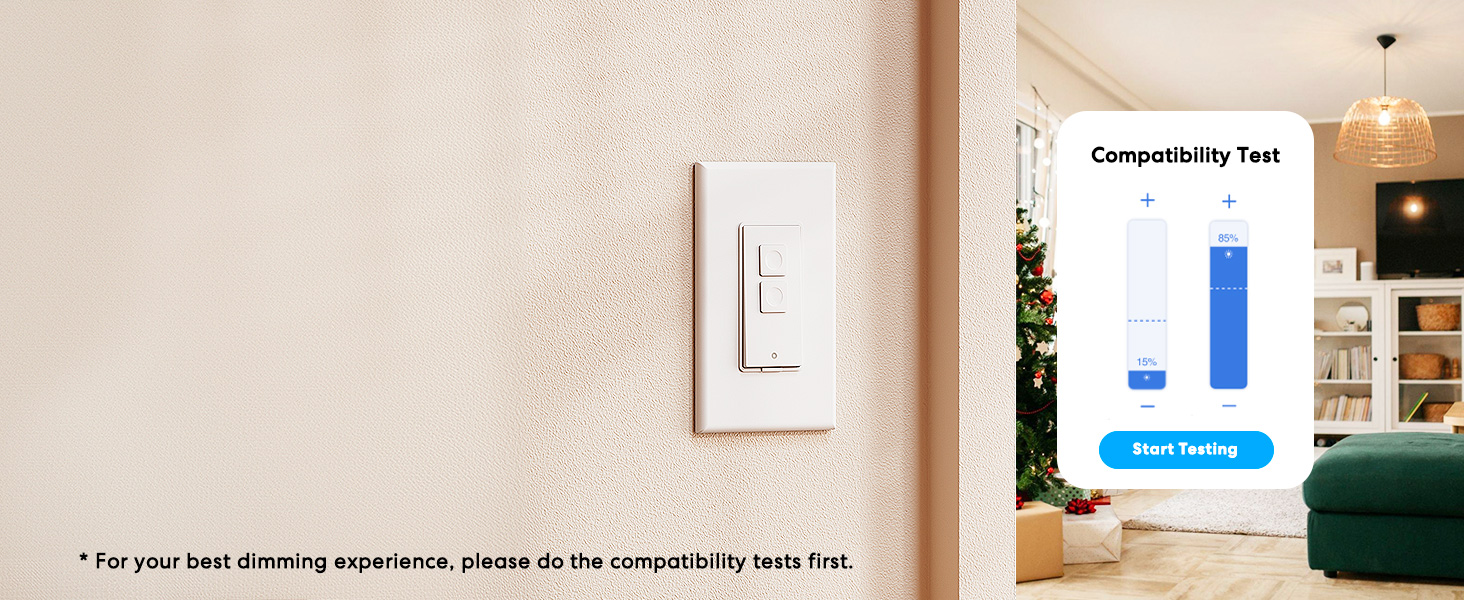
Image: Meross app interface demonstrating the dimming compatibility test to optimize light levels.
Інструкція з експлуатації
Ручне керування
The Meross Smart Dimmer Switch features physical buttons for direct control:
- Кнопка ввімкнення/вимкнення: Press the main button to turn lights on or off.
- Кнопки затемнення: Use the smaller up/down buttons to adjust brightness levels.
Контроль програми
Control your lights from anywhere with internet access using the Meross app:
- Дистанційне ввімкнення/вимкнення: Tap the switch icon in the app to toggle lights.
- Затемнення: Use the slider in the app to precisely adjust brightness from 0% to 100%.

Image: A user controlling lights remotely via the Meross app on a smartphone.
Голосове керування
The Meross Smart Dimmer Switch is compatible with leading voice assistants:
- Apple HomeKit/Siri: Say "Hey Siri, turn on the light" or "Hey Siri, dim the light to 50%".
- Amazon Alexa: Say "Alexa, turn on the light" or "Alexa, dim the light to 20%".
- Google Assistant: Say "Hey Google, turn on the light" or "Hey Google, dim the light to 90%".

Image: Visual representation of voice commands for Siri, Alexa, and Google Assistant to control light brightness.
Scheduling & Scenes
Automate your lighting to suit your lifestyle:
- Розклади: Set specific times for lights to turn on/off or dim automatically. Supports sunrise and sunset settings.
- Сцени: Create custom scenes for different moods or activities (e.g., "Movie Night" with dimmed lights).

Image: Meross app interface displaying options for setting scenes, timers, and schedules for automated lighting control.
Технічне обслуговування
- Прибирання: Wipe the switch and faceplate with a soft, dry cloth. Do not use liquid cleaners or aerosols.
- Оновлення прошивки: Regularly check the Meross app for firmware updates to ensure optimal performance and security.
Усунення несправностей
- Перемикач не відповідає: If the switch is unresponsive or the indicator light is red, try pressing the small power reset button located at the bottom of the switch.
- Проблеми з підключенням Wi-Fi: Ensure your smartphone is connected to a 2.4GHz Wi-Fi network during setup. If the switch loses connection, verify your router is functioning correctly and the switch is within range.
- Проблеми затемнення: If lights flicker or do not dim correctly, re-calibrate the dimming range in the Meross app. Ensure you are using compatible non-smart dimmable bulbs.
- HomeKit Remote Control: For remote control via HomeKit, an additional networked Apple device (HomePod, Apple TV 4K/HD, or iPad) must be set up as a HomeKit bridge and remain online.
Технічні характеристики
| Особливість | Специфікація |
|---|---|
| Режим роботи | УВІМКНЕНО ВИМКНЕНО |
| Поточний рейтинг | 4 Amps |
| Робочий випtage | 120 вольт |
| Тип контакту | Нормально відкритий |
| Тип роз'єму | Clamp |
| Термінал | Лезо |
| Розміри предмета (Д x Ш x В) | 4.7 x 2.8 x 1.5 дюймів |
| Тип схеми | 1-сторонній (однополюсний) |
| Тип приводу | Кнопка |
| Контактний матеріал | Мідь |
| Міжнародний захист рейтингу | IP00 |
| Кількість позицій | 1 |
| Верхня температура | 40 градусів Цельсія |
| Тип контролера | Amazon Alexa, Apple HomeKit, Google Асистент |
| Спосіб контролю | Голос, Додаток |
| Протокол підключення | Wi-Fi (лише 2.4 ГГц) |
| Колір | Білий |
| Wattage | 400 watts (INC), 150 watts (CFL & LED) |
| матеріал | Plastic (PC+ABS fire-retardant) |
Гарантія та підтримка
Гарантія
The Meross Smart Dimmer Switch typically comes with a 1-year warranty. Please refer to your product packaging or the Meross webсайт для отримання інформації про конкретні гарантійні умови.
Підтримка
If you have any questions regarding your switch type, installation, or Wi-Fi connections, please contact Meross customer support. You can usually find contact information within the Meross app or on the official Meross webсайт.
Додаткова інформація
Відео: Оверview of Meross smart home products, showcasing various features and benefits of integrating smart devices into your home.
Пов'язані документи - MSS560
 |
Meross Smart Dimmer Switch MSS560 User Manual User manual for the Meross Smart Dimmer Switch (MSS560), detailing installation, setup, LED indicators, troubleshooting, warranty, and compliance information. |
 |
Інструкція користувача розумної розетки Meross MSS425E Вичерпний посібник користувача для розумної розетки Meross MSS425E, що містить детальний опис запобіжних заходів, кроків встановлення, налаштування пристрою через додаток Meross, світлодіодних індикаторів, функцій кнопок, інтеграції голосового помічника (Amazon Alexa, Google Assistant), поширених запитань, інформації про гарантію та відмови від відповідальності. |
 |
Керівництво користувача та посібник зі встановлення розумного настінного вимикача Meross MSS550 Офіційний посібник користувача та посібник зі встановлення для розумного настінного вимикача Meross (MSS550). Охоплює налаштування, підключення, функції, усунення несправностей, гарантію та інформацію про відповідність вимогам для інтеграції розумного дому з Alexa, Google Assistant та HomeKit. |
 |
Керівництво користувача та посібник зі встановлення розумного настінного вимикача Meross MSS560 Вичерпний посібник користувача та посібник зі встановлення настінного вимикача Meross Smart Wall Switch (MSS560), що охоплює налаштування, встановлення обладнання, усунення несправностей, гарантію та інформацію про відповідність вимогам. |
 |
Meross MSS560XHK(US) Smart Wi-Fi Wall Switch User Manual User manual and installation guide for the Meross MSS560XHK(US) Smart Wi-Fi Wall Switch, covering setup, operation, troubleshooting, and compliance information. |
 |
Інтелектуальний Wi-Fi вентилятор та димер світла Meross MFC100, посібник користувача User manual for the Meross MFC100 Smart Wi-Fi Fan Control and Dimmer Light Switch. Provides detailed instructions for installation, setup, usage, troubleshooting, safety guidelines, and compatibility with smart home ecosystems like Apple HomeKit, Siri, Amazon Alexa, and Google Assistant. |
Ask a question about this manual
Ask about setup, troubleshooting, compatibility, parts, safety, or missing instructions. Manuals+ will review the question and use this page’s manual context to help answer it.