
вступ
This manual provides comprehensive instructions for the Lexmark MS431dw Monochrome Laser Printer. It covers setup, operation, maintenance, and troubleshooting to ensure optimal performance and longevity of your device. The Lexmark MS431dw is designed for efficient monochrome printing, offering speeds up to 40 pages per minute and automatic duplex printing.

Зображення: Передній правий view of the Lexmark MS431dw Monochrome Laser Printer.
Налаштування
1. Розпакування принтера
Обережно вийміть принтер з упаковки. Переконайтеся, що всі пакувальні матеріали, стрічки та захисні плівки видалені з зовнішньої та внутрішньої частин принтера. Зберігайте упаковку для подальшого транспортування, якщо це буде потрібно.
2. Встановлення картриджа з тонером
- Відкрийте передню кришку принтера.
- Вийміть новий картридж із тонером з упаковки та обережно струсіть його, щоб розподілити тонер.
- Вставте картридж із тонером у відповідний слот, доки він не зафіксується на місці.
- Закрийте передню кришку.
3. Завантаження паперу
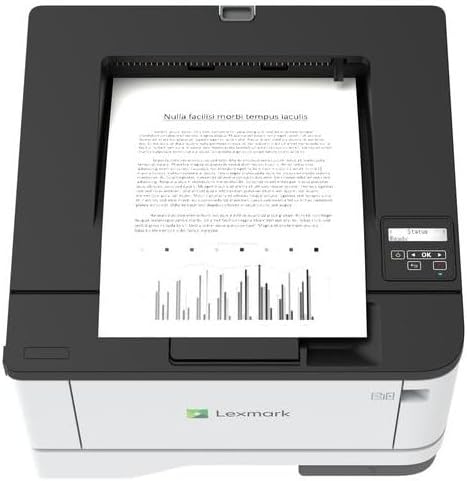
Зображення: Верх view of the Lexmark MS431dw with paper loaded in the input tray.
Open the paper tray and adjust the paper guides to fit the size of your paper. Load the paper stack into the tray, ensuring it is flat and below the maximum fill line. Close the paper tray. The printer supports various media types, including card stock.
4. Підключення живлення
Підключіть шнур живлення до входу живлення принтера, а потім до заземленої електричної розетки.
5. Connecting to a Network/Computer
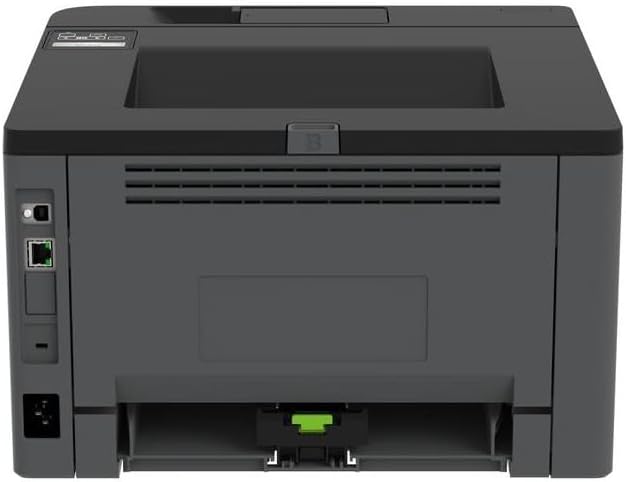
Зображення: Задня частина view of the Lexmark MS431dw, highlighting the Ethernet and power connection ports.
The Lexmark MS431dw supports Ethernet connectivity. Connect an Ethernet cable from your network router or switch to the Ethernet port on the back of the printer. For direct connection to a computer, use a USB cable (not included) if available, or configure network printing.
6. Встановлення драйвера
Turn on the printer. Insert the driver CD (if provided) into your computer, or download the latest drivers from the official Lexmark support webсайт. Дотримуйтесь інструкцій на екрані, щоб завершити встановлення драйвера.
Інструкція з експлуатації
1. Панель керування завершеноview

Зображення: Верх view of the Lexmark MS431dw, showing the printer's control panel with display and buttons.
The control panel features a display screen and navigation buttons (Up, Down, OK, Back) to access printer settings, status, and functions. Refer to the on-screen menus for specific options.
2. Базовий друк
- Переконайтеся, що принтер увімкнено та підключено до комп’ютера або мережі.
- Відкрийте на комп’ютері документ, який потрібно роздрукувати.
- Виберіть Роздрукувати з меню програми (наприклад, File (Друк).
- Choose the Lexmark MS431dw from the list of available printers.
- Adjust print settings as desired (e.g., number of copies, paper size).
- Натисніть Роздрукувати.
3. Автоматичний двосторонній друк
The MS431dw supports automatic two-sided (duplex) printing. To enable this feature:
- In the print dialog box on your computer, navigate to the printer properties or preferences.
- Look for an option related to "Two-sided printing" or "Duplex printing."
- Виберіть потрібний параметр двостороннього друку (наприклад, скріплення по довгому краю, скріплення по короткому краю).
- Підтвердіть свій вибір і продовжте друк.
Технічне обслуговування
1. Заміна картриджа з тонером
When the toner level is low, the printer's display will indicate a warning. To replace the cartridge:
- Переконайтеся, що принтер увімкнено.
- Відкрийте передню кришку.
- Вийміть старий картридж із тонером, потягнувши його.
- Unpack a new Lexmark-compatible toner cartridge and gently shake it.
- Вставте новий картридж до фіксації.
- Закрийте передню кришку.
2. Очищення принтера
Регулярне очищення допомагає підтримувати якість друку та подовжує термін служби принтера.
- Зовні: Протріть зовнішні поверхні м’якою, damp, тканина без ворсу. Не використовуйте абразивні засоби для чищення або розчинники.
- Інтер'єр: Periodically open the front cover and gently remove any dust or paper debris from accessible areas using a dry, lint-free cloth. Avoid touching the fuser unit.
Усунення несправностей
This section addresses common issues you might encounter. For more detailed troubleshooting, refer to the Lexmark support webсайт.
1. Застрягання паперу
- If a paper jam occurs, the printer display will show an error message indicating the location of the jam.
- Обережно відкрийте зазначені кришки або лотки.
- Обережно потягніть застряглий папір у напрямку тракту проходження паперу. Уникайте розриву паперу.
- Close all covers and trays. The printer should resume printing.
2. Погана якість друку
- Вицвілі відбитки: The toner cartridge may be low. Replace it if necessary.
- Смуги або плями: Clean the printer's interior as described in the Maintenance section. Ensure the toner cartridge is properly seated.
- Порожні сторінки: Verify the toner cartridge is installed correctly and has toner. Check printer drivers and print settings.
3. Проблеми з підключенням
- Принтер не знайдено: Ensure the Ethernet cable is securely connected to both the printer and the network. Verify network settings on the printer and computer.
- Статус офлайн: Check the printer's power and network connection. Restart both the printer and your computer.
Технічні характеристики
| Особливість | Деталь |
|---|---|
| Номер моделі | 29S0110 |
| Технологія друку | Лазерна |
| Вихід на принтер | Монохромний |
| Максимальна швидкість друку (монохромний) | До 40 стор./хв (сторінок за хвилину) |
| Технологія підключення | Ethernet |
| Особливість | Auto-Duplex (Automatic Two-sided Printing) |
| Максимальна ємність вхідного аркуша | 900 аркушів |
| Підтримка друкованих ЗМІ | Card stock, Plain paper |
| Вага товару | 9300 грамів (приблизно 20.5 фунта) |
| Wattage | 570 Вт |
| UPC | 734646695558 |
Примітка: Технічні характеристики можуть бути змінені без попередження.
Гарантія та підтримка
Інформація про гарантію
Your Lexmark MS431dw printer is covered by a standard manufacturer's warranty. For specific terms, conditions, and duration of your warranty, please refer to the documentation included with your product or visit the official Lexmark webсайт. Зберігайте чек про покупку для гарантійних претензій.
Підтримка клієнтів
For technical assistance, driver downloads, or further support, please visit the official Lexmark support portal.
Visit the Lexmark Store for Support