
1. Вступ
The VGEBY YCX-003 MPPT Solar Charge Controller is designed to manage power flow from your solar panels to your battery bank and connected loads. It features an industrial-grade master chip for accurate monitoring and control, ensuring efficient charging and protection for your battery system. This controller automatically adapts to 12V or 24V systems and incorporates advanced Maximum Power Point Tracking (MPPT) technology for high charging efficiency.
Ключові функції включають:
- Maintaining optimal battery charge levels.
- Protection against over-charging and over-discharging.
- Prevention of reverse charging from battery to solar panels at night.
- Reverse polarity protection for both battery and solar panels.
- Automatic load cut-off and recovery based on battery voltage.
- Built-in thunder protection.
- Автоматична температурна компенсація для об'єму зарядкиtage.
2. Налаштування та встановлення
Правильне встановлення є вирішальним для безпечної та ефективної роботи вашого контролера сонячного заряду. Будь ласка, уважно виконайте ці кроки.
2.1 Схема підключення

Figure 1: Wiring connections for the solar charge controller.
2.2 Етапи підключення
Connect the components in the following order to prevent damage to the controller or other system components:
- Підключіть батарею: First, connect the battery to the controller's battery terminals. Ensure correct polarity (positive to positive, negative to negative). The controller will automatically detect the system voltage (12 В або 24 В).
- Підключіть сонячну панель: Next, connect the solar panel to the controller's solar panel terminals. Ensure correct polarity.
- Підключіть навантаження: Finally, connect your DC loads to the controller's load terminals. Ensure correct polarity.
Важливо: Always connect the battery first and disconnect the load first when disassembling the system.
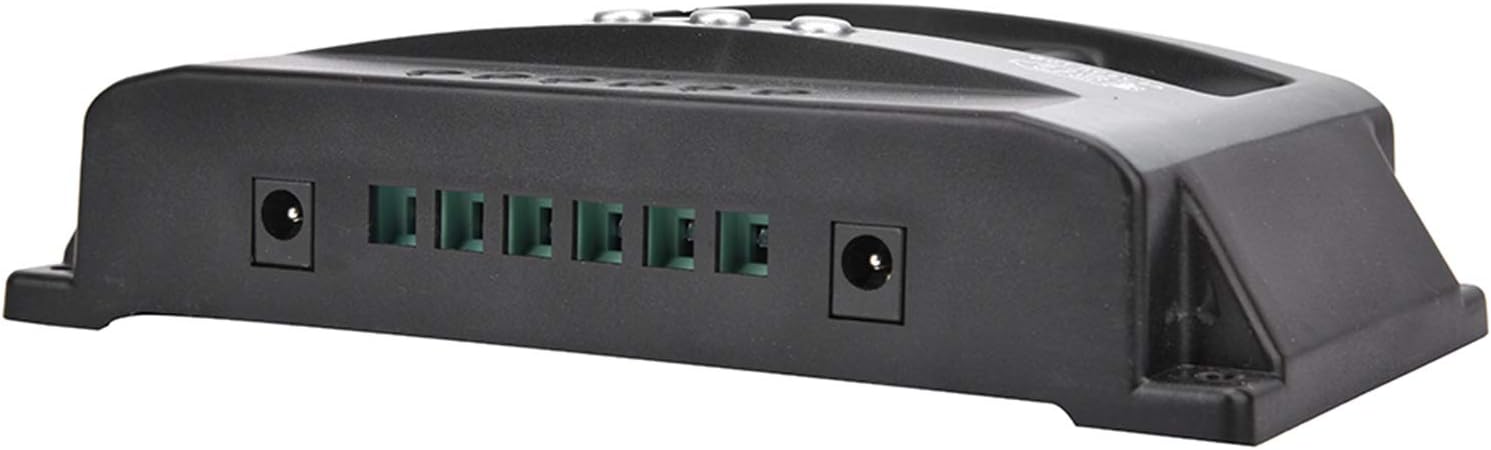
Figure 2: Connection terminals on the side of the controller.
3. Інструкція з експлуатації
The VGEBY YCX-003 controller features a large LCD display and user-friendly buttons for monitoring and adjusting parameters.
3.1 РК-дисплей та кнопки

Рисунок 3: Передня панель з РК-дисплеєм та кнопками керування.
The LCD display provides real-time information on battery voltage, charging current, discharge current, and system status. The buttons allow you to navigate through display modes and adjust certain charging and discharging parameters.
3.2 Регульовані параметри
The controller allows for adjustment of floating charge voltage, граничний об’єм викидуtage, and discharge recovery voltage. Refer to the on-screen menu for specific adjustment procedures. These parameters are factory-set to default values suitable for most lead-acid batteries but can be customized if needed.
3.3 USB вихід
The controller includes a 5V/2A USB output for charging small electronic devices. This output is active when the battery has sufficient charge.

Figure 4: USB charging capability.
4. Технічне обслуговування
To ensure the longevity and optimal performance of your VGEBY YCX-003 MPPT Solar Charge Controller, periodic maintenance is recommended.
- Чистота: Тримайте контролер чистим та без пилу та сміття. Використовуйте суху тканину для очищення.
- Підключення: Періодично перевіряйте всі з'єднання проводів, щоб переконатися в їх надійності та відсутності корозії. Нещільні з'єднання можуть призвести до втрати живлення або перегріву.
- Вентиляція: Переконайтеся, що контролер встановлено в добре провітрюваному приміщенні, щоб запобігти перегріву.
5. Вирішення проблем
The VGEBY YCX-003 controller is designed with several built-in protection features. If the system is not operating as expected, check the following:
- Без дисплея/живлення: Перевірте з'єднання акумулятора та переконайтеся, що акумулятор має достатній рівень зарядуtage.
- Без зарядки: Verify solar panel connections and ensure adequate sunlight. Check for reverse polarity on solar panel connections.
- Навантаження не працює: Check load connections and ensure the battery voltage is above the discharge recovery voltage. The controller automatically cuts off the load if battery voltage занадто низький.
- Коди помилок/попередження: The controller has built-in protections for overheating, overcurrent, short circuit, open circuit, and reverse connection. If a fault occurs, the controller will automatically recover once the issue is resolved. Consult the display for any specific indicators.
- Зворотна полярність: The controller has reverse polarity protection for both the battery and solar panels. If connected incorrectly, the controller will not operate until the polarity is corrected.
6. Технічні характеристики

Figure 5: VGEBY YCX-003 MPPT Solar Charge Controller.
| Особливість | Специфікація |
|---|---|
| Модель | YCX-003 |
| System Voltage | 12V/24V Adaptive |
| Сонячна панель випtage | 12В, 18В, 24В, 36В |
| Плаваючий заряд Voltage | 13.7 В (за замовчуванням, регулюється) |
| Обсяг розрядуtage | 10.7 В (за замовчуванням, регулюється) |
| Розряд відновлення Voltage | 12.6 В (за замовчуванням, регулюється) |
| Струм очікування | <10 мА |
| Вихід USB | 5V / 2A Макс |
| Параметри номінального струму | 40А, 50А, 60А, 100А |
| Макс. PV Voltage | 50 В |
| Макс. Вхідна потужність PV | 750 Вт (12 В) / 1500 Вт (24 В) |
| Розміри | Approx. 170 x 92 x 45mm (6.7 x 3.6 x 1.8 inches) |
| матеріал | ABS + ROHS |
| Виробник | VGEBY |
7. Гарантія та підтримка
For warranty information or technical support, please refer to the documentation provided at the time of purchase or contact VGEBY customer service directly. Ensure you have your product model number (YCX-003) and purchase details available when seeking support.