
Temtop LKC-1000S+
Temtop LKC-1000S+ 2nd Air Quality Monitor User Manual
Model: LKC-1000S+ 2nd
1. Вступ
The Temtop LKC-1000S+ 2nd is a professional air quality monitor designed to measure various indoor and outdoor air pollutants. This device provides real-time data for PM2.5, PM10, Formaldehyde (HCHO), Total Volatile Organic Compounds (TVOC), Air Quality Index (AQI), temperature, and humidity. It features a histogram function for PM2.5 trends and a data export capability for detailed analysis. This manual provides essential information for the proper use and maintenance of your air quality monitor.
2. Продукт закінчивсяview
The Temtop LKC-1000S+ 2nd air quality monitor is equipped with advanced sensors for accurate readings and a clear TFT display for easy data interpretation.

Image 2.1: The Temtop LKC-1000S+ 2nd Air Quality Monitor, showing its sleek design and digital display.
2.1 Основні характеристики
- Measures PM2.5, PM10, HCHO, TVOC, AQI, Temperature, and Humidity.
- Advanced 3rd generation laser particle sensor with a lifespan of up to 20,000 hours.
- Factory-calibrated electrochemical sensors for high-precision formaldehyde detection.
- New bar graph function displays PM2.5 changes over the past 12 hours.
- Data export function via USB.
- Large TFT screen for clear readability.

Зображення 2.2: закінченоview of the Temtop LKC-1000S+ 2nd's measurement capabilities, including PM2.5, PM10, particles, temperature, humidity, AQI, TVOC, formaldehyde, histogram, and data export.
2.2 Компоненти пристрою

Image 2.3: Diagram illustrating the main components of the monitor: Air Outlet, Air Inlet, LCD Screen, and control buttons for AQI/Temp/Humi, PM2.5/PM10/Particles, and HCHO/TVOC.
- Вхід повітря: Де повітряamples are drawn into the device.
- Вихід повітря: Where processed air exits the device.
- РК-екран: Displays all measurement data and device status.
- Кнопки управління: For navigating menus and selecting measurement parameters.
- Порт USB: Для заряджання та експорту даних.

Зображення 2.4: Розгорнуто view showing the internal sensors: DART Electrochemical HCHO Sensor, Sensirion Temp & Humi Sensor, and Temtop Laser PM2.5 Sensor (3rd Gen).
3. Налаштування
3.1 Розпакування та початковий огляд
Upon receiving your Temtop LKC-1000S+ 2nd, carefully unpack all components. The package should include:
- Temtop LKC-1000S+ 2nd Air Quality Monitor
- USB-кабель для зарядки
- Посібник користувача
- Ящик для зберігання

Image 3.1: Contents of the Temtop LKC-1000S+ 2nd package, including the monitor, USB charging cable, and manual.
Inspect the device for any signs of damage. If any components are missing or damaged, contact customer support.
3.2 Зарядка пристрою
The monitor is powered by a built-in 3000mAh rechargeable Lithium-ion battery. Before first use, fully charge the device.
- Connect the provided USB charging cable to the monitor's USB port.
- Підключіть інший кінець USB-кабелю до сумісного USB-адаптера живлення (не входить до комплекту) або USB-порту комп’ютера.
- Індикатор заряду батареї на екрані показуватиме стан заряджання. Повне заряджання зазвичай триває кілька годин.
- Після повного заряджання від’єднайте зарядний кабель.

Image 3.2: The monitor connected via USB cable, illustrating both charging and data export capabilities.
4. Інструкція з експлуатації
4.1 Увімкнення/вимкнення
- To power on: Press and hold the power button (usually the central button) until the screen illuminates.
- To power off: Press and hold the power button until the screen turns off.
4.2 Розуміння дисплея
The large TFT screen displays real-time measurements for various air quality parameters. The main screen typically shows PM2.5, PM10, and particle count, along with an overall air quality indicator (e.g., "Good").
- PM2.5 (µg/m³): Particulate matter less than 2.5 micrometers in diameter.
- PM10 (µg/m³): Particulate matter less than 10 micrometers in diameter.
- HCHO (mg/m³): Formaldehyde concentration.
- TVOC (mg/m³): Total Volatile Organic Compounds concentration.
- AQI: Air Quality Index, an overall indicator of air quality.
- Температура (°C/°F): Температура навколишнього середовища.
- Вологість (%): Відносна вологість.
4.3 Navigating Measurements and Functions
Use the dedicated buttons to switch between different measurement displays and access functions:
- Кнопка PM2.5: Натисніть один раз, щоб view the pollutant index for PM2.5.
- HCHO/TVOC Button: Натисніть один раз, щоб view HCHO and TVOC readings. Double-click to view the corresponding histogram.
- AQI Button: Натисніть один раз, щоб view AQI, temperature, and humidity.
- Кнопка живлення/меню: Press to power on/off, or short press to enter/exit menu options.
4.4 Interpreting Air Quality Levels (EPA Standards)
The device provides a visual indication of air quality based on EPA standards, often using color codes:
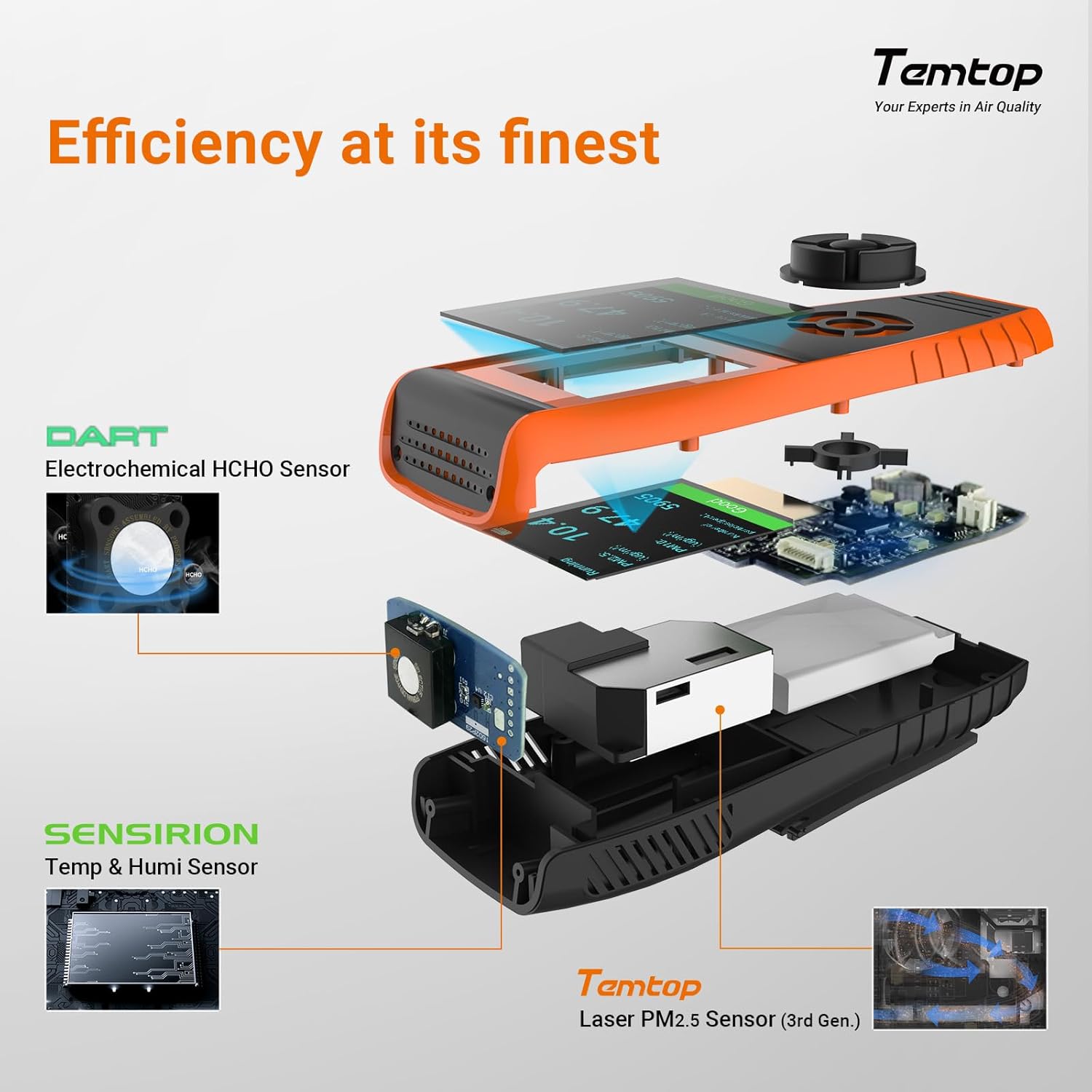
Image 4.1: The monitor's display showing air quality levels categorized by color, referencing EPA standards for Good/Safe, Moderate, Unhealthy for Sensitive Groups, Unhealthy, Very Unhealthy, and Hazardous.
- Зелений: Good/Safe
- Жовтий: Помірний
- Помаранчевий: Нездоровий для чутливих груп
- Червоний: Нездоровий
- фіолетовий: Дуже нездоровий
- Бордовий: небезпечний
4.5 Експорт даних
The monitor supports data export via its USB port, allowing for detailed analysis of recorded measurements.
- Connect the monitor to a computer using the provided USB cable.
- Пристрій має відображатися як знімний носій інформації.
- Access the stored data files (e.g., CSV format) and copy them to your computer for analysis.
The device's memory allows for at least 3 months of continuous data recording.
5. Технічне обслуговування
5.1 Очищення
To clean the device, use a soft, dry cloth. Do not use abrasive cleaners, solvents, or immerse the device in water. Keep the air inlet and outlet free from dust and obstructions.
5.2 Догляд за датчиком
The advanced laser particle sensor has a long lifespan of up to 20,000 hours. The electrochemical sensors are factory-calibrated for accuracy. Avoid exposing the device to extreme temperatures, high humidity, or corrosive gases, as this can affect sensor performance and lifespan.
5.3 Догляд за акумулятором
Щоб продовжити термін служби акумулятора, уникайте частого повного розряджання акумулятора. Регулярно заряджайте пристрій, особливо якщо він зберігатиметься протягом тривалого часу.
6. Вирішення проблем
If you encounter issues with your Temtop LKC-1000S+ 2nd, refer to the following common problems and solutions:
| проблема | Можлива причина | Рішення |
|---|---|---|
| Пристрій не включається. | Низький заряд батареї або несправність пристрою. | Charge the device for at least 2 hours. If it still doesn't power on, contact support. |
| Неточні показання. | Sensor obstruction, environmental factors, or calibration issue. | Ensure air inlets/outlets are clear. Move the device to a stable environment. Allow 5-10 minutes for readings to stabilize. If issues persist, contact support. |
| Не вдається експортувати дані. | Неправильне USB-підключення або проблема з драйвером. | Ensure the USB cable is securely connected to both the device and the computer. Try a different USB port or computer. |
| Екран порожній або завислий. | Збій програмного забезпечення. | Натисніть і утримуйте кнопку живлення протягом 10-15 секунд, щоб примусово перезавантажити пристрій. |
For problems not listed here or if solutions do not resolve the issue, please contact Temtop customer support.
7. Технічні характеристики
| Параметр | Значення |
|---|---|
| Номер моделі | LKC-1000S+2nd |
| Виробник | Elitech (Brand: Temtop) |
| Розміри продукту | 6.55 х 3.2 х 17.55 см |
| вага | 408.23 г |
| Тип батареї | 1 літій-іонний акумулятор (у комплекті) |
| Ємність акумулятора | 3000mAh (recyclable) |
| Джерело живлення | Акумулятор |
| томtage | 5 Вольт |
| Тип датчика | Electrochemical (HCHO), Laser (PM2.5/PM10), Sensirion (Temp/Humi) |
| PM2.5 Sensor Lifespan | До 20,000 годин |
| Вимірювання | PM2.5, PM10, HCHO, TVOC, AQI, Temperature, Humidity |
| Експорт даних | Так, через USB |
| UPC | 757233346244 |
8. Гарантія та підтримка
8.1 Інформація про гарантію
Specific warranty details for the Temtop LKC-1000S+ 2nd Air Quality Monitor are not provided in this manual. Please refer to the warranty card included with your product or visit the official Temtop webсайт для ознайомлення з найактуальнішою гарантійною політикою.
8.2 Підтримка клієнтів
For technical assistance, troubleshooting, or any questions regarding your device, please contact Temtop customer support. Contact information can typically be found on the product packaging, the official Temtop webсайт або гарантійний талон.
Ask a question about this manual
Ask about setup, troubleshooting, compatibility, parts, safety, or missing instructions. Manuals+ will review the question and use this page’s manual context to help answer it.