
вступ
This manual provides detailed instructions for the setup, operation, and maintenance of your HXSJ J800 Wired Gaming Mouse. Please read this manual thoroughly to ensure proper use and to maximize your gaming and productivity experience.
Вміст упаковки
- 1 x HXSJ J800 Wired Gaming Mouse
- 1 х посібник користувача
Налаштування
- Підключіть мишку: Insert the USB connector of the HXSJ J800 mouse into an available USB port on your computer.
- Встановлення драйвера: Миша працює за принципом «підключи і працюй». Ваша операційна система автоматично виявить і встановить необхідні драйвери. Для базової функціональності не потрібне встановлення додаткового програмного забезпечення.
- Початкове використання: Once connected, the mouse is ready for immediate use.

Image: The HXSJ J800 mouse with its braided USB cable, ready for connection to a computer.
Інструкція з експлуатації
1. Mode Switching (Office Mode / Game Mode)
The HXSJ J800 mouse features two operational modes: Office Mode and Game Mode.
- Типовий режим: The mouse defaults to Office Mode upon connection.
- Перемикання режимів: To switch between Office Mode and Game Mode, press and hold the Scroll Wheel button і Права кнопка миші одночасно протягом 3 секунд.
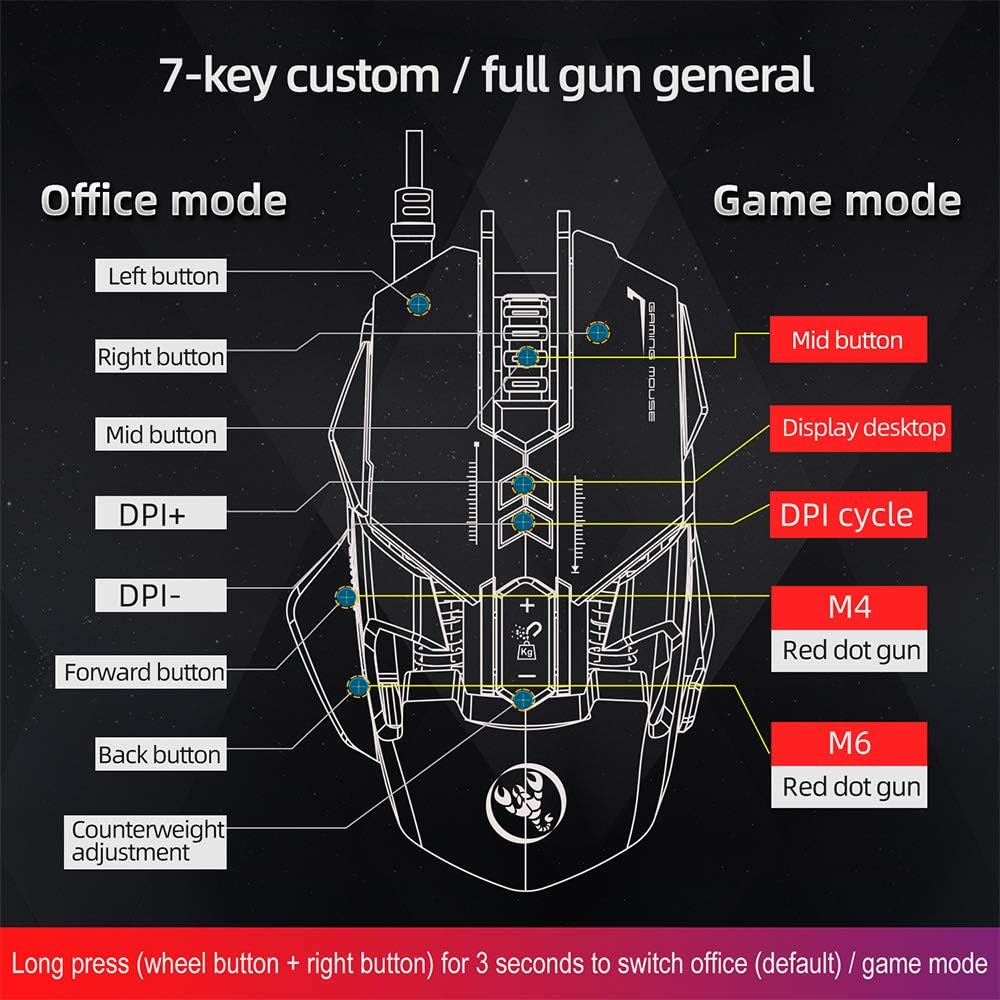
Image: A diagram illustrating the different button assignments for Office Mode (left) and Game Mode (right), including the mode switching instruction.
2. Налаштування роздільної здатності
The mouse supports six adjustable DPI settings for varying cursor sensitivity.
- Рівні DPI: 800, 1600, 2400, 3200, 4800, 6400 DPI.
- Зміна DPI: Use the dedicated DPI+ and DPI- buttons located on the top of the mouse to cycle through the available DPI settings.
- Візуальний індикатор: The RGB lighting will flash with a corresponding color when the DPI setting is changed.
3. Програмування макросів
The HXSJ J800 features an A6653 E-sports Game Chip with onboard storage for hardware macro definition.
- Функціональність: Record and write macro definition commands directly to the mouse.
- Software-Free Operation: Once macros are recorded, no additional software is required for their execution, making it convenient for use across different computers.

Зображення: Детальний view of the A6653 E-sports Game Chip, highlighting its role in hardware macro definition.
4. RGB Light Effect
The mouse features 16.8 million color RGB backlight modes.
- Налаштування: The RGB lighting provides various color effects.
- Індикатор DPI: The light of the corresponding gear will flash every time the DPI changes.

Image: The HXSJ J800 mouse illuminated with vibrant RGB lighting, showcasing its aesthetic features.
5. Removable Weight Adjustment
Customize the mouse's weight for enhanced stability and accuracy.
- Система ваг: The mouse incorporates a suction magnet design with two 5g removable weights.
- коригування: The weights can be easily inserted into or removed from the weight chamber. The magnetic design ensures the weights are securely held and not easily lost.

Image: A user adjusting the removable 5g weights in the HXSJ J800 mouse's magnetic weight chamber.
Особливості Понадview
- Seven-Key Macro Programming: Supports recording and writing macro definition commands for personalized control.
- Six Adjustable DPI Levels: Easily switch between 800-1600-2400-3200-4800-6400DPI to suit various tasks and games.
- E-sports Game Chip (A6653): Features onboard storage for true hardware macro definition, eliminating the need for software after initial setup.
- Cool RGB Light Effect: 16.8 million color RGB backlight modes with dynamic effects and DPI change indicators.
- Removable Weight Design: Two 5g magnetic weights allow for customization of mouse weight for optimal feel and precision.
- Міцні перемикачі: Rated for 20 million cycles.
- Aluminum Alloy Roller: Provides a high-grade feel and comfortable dampінж.

Зображення: Внутрішній view of the HXSJ J800 mouse, highlighting key components such as the A6653 chip, aluminum alloy roller, and weight counterweights.

Image: A close-up of the HXSJ J800 mouse, focusing on the aluminum alloy scroll wheel and its textured design.
Технічне обслуговування
- Прибирання: Використовуйте м’яку суху тканину для очищення поверхні миші. Для стійкого бруду злегкаampпромийте тканину водою. Уникайте використання агресивних хімікатів або абразивних матеріалів.
- Догляд за датчиком: Тримайте оптичний датчик на нижній стороні миші чистим та без пилу чи сміття, щоб забезпечити точне відстеження.
- Управління кабелем: Уникайте різких згинів або надмірного натягування USB-кабелю, щоб запобігти його пошкодженню.
- Зберігання: Зберігайте мишу в чистому, сухому місці, коли вона не використовується.
Усунення несправностей
- Миша не реагує:
- - Ensure the USB cable is securely connected to your computer's USB port.
- - Try connecting the mouse to a different USB port.
- - Перезавантажте комп'ютер.
- Налаштування DPI не працює:
- - Ensure you are pressing the correct DPI+ or DPI- buttons.
- - Check if the mouse is in a mode that supports DPI adjustment (both Office and Game modes support it).
- RGB-підсвічування не працює:
- - Verify the mouse is properly connected and receiving power.
- - The lighting should activate automatically. If not, ensure no software is overriding the mouse's default lighting settings (though this mouse is designed to be software-free for basic functions).
- Макроси не виконуються:
- - Ensure the macros were correctly recorded and saved to the mouse's onboard memory.
- - Confirm the mouse is in Game Mode if the macros are assigned to Game Mode specific buttons.
Технічні характеристики
| Пункт | Специфікація |
|---|---|
| Модель | J800 |
| Колір | Сірий |
| Кількість клавіш | 7 |
| Налаштування DPI | 800-1600-2400-3200-4800-6400DPI |
| Інтерфейс | USB |
| Switch Life | 20 мільйонів циклів |
| томtagе/Поточний | Постійний струм 5 В/100 мА |
| Підтримувана система | Windows 2000/XP/Win7/Win8/Win10 Vista 32bit, iOS or latest |
| Розмір елемента | 13 x 8 x 4 см (Д x Ш x В) |
| Вага товару | прибл. 154г |
| Чіп | A6653 E-sports Game Chip |
| Особливості | Programmable Buttons, Adjustable DPI, RGB Lighting, Removable Weights |
Гарантія та підтримка
For warranty information or technical support, please refer to the retailer where you purchased the HXSJ J800 Wired Gaming Mouse or visit the official HXSJ webсайт. Будь ласка, збережіть підтвердження покупки для гарантійних претензій.