
вступ
Thank you for choosing the JBL Tune 225 TWS Wireless In-Ear Headphones. This manual provides essential information for setting up, operating, and maintaining your device. Please read it carefully to ensure optimal performance and longevity of your headphones.
Що в коробці
Your JBL Tune 225 TWS package includes the following items:
- JBL Tune 225 TWS Wireless In-Ear Headphones (Left and Right earbuds)
- Компактний зарядний футляр
- Зарядний кабель USB-C

Image: JBL Tune 225 TWS earbuds and their charging case, showing the components included in the package.
Налаштування
1. Заряджання навушників та кейса
Before first use, fully charge both the earbuds and the charging case. Connect the provided USB-C cable to the charging case and a power source. The LED indicators on the case will show the charging status. A full charge typically takes approximately 2 hours.
- Час роботи акумулятора в зарядному пристрої: Up to 20 hours capacity, providing an average of 25 hours of combined playtime with the earbuds.
- Термін служби батареї навушників: До 5 годин на одному заряді.

Image: JBL Tune 225 TWS earbuds placed inside their open charging case, showing the LED battery indicators.
2. Підключення Bluetooth
- Відкрийте зарядний футляр. Навушники автоматично перейдуть у режим сполучення.
- На вашому пристрої (смартфоні, планшеті тощо) перейдіть до налаштувань Bluetooth.
- Select "JBL Tune 225 TWS" from the list of available devices.
- Once connected, you will hear an audible confirmation, and the LED on the earbuds will indicate a successful connection.
The JBL Tune 225 TWS uses Bluetooth version 5.0 for a stable connection up to 10 meters (33 feet).
Експлуатація навушників
Сенсорне керування
The JBL Tune 225 TWS features touch controls on each earbud for managing audio playback and calls.
| Дія | Лівий навушник | Правий навушник |
|---|---|---|
| Відтворення/Пауза | N/A | Один дотик |
| Наступний трек | Двічі торкніться | N/A |
| Попередній трек | Потрійний дотик | N/A |
| Відповісти/закінчити виклик | Один дотик | Один дотик |
| Відхилити виклик | Натисніть і утримуйте (2 с) | Натисніть і утримуйте (2 с) |
| Активуйте голосовий помічник | N/A | Двічі торкніться |
Note: Volume control is not directly available on the earbuds and must be adjusted via your connected device.
Використання одного або двох навушників
The JBL Tune 225 TWS allows for flexible use of either a single earbud or both earbuds simultaneously. Simply remove one or both from the charging case, and they will automatically connect to your paired device. If you place one earbud back into the case, the other will continue to play.

Зображення: Крупний план view of the left and right JBL Tune 225 TWS earbuds, highlighting their individual design.
Технічне обслуговування
прибирання
Regular cleaning helps maintain sound quality and hygiene. Use a soft, dry, lint-free cloth to wipe the earbuds and charging case. Do not use harsh chemicals or abrasive materials. For earbud grilles, gently use a dry cotton swab to remove any debris.
Зберігання
Коли навушники не використовуються, завжди зберігайте їх у зарядному футлярі, щоб захистити їх та підтримувати зарядженими. Зберігайте футляр у прохолодному, сухому місці, подалі від екстремальних температур та прямих сонячних променів.
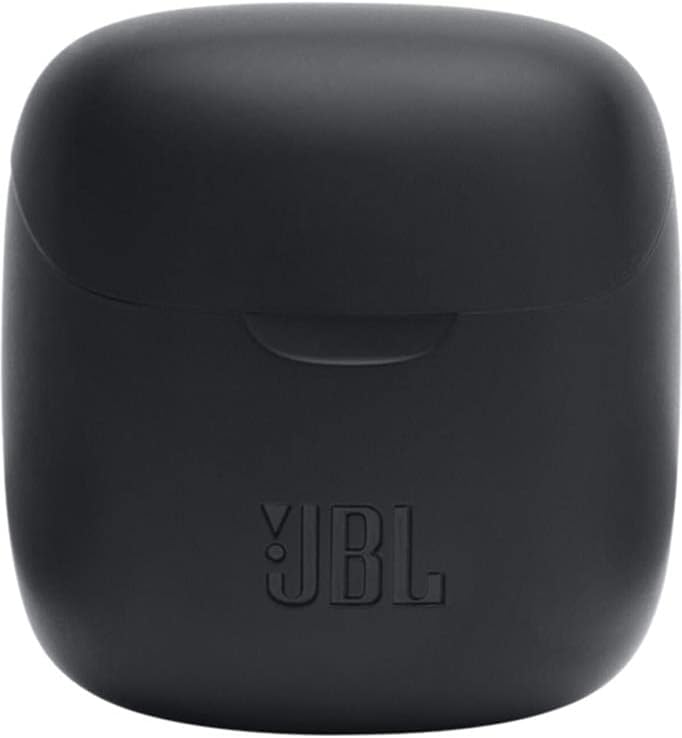
Image: The closed charging case for the JBL Tune 225 TWS, ready for storage or transport.
Усунення несправностей
- Немає проблем зі звуком/з’єднанням: Ensure both earbuds are charged. Place them back in the case, close it, then reopen to re-initiate pairing. Check your device's Bluetooth settings to ensure "JBL Tune 225 TWS" is connected. Try forgetting the device and re-pairing.
- Один навушник не працює: Ensure both earbuds are charged. Try placing both back in the case, closing it, and then taking them out again. Sometimes a simple reset by placing them in the case can resolve this.
- Проблеми із зарядкою: Ensure the USB-C cable is securely connected to both the case and the power source. Check if the charging port is clean and free of debris. Try a different USB-C cable or power adapter.
- Низька гучність: Відрегулюйте гучність на підключеному пристрої. Переконайтеся, що навушники правильно розміщені у вухах.
Технічні характеристики
| Особливість | Деталь |
|---|---|
| Бренд | JBL |
| Назва моделі | Налаштування 225TWS |
| Номер моделі | Налаштування 225TWS |
| Колір | чорний |
| Розташування вуха | Вкладиші |
| Форм-фактор | Вкладиші |
| Імпеданс | 32 Ом |
| Тип драйвера | Динамічний драйвер |
| Розмір драйвера | 12.5 мм |
| Діапазон частот | 20 Гц - 20 000 Гц |
| Чутливість | 105 дБ |
| Технологія підключення | Бездротовий (Bluetooth) |
| Версія Bluetooth | 5.0 |
| Діапазон Bluetooth | 10 метрів |
| Спосіб контролю | Дотик |
| Термін служби батареї навушників | 5 години |
| Час зарядки Час роботи від акумулятора | До 20 годин (додатково) |
| Total Combined Playtime | До 25 годин |
| Час зарядки | 2 години |
| Рівень водонепроникності | Водостійкий |
| Вага продукту | 57 грамів |
| Вага зарядного кейса | 100 грамів |
| UPC | 050036374019 |
Гарантія та підтримка
For warranty information and customer support, please refer to the official JBL website or contact your local JBL authorized dealer. Keep your proof of purchase for warranty claims.
Цифрову копію посібника користувача можна завантажити: JBL Tune 225 TWS User Manual (PDF)