
вступ
Welcome to your new Gembird GHS-U-5.1-01 USB 5.1 Surround Headset. This manual provides essential information for setup, operation, and maintenance to ensure optimal performance and an immersive audio experience.
Вміст упаковки
Пакет повинен містити такі предмети:
- Gembird GHS-U-5.1-01 USB 5.1 Surround Headset

Image: Retail packaging for the Gembird GHS-U-5.1-01 USB 5.1 Surround Headset, showing the headset inside a clear window.
Продукт закінченийview
The Gembird GHS-U-5.1-01 is a USB headset designed for immersive audio experiences with 5.1 surround sound. It features an adjustable microphone, built-in volume control, comfortable ear pads, and an adjustable headband for extended use.
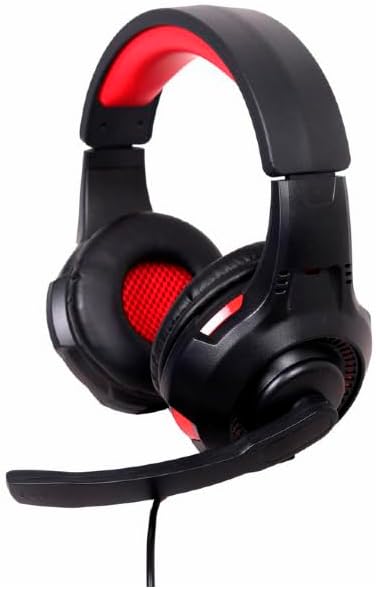
Зображення: Кутове view of the Gembird GHS-U-5.1-01 USB 5.1 Surround Headset, showcasing its black and red design with the microphone boom extended.

Зображення: спереду view of the Gembird GHS-U-5.1-01 USB 5.1 Surround Headset, highlighting the adjustable headband and earcups.

Image: Close-up of the in-line control unit for the Gembird GHS-U-5.1-01 headset, showing volume up/down and microphone mute buttons.
Налаштування
Підключення гарнітури
The Gembird GHS-U-5.1-01 headset connects via a standard USB port.
- Знайдіть вільний порт USB на комп’ютері.
- Підключіть USB-роз'єм гарнітури до USB-порту.
- Ваша операційна система повинна автоматично виявити та встановити необхідні драйвери. Цей процес може тривати кілька хвилин.
- Once installed, the headset will be ready for use as an audio input and output device.
Audio Settings Configuration
For optimal 5.1 surround sound experience, you may need to configure your computer's audio settings.
- Windows: Go to "Sound Settings" (right-click speaker icon in taskbar) > "Sound Control Panel" > "Playback" tab. Select the Gembird headset, click "Configure," and choose "5.1 Surround."
- macOS: Go to "System Preferences" > "Sound" > "Output" tab. Select the Gembird headset.
Інструкція з експлуатації
Регулювання гучності
The headset features an in-line remote control for easy volume adjustment.
- Використовуйте "+" кнопку для збільшення гучності.
- Використовуйте "-" кнопку, щоб зменшити гучність.
Використання мікрофона
The adjustable microphone boom allows for precise positioning.
- Position the microphone approximately 1-2 inches from your mouth for clear voice capture.
- Use the microphone mute button on the in-line remote to toggle the microphone on or off.
Регулювання комфорту
Adjust the headband to fit comfortably on your head. The ear pads are designed for extended use.
Технічне обслуговування
To ensure the longevity and performance of your headset, follow these maintenance guidelines:
- Прибирання: Use a soft, dry cloth to wipe the headset. Do not use harsh chemicals or abrasive cleaners.
- Зберігання: Store the headset in a clean, dry place away from extreme temperatures.
- Догляд за кабелем: Уникайте різких згинів або надмірного натягування USB-кабелю, щоб запобігти його пошкодженню.
Усунення несправностей
No Sound or Microphone Not Working
- Перевірте підключення USB: Ensure the USB connector is fully inserted into the port. Try a different USB port.
- Перевірте рівні гучності: Verify that the volume on the in-line control, your computer's system volume, and application-specific volumes are not muted or set too low.
- Перевірте налаштування аудіо: Confirm that the Gembird headset is selected as the default playback and recording device in your computer's sound settings.
- Перезавантажте комп'ютер: Sometimes a simple restart can resolve driver or software conflicts.
Проблеми з якістю звуку
- Оновлення драйвера: Переконайтеся, що драйвери вашої операційної системи оновлені.
- Якість джерела: Poor audio quality may stem from the audio source itself. Test with different audio files або додатків.
Технічні характеристики
| Назва моделі | ГГС-У-5.1-01 |
| Підключення | Провідний USB |
| Форм-фактор | На вухо |
| Колір | чорний |
| матеріал | Aluminum (Enclosure) |
| вага | 0.4 кілограма |
| Додаткові функції | Adjustable microphone boom, Built-in volume control, Comfortable ear pads, Adjustable headband |
Інформація про гарантію
This Gembird headset comes with a 24 Month Manufacturer Guarantee. Please retain your proof of purchase for warranty claims. For detailed warranty terms and conditions, refer to the documentation provided with your product or contact Gembird customer support.
Підтримка
If you encounter issues not covered in this manual or require further assistance, please visit the official Gembird website or contact their customer support for technical assistance.