
1. Вступ
The ScopeAround MS450 Digital Otoscope Ear Camera is designed to provide a clear and detailed view of the ear canal and eardrum. This device features a 4.5-inch IPS screen, a high-definition camera with adjustable LED lights, and an intelligent gyroscope for image stabilization. It is intended for personal ear inspection and can assist in monitoring ear health. This manual provides essential information for the safe and effective use of your otoscope.
2. Інформація про безпеку
- Do not insert the otoscope too deeply into the ear canal. Excessive insertion can cause injury to the eardrum or inner ear structures.
- Always use the provided ear specula to prevent over-insertion and protect the ear canal.
- Clean the camera lens and ear specula thoroughly before and after each use with alcohol wipes to prevent infection.
- This device is for observation and minor earwax removal only. For significant earwax impaction or ear infections, consult a medical professional.
- Keep the device out of reach of children. Adult supervision is required if used on children.
- Avoid using the device if you experience pain, discomfort, or bleeding during examination. Seek medical attention immediately.
- Не намагайтеся розбирати або модифікувати пристрій. Це може призвести до анулювання гарантії та створення ризиків для безпеки.
3. Вміст упаковки
Перевірте наявність усіх елементів в упаковці:
- MS450 Otoscope Camera Unit
- Зарядний кабель (USB Type-C)
- Посібник користувача
- 4 x Silicone Ear Spoons (various types)
- 3 x Ear Specula (protective cones)
- 1 Pack of Alcohol Prep Pads
- 32GB MicroSD Memory Card (pre-installed or included separately)

4. Продукт закінчивсяview
The MS450 otoscope consists of a main display unit and a connected camera probe. Familiarize yourself with the components and controls:

- Блок дисплея: Features a 4.5-inch IPS screen for real-time viewінж.
- Зонд камери: Equipped with an HD camera, 6 adjustable LED lights, and a gyroscope.
- Кнопки управління: Power, Photo/Video, Light Control, Mode Switch, Navigation (Up/Down), OK, and Settings.
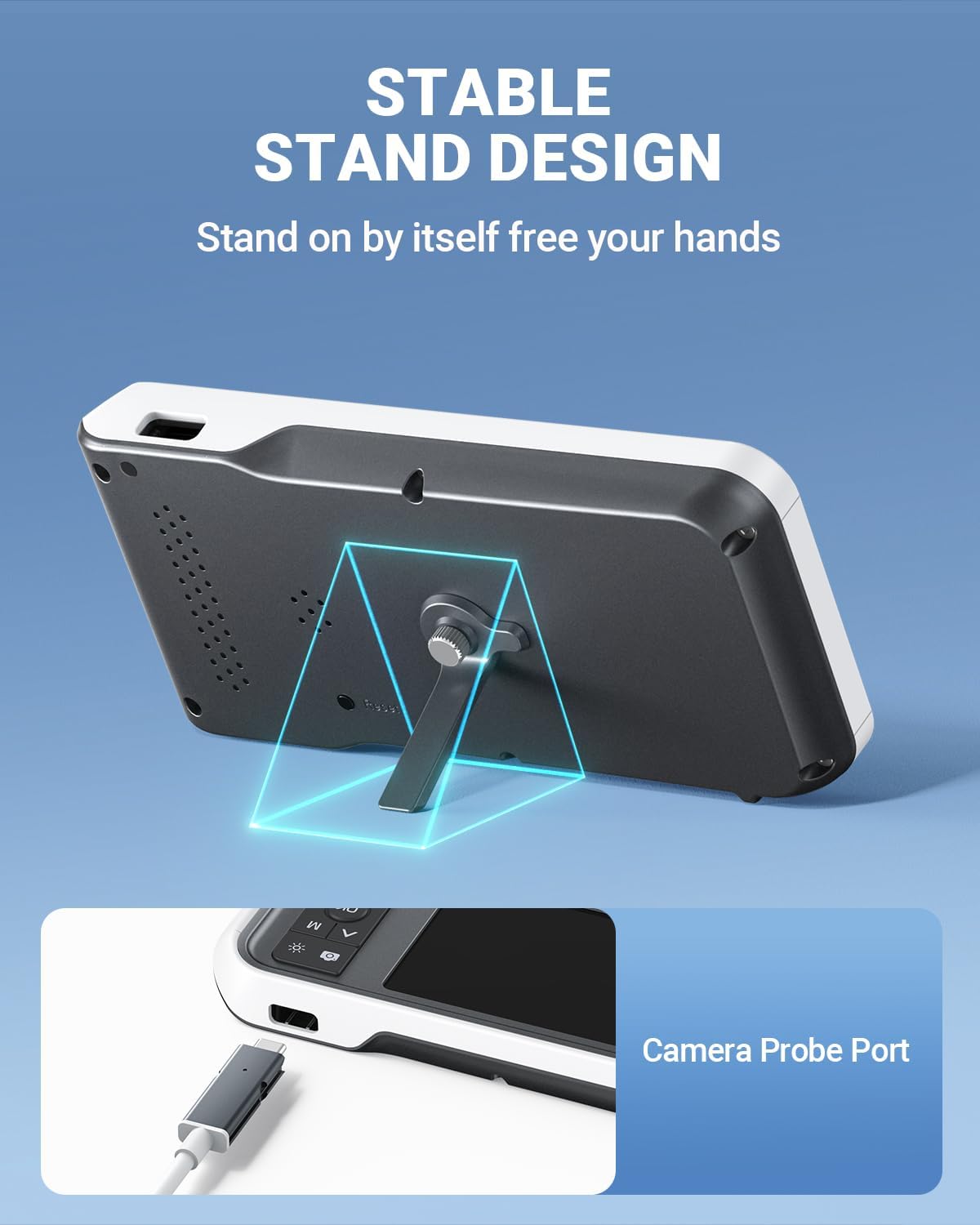
- Порти: USB Type-C Charging Port, TF Card Slot, Camera Probe Connector.
- Вбудована підставка: Allows for hands-free operation.
5. Налаштування
- Зарядіть пристрій: Before first use, fully charge the otoscope using the provided USB Type-C cable and a compatible power adapter (not included). The charging port is located on the side of the display unit. A full charge provides over 4 hours of continuous use.
- Вставте картку MicroSD: Ensure the 32GB MicroSD card is properly inserted into the TF Card Slot. This card is used to store photos and videos.
- Attach Camera Probe: Connect the camera probe cable securely to the Camera Probe Connector on the display unit.
- Select and Attach Specula/Ear Spoon: Choose an appropriate ear speculum (protective cone) or silicone ear spoon. Gently push it onto the tip of the camera probe until it is secure. Always use a speculum to protect the ear canal.


6. Інструкція з експлуатації
- Увімкнення: Press and hold the Power Button (blue button) for a few seconds until the screen turns on.
- Регулювання яскравості світлодіода: Use the Light Control Button (sun icon) to cycle through 3 levels of LED brightness to achieve optimal illumination for your ear canal.
- Позиціонування: Gently insert the camera probe into the ear canal. The 4.5-inch IPS screen will display a real-time view. The intelligent directional gyroscope helps stabilize the image, preventing disorientation.
- Робота в режимі "вільні руки": Utilize the integrated stand on the back of the display unit to position the device on a flat surface, allowing for hands-free viewing and easier manipulation of the probe.
- Capture Photos/Videos:
- Press the Mode Switch Button (M) to switch between photo and video modes.
- In photo mode, press the Photo/Video Button (camera icon) once to take a picture.
- In video mode, press the Photo/Video Button once to start recording, and press again to stop.
- Review ЗМІ: Use the navigation buttons (Up/Down) to browse captured photos and videos. Press the OK button to view вибраний елемент.
- Передача даних: Connect the device to a computer using the USB Type-C cable to transfer photos and videos from the MicroSD card. Alternatively, remove the MicroSD card and insert it into a card reader.
- Вимкнення живлення: Press and hold the Power Button until the screen turns off.

7. Технічне обслуговування
- Очищення об'єктива камери: After each use, gently wipe the camera lens with an alcohol prep pad or a soft, dry cloth. Ensure no residue remains.
- Cleaning Ear Spoons/Specula: Wash reusable ear spoons and specula with soap and water, then sterilize with alcohol prep pads. Replace disposable specula after each use.
- Очищення пристрою: Wipe the main unit with a soft, dry cloth. Do not immerse the main unit in water. The camera probe is waterproof and can be cleaned with water and alcohol.
- Зберігання: Store the otoscope in a clean, dry place at room temperature, away from direct sunlight and extreme temperatures.
- Догляд за акумулятором: Щоб продовжити термін служби акумулятора, уникайте частого повного розряджання пристрою. Регулярно заряджайте його, навіть якщо він не використовується протягом тривалого часу.

8. Вирішення проблем
| проблема | Можлива причина | Рішення |
|---|---|---|
| Пристрій не включається. | Низький заряд батареї; пристрій завис. | Charge the device fully. If unresponsive, press the Reset button with a pin. |
| Немає зображення на екрані. | Camera probe not connected; faulty probe. | Ensure camera probe is securely connected. If problem persists, contact support. |
| Зображення розмите. | Dirty lens; incorrect focal distance. | Clean the camera lens. Ensure the probe is within the optimal focal distance (approx. 1 inch / 2.5 cm). |
| Не вдається робити фото/відео. | MicroSD card full or not inserted; incorrect mode. | Check MicroSD card status and ensure it is inserted. Verify device is in photo or video mode. |
| Світлодіодні ліхтарі не працюють. | Lights turned off or set to lowest brightness. | Press the Light Control Button to adjust brightness levels. |
9. Технічні характеристики
- модель: MS450
- Дисплей: 4.5-дюймовий IPS-екран
- Роздільна здатність камери: Full HD (1080P for images, 720P for video)
- Джерело світла: 6 adjustable LED lights (3 brightness levels)
- Батарея: Літій-полімерний акумулятор 2500 мАг (акумуляторний)
- Термін служби батареї: Приблизно 4 годин безперервного використання
- Зберігання: Карта MicroSD на 32 ГБ (в комплекті)
- Фокусна відстань: Approximately 1 inch (2.5 cm)
- Гіроскоп: Intelligent directional gyroscope for image stabilization
- Підключення: USB Type-C for charging and data transfer
- Розміри продукту: 5.9 x 2.9 x 0.79 дюймів
- Вага товару: 12 унції
- матеріал: Glass (lens), other components as specified by manufacturer
10. Гарантія
ScopeAround products are covered by a limited manufacturer's warranty against defects in materials and workmanship. Please refer to the warranty card included in your package or visit the official ScopeAround webДетальні умови гарантії див. на сайті. Зберігайте чек про покупку для гарантійних випадків.
11. Підтримка
For technical assistance, troubleshooting, or product inquiries, please contact ScopeAround customer support:
- Webсайт: Visit the official ScopeAround webсайт із поширеними запитаннями та ресурсами підтримки.
- Електронна пошта: Зверніться до упаковки вашого продукту або до офіційного webсайт для електронної пошти служби підтримки клієнтів.
- телефон: Зверніться до упаковки вашого продукту або до офіційного webсайт для номера телефону служби підтримки клієнтів.
Our US-based after-sales support team is available to assist you.