
1. Вступ
The Kinter A7BT is a compact 2-channel mini amplifier designed for various audio applications, including home, automotive, and motorcycle setups. It features Bluetooth connectivity, USB and TF card playback, FM radio, and multiple control options. This manual provides detailed instructions for the proper installation, operation, and maintenance of your A7BT ampліфірник.
2. Вміст упаковки
Verify that all items listed below are included in your package. If any items are missing or damaged, please contact Kinter customer support.
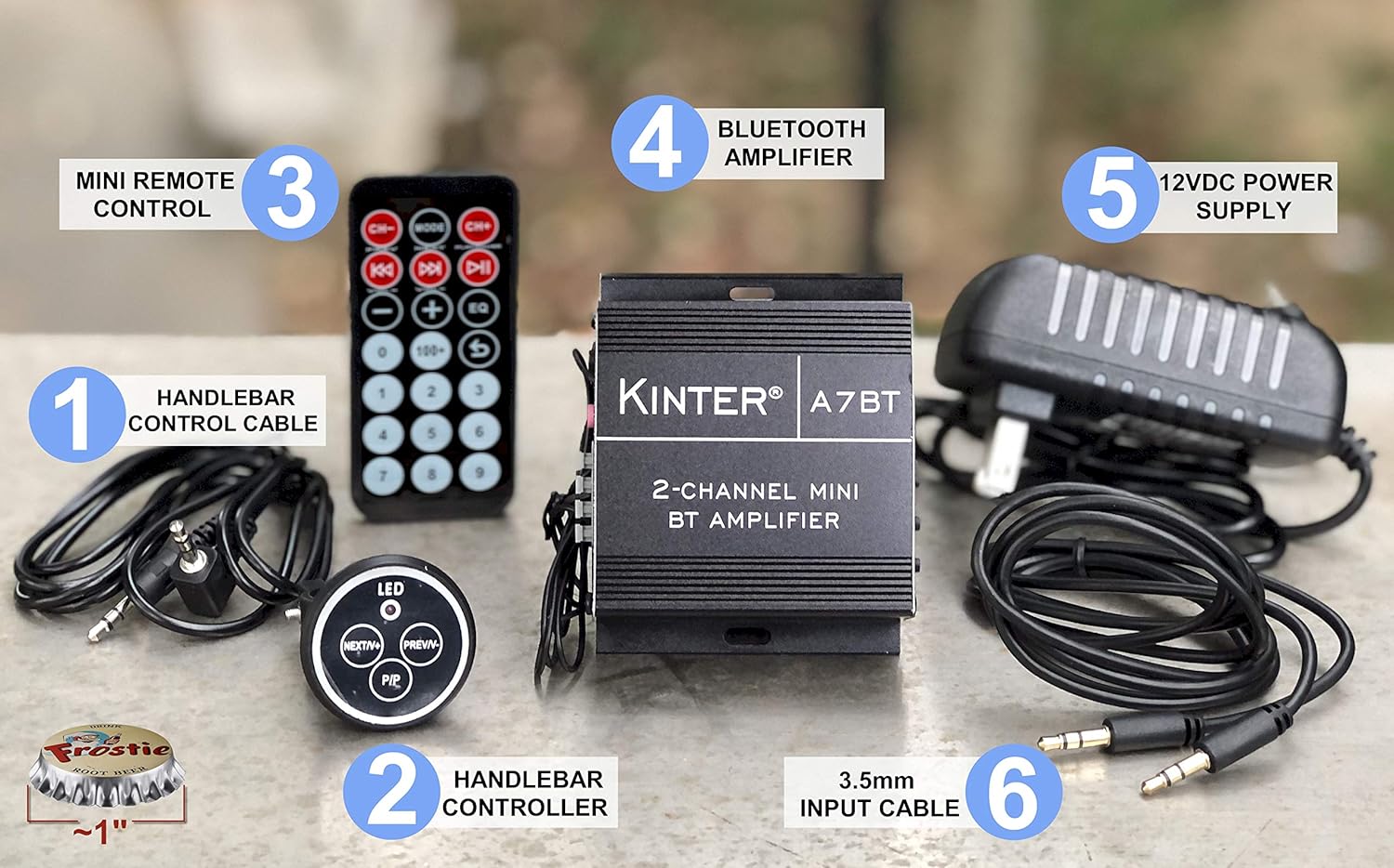
Image: Kinter A7BT amplifier, handlebar controller, IR remote, 12V power supply, and cables.
- Kinter A7BT 2-Channel Mini Bluetooth Ampлібератор
- Wired Handlebar Controller
- Wireless Infrared (IR) Remote Control
- 3.5mm Audio Input Cable (59 inches length)
- 12V DC Power Supply (34 inches length)
3. Продукт закінчивсяview
3.1 Передня та задня панелі
Familiarize yourself with the various controls and connections on the ampліфірник.
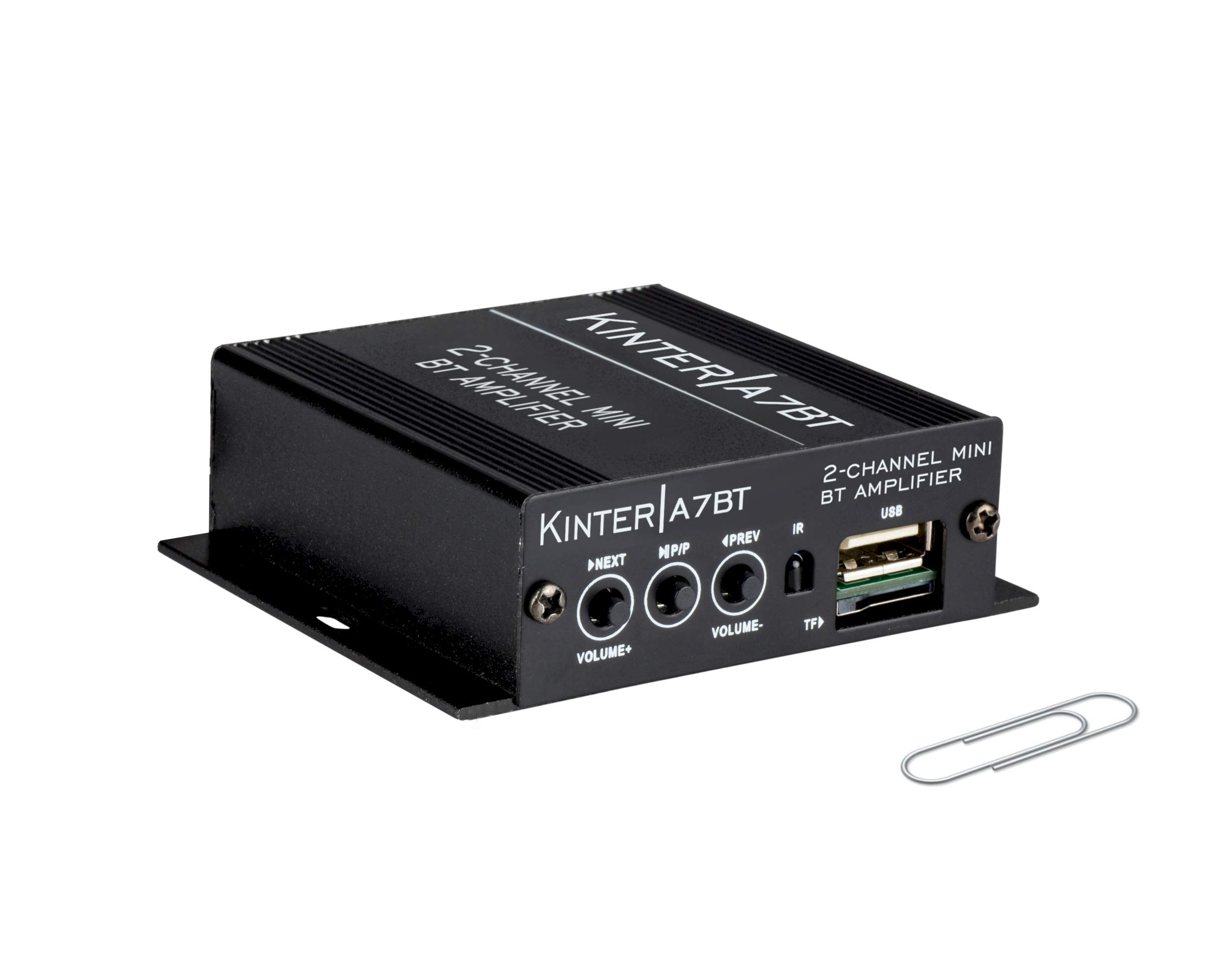
Image: Detailed diagram showing the front and rear panels of the Kinter A7BT ampрятувальник з пронумерованими компонентами.
- NEXT/P (Next Song / Volume Up): Коротке натискання для наступного треку, довге натискання для збільшення гучності.
- M/P/P (Mode / Play / Pause): Short press for play/pause, long press to change input mode (Bluetooth, AUX, USB/TF, FM).
- PREV/V (Previous Song / Volume Down): Коротке натискання для попереднього треку, довге натискання для зменшення гучності.
- ІЧ (інфрачервоний приймач): For wireless remote control signals.
- TF (TransFlash / Micro SD Card Slot): Для відтворення аудіо files з карти TF.
- USB (USB Port): Для відтворення аудіо files з флешки. Note: This is not a charging port.
- AUX IN (3.5mm Stereo Audio Input Jack): Для підключення зовнішніх аудіопристроїв за допомогою кабелю 3.5 мм.
- FM-АНТЕНА: Connection point for the FM antenna wire.
- REMOTE LINE IN: Input for the wired handlebar remote control.
- SPEAKER OUT (R/L): Terminals for connecting passive speakers (Right and Left channels).
- DC12V (12V DC Power Input): For connecting the 12V DC power supply.
- Bluetooth Operation Indicator: LED indicator for Bluetooth status.
3.2 Handlebar Controller
The wired handlebar controller provides convenient access to essential functions.
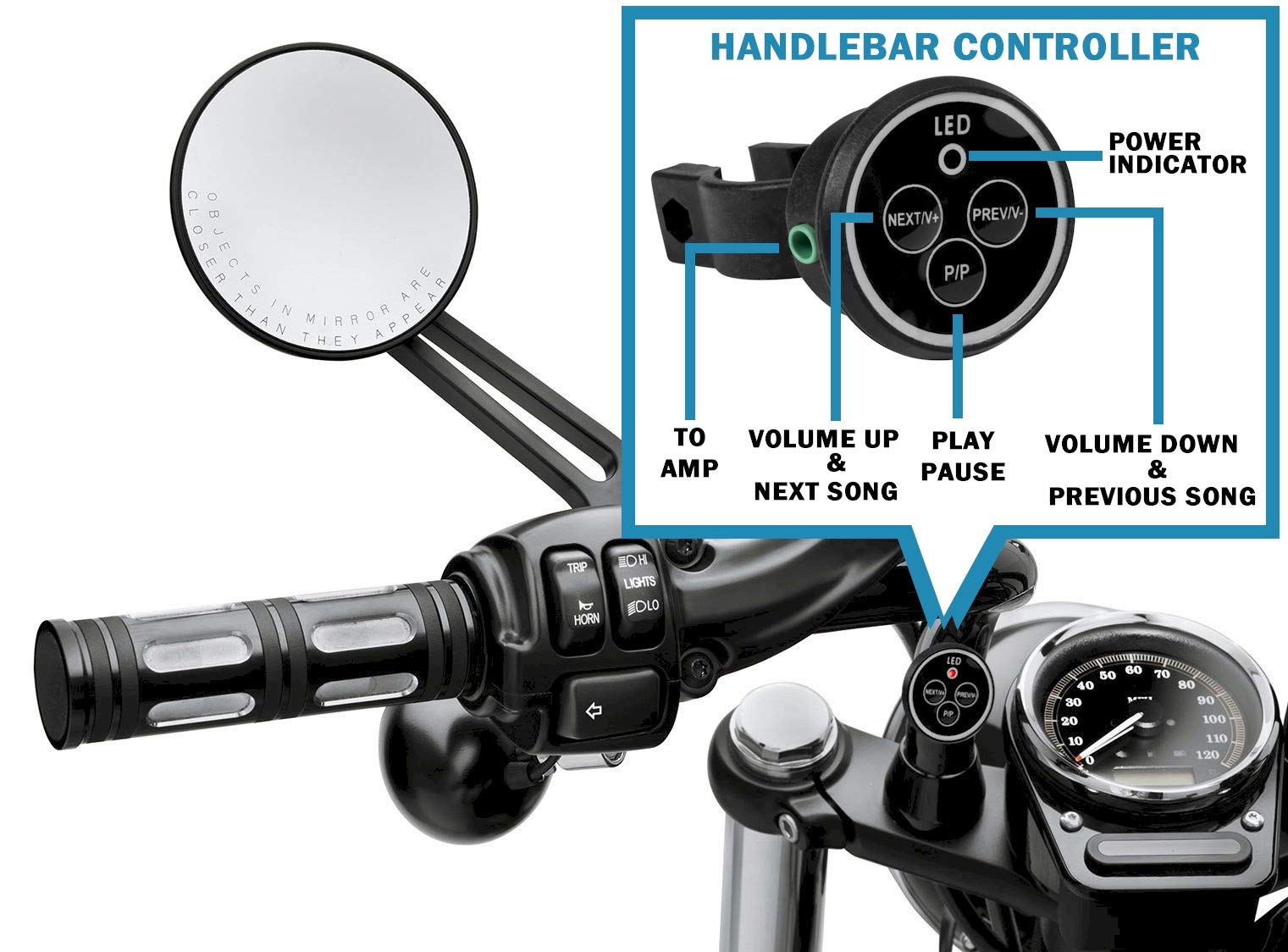
Image: Close-up of the handlebar controller showing LED power indicator, Next/Volume Up, Previous/Volume Down, and Play/Pause buttons.
- світлодіод: Індикатор живлення.
- NEXT/V+: Next Song / Volume Up.
- PREV/V-: Previous Song / Volume Down.
- P/P: Відтворення / Пауза.
4. Налаштування
4.1 Підключення живлення
Connect the included 12V DC power supply to the DC12V input on the amplifier. Plug the power supply into a standard wall outlet.
For automotive or motorcycle applications, you can hardwire the amplifier to a 12V battery system. Use the included PSU's wire and connector. Strip the wire as shown in the diagram below. The white wire is POSITIVE (+), and the bare wire is GROUND (-). It is recommended to install a 2 Amp fuse inline (not included) for protection.
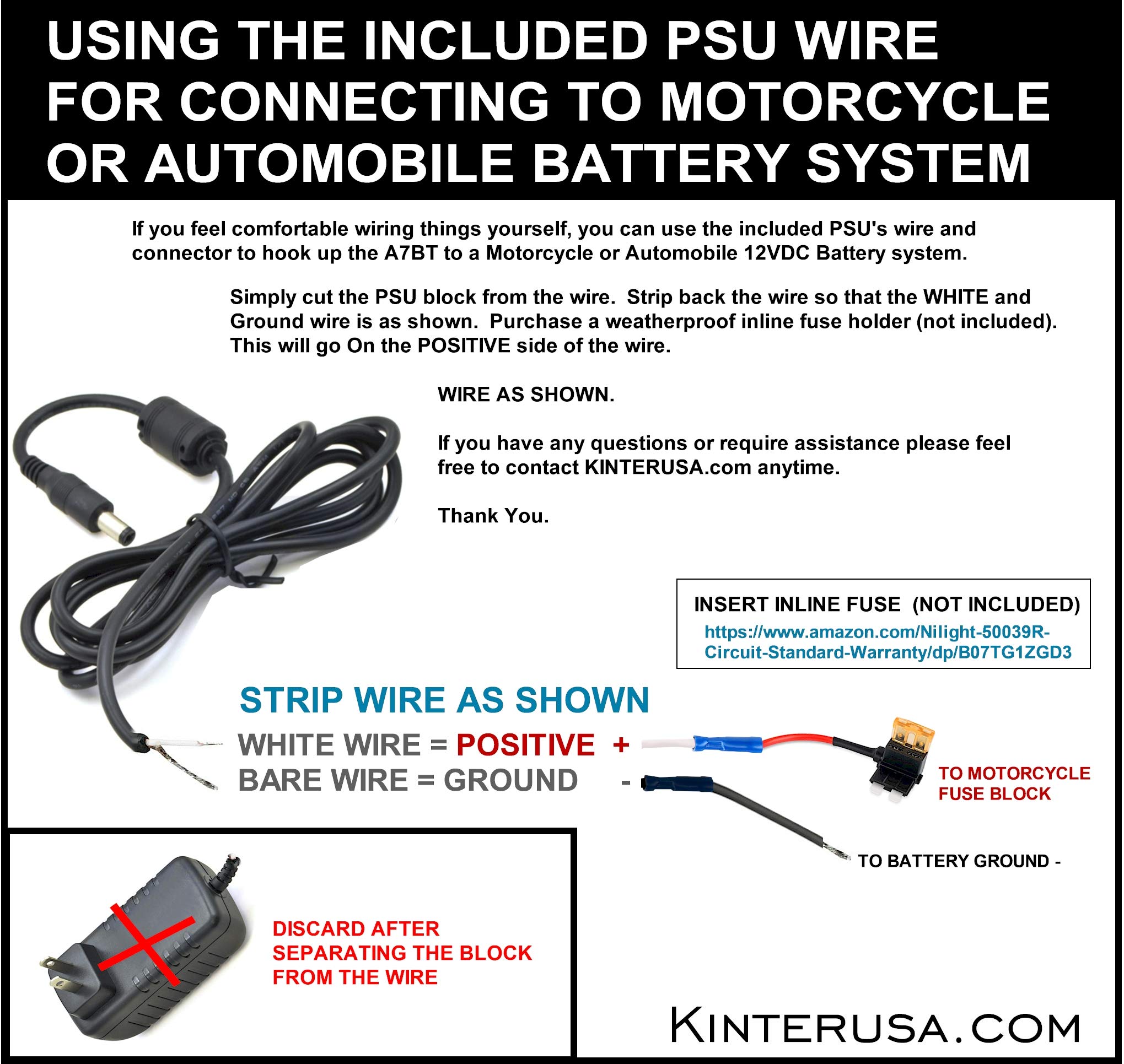
Image: Instructions for connecting the amplifier to a motorcycle or automobile battery, including wire stripping and fuse recommendation.
4.2 Підключення динаміка
Connect your passive speakers to the SPEAKER OUT terminals on the rear panel. Ensure correct polarity (positive to positive, negative to negative) for each channel (Left and Right). Use a small screwdriver to press the terminal tabs, insert the speaker wire, and then release the tab to secure the wire.
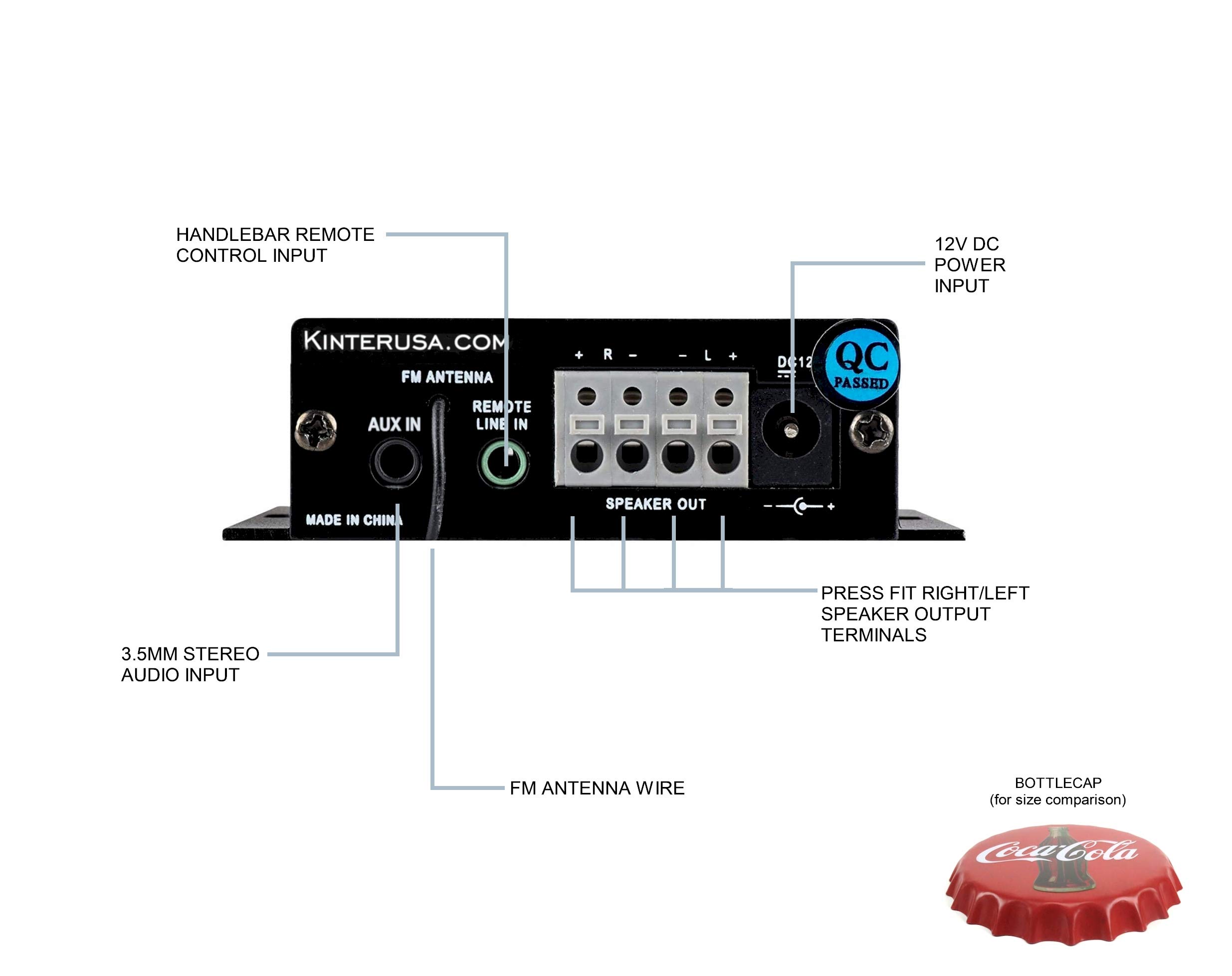
Image: A finger pressing a speaker terminal tab while inserting a speaker wire.
Примітка: Avoid using excessively large speaker wire that may cause shorts. Soldering the ends of the speaker wires can prevent stray strands and improve connection reliability.
4.3 Підключення аудіовходів
- Вхід AUX: Connect external audio devices (e.g., smartphone, MP3 player) using the included 3.5mm audio cable to the AUX IN jack.
- USB/TF-карта: Insert a USB flash drive or a TF (Micro SD) card containing MP3 audio files into the respective ports. The amplifier will automatically detect and play compatible files.
- FM антена: Connect the FM antenna wire to the FM ANTENNA input for radio reception.
4.4 Підключення пульта дистанційного керування
- Wired Handlebar Controller: Plug the handlebar controller cable into the REMOTE LINE IN jack on the ampзадня панель рятувальника.
- Wireless IR Remote: Ensure the IR receiver on the front panel (labeled 'IR') has a clear line of sight to the remote control.
5. Операція
5.1 Увімкнення/вимкнення живлення
The Kinter A7BT amplifier does not have a dedicated power on/off button. It powers on automatically when connected to a 12V DC power source and powers off when the power source is disconnected.
5.2 Вибір режиму
Натисніть і утримуйте M/P/P button on the front panel or the 'MODE' button on the IR remote to cycle through the available input modes: Bluetooth, AUX, USB, TF, and FM radio.
5.3 Регулювання гучності
Adjust the volume using the:
- Передня панель: Тривале натискання NEXT/P button for Volume Up, and long press the PREV/V button for Volume Down.
- Handlebar Controller: Використовуйте ДАЛІ/V+ button for Volume Up, and ПОПЕРЕДНІЙ/V- button for Volume Down.
- ІЧ-пульт: Use the dedicated Volume Up and Volume Down buttons.
5.4 Керування відтворенням
Control audio playback using the:
- Передня панель: Коротке натискання NEXT/P for next track, short press PREV/V for previous track, short press M/P/P для відтворення/паузи.
- Handlebar Controller: використання ДАЛІ/V+ для наступного треку, ПОПЕРЕДНІЙ/V- for previous track, and П/П для відтворення/паузи.
- ІЧ-пульт: Use the dedicated track skip and play/pause buttons.
5.5 Створення пари Bluetooth
When the A7BT amplifier is powered on, it is ready for Bluetooth pairing. Follow these steps:
- Ensure Bluetooth is enabled on your audio device (e.g., smartphone, tablet).
- Open your device's Bluetooth settings.
- Пошук нових пристроїв.
- Select "A7BT" from the list of available devices to connect.
- Once connected, the Bluetooth operation indicator will confirm the status.
5.6 Робота FM-радіо
In FM mode, use the track skip buttons on the front panel, handlebar controller, or IR remote to scan for and select radio stations.
5.7 Відтворення з USB/TF-картки
When a USB drive or TF card is inserted, the amplifier will automatically switch to the corresponding mode and begin playing audio files. The unit will resume playback from where it left off when powered off and on again. Fast-forwarding within a song is not supported.
6. Технічне обслуговування
To ensure optimal performance and longevity of your Kinter A7BT amplifier, observe the following maintenance guidelines:
- Вентиляція: Забезпечити amplifier is placed in a well-ventilated area. The aluminum casing acts as a heatsink, and proper airflow is crucial to prevent overheating. Avoid enclosing the unit in tight spaces without ventilation.
- Прибирання: Для очищення використовуйте м’яку суху тканину amplifier's exterior. Do not use liquid cleaners or solvents.
- Середовище: Уникайте викриття amplifier to extreme temperatures, direct sunlight, high humidity, or dusty environments.
- Підключення: Періодично перевіряйте всі кабельні з'єднання, щоб переконатися в їх надійності та відсутності корозії.
7. Вирішення проблем
If you encounter issues with your Kinter A7BT ampрятувальник, зверніться до наступних поширених проблем та рішень:
| проблема | Можлива причина | Рішення |
|---|---|---|
| Немає живлення | Power supply not connected or faulty; vehicle battery issue. | Check power supply connection and outlet. If hardwired, check battery connection and inline fuse (if installed). |
| Ні звуку | Incorrect input mode; speaker wires loose or incorrectly connected; volume too low; faulty audio source. | Verify correct input mode. Check speaker wire connections and polarity. Increase volume. Test with a different audio source. |
| Bluetooth не підключається | Amplifier not in Bluetooth mode; device too far; device already paired to another unit. | Забезпечити amplifier is in Bluetooth mode. Move device closer. Forget "A7BT" on your device and re-pair. |
| USB/TF-карта не відтворюється | Не підтримується file формат; карта/диск вставлено неправильно; пошкоджено files. | Забезпечити files are MP3 format. Reinsert card/drive. Try a different card/drive. |
| Amplifier перегрівається | Poor ventilation; impedance mismatch with speakers. | Ensure adequate airflow around the unit. Verify speaker impedance matches ampхарактеристики lifier. |
| Пульт не працює | IR receiver blocked; remote battery low (for wireless IR remote); wired remote connection loose. | Ensure clear line of sight to IR receiver. Replace remote battery. Check wired remote connection. |
8. Технічні характеристики
Detailed technical specifications for the Kinter A7BT ampліфірник.
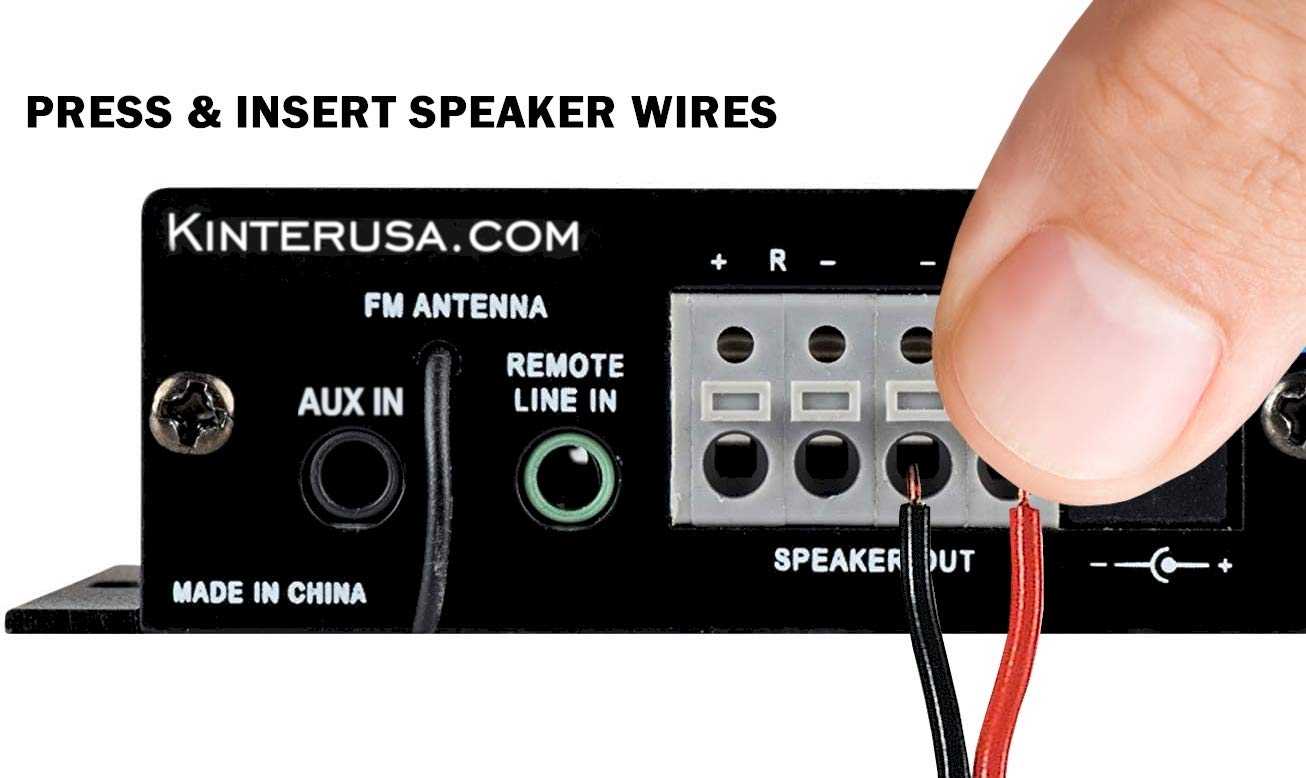
Image: The Kinter A7BT amplifier with its length, width, and height dimensions indicated.
| Особливість | Специфікація |
|---|---|
| Номер моделі | A7BT |
| Кількість каналів | 2 |
| Вихідна потужність | 2 x 20W (4Ω, 10% THD Max) |
| Вхідний об'ємtage | 9-14.4V DC |
| Номінальна вхідна обtage | 12 вольт |
| Номінальний вхідний струм | ≤3A |
| АЧХ | 20 Гц-20 КГц |
| Вихідний опір | 4-8 Ом |
| Співвідношення сигнал / шум (SNR) | ≥80 дБ |
| Повне гармонійне спотворення (THD) | ≤0.02% 4W |
| Діапазон частот FM | 87.5-108.0 МГц |
| Input Impedance (FM) | 47 кОм |
| Зовнішній контроль | Інфрачервоний пульт дистанційного керування |
| Робоча температура | 0-46°C (32-115°F) |
| Температура зберігання | 0-60°C (32-140°F) |
| Вологість | 10-85% (Operating), 10-95% (Storage) |
| Розміри предмета (Д x Ш x В) | 6.4 x 6.4 x 2.5 Centimeters (2.5 x 2.5 x 1 inches approx.) |
9. Гарантія та підтримка
The Kinter A7BT amplifier comes with a one-year warranty from the date of purchase. This warranty covers manufacturing defects under normal use. It does not cover damage caused by misuse, accidents, unauthorized modifications, or improper installation.
For technical support, warranty claims, or any questions regarding your Kinter A7BT amplifier, please visit the official KinterUSA webсайт або зверніться безпосередньо до служби підтримки клієнтів.