
REOLINK Reolink Lumus
REOLINK Wireless Outdoor Security Camera Lumus 2K User Manual
Model: Reolink Lumus
1. Вступ
The REOLINK Lumus 2K Wireless Outdoor Security Camera is designed to provide comprehensive surveillance with advanced features. It offers upgraded 2K resolution, color night vision with built-in spotlights, and dual-band Wi-Fi compatibility for stable connectivity. Equipped with smart AI detection for persons, vehicles, and animals, it minimizes false alarms. The camera also supports two-way talk and multiple alarm options for enhanced security.

Figure 1.1: REOLINK Lumus 2K Wireless Outdoor Security Camera.
2. Що в коробці
- Камера х 1
- Кронштейн x 1
- Адаптер живлення x 1
- Короткий посібник x 1
3. Продукт закінчивсяview
Familiarize yourself with the components of your REOLINK Lumus 2K camera:

Figure 3.1: Main components of the REOLINK Lumus 2K camera, including the Status LED, Spotlights, Lens, Daylight Sensor, IR LEDs, Built-in Mic, and Power Cable. The image also highlights the microSD Card Socket and Reset Button.
- Індикатор стану: Indicates the camera's operational status.
- Прожектори: Provide illumination for color night vision and deterrence.
- Об'єктив: Знімає відео footage.
- Датчик денного світла: Detects ambient light levels to switch between day and night modes.
- 6 Pcs IR LEDs: Infrared LEDs for black and white night vision.
- Вбудований мікрофон: For audio input and two-way talk functionality.
- Кабель живлення: Connects the camera to the power adapter.
- microSD Card Socket: Для локального зберігання записів (підтримка до 256 ГБ).
- Кнопка скидання: Використовується для скидання налаштувань камери до заводських.
4. Налаштування
4.1 Початкове підключення
- Завантажте застосунок Reolink: шукати "Reolink" in your mobile app store (iOS or Android) and download the official application.
- Увімкнення: Connect the camera to the included power adapter and plug it into a power outlet. The camera will power on and the status LED will indicate its state.
- Додати пристрій: Open the Reolink App, tap the "+" icon in the top right corner, and scan the QR code located on the camera body. Follow the on-screen instructions to connect the camera to your Wi-Fi network. The camera supports both 2.4GHz and 5GHz Wi-Fi bands for flexible connectivity.

Figure 4.1: The user-friendly Reolink App interface for managing your camera.

Figure 4.2: The camera supports both 2.4GHz for wider coverage and 5GHz for faster data transfer speeds.
4.2 Встановлення камери
The REOLINK Lumus 2K camera is designed for both indoor and outdoor use and can be wall-mounted. Use the provided bracket and screws for secure installation. Ensure the camera is positioned to cover the desired area without obstructions and within Wi-Fi range.
5. Інструкція з експлуатації
5.1 Розумне виявлення за допомогою штучного інтелекту
The camera features intelligent detection capabilities to distinguish between persons, vehicles, and animals. This helps reduce false alarms caused by irrelevant motion. You can configure detection zones and sensitivity settings within the Reolink App.

Figure 5.1: The camera's smart AI detection identifies persons, vehicles, and animals, enabling precise alerts and two-way communication.
5.2 Кольорове нічне бачення
With built-in spotlights, the Lumus 2K camera provides full-color video footage even in low-light conditions. The spotlights can be configured to activate upon motion detection, enhancing visibility and acting as a deterrent.

Figure 5.2: Comparison of color night vision with spotlights on versus traditional black and white night vision.
5.3 Двосторонній зв'язок
The integrated microphone and speaker allow for two-way audio communication. You can speak to visitors or deter intruders directly through the Reolink App.
5.4 Параметри будильника
Upon detection, the camera can trigger various alarms: instant notifications to your Reolink App, email alerts, activation of the built-in siren, and turning on the spotlights. These options can be customized to suit your security needs.

Figure 5.3: Visual representation of the multiple alarm options available, including spotlight, siren, push notifications, and email alerts.
5.5 Параметри запису
The camera offers flexible recording solutions:
- карта microSD: Insert a microSD card (up to 256GB, not included) for local storage of motion-triggered events.
- Реєстраційний відеореєстратор: Connect to a Reolink Network Video Recorder (NVR) for 24/7 continuous recording (optional).
- Запланований запис: Customize recording schedules through the app.
Note: The camera does not currently support FTP server recording.
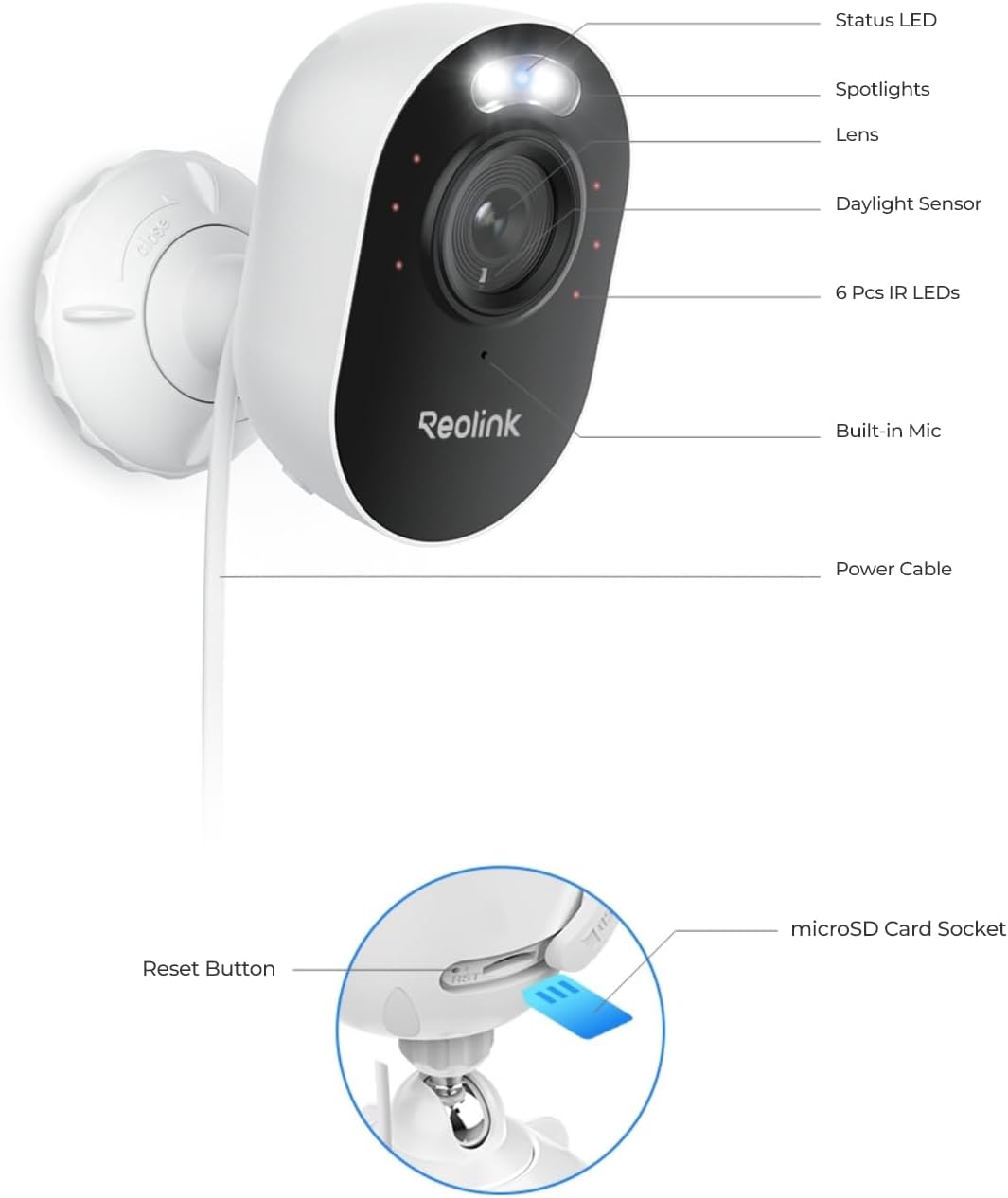
Figure 5.4: Illustration of local storage options, including microSD card and Reolink NVR.
6. Технічне обслуговування
- Очищення лінз: Регулярно протирайте об’єктив камери м’якою сухою тканиною, щоб забезпечити чітке зображення. Уникайте абразивних засобів для чищення.
- Прибирання житла: Протріть корпус камери рекламнимamp тканину за потреби.
- Перевірка кабелю: Periodically check the power cable for any signs of damage or wear, especially if installed outdoors.
- Оновлення прошивки: Check the Reolink App regularly for available firmware updates to ensure optimal performance and security.
7. Вирішення проблем
| Випуск | Можлива причина / рішення |
|---|---|
| Камера офлайн у додатку |
|
| Погана якість зображення |
|
| Часті помилкові тривоги |
|
| Двостороння розмова не працює |
|
8. Технічні характеристики
| Особливість | Деталь |
|---|---|
| Назва моделі | Reolink Lumus |
| Використання в приміщенні/зовні | В приміщенні, на відкритому повітрі |
| Роздільна здатність захоплення відео | 2K (ефективна роздільна здатність фотографій 4 МП) |
| Технологія підключення | 2.4/5GHz WiFi |
| Джерело живлення | Дротовий електричний (5 вольт, 6 ват) |
| Особливості | Color Night Vision, Two-Way Talk, Smart Person/Vehicle/Animal Detection |
| Тип монтажу | Настінне кріплення |
| Viewкут нахилу | 100 градусів |
| Діапазон нічного бачення | 33 футів |
| Параметри зберігання | microSD Card (up to 256GB), Reolink NVR |
| Рівень водонепроникності | Водонепроникний (IP65) |
| Розміри предмета (Д x Ш x В) | 3.9 x 3.58 x 2.36 дюймів |
| Вага товару | 6.5 унції |
9. Гарантія та підтримка
For detailed warranty information and technical support, please refer to the official Reolink webсайт або наданий PDF-файл посібника користувача.
- Офіційний посібник користувача (PDF): Завантажити посібник користувача
- Reolink Store: Visit REOLINK Store on Amazon
Additional protection plans may be available for purchase. Please check the product listing for details.