
1. Вступ і даліview
The Casambi Xpress is a wireless user interface designed for controlling Casambi-enabled lighting systems. It allows for flexible configuration via the Casambi app, enabling control over individual luminaires, groups of luminaires, or all lamps within a network. The Xpress features four configurable target buttons and dedicated dimming controls, providing intuitive operation for various lighting scenarios.

Image 1: The Casambi Xpress LED Bluetooth Wall Remote Control, a white square device with four circular buttons arranged in an 'X' pattern, along with central dimming controls.
2. Налаштування та встановлення
The Casambi Xpress is designed for easy installation. It is equipped with magnets for convenient attachment to a mounting bracket. The required mounting bracket is included with the device.

Image 2: Diagrams illustrating the magnetic mounting mechanism of the Casambi Xpress. It shows the device attaching to a wall-mounted bracket, highlighting the magnetic connection points.
Щоб встановити:
- Secure the included mounting bracket to a desired wall surface using appropriate fasteners (not included).
- Align the Casambi Xpress with the mounting bracket. The magnets will automatically secure the device in place.
3. Інструкція з експлуатації
3.1 Основні функції
The Xpress features four preset buttons (1, 2, 3, 4), two multipurpose buttons (Λ, V), and dedicated dimming buttons (+, -). All preset buttons can be configured via the Casambi app.
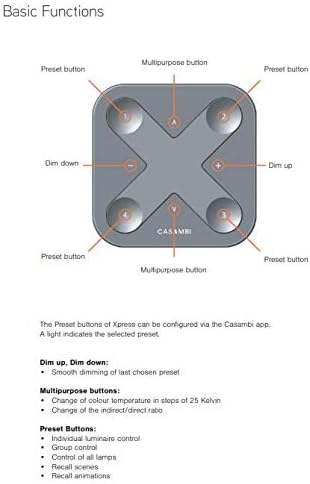
Image 3: A diagram labeling the buttons on the Casambi Xpress. It identifies the four corner buttons as 'Preset buttons', the central top and bottom buttons as 'Multipurpose buttons', and the central left and right buttons as 'Dim down' and 'Dim up' respectively.
- Кнопки попередньо встановлених налаштувань (1, 2, 3, 4): These buttons can be configured via the Casambi app to control individual luminaires, groups of luminaires, all lamps, recall scenes, or recall animations. A light indicator shows the selected preset.
- Dim Up (+): Increases the brightness of the selected luminaire or group.
- Dim Down (-): Decreases the brightness of the selected luminaire or group.
- Multipurpose Buttons (Λ, V): These buttons are used for advanced functions such as changing color temperature or adjusting indirect/direct lighting ratios.
3.2 Інтелектуальні функції
The Xpress offers advanced control capabilities for precise lighting adjustments.

Image 4: Text detailing the smart functions of the Casambi Xpress, including advanced dimming, preset button behavior, color temperature control, indirect/direct ratio adjustment, and how to turn off the device.
- Затемнення:
- Hold Dim Down or Dim Up button: Provides smooth dimming of the last chosen preset. A full cycle takes approximately 5 seconds.
- Tap Dim Down button: Sets the chosen preset to 0% brightness.
- Tap Dim Up button: Sets the chosen preset to 100% brightness.
- Кнопки попередньо встановлених налаштувань (1, 2, 3, 4):
- Торкніться: Activates the chosen preset (lamp контроль, груповий контроль, усі лamps, scene recall, or animation recall), turning it ON.
- Натисніть знову: Deactivates the chosen preset, turning it OFF.
- Колірна температура:
- Hold Multipurpose button: Changes color temperature smoothly. A full cycle takes approximately 5 seconds.
- Tap Upper Multipurpose button (Λ): Adjusts to the warmest color temperature.
- Tap Lower Multipurpose button (V): Adjusts to the coldest color temperature.
- Indirect/Direct Ratio:
- Hold Upper Multipurpose button (Λ): Dims up the indirect lighting smoothly. A full cycle takes approximately 5 seconds.
- Hold Lower Multipurpose button (V): Dims up the direct lighting smoothly. A full cycle takes approximately 5 seconds.
- Tap Upper Multipurpose button (Λ): Sets the indirect part to maximum level.
- Tap Lower Multipurpose button (V): Sets the direct part to maximum level.
- Вимкнути: Press both the Dim Down (-) and Dim Up (+) buttons simultaneously for more than 1 second to turn off all lights in the selected network.
4. Технічне обслуговування
The Casambi Xpress is powered by a CR2430 Lithium coin cell battery. This battery is included with the device and typically has a lifetime of 2-5 years, depending on usage. When the battery needs replacement, carefully open the device to access the battery compartment and replace it with a new CR2430 battery, ensuring correct polarity.
5. Технічні характеристики
| Особливість | Деталь |
|---|---|
| Модель | Xpress |
| Розміри | 90 x 90 x 12 мм |
| Кольори | Білий і Чорний |
| Дальність бездротового зв'язку | До 50 метрів на відкритому повітрі |
| Тип батареї | CR2430 Lithium coin cell (included) |
| Термін служби батареї | 2-5 years (depending on usage) |
| ASIN | B0856PBN2 |
| Перший доступний | 27 листопада 2019 р |