
вступ
The EVOLVEO EASYPHONE FM is a user-friendly mobile phone designed for straightforward communication. It features large, separated keys, a clear display, and essential functions to ensure ease of use. This manual provides instructions for setting up, operating, and maintaining your device.
1. Вміст упаковки
Будь ласка, перевірте упаковку на наявність наступних предметів:
- EVOLVEO EASYPHONE FM Mobile Phone
- Док-станція для зарядки
- Адаптер змінного струму
- Li-ion 1000 mAh Battery
- Посібник користувача
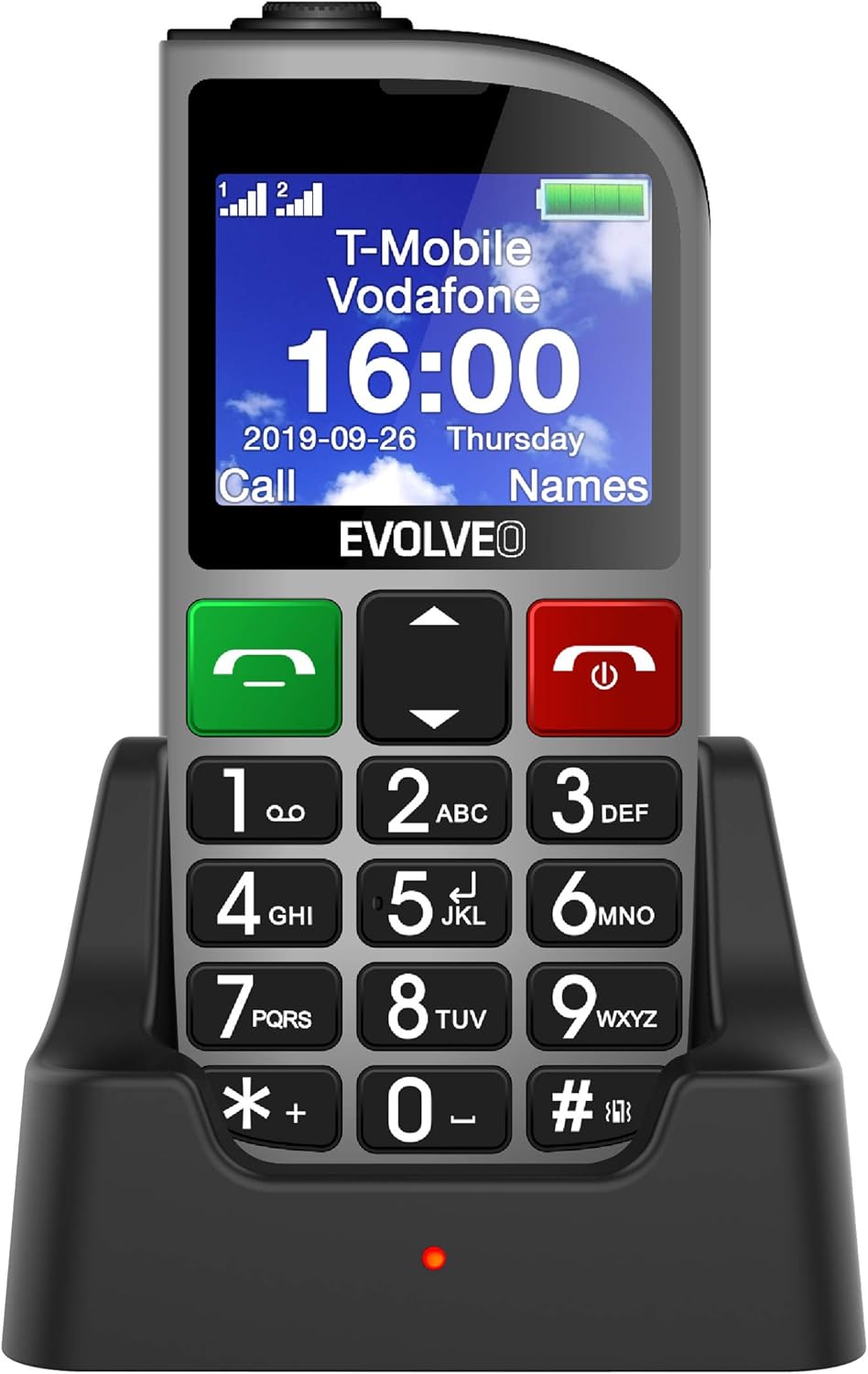
малюнок 1.1: EVOLVEO EASYPHONE FM placed in its charging dock. The phone features a large display showing time and network information, with prominent green call and red end call buttons, and a numeric keypad below.
2. Налаштування
2.1. Встановлення та зарядка акумулятора
- Зніміть задню кришку телефону.
- Insert the Li-ion 1000 mAh battery, ensuring the contacts align correctly.
- Встановіть задню кришку.
- Connect the AC adapter to the charging dock.
- Place the phone into the charging dock. The charging indicator light will illuminate.
- Дайте телефону повністю зарядитися перед першим використанням.
2.2. Встановлення SIM-картки(-ок)
The phone supports two SIM cards (Dual SIM) for GSM/GPRS 850/900/1800/1900 MHz networks.
- Переконайтеся, що телефон вимкнено.
- Зніміть задню кришку та акумулятор.
- Locate the SIM card slots.
- Insert your SIM card(s) into the designated slots, ensuring correct orientation.
- Знову вставте акумулятор і задню кришку.
2.3. Inserting a MicroSDHC Card
You can expand the phone's storage for music, photos, and other files by inserting a MicroSDHC card.
- Переконайтеся, що телефон вимкнено.
- Зніміть задню кришку та акумулятор.
- Locate the MicroSDHC card slot.
- Gently insert the MicroSDHC card until it clicks into place.
- Знову вставте акумулятор і задню кришку.
3. Інструкція з експлуатації
3.1. Увімкнення/вимкнення живлення
- Щоб увімкнути живлення: натисніть і утримуйте Red End Call/Power кнопку, доки не засвітиться екран.
- Щоб вимкнути живлення: натисніть і утримуйте Red End Call/Power button until the power off options appear, then confirm.

малюнок 3.1: Фронт view of the EVOLVEO EASYPHONE FM, highlighting the large display, call buttons, and numeric keypad for easy dialing.
3.2. Здійснення та отримання дзвінків
- Здійснення дзвінка: Dial the number using the numeric keypad and press the Зелений дзвінок кнопку.
- Швидкий набір: The phone supports quick access to 8 popular contacts. Assign numbers to keys 2-9 for speed dialing. Press and hold the assigned key to dial.
- Отримання дзвінка: Натисніть Зелений дзвінок кнопку, щоб відповісти на вхідний дзвінок.
- Завершення дзвінка: Натисніть Red End Call/Power button to end an active call.
3.3. Надсилання та отримання SMS-повідомлень
The separated keyboard keys facilitate easy writing of SMS messages.
- Navigate to the Messaging menu.
- Select "Write Message" to compose a new SMS.
- Введіть номер одержувача або виберіть його з контактів.
- Введіть повідомлення за допомогою клавіатури.
- Press "Send" to transmit the message.
3.4. Регулювання гучності
Adjust the call and ringtone volume using the dedicated volume control button located on the left side of the phone.

малюнок 3.2: Left side of the phone, showing the volume control buttons and the FM radio activation button.
3.5. Екстрена кнопка SOS
The SOS button, located on the back of the device, allows for quick emergency calls and messages.
- Before use, configure up to five emergency contact numbers in the phone settings.
- У разі надзвичайної ситуації натисніть і утримуйте SOS кнопку.
- The phone will automatically dial the predefined emergency numbers sequentially and send an emergency message to these contacts.

малюнок 3.3: Задня view of the EVOLVEO EASYPHONE FM, showing the prominent red SOS emergency button and the camera lens.
3.6. FM-радіо
The phone includes an FM radio with a dedicated activation button.
- To turn on the FM radio, press the independent FM button on the side of the device.
- The radio can play in the background, allowing you to use other phone functions.
- During an incoming or outgoing call, the radio will automatically mute and resume playback after the call ends.
3.7. Ліхтарик
A powerful flashlight is integrated into the phone, activated by a dedicated button.
- Press the dedicated flashlight button on the side of the phone to turn the flashlight on or off.

малюнок 3.4: Right side of the phone, showing the dedicated flashlight button.
3.8. Інші функції
- Камера: The phone includes a VGA camera for basic photo capture.
- Музичний програвач: Слухайте музику files stored on your MicroSDHC card.
- Digital Recorder (Dictaphone): Record voice notes.
- Календар: Слідкуйте за важливими датами та подіями.
- Будильник: Встановіть будильники для нагадувань.
- Калькулятор: Виконайте основні розрахунки.
- Збільшувальне скло: Utilize the screen as a magnifying glass.
4. Технічне обслуговування
4.1. Очищення пристрою
- Use a soft, dry cloth to clean the phone's surface and screen.
- Avoid using liquid cleaners or abrasive materials, as they may damage the device.
- Ensure no moisture enters the charging port or other openings.
4.2. Догляд за акумулятором
- Щоб продовжити термін служби акумулятора, уникайте впливу екстремальних температур на телефон.
- Charge the battery regularly, but avoid overcharging or letting it completely drain for extended periods.
- If the phone will not be used for a long time, charge the battery to about 50% before storing it.
5. Вирішення проблем
If you encounter issues with your EVOLVEO EASYPHONE FM, refer to the following common problems and solutions:
5.1. Телефон не вмикається
- Переконайтеся, що акумулятор правильно встановлено та заряджено.
- Connect the phone to the charger and wait a few minutes before attempting to power it on again.
- Перевірте, чи контакти батареї чисті.
5.2. Cannot Make or Receive Calls
- Check if the SIM card(s) are correctly inserted and activated.
- Переконайтеся, що у вас є мережеве покриття.
- Переконайтеся, що телефон не перебуває в режимі польоту (якщо це можливо).
- Check your account balance or subscription status with your service provider.
5.3. FM Radio Not Working
- Переконайтеся, що ви перебуваєте в зоні з хорошим прийомом FM-сигналу.
- Check if the FM radio is properly activated using its dedicated button.
5.4. Відображення проблем
- If the display is dim, check the brightness settings.
- If the screen is unresponsive, try restarting the phone.
6. Технічні характеристики
| Бренд | Евольвео |
| Модель | EASYPHONE FM |
| Розмір дисплея | 1.8 дюймів |
| Роздільна здатність дисплея | 320 x 240 пікселів |
| Стільникові технології | 2G (GSM/GPRS 850/900/1800/1900 MHz) |
| Підтримка SIM | Подвійна SIM-карта |
| Підключення | Bluetooth, роз'єм 3.5 мм |
| Акумулятор | Li-ion 1000 мАг |
| Розміри | 130 × 61 × 16.5 мм |
| вага | 105 г (з акумулятором) |
| Камера | VGA |
| Розширення сховища | Слот для карт MicroSDHC |
Примітка. Специфікації можуть бути змінені без попереднього повідомлення.
7. Гарантія та підтримка
For warranty information and technical support, please refer to the warranty card included in your package or visit the official Evolveo webсайт. Зберігайте чек про покупку для гарантійних претензій.