
вступ
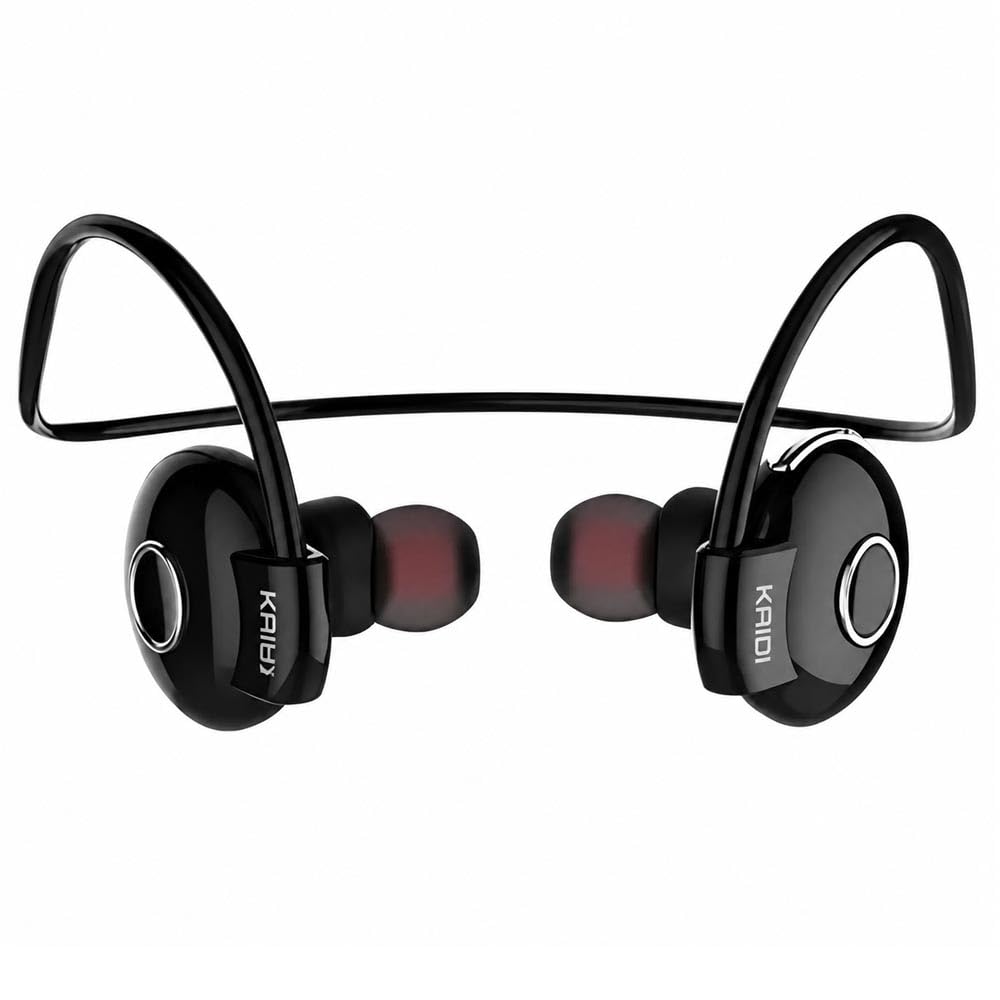
Thank you for choosing the Kaidi KD903 Wireless Bluetooth Earphones. This manual provides essential information for the safe and optimal use of your device. Please read it carefully before use and retain it for future reference.
Що в коробці:
- 1 x Kaidi KD903 Wireless Earphones
- 2 x Pairs of Comfortable Ear Tips (different sizes)
- 1 x USB-кабель для зарядки
- 1 х посібник користувача

Image: Kaidi KD903 Wireless Earphones with included accessories, such as the charging cable and additional ear tips.
Продукт закінченийview
The Kaidi KD903 earphones are designed for active lifestyles, offering a secure fit and resistance to sweat. They feature Bluetooth 4.1 for stable connectivity and clear audio.
Ключові характеристики:
- Bluetooth 4.1: Забезпечує стабільне та ефективне бездротове з'єднання.
- Стійкість до поту: Ideal for sports and workouts.
- Інтелектуальне шумозаглушення CVC: Minimizes wind noise for clearer calls.
- Багатоточкове підключення: Підключається до двох пристроїв одночасно.
- Голосове нагадування: Provides audio prompts for status updates.
- IOS Power Display: Shows battery level on iOS devices.
Зображення: Вибух view illustrating the internal components and design of the Kaidi KD903 earphone.
Налаштування
1. Заряджання навушників
- Підключіть USB-кабель для зарядки до порту зарядки на навушниках.
- Підключіть інший кінець USB-кабелю до сумісного USB-джерела живлення (наприклад, комп’ютера, адаптера живлення).
- The indicator light will illuminate to show charging status. A full charge typically takes approximately 2.5 hours.
- Після повного заряджання індикатор змінить колір або згасне. Від’єднайте зарядний кабель.
2. Сполучення з пристроєм Bluetooth
- Переконайтеся, що навушники вимкнені.
- Press and hold the multi-function button (usually the main button on the earphone) for approximately 5-7 seconds until the indicator light flashes red and blue alternately. This indicates the earphones are in pairing mode.
- На смартфоні або іншому пристрої з підтримкою Bluetooth увімкніть Bluetooth і знайдіть доступні пристрої.
- Select 'KD903' from the list of found devices.
- Once connected, a voice prompt will confirm successful pairing, and the indicator light will typically flash blue slowly.

Image: A person wearing the Kaidi KD903 wireless earphones, highlighting their suitability for sports and active use.
Інструкція з експлуатації
Увімкнення/вимкнення живлення
- Увімкнення: Press and hold the multi-function button for approximately 3 seconds until the blue indicator light flashes and a voice prompt says "Power On".
- Вимкнення живлення: Press and hold the multi-function button for approximately 3 seconds until the red indicator light flashes and a voice prompt says "Power Off".
Відтворення музики
- Відтворення/пауза: Натисніть багатофункціональну кнопку один раз.
- Наступний трек: Натисніть і утримуйте кнопку «Гучність +».
- Попередній трек: Натисніть і утримуйте кнопку гучності -.
- Збільшення гучності: Коротко натисніть кнопку «Гучність +».
- Зменшення гучності: Коротко натисніть кнопку гучності -.
Управління дзвінками
- Відповісти/закінчити виклик: Натисніть багатофункціональну кнопку один раз.
- Відхилити виклик: Натисніть і утримуйте багатофункціональну кнопку приблизно 2 секунди.
- Повторний набір останнього номера: Двічі натисніть багатофункціональну кнопку.
Multipoint Connection (Connecting to Two Devices)
- Pair the earphones with the first device as described in the "Pairing" section.
- Після успішного сполучення вимкніть Bluetooth на першому пристрої.
- Put the earphones back into pairing mode (red and blue flashing light).
- З’єднайте навушники з другим пристроєм.
- Once the second device is paired, re-enable Bluetooth on the first device. The earphones should now be connected to both devices simultaneously.
Технічне обслуговування
Proper maintenance ensures the longevity and performance of your Kaidi KD903 earphones.
- Прибирання: Regularly clean the earphones with a soft, dry, lint-free cloth. Do not use abrasive cleaners, solvents, or harsh chemicals.
- Стійкість до поту: While the earphones are sweat-resistant, avoid submerging them in water or exposing them to heavy rain. After intense workouts, wipe them dry.
- Зберігання: Коли навушники не використовуються, зберігайте їх у прохолодному, сухому місці, подалі від прямих сонячних променів та екстремальних температур.
- Зарядка: Charge the earphones using only the provided USB cable or a certified equivalent. Avoid overcharging.
Усунення несправностей
Якщо у вас виникли проблеми з навушниками, зверніться до наступних поширених проблем та способів їх вирішення:
- Earphones do not power on:
Ensure the earphones are fully charged. Connect them to a power source and allow them to charge for at least 30 minutes before attempting to power on again. - Немає звуку або гучність низька:
Check the volume levels on both the earphones and your connected device. Ensure the earphones are properly paired and connected to your device. Try re-pairing the earphones. - Не вдається підключитися до пристрою:
Ensure the earphones are in pairing mode (red and blue indicator light flashing). Make sure Bluetooth is enabled on your device and it is within the 8-meter transmission range. Try restarting both the earphones and your device. - Connection is unstable or drops frequently:
Ensure there are no obstacles between the earphones and your device. Move closer to your device. Avoid environments with strong Wi-Fi or other wireless interference. - Проблема зарядки:
Verify that the charging cable is securely connected to both the earphones and the power source. Try using a different USB port or charging adapter.
Технічні характеристики
| Особливість | Специфікація |
|---|---|
| Версія Bluetooth | 4.1 |
| Profile Підтримка | HSP/HFP/A2DP/AVRCP |
| Час очікування | 200 години |
| Час розмови | 10 години |
| Час відтворення музики | 6 години |
| Час зарядки | 2.5 години |
| Діапазон частот | RF 2.40 GHz (2.402 G – 2.480 G) |
| Температура навколишнього середовища | від -20°C до +60°C |
| Відстань передачі | До 8 метрів |
| Ємність акумулятора | 100mAh перезаряджається |
| Розміри (Д x Ш x В) | 12.2 х 10.3 х 4.4 см |
| Тип роз'єму | USB Type-C |
| Колір | чорний |
Гарантія та підтримка
Інформація про гарантію
This Kaidi KD903 product comes with a Гарантія 30 днів from the date of purchase. This warranty covers manufacturing defects. Please retain your proof of purchase (receipt or invoice) as it is required for any warranty claims.
Гарантія не поширюється на пошкодження, спричинені неправильним використанням, аваріями, несанкціонованими модифікаціями або нормальним зносом.
Підтримка клієнтів
For technical assistance, troubleshooting not covered in this manual, or warranty inquiries, please contact the retailer from whom you purchased the product. You may also visit the official Kaidi webсайт для додаткових ресурсів підтримки.