
1. Вступ
Thank you for choosing the SUNSHINE P-1503T Analog Power Supply. This manual provides essential information for the safe and efficient operation, setup, maintenance, and troubleshooting of your device. Please read this manual thoroughly before using the product and keep it for future reference.
The SUNSHINE P-1503T is a versatile 15-volt, 3-amp analog power supply designed primarily for mobile phone maintenance. It features touch-sensitive controls and includes two USB ports for convenient mobile testing and charging.
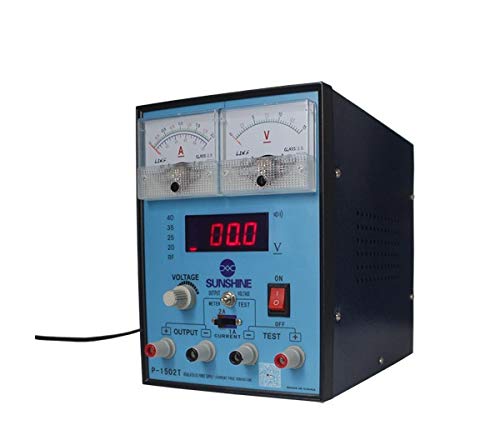
Малюнок 1: Спереду view of the SUNSHINE P-1503T Analog Power Supply. This image shows the device's display, control knobs, and output terminals, including the two USB ports.
2. Інформація про безпеку
ПОПЕРЕДЖЕННЯ: Недотримання цих інструкцій з безпеки може призвести до ураження електричним струмом, пожежі або серйозних травм.
- Завжди підключайте блок живлення до заземленої електричної розетки.
- Не використовуйте пристрій у вологих або damp умови.
- Забезпечте належну вентиляцію, щоб запобігти перегріву. Не закривайте вентиляційні отвори.
- Не відкривайте casing блока живлення. Усередині немає деталей, які може обслуговувати користувач. Звертайтеся до кваліфікованого персоналу з будь-яким обслуговуванням.
- Avoid touching output terminals when the device is powered on.
- Disconnect the power cord from the outlet before cleaning or if the device will not be used for an extended period.
- Використовуйте лише вказаний вхідний об'ємtage (15 Volts) as indicated on the device.
3. Налаштування
3.1 Розпакування
- Обережно вийміть блок живлення з упаковки.
- Inspect the device for any signs of damage during transit. If damaged, do not use and contact your supplier.
- Ensure all accessories are present (e.g., power cord, test leads if included).
3.2 Підключення до живлення
- Place the power supply on a stable, level surface with adequate ventilation.
- Connect the provided power cord to the power input socket on the rear of the device.
- Plug the other end of the power cord into a suitable grounded electrical outlet.
4. Інструкція з експлуатації
4.1 Увімкнення/вимкнення
- To power on the device, press the power switch located on the front panel. The display will illuminate.
- Щоб вимкнути живлення, знову натисніть кнопку живлення.
4.2 Adjusting Output
The P-1503T is an analog power supply, typically meaning voltage and current are set via rotary knobs.
- Використовуйте томtage Ручка регулювання щоб встановити потрібну гучність на виходіtage. Monitor the voltage дисплей.
- Використовуйте Ручка регулювання струму to set the desired current limit. Monitor the current display.
- The device emits a sound upon touch, indicating interaction with its controls.
4.3 Використання USB-портів
The power supply features two USB ports on the front panel:
- USB Port 1 (Mobile Testing): Connect a mobile device here for diagnostic purposes. This port is designed to provide stable power for testing mobile phone circuits.
- USB Port 2 (Mobile Charging): Connect a mobile device here for charging. This port delivers power suitable for recharging mobile phone batteries.
Note: Always ensure the output voltage and current settings are appropriate for the device being connected to prevent damage.
5. Технічне обслуговування
5.1 Очищення
- Ensure the power supply is turned off and disconnected from the main power outlet before cleaning.
- Використовуйте м’яку суху тканину, щоб протерти зовнішню поверхню пристрою.
- Do not use liquid cleaners, aerosols, or solvents, as these may damage the casing або внутрішні компоненти.
- Тримайте вентиляційні отвори чистими від пилу та сміття.
5.2 Зберігання
When not in use, store the power supply in a cool, dry place, away from direct sunlight and extreme temperatures.
6. Вирішення проблем
| проблема | Можлива причина | Рішення |
|---|---|---|
| Пристрій не включається. |
|
|
| Вихідний об'єм відсутнійtagе/струм. |
|
|
| USB-порти не працюють. |
|
|
7. Технічні характеристики
| Особливість | Деталь |
|---|---|
| Бренд | СОНЕЧНЕ |
| Модель | П-1503Т |
| Сумісні пристрої | Мобільний телефон |
| Тип роз'єму | ATX |
| Форм-фактор | ATX |
| Спосіб охолодження | повітря |
| Максимальний вхідний об'ємtage | 15 вольт |
| Мінімальна вхідна гучністьtage | 15 вольт |
| Виробник | СОНЕЧНЕ |
| System Bus Connector Type | Роз'єм 2 |
| Джерело живлення | зовнішній |
| ASIN | B0847QS2FX |
8. Гарантія та підтримка
This product is covered by a standard manufacturer's warranty. Please refer to the warranty card included with your purchase for specific terms and conditions. For technical support, service, or warranty claims, please contact your retailer or the manufacturer directly.
For the latest information and support, please visit the official SUNSHINE webсайту (за наявності).