
вступ
This manual provides essential information for the safe and efficient operation of your Dual MCR 4 Portable DAB+/FM Radio. This device offers both digital DAB+ and analog FM radio reception, ensuring a wide range of listening options. Its color TFT display enhances usability by showing station names and additional information. With intuitive controls, auxiliary input, and headphone jack, the MCR 4 is designed for versatile and enjoyable audio experiences.
Інформація про безпеку
- Перед використанням пристрою уважно прочитайте всі інструкції.
- Тримайте пристрій подалі від води, вологи та високих температур.
- Не намагайтеся розбирати або модифікувати пристрій. Звертайтеся до кваліфікованого персоналу для проведення будь-яких технічних робіт.
- Use only the provided power adapter or recommended battery types.
- Забезпечте належну вентиляцію навколо пристрою під час роботи.
- Утилізуйте батарейки відповідально згідно з місцевими правилами.
Вміст упаковки
Будь ласка, перевірте наявність усіх предметів у упаковці:
- Dual MCR 4 Main Unit
- Адаптер живлення
- Посібник користувача
Продукт закінченийview
The Dual MCR 4 features a compact design with intuitive controls for easy access to its functions. Key components include:
- Color TFT Display: Відображає інформацію про станцію, час та пункти меню.
- Поворотна ручка: For tuning, volume control, and menu navigation.
- Кнопки пам'яті: To save and recall your favorite radio stations.
- Телескопічна антена: Для оптимального прийому радіосигналу.
- Auxiliary Input (AUX-IN): Located at the back, for connecting external audio devices.
- Роз'єм для навушників: Located at the back, for private listening.
- Mechanical On/Off Switch: Located at the back, for direct power control.
- Passive Membrane: Located at the back, contributing to exceptional sound quality.
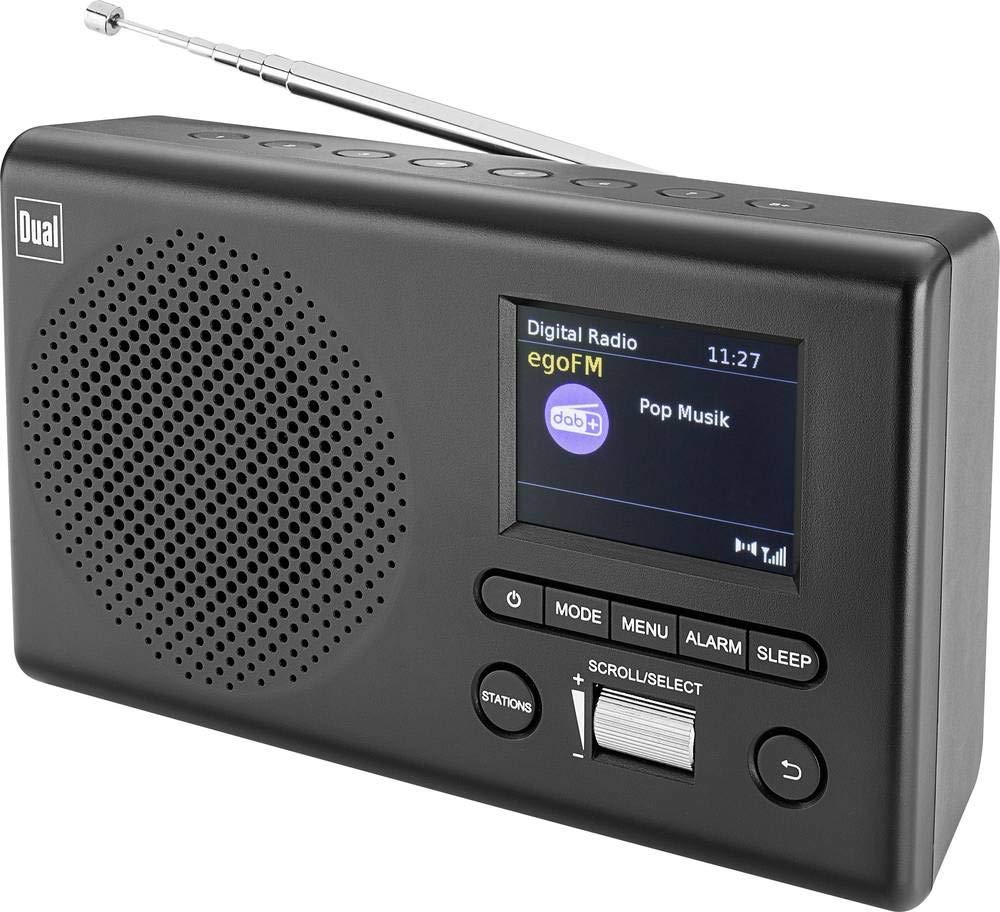
Зображення: спереду view of the Dual MCR 4 Portable DAB+/FM Radio, showing the color TFT display, rotary knob, and control buttons. The radio has a black and silver finish.
Налаштування
1. Живлення пристрою
The Dual MCR 4 can be powered by either the included AC power adapter or batteries, offering portability.
- Використання адаптера змінного струму: Connect the power adapter to the DC IN port on the back of the radio and plug the other end into a standard wall outlet.
- Використання батарей: Open the battery compartment on the bottom/back of the radio and insert the required batteries (type and quantity usually specified inside the compartment or in the full manual). Ensure correct polarity.
2. Регулювання антени
Extend the telescopic antenna fully for optimal reception of both DAB+ and FM radio signals. Adjust its position for the best signal quality.
3. Initial Power On and Station Scan
After connecting power, switch on the radio using the mechanical ON/OFF switch at the back. The radio will typically perform an automatic station scan upon first use, searching for available digital (DAB+) and analog (FM) radio stations. This process may take a few moments.
Інструкція з експлуатації
1. Основна операція
- Увімкнення/вимкнення живлення: Use the mechanical switch at the back. For standby, a dedicated button on the front might be available (refer to physical unit).
- Регулювання гучності: Rotate the main rotary knob to adjust the listening volume.
2. Режим DAB+ радіо
- Selecting DAB+ Mode: Press the MODE button (if available) or navigate through the menu using the rotary knob until DAB+ mode is selected.
- Вибір станції: After an automatic scan, use the rotary knob to scroll through the list of available DAB+ stations. Press the knob to confirm your selection.
- Збереження пресетів: Tune to your desired station. Press and hold a memory button (e.g., 1-5) until the display confirms the station is saved.
- Згадуючи пресети: Briefly press the corresponding memory button to recall a saved station.
- Відображення інформації: The color TFT display will show station name, program information (DLS), and potentially station logos or slideshows.
3. Режим FM-радіо
- Selecting FM Mode: Press the MODE button or navigate through the menu until FM mode is selected.
- Ручна настройка: Rotate the tuning knob to manually adjust the frequency.
- Автоматичне сканування: Press and hold the tuning knob or a dedicated scan button to automatically search for the next available FM station.
- Збереження пресетів: Tune to your desired FM station. Press and hold a memory button until the display confirms the station is saved.
- Згадуючи пресети: Briefly press the corresponding memory button to recall a saved station.
4. Auxiliary Input (AUX-IN)
Connect an external audio device (e.g., smartphone, MP3 player) to the AUX-IN port on the back of the radio using a 3.5mm audio cable. Select AUX mode on the radio to play audio from the connected device.
5. Використання навушників
For private listening, plug standard 3.5mm headphones into the headphone jack located on the back of the unit. The internal speaker will automatically mute.
Технічне обслуговування
- Прибирання: Протирайте радіо м’якою сухою тканиною. Не використовуйте абразивні засоби для чищення або розчинники.
- Зберігання: If storing for an extended period, remove batteries and store the unit in a cool, dry place.
- Догляд за антеною: Обережно поводьтеся з телескопічною антеною, щоб уникнути пошкоджень.
Усунення несправностей
| проблема | Можливе рішення |
|---|---|
| Немає живлення |
|
| Поганий радіоприйом |
|
| Немає звуку з динаміків |
|
Технічні характеристики
| Бренд | Подвійний |
| Номер моделі | 76074 |
| Колір | Чорний, Срібний |
| Технологія тюнінгу | DAB+, FM |
| Технологія підключення | Auxiliary (AUX-IN) |
| Особливості | Portable, Color TFT Display |
| Сумісні пристрої | Headphones, External Audio Devices (via AUX-IN) |
| Джерело живлення | Mains (AC Adapter), Battery Powered |
| Включені компоненти | Main Unit, Power Adapter, User Manual |
| Рекомендоване використання | музика |
Гарантія та підтримка
For warranty information and technical support, please refer to the specific warranty card included with your product or contact Dual customer service. The included user manual provides detailed instructions and contact information.