
1. Вступ
Дякуємо за покупкуasing the Moukey MAMP1 220W Bluetooth Dual Channel Power Ampліфікатор. Це amplifier is designed to provide powerful and versatile audio amplification for various applications, including karaoke, home theater systems, and general audio playback. It features multiple input options, Bluetooth 5.0 connectivity, and intuitive controls for an enhanced audio experience. Please read this manual thoroughly before use to ensure proper operation and to maximize the product's performance.
2. Техніка безпеки
Щоб запобігти ураженню електричним струмом, пожежі або пошкодженню пристрою, дотримуйтесь наступних запобіжних заходів безпеки:
- Не піддавайте цей пристрій дії дощу або вологи.
- Не відкривайте casing. Усередині немає деталей, які може обслуговувати користувач. Звертайтеся до кваліфікованого персоналу з будь-яким обслуговуванням.
- Переконайтеся, що блок живлення обtage відповідає вимогам, зазначеним на пристрої.
- Place the unit on a stable, flat surface with adequate ventilation. Do not block ventilation openings.
- Тримайте пристрій подалі від джерел тепла, прямих сонячних променів та надмірного запилу.
- Disconnect the power plug from the outlet if the unit will not be used for an extended period.
- Не використовуйте пристрій мокрими руками.
3. Вміст упаковки
Перевірте наявність усіх елементів в упаковці:
- Мукі МAMP1 Потужність Ampодиниця lifier
- Пульт дистанційного керування
- FM антена
- Посібник користувача (цей документ)
4. Продукт закінчивсяview
4.1 Елементи керування та функції передньої панелі
The front panel provides access to all primary controls and input ports for easy operation.

Image: Detailed diagram of the Moukey MAMP1 front panel, highlighting each control and port with corresponding numbers.
- Вимикач живлення: Вмикає або вимикає пристрій.
- USB / SD Slot: Для відтворення аудіо files from USB drives (max 32GB) or SD cards (max 16GB).
- Кнопка режиму: Cycles through input modes (Bluetooth, USB, SD, AUX, FM).
- Кнопка BT: Directly switches to Bluetooth mode.
- Кнопка «Попередній»: Перехід до попереднього треку/станції.
- Кнопка відтворення / паузи: Відтворює або призупиняє відтворення аудіо.
- Кнопка "Далі": Перехід до наступного треку/станції.
- Світлодіодний дисплей: Shows current mode, track information, or frequency.
- Folder / Track: Navigates through folders or tracks on USB/SD.
- Головна ручка гучності: Регулює загальну гучність виводу.
- Роз'єм для навушників: 3.5mm output for monitor headphones.
- Microphone 1 Input: 6.35-мм роз'єм для підключення мікрофона.
- Microphone 2 Input: 6.35mm jack for a second microphone connection.
- Регулятор гучності мікрофона: Регулює гучність підключених мікрофонів.
- Ручка відлуння: Керує ефектом луни для мікрофонів.
- Бас ручка: Регулює низькочастотний аудіовихід.
- Регулятор високих частот: Регулює високочастотний аудіовихід.
- Ручка балансу: Регулювання балансу лівого/правого каналів.
- Вхідний роз'єм AUX: 3.5-мм вхід для підключення зовнішніх аудіопристроїв.
- Селектор введення: Rotary switch to select between CD, AUX, DVD, and MP3/W inputs.
4.2 Підключення задньої панелі
The rear panel houses the main audio input and output connections.

Зображення: Задня частина view of the Moukey MAMP1 amplifier, що показує всі вхідні та вихідні порти.

Image: Detailed diagram of the Moukey MAMP1 rear panel, highlighting each connection point.
- Audio Input for DVD (RCA): Connect DVD players or other audio sources.
- Audio Input for CD (RCA): Connect CD players or other audio sources.
- Line Out Jack (RCA): Для підключення до іншого ampпідсилювач або записуючий пристрій.
- FM Antenna Jack: Підключіть FM-антену, що входить до комплекту, для прийому радіо.
- Speaker Output Jacks: Connect passive speakers (4-16 Ohm impedance).
- Вхід кабелю живлення: Підключіть шнур живлення змінного струму.
5. Налаштування
5.1 Розміщення
Розмістіть amplifier on a flat, stable surface. Ensure there is sufficient space around the unit for proper ventilation to prevent overheating.
5.2 Підключення живлення
Connect the power cable to the Power Cable Input on the rear panel of the amplifier, then plug the other end into a suitable AC power outlet (115V AC).
5.3 Підключення динаміка
МAMP1 amplifier supports two sets of passive speakers with an impedance of 4-16 Ohms. Use appropriate speaker wire to connect your speakers to the Speaker Output Jacks on the rear panel.

Image: Diagram illustrating how to connect speakers to the amplifier's binding posts.
- Rotate and loosen the speaker knob on the binding post.
- Insert the bare wire (remove approximately 10mm of insulation) into the hole. Ensure correct polarity (+ to + and - to -).
- Tighten the knobs to secure the wires firmly.
5.4 Input Device Connection
Connect your audio sources (CD player, DVD player, tuner, etc.) to the corresponding RCA Audio Input jacks on the rear panel. For microphones, use the 6.35mm jacks on the front panel. For 3.5mm AUX devices, use the front panel AUX Input Jack.
6. Інструкція з експлуатації
6.1 Увімкнення/вимкнення живлення
Натисніть Вимикач живлення на передній панелі, щоб увімкнути amplifier on or off. The LED display will illuminate when the unit is powered on.
6.2 Вибір входу
Використовуйте Кнопка режиму on the front panel or the remote control to cycle through available input sources (Bluetooth, USB, SD, AUX, FM). Alternatively, use the Вибір входу knob on the front panel for RCA inputs (CD, AUX, DVD, MP3/W).
6.3 Регулювання гучності
- Основний том: Обертайте Майстер гучності to adjust the overall output level of the ampліфірник.
- Гучність мікрофона: Використовуйте Ручка гучності мікрофона to control the volume of connected microphones independently.
6.4 Регулювання тембру
Adjust the audio characteristics using the Басова ручка і Висока частота to suit your preference. The Ручка балансу allows adjustment of the left and right channel output levels.

Image: Close-up of the Moukey MAMP1 showing the Bass and Treble adjustment knobs.
6.5 Echo Control
Поверніть Ручка відлуння to add or reduce the echo effect on the microphone inputs, suitable for karaoke applications.
6.6 Створення пари Bluetooth
Щоб підключити пристрій Bluetooth:
- Натисніть Кнопка BT or cycle through modes until "BLUE" appears on the LED display.
- Увімкніть Bluetooth на своєму смартфоні, планшеті або комп’ютері.
- шукати "Moukey MAMP1" in your device's Bluetooth settings and select it to pair.
- Once paired, you can stream audio wirelessly. Playback will temporarily pause during phone calls to protect privacy.
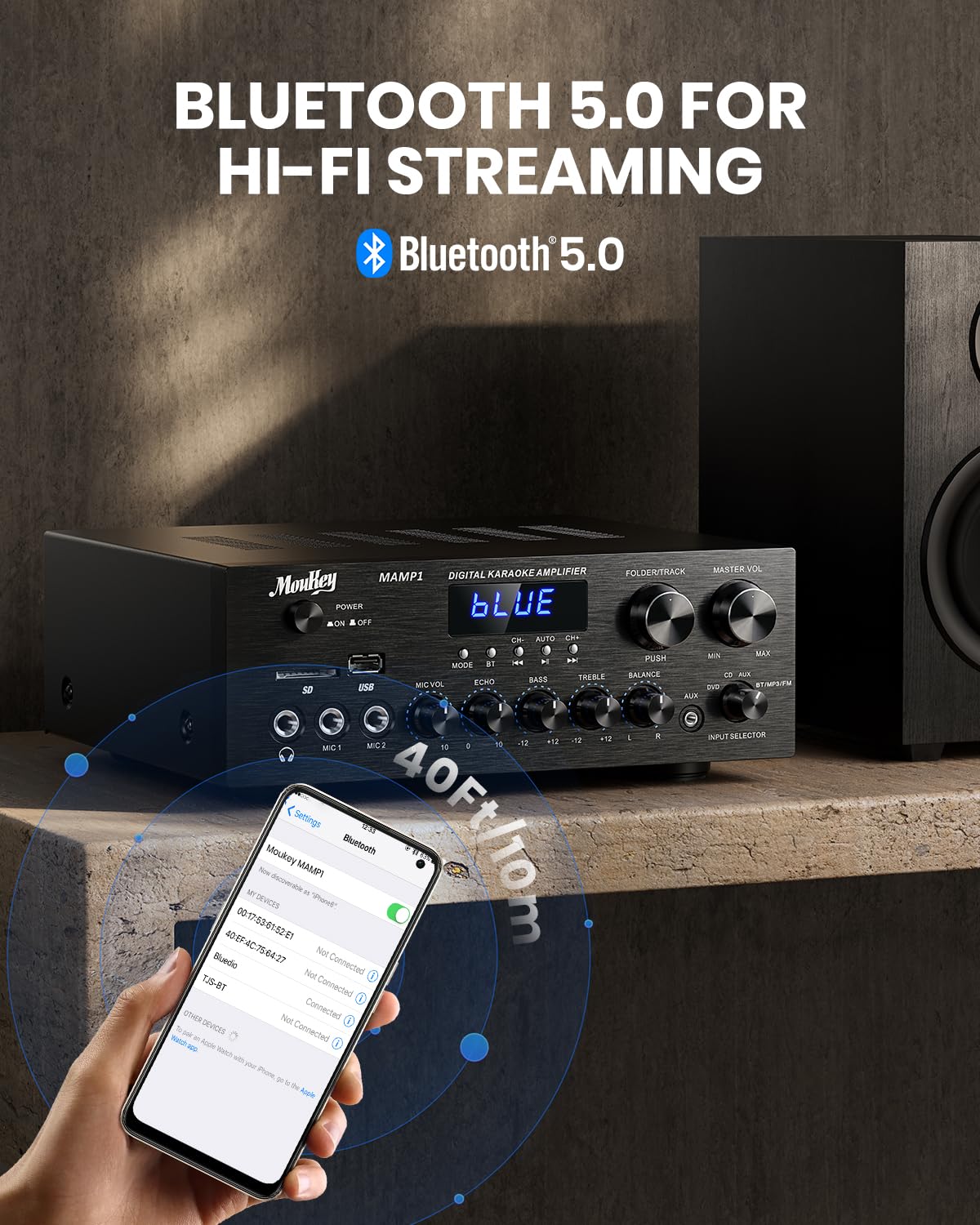
Image: The Moukey MAMP1 amplifier displaying "BLUE" on its screen, indicating Bluetooth mode, with a smartphone showing pairing options.
6.7 Відтворення з USB/SD-карти
Insert a USB drive (max 32GB) or SD card (max 16GB) into the respective slot on the front panel. The amplifier will automatically switch to USB/SD mode and begin playback. Use the попередня, Відтворення/Пауза, Далі, і Folder/Track кнопки для керування відтворенням.
6.8 FM-радіо
Ensure the FM antenna is connected to the rear panel. Select FM mode using the Кнопка режиму. Використовуйте попередня і Далі buttons to tune to radio stations. The LED display will show the current frequency.
7. Технічне обслуговування
Щоб підтримувати продуктивність та зовнішній вигляд вашого ampліфтер:
- Прибирання: Використовуйте м’яку суху тканину для протирання зовнішньої частини пристрою. Не використовуйте рідкі засоби для чищення або абразивні хімікати.
- Вентиляція: Переконайтеся, що вентиляційні отвори чисті від пилу та сміття.
- Зберігання: Якщо пристрій зберігатиметься протягом тривалого часу, від’єднайте його від живлення та зберігайте у прохолодному сухому місці.
8. Вирішення проблем
If you encounter issues with your Moukey MAMP1 ampрятувальник, зверніться до наступної таблиці, щоб знайти поширені проблеми та способи їх вирішення:
| проблема | Можлива причина | Рішення |
|---|---|---|
| Немає живлення | Кабель живлення не підключено; несправна розетка; живлення вимкнено. | Ensure power cable is securely connected. Try a different power outlet. Press the power switch to ON. |
| Немає звуку | Incorrect input selected; Volume too low; Speakers not connected; Speaker wires loose; Mute function active. | Select the correct input source. Increase Master Volume. Check speaker connections and polarity. Ensure mute is off. |
| Bluetooth не підключається | Amplifier not in Bluetooth mode; Device too far; Device already paired to another unit. | Забезпечити amplifier is in Bluetooth mode ("BLUE" on display). Move device closer to amplifier. Disconnect from other devices. |
| Мікрофон не працює | Microphone not connected; Mic volume too low; Echo knob set to minimum. | Connect microphone securely. Increase Microphone Volume. Adjust Echo knob. |
| Проблеми з відтворенням USB/SD | Не підтримується file format; USB drive/SD card corrupted; Capacity exceeded. | Забезпечити звук files are in supported formats (e.g., MP3). Try a different USB drive/SD card. Check capacity limits (USB max 32G, SD max 16G). |
Якщо проблема не зникає після спроби цих рішень, зверніться до служби підтримки клієнтів.
9. Технічні характеристики
| Особливість | Специфікація |
|---|---|
| Бренд | Мукі |
| Модель | MAMP1 |
| Вихідна потужність | 220 Вт |
| Канали | 2 |
| томtage | 115 вольт (перемінний струм) |
| Імпеданс динаміка | 4-16 Ом |
| Версія Bluetooth | 5.0 |
| Діапазон Bluetooth | Понад 12 метрів (40 фути) |
| Підтримка USB/SD-карт | USB: Max 32GB, SD: Max 16GB |
| Розміри (Д x Ш x В) | 25 см x 21.3 см x 9.5 см (приблизно 10 дюйма x 8 дюйма x 4 дюйма) |
| UPC | 715802779039 |
| Країна походження | Китай |

Image: The Moukey MAMP1 amplifier with its dimensions labeled.
10. Гарантія та підтримка
This Moukey MAMP1 Потужність Amplifier поставляється з a Гарантія 1 рік з дати покупки. Ця гарантія поширюється на виробничі дефекти та дефекти виготовлення за умов нормального використання.
Гарантія не поширюється на:
- Damage caused by accident, abuse, misuse, flood, fire, or other natural causes.
- Пошкодження, спричинені несанкціонованою модифікацією або ремонтом.
- Damage caused by improper installation or connection.
- Cosmetic damage, such as scratches, dents, and broken plastic on ports.
For warranty claims or technical support, please contact the retailer where you purchased the product or visit the official Moukey website for contact information. Please have your purchase receipt and product model number (MAMP1) ready when contacting support.