
1. Вступ
This manual provides comprehensive instructions for the setup, operation, and maintenance of your SIMOLIO Wireless TV Headphones. Designed for enhanced voice clarity and comfortable listening, these headphones offer a superior audio experience for television viewінж.
2. Вміст упаковки
Будь ласка, перевірте, чи всі перелічені нижче предмети входять до вашої упаковки:
- SIMOLIO Wireless Headphones (1 unit)
- Wireless Transmitter (1 unit)
- Оптичний волоконно-оптичний кабель (1 одиниця)
- Аудіокабель RCA (1 шт.)
- 3.5-мм аудіокабель (1 шт.)
- USB Charging Cable for Headphone (1 unit)
- Адаптер живлення (1 шт.)
- Spare Rechargeable Battery (1 unit)
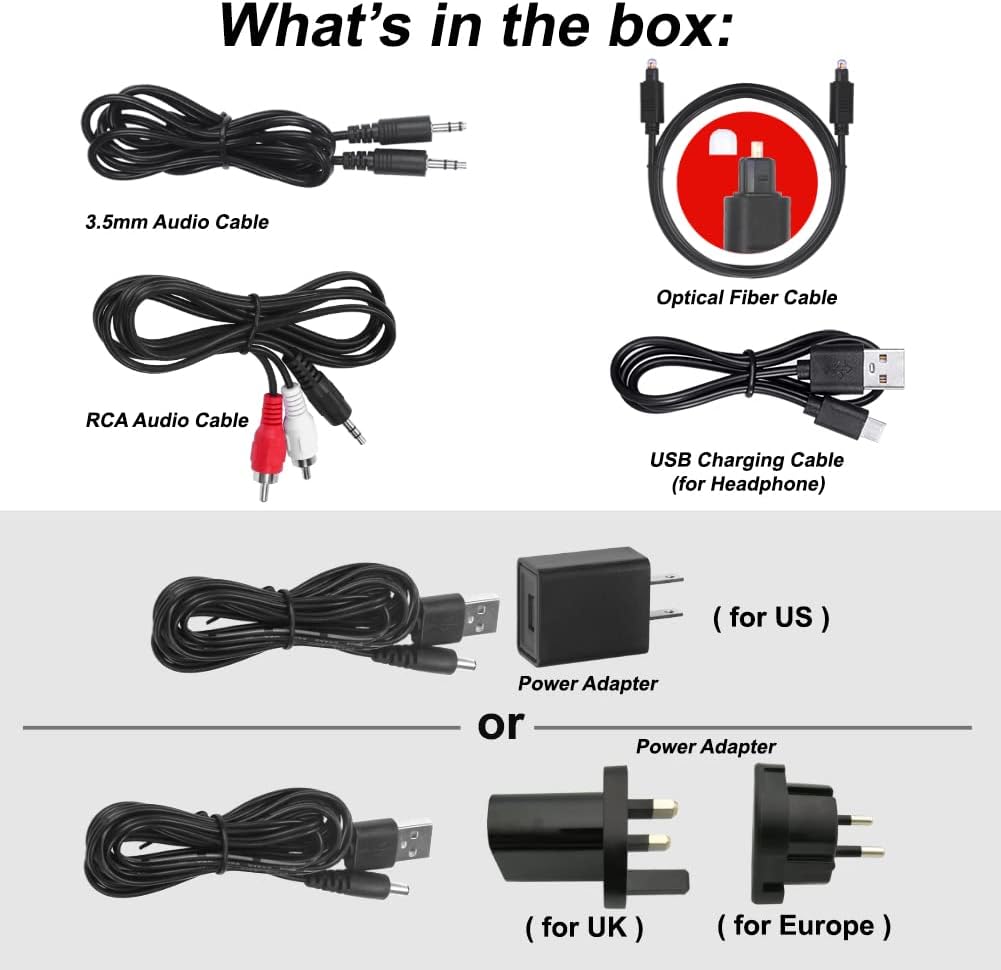
Рисунок 2.1: Комплектація та основні компоненти.
3. Продукт закінчивсяview
3.1 Навушники
- Регульоване наголов'я: Для комфортної та надійної посадки.
- Noise Isolation Memory Foam Earmuffs: Designed for comfort during extended use and to reduce external noise.
- Вбудована акумуляторна батарея: Provides up to 10 hours of listening time.
- Регулювання гучності: Independent volume adjustment for left and right ears (Balance Adjustment).
- Регулювання тембру: Options for Treble, Normal, and Bass to optimize sound clarity.
- Перемикач MONO/STEREO: Select for clearer dialogue or more vivid music.
- MIC ON/OFF Button: Activates a personal sound amplifier function to temporarily hear surrounding conversations without removing the headphones.
- Audio Sharing Port: Allows another wired headphone to connect and share the audio.
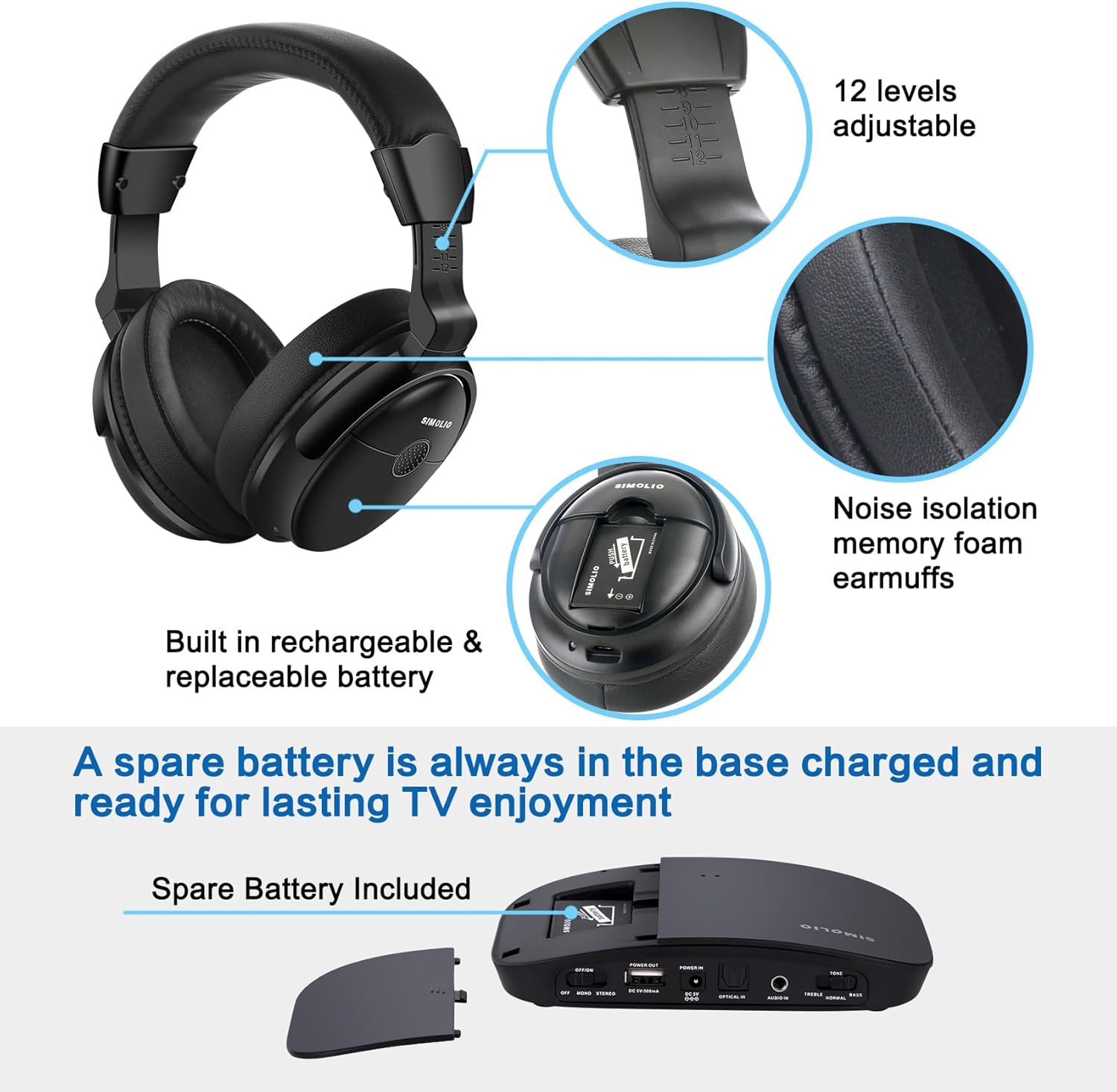
Figure 3.1: Headphone features including comfort elements and battery compartment.

Figure 3.2: Headphone controls for balance adjustment and audio sharing.
3.2 Бездротовий передавач
The transmitter connects to your audio source (e.g., TV, cable box) and wirelessly sends audio to the headphones. It also features a charging slot for the spare battery.
4. Налаштування
4.1 Connecting the Transmitter to Your Audio Source
The SIMOLIO Wireless TV Headphones support multiple audio output options. Choose the most suitable connection for your TV or audio device:
- Digital Optical (Toslink/SPDIF): For optimal digital audio quality. Ensure your TV's audio format is set to PCM when using this connection.
- RCA (Red/White): Для аналогового аудіовиходу.
- 3.5 мм AUX: For devices with a headphone jack or AUX output.
Only one audio cable connection is required. Refer to your TV's manual for specific audio output port locations.

Figure 4.1: Supported audio connection types.
4.2 Initial Pairing and Powering On
The headphones and transmitter are designed for automatic connection. Simply turn on both devices, and they will pair with each other. No manual pairing is required.
4.3 Charging the Headphones and Spare Battery
The headphones can be charged by plugging the USB charging cable into the headphone's charging port and connecting it to a compatible USB power source (e.g., transmitter USB port, PC, or TV USB port). The spare battery can be charged by inserting it into the dedicated charging slot on the transmitter.
5. Інструкція з експлуатації
5.1 Voice Enhancement and Noise Reduction
The headphones feature voice highlighting and noise reduction technology to make TV conversations clearer by reducing background noise. Use the Tone adjustment switch (Treble/Normal/Bass) on the headphones to find your preferred audio profile for optimal clarity.

Figure 5.1: Key audio enhancement features.
5.2 L/R Balance Volume Control
Adjust the balance control on the headphones to customize the volume level for your left and right ears, which is particularly useful for individuals with different hearing levels in each ear.
5.3 Персональний звук Ampфункція lifier
Press the MIC ON/OFF button on the headphones to activate the personal sound amplifier. This allows you to temporarily hear external sounds and conversations without needing to remove the headphones, making it convenient for quick interactions.

Figure 5.2: Personal sound amplifier у використанні.
5.4 Audio Sharing Function
Connect another wired headphone to the audio sharing port on the right side of the SIMOLIO headphones to share the TV audio with a friend or family member.
5.5 Радіус дії бездротового зв'язку
The 2.4GHz RF technology provides a stable connection up to 100 feet (30 meters), allowing you to move freely around your home while enjoying clear audio.

Figure 5.3: Wireless range capability.
6. Технічне обслуговування
To ensure the longevity and optimal performance of your SIMOLIO Wireless TV Headphones, follow these maintenance guidelines:
- Прибирання: Wipe the headphones and transmitter with a soft, dry cloth. Avoid using harsh chemicals or abrasive materials.
- Зберігання: Коли навушники не використовуються, зберігайте їх у прохолодному сухому місці.
- Догляд за акумулятором: Always keep the spare battery charged in the transmitter's charging slot to ensure it's ready for immediate use. Avoid fully discharging the batteries for extended periods.
- Комфорт: For prolonged listening sessions, it is recommended to take off the headphones every 1-2 hours to allow your ears to rest.
7. Вирішення проблем
If you encounter any issues with your SIMOLIO Wireless TV Headphones, please refer to the solutions below. For more detailed visual guides, refer to the official video tutorials.
7.1 No Sound from TV
This is a common issue, often related to TV audio settings. Please check the following:
- Кабельне підключення: Ensure the optical, RCA, or AUX cable is securely connected to both the TV/audio source and the transmitter.
- TV Audio Output Setting (PCM): For optical connections, your TV's digital audio output format MUST be set to PCM.
- TV Speaker Output: Some TVs may mute internal speakers when an external audio device is connected. Check your TV's sound output settings.
- TV Power Cycle: Unplug your TV from the power outlet for a few minutes, then plug it back in.
- Factory Reset TV (as a last resort): If other methods fail, a factory reset of your TV might resolve software conflicts. Consult your TV's manual before proceeding.
Specific TV Brand Troubleshooting Videos:
Philips TV No Sound Troubleshooting:
This video provides detailed steps to resolve 'no sound' issues when connecting to a Philips TV via optical cable, including power cycling the TV, performing a factory reset, and adjusting sound settings to PCM and disabling surround sound.
LG TV No Sound Troubleshooting:
Watch this video for instructions on fixing 'no sound' problems with your LG TV's optical output, focusing on setting the digital sound out to PCM.
Samsung TV No Sound Troubleshooting:
This video guides you through resolving 'no sound' issues when connecting to a Samsung TV's optical output, including setting the digital output audio format to PCM.
7.2 Audio Lag/Delay
The SIMOLIO headphones utilize 2.4GHz RF technology, which is designed to provide virtually no audio lag. If you experience delay, ensure there are no significant obstructions between the transmitter and headphones, and that the transmitter is placed optimally.
7.3 Погана якість звуку
- Регулювання тембру: Experiment with the Treble/Normal/Bass settings on the headphones to find the best sound for your content.
- Контроль балансу: Adjust the L/R balance to ensure sound is evenly distributed or optimized for your hearing.
- Якість джерела: Ensure the audio source itself is providing a clear signal.
7.4 Headphones Not Charging / Low Battery Life
- Зарядний кабель: Verify the USB charging cable is correctly connected to the headphones and a working USB power source.
- Запасний акумулятор: Utilize the included spare battery to avoid interruptions during long listening sessions. Ensure the spare battery is always charged in the transmitter.
- Адаптер живлення: Confirm the power adapter for the transmitter is securely plugged in and functioning.
8. Технічні характеристики
| Особливість | Специфікація |
|---|---|
| Назва моделі | SM-825D Pro |
| Технологія підключення | Бездротовий (РЧ) |
| Технологія бездротового зв'язку | РЧ (2.4 ГГц) |
| Контроль шуму | Активне шумозаглушення |
| Гніздо для навушників | 3.5 mm Jack (for sharing port) |
| Термін служби батареї | До 10 годин |
| Час зарядки | 3 години |
| Діапазон частот | 20 Гц - 20 000 Гц |
| Імпеданс | 32 Ом |
| Дальність бездротового зв'язку | До 100 футів (30 метра) |
| Розміри продукту | 6.7 x 8.5 x 3.3 дюймів |
| Вага товару | 1.89 фунта (0.86 кілограма) |
9. Гарантія та підтримка
SIMOLIO products are designed for quality and reliability. For any questions, technical assistance, or warranty inquiries, please contact the SIMOLIO support team. We are committed to providing excellent customer service and finding a solution for any issues you may encounter.
Contact information can typically be found on the SIMOLIO official webсайт або через вашу платформу для покупок.