
1. Вступ
This manual provides detailed instructions for the Amazon Basics Aluminum Type-C Docking Station. This device expands the connectivity of your USB-C enabled laptop or tablet, offering a wide range of ports for various peripherals and external displays. Please read this manual thoroughly before use to ensure proper operation and to maximize the product's functionality.
2. Особливості продукту
- Багатопортовий дизайн 11-в-1: Integrates Mini DisplayPort, HDMI, VGA, 3 USB-A ports, Ethernet, SD/TF card reader, 3.5mm audio jack, and a Type-C charging port (PD 100W).
- Вихід відео високої роздільної здатності: Supports Ultra HD 4K output via Mini DisplayPort/HDMI and Full HD 1080P via VGA, allowing for mirroring or extending your display to HDTVs, monitors, or projectors. Note: 4K resolution is supported at 30Hz refresh rate.
- Швидка передача даних: Three USB 3.0 A ports provide data transfer speeds up to 5Gbps, backward compatible with USB 2.0/1.0.
- Стабільне мережеве з'єднання: 1000Mbps RJ45 Ethernet port ensures a fast and reliable wired network connection.
- Universal Card Reader: Integrated SD and TF slots allow simultaneous reading of universal SD and Micro SD memory cards.
- Потужність: Type-C charging port supports Power Delivery (PD) up to 100 watts for charging your host device.
- Підключення аудіо: 3.5-мм аудіороз'єм для навушників або динаміків.
- Міцна конструкція: Features an aluminum pedestal-style housing for enhanced durability and heat dissipation.
3. Вміст упаковки
- Amazon Basics Aluminum Type-C Docking Station
- Посібник користувача
4. Продукт закінчивсяview and Port Layout
Familiarize yourself with the various ports and their functions on your docking station.

Зображення: Крупний план view of the Amazon Basics Type-C Docking Station's ports, including Ethernet, Mini DisplayPort, HDMI, VGA, and USB-C.
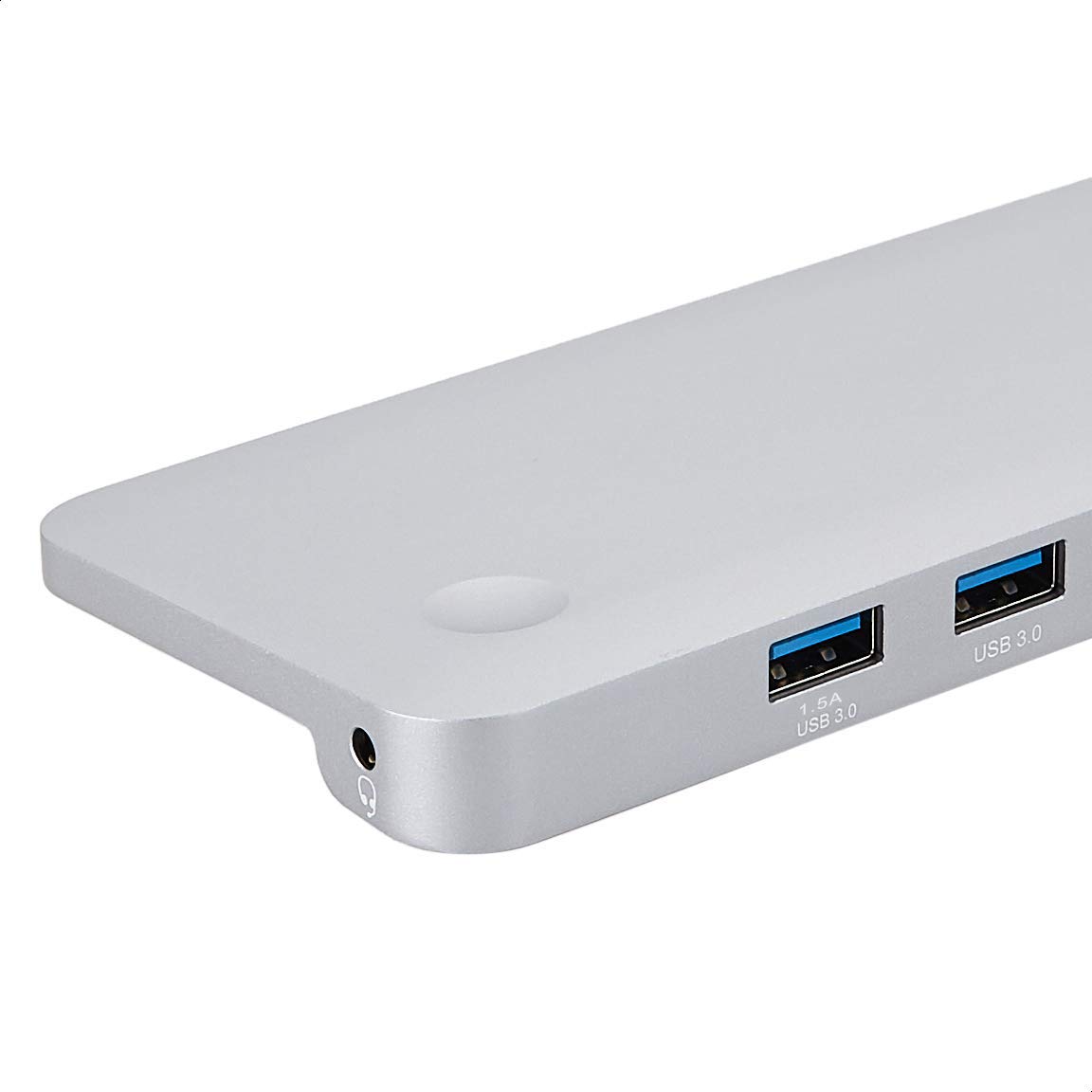
Зображення: Детальне view of the USB 3.0 ports and 3.5mm audio jack on the Amazon Basics Type-C Docking Station.
- Роз'єм USB-C для хоста: Connects to your laptop or tablet's USB-C port.
- Порти USB 3.0 (x3): For connecting USB devices such as external hard drives, keyboards, mice, or USB flash drives.
- Слот для SD-карти: Для читання стандартних карт пам'яті SD.
- Слот для карт пам'яті TF (Micro SD): Для читання карт пам'яті Micro SD.
- Порт Ethernet RJ45: Для дротового мережевого підключення.
- Mini DisplayPort: Для підключення до зовнішнього дисплея.
- Порт HDMI: Для підключення до зовнішнього дисплея.
- Порт VGA: Для підключення до зовнішнього дисплея.
- 3.5 мм аудіороз’єм: Для підключення навушників або динаміків.
- Порт зарядки USB-C PD: For connecting a USB-C power adapter to charge your host device and power the docking station.
5. Інструкції з налаштування
Виконайте такі кроки, щоб налаштувати док-станцію:
- Підключення до хост-пристрою: Plug the integrated USB-C host connector cable from the docking station into an available USB-C port on your laptop or tablet. Ensure your host device's USB-C port supports DisplayPort Alt Mode (DP Alt Mode) for video output functionality.
- Підключення живлення (необов'язково, але рекомендовано): If your host device requires charging or if you are connecting power-intensive peripherals, connect your USB-C power adapter (up to 100W) to the USB-C PD Charging Port on the docking station. This will charge your host device and provide stable power to the docking station and connected peripherals.
- Підключення периферійних пристроїв: Connect your desired peripherals (e.g., external monitors, USB devices, Ethernet cable, SD/TF cards, audio devices) to the corresponding ports on the docking station.

Image: Amazon Basics Type-C Docking Station connected to a laptop, with multiple peripherals like a USB drive and external display cables plugged in.
6. Інструкція з експлуатації
6.1. Відео вихід
- Connect your monitor or projector to the HDMI, Mini DisplayPort, or VGA port.
- Your operating system should automatically detect the external display. You may need to adjust display settings (e.g., extend, duplicate) in your computer's display preferences.
- The docking station supports 4K resolution at 30Hz refresh rate via HDMI and Mini DisplayPort. For optimal performance, ensure your display and cables support the desired resolution and refresh rate.
- Dual video display is supported, allowing you to mirror or expand your screen across multiple monitors.
6.2. USB Data Transfer
- Plug your USB devices into the USB 3.0 ports.
- Порти підтримують швидкість передачі даних до 5 Гбіт/с.
6.3. Підключення Ethernet
- Connect an Ethernet cable from your router or modem to the RJ45 Ethernet port on the docking station.
- Your computer should automatically establish a wired network connection.
6.4. Зчитувач карт SD/TF
- Вставте карту SD або TF (Micro SD) у відповідний слот.
- The cards will appear as removable drives on your computer, allowing you to access and transfer files. Both slots can be used simultaneously.
6.5. Аудіо вихід
- Connect your headphones or speakers to the 3.5mm audio jack.
- You may need to select the docking station as the default audio output device in your computer's sound settings.
6.6. Подача живлення (PD)
- Connect your laptop's USB-C power adapter to the USB-C PD Charging Port on the docking station.
- This port supports up to 100W power delivery to charge your host device while using the docking station.
7. Сумісність
This docking station is compatible with a wide range of USB-C enabled devices, including but not limited to:
- MacBook Pro 2018/2017/2016
- iPad Pro 2018
- Mac mini 2018
- MacBook Air
- iMac 2017
- Samsung Note9
- HUAWEI MateBook X
- Dell XPS 13
- ThinkPad
- Chromebook
Важливо: This product functions only with computers that support DisplayPort Alt Mode (DP Alt Mode) via their USB-C port. Please verify your computer's specifications for compatibility before use.
8. Вирішення проблем
- Немає виводу на дисплей:
- Переконайтеся, що порт USB-C вашого хост-пристрою підтримує режим DisplayPort Alt.
- Check all cable connections (USB-C to host, video cable to monitor).
- Verify the external monitor is powered on and set to the correct input source.
- Спробуйте перезавантажити комп'ютер.
- 4K Resolution Not Working at 60Hz:
- This docking station supports 4K resolution at a maximum refresh rate of 30Hz. If your monitor is set to 4K@60Hz, it will not display correctly. Adjust your display settings to 4K@30Hz or a lower resolution with a higher refresh rate if desired.
- USB-пристрої не розпізнаються або відключаються:
- Ensure the docking station is receiving sufficient power. Connect a USB-C power adapter to the PD port if you are using multiple power-intensive USB devices.
- Try connecting the USB device directly to your computer to confirm it is functional.
- Reconnect the docking station to your computer.
- No Network Connection via Ethernet:
- Перевірте підключення кабелю Ethernet до док-станції та маршрутизатора/модему.
- Перевірте налаштування мережі на вашому комп’ютері.
- Переконайтеся, що ваш маршрутизатор/модем працює належним чином.
- Немає аудіовиходу:
- Ensure your headphones or speakers are properly connected to the 3.5mm audio jack.
- Check your computer's sound settings and select the docking station as the default audio output device.
- Хост-пристрій не заряджається:
- Ensure a compatible USB-C power adapter is connected to the docking station's USB-C PD Charging Port.
- Перевірте, чи ваш хост-пристрій підтримує USB-C Power Delivery.
- Перевірте адаптер живлення та кабель на наявність пошкоджень.
9. Технічні характеристики
| Особливість | Специфікація |
|---|---|
| Бренд | Основи Amazon |
| Номер моделі | UTC-DOCK01-PRO |
| Колір | Сірий |
| Розміри (ДxШxВ) | 28 x 7.5 x 1.4 сантиметрів (11.02 x 2.95 x 0.55 дюймів) |
| Вага товару | 317 г (0.32 кілограма) |
| Загальна кількість портів | 11 |
| USB порти | 3 x USB 3.0 Type-A |
| Порти виходу відео | 1 x HDMI, 1 x Mini DisplayPort, 1 x VGA |
| Роздільна здатність HDMI | До 4K при 30 Гц |
| Mini DisplayPort Resolution | До 4K при 30 Гц |
| Порт Ethernet | Гігабітний Ethernet RJ45 (10/100/1000 Мбіт/с) |
| Зчитувач карток | SD and TF (Micro SD) slots, simultaneous read |
| Аудіопорт | 3.5mm Audio Jack |
| Порт для зарядки PD-USB | До 100 Вт |
| Апаратний інтерфейс | Ethernet, HDMI, Mini DisplayPort, VGA, USB-A, USB-C, SD/TF, Audio |
10. Технічне обслуговування
- Прибирання: Використовуйте м’яку суху тканину для очищення док-станції. Уникайте використання рідких засобів для чищення або аерозолів.
- Зберігання: Зберігайте пристрій у прохолодному, сухому місці, подалі від прямих сонячних променів та екстремальних температур.
- Обробка: Avoid dropping or subjecting the device to strong impacts. Do not attempt to disassemble or modify the docking station.
11. Інформація про безпеку
- Тримайте пристрій подалі від води, вогню та середовищ з високою вологістю.
- Не піддавайте пристрій дії екстремальних температур.
- Use only compatible power adapters and cables.
- Зберігати в недоступному для дітей місці.
- Якщо пристрій пошкоджено або несправний, негайно припиніть його використання та зверніться до служби підтримки клієнтів.
12. Гарантія та підтримка
This Amazon Basics product comes with a 1-річна обмежена гарантія from the date of purchase. This warranty covers manufacturing defects and workmanship under normal use. It does not cover damage caused by misuse, accident, modification, or unauthorized repair.
For warranty claims, technical support, or further assistance, please contact Amazon Basics customer service through your Amazon purchase history or the official Amazon Basics support channels.