
1. Продукт закінчивсяview
The EPEVER Tracer BN Series MPPT Solar Charge Controller is an advanced, efficient, and multi-functional device designed for off-grid solar systems. It utilizes Maximum Power Point Tracking (MPPT) technology to maximize energy harvest from solar panels, ensuring optimal charging for your battery bank. This controller is suitable for various applications, including telecommunication base stations, household systems, street lighting, and wilderness monitoring systems.
Ключові особливості:
- Advanced MPPT technology with tracking efficiency no less than 99.5% and maximum conversion efficiency of 98%.
- Reliable automatic limit function of maximum PV input power, preventing overload under any circumstances.
- Широкий робочий обсяг MPPtagе діапазон.
- Die-cast aluminum design for excellent heat dissipation.
- 12/24VDC автоматична система voltage ідентифікація.
- Multiple load control modes: manual control, light ON/OFF, light ON+Timer, and time control.
- Supports 4 charging options: Sealed, Gel, Flooded, and User-defined.
- PC monitoring and external display unit (like MT50) connectivity for real-time data checking and parameter setting, with software upgrade support.
- Modbus communication protocol interface for expanded applications and monitoring.
2. Компоненти продукту
Familiarize yourself with the main components and interfaces of the Tracer BN series solar charge controller:

Figure 2.1: Controller Components Overview
This image displays the EPEVER Tracer BN Series Solar Charge Controller with key components labeled, including the Heat Sink, Button, Charging LED indicator, Battery LED indicator, RTS port, RS485 Port, Solar Terminal, Battery Terminal, and Load Terminal.
- Радіатор: Dissipates heat generated during operation to maintain optimal performance.
- кнопка: Used for manual control of the load and navigating settings.
- Світлодіодний індикатор зарядки: Shows the status of PV (solar panel) charging.
- Світлодіодний індикатор батареї: Displays the battery charging status.
- RTS (Remote Temperature Sensor) Port: Connects an optional remote temperature sensor for accurate battery temperature compensation.
- Порт RS485: Communication interface for connecting to PC, MT50 remote meter, WiFi, or Bluetooth modules.
- Solar Terminal (PV): Підключається до масиву сонячних панелей.
- Battery Terminal (BATT): Підключається до акумуляторної батареї.
- Термінал навантаження: Підключається до навантажень постійного струму.
3. Налаштування та встановлення
Правильне встановлення є вирішальним для безпечної та ефективної роботи вашого контролера сонячного заряду. Будь ласка, уважно виконайте ці кроки:
3.1 Розпакування та початковий огляд
Video 3.1: Unboxing and Component Overview
This video demonstrates the unboxing process of the EPEVER Tracer BN MPPT Solar Charge Controller and provides a visual overview of its main components and ports, including the PV charging LED indicator, battery charging LED indicator, button, PV terminals, battery terminals, load terminals, heat sink, RTS port, and RS485 port.
- Carefully open the packaging and remove the controller and any accessories.
- Inspect the controller for any visible damage. If damage is found, contact your supplier.
- Переконайтеся, що всі перелічені компоненти присутні.
3.2 Підключення проводів
Важлива примітка щодо безпеки: While wiring the controller, ensure that the circuit breaker or fuse is ні closed. Verify that the positive ("+") and negative ("-") leads are connected correctly to prevent damage to the controller or other components.
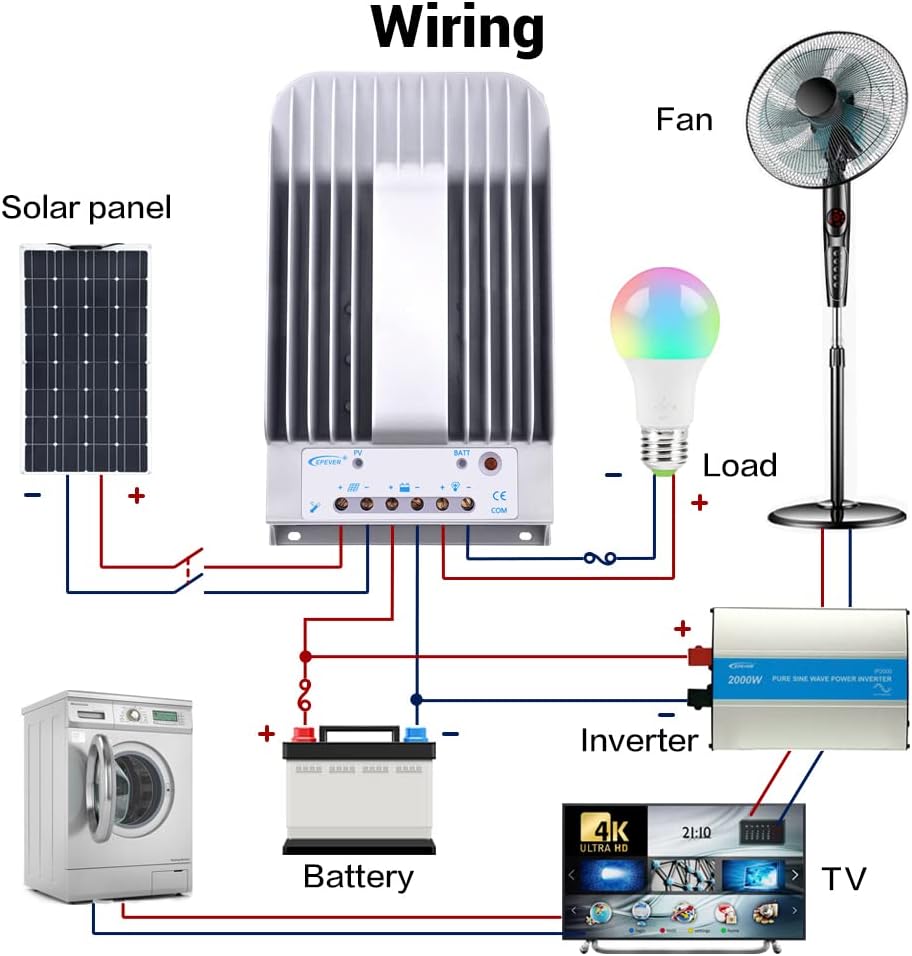
Рисунок 3.2: Типова схема підключення системи
This diagram illustrates a typical solar power system setup, showing the connection of the solar panel to the controller, the controller to the battery, and the controller to various DC and AC loads via an inverter. Ensure correct polarity for all connections.
The connection order is critical:
- Підключіть батарею: First, connect the battery to the controller's battery terminals. Ensure correct polarity (positive to positive, negative to negative). The controller will automatically detect the system voltage (12V/24V). The controller supports Lead-acid Batteries (Sealed, AGM, Gel, Flooded) and User-defined settings.
- Підключіть навантаження: Next, connect your DC loads to the controller's load terminals.
- Підключення сонячної панелі (PV): Finally, connect the solar panel array to the controller's PV terminals.
The disconnection order is the reverse: PV -> Load -> Battery.
Refer to the following table for recommended wire sizes based on controller model:
| Модель | Wire Size (AWG/mm²) |
|---|---|
| Tracer1215BN | 12AWG (4 мм²) |
| Tracer2215BN | 8AWG (10 мм²) |
| Tracer3215BN | 6AWG (16 мм²) |
| Tracer4215BN | 4AWG (25 мм²) |
4. Інструкція з експлуатації
Once the controller is correctly wired and powered, it will begin operating automatically. The LED indicators provide visual feedback on the system status.
4.1 Контроль навантаження
The controller offers various load control modes. In manual control mode, you can toggle the load on or off using the controller's button.
Video 4.1: Load Manual Mode Operation
This video segment demonstrates how to manually turn the load ON/OFF by pressing the 'ENTER' button on the controller when it is in load manual mode.
Other load control modes (Light ON/OFF, Light ON+Timer, Time Control) can be configured using an external display unit (like MT50) or PC/APP software connected via the RS485 port.
4.2 Monitoring and Parameter Setting
The controller supports various accessories for enhanced monitoring and parameter adjustment:

Figure 4.2: Controller with Communication Accessories
This image illustrates how the solar charge controller can be connected to various communication accessories such as the MT50 remote meter, eBox-WIFI-01 for WiFi monitoring, eBox-BLE-01 for Bluetooth monitoring, and a PC via a USB to RS485 cable for detailed system management.
Optional accessories for monitoring and control:
| Аксесуар | опис |
|---|---|
| Remote Temperature Sensor (RTS300R47K3.81A) | Acquisition of battery temperature for temperature compensation of control parameters. The standard length of the cable is 3m (can be customized). The RTS300R47K3.81A connects to the port (4th) on the controller. ПРИМІТКА: If the temperature sensor is short-circuited or damaged, the controller will be charging or discharging at the default temperature 25 °C. |
| USB to RS485 cable (CC-USB-RS485-150U) | USB to RS-485 converter used to monitor each controller on the network using Solar Station PC software. The length of cable is 1.5m. The CC-USB-RS485-150U connects to the RS-485 Port on the controller. |
| OTG cable (OTG-12CM) | Used to connect a mobile communication cable and able to achieve real-time monitoring of the controller and modification of the parameters by using mobile APP software. |
| Remote Meter (MT50) | MT50 can display various operating data and fault of the system. The information can be displayed on a backlit LCD screen, the buttons are easy-to-operate, and the numeric display is readable. |
| WiFi Serial Adapter (eBox-WIFI-01) | After the controller is connected with the eBox-WIFI-01 through the standard Ethernet cable (parallel cable), the operating status and related parameters of the controller can be monitored by the mobile APP software through WiFi signals. |
| RS485 to Bluetooth Adapter (eBox-BLE-01) | After the controller is connected with the eBox-BLE-01 through the standard Ethernet cable (parallel cable), the operating status and related parameters of the controller can be monitored by the mobile APP software through Bluetooth signals. |
| Logger (eLOG01) | Після підключення контролера до eLOG-01 через кабель зв’язку RS485 він може записувати робочі дані контролера або контролювати робочий стан контролера в режимі реального часу за допомогою програмного забезпечення ПК. |
ПРИМІТКА: For setting and operation of accessories, please refer to their specific instructions.
5. Технічне обслуговування
Регулярне технічне обслуговування забезпечує довговічність та оптимальну роботу вашого контролера сонячного заряду:
- Чистота: Тримайте контролер чистим та без пилу та сміття. Використовуйте суху тканину для протирання зовнішньої поверхні.
- Підключення: Periodically check all wiring connections for tightness. Loose connections can cause overheating and damage.
- Вентиляція: Ensure the heat sink fins are not obstructed to allow for proper airflow and heat dissipation.
- Середовище: Operate the controller within its specified ambient temperature and humidity ranges.
6. Вирішення проблем
If you encounter issues with your EPEVER solar charge controller, consider the following basic troubleshooting steps:
- Без живлення/дисплей: Перевірте з'єднання акумулятора та переконайтеся, що акумулятор зарядженийtage is within the controller's operating range. Verify fuses or circuit breakers are not tripped.
- Без зарядки: Переконайтеся, що сонячні панелі підключені правильно та отримують достатньо сонячного світла. Перевірте об'єм вхідного фотоелектричного поля.tage and current. Verify PV circuit breaker/fuse.
- Навантаження не працює: Check load connections and ensure the load is not exceeding the controller's rated current. Verify the load control mode settings.
- Abnormal LED Indicators: Refer to the full user manual for specific error codes or indicator patterns to diagnose issues.
У разі складних або постійних проблем зверніться до служби технічної підтримки.
7. Технічні характеристики
The following table provides detailed technical specifications for the Tracer BN series, including the 40A model (Tracer4215BN):
Video 7.1: Technical Specifications Overview
This video segment displays a table detailing the technical specifications for the Tracer BN series MPPT Solar Charge Controllers, including electrical and environmental parameters for various models (Tracer1215BN, Tracer2215BN, Tracer3215BN, Tracer4215BN).
| Пункт | Tracer 1215BN | Tracer 2215BN | Tracer 3215BN | Tracer 4215BN |
|---|---|---|---|---|
| Номінальна система випtage | 12/24 В постійного струму Авто | |||
| Номінальний струм заряду | 10А | 20А | 30А | 40А |
| Номінальний струм розряду | 10А | 20А | 20А | 20А |
| Акумулятор обtagе діапазон | 8В~32В | |||
| Макс. PV розімкнутий ланцюг випtage | 150 В (при мінімальній температурі робочого середовища) 138 В (при температурі навколишнього середовища 25°C) | |||
| MPP випtagе діапазон | Акумулятор обtage+2V ~ 108V | |||
| Макс. Вхідна потужність PV | 130 Вт (12 В) 260 Вт (24 В) | 260 Вт (12 В) 520 Вт (24 В) | 390 Вт (12 В) 780 Вт (24 В) | 520 Вт (12 В) 1040 Вт (24 В) |
| Самоспоживання | ≤60 мА (12 В); ≤30 мА (24 В) | |||
| Розрядний контур обtage крапля | ≤0.15 В | |||
| Коефіцієнт компенсації температури | -3 мВ/°C/2 В (за замовчуванням) | |||
| спілкування | RS485 (RJ45 interface) | |||
| Заземлення | Поширений негатив | |||
| Ambient temperature range* | -35°C ~ +55°C | |||
| Діапазон температур зберігання | -35°C ~ +80°C | |||
| Діапазон вологості | ≤95% (N.C.) | |||
| Корпус | IP30 | |||
*Please operate controller at permitted ambient temperature. If over permissible range, please derate capacity accordingly.
8. Гарантія та підтримка
EPEVER products are designed for reliability and performance. For warranty information, please refer to the documentation included with your purchase or visit the official EPEVER website. If you require technical assistance or have questions regarding your Tracer BN series solar charge controller, please contact EPEVER customer support or your authorized dealer.