
1. Вступ
Thank you for choosing the AUNA Pro Amp-Pro1 BT PA Ampліфікатор. Це amplifier is designed to deliver professional-level sound for various events, including karaoke nights, parties, and general audio amplification. It features a robust 2 x 50W RMS output, Bluetooth connectivity, multiple microphone inputs, USB/SD media playback, and a 7-band equalizer for precise sound control. This manual provides essential information for safe operation, setup, and maintenance of your device.
2. Техніка безпеки
Будь ласка, уважно прочитайте ці інструкції з безпеки перед використанням пристрою та збережіть їх для подальшого використання. Недотримання цих інструкцій може призвести до ураження електричним струмом, пожежі або інших небезпек.
- Джерело живлення: Connect the device only to a 230 V, 50 Hz AC power outlet. Ensure the power cord is not damaged or pinched.
- Вентиляція: Do not block any ventilation openings. Ensure adequate airflow around the unit to prevent overheating. Do not place the amplifier on soft surfaces that may block vents.
- Вода і вологість: Do not expose the device to rain or moisture. Do not place objects filled with liquids, such as vases, on or near the ampліфірник.
- Джерела тепла: Зберігайте amplifier away from heat sources such as radiators, heat registers, stoves, or other heat-producing appliances.
- Прибирання: Unplug the device from the power outlet before cleaning. Use a dry, soft cloth. Do not use liquid cleaners or aerosol cleaners.
- Обслуговування: Не намагайтеся обслуговувати цей виріб самостійно. Зверніться до кваліфікованого сервісного персоналу для проведення будь-яких робіт. Відкриття пристрою може наразити вас на небезпечне випромінювання.tagабо інші небезпеки.
- Вхід об’єкта та рідини: Ніколи не проштовхуйте будь-які предмети в цей виріб через отвори, оскільки вони можуть торкнутися небезпечної вологиtagточки або короткі замикання частин, що може призвести до займання або ураження електричним струмом.
- Розміщення: Place the unit on a stable, level surface. Avoid placing it in direct sunlight or in areas with high humidity or dust.
3. Продукт закінчивсяview
The AUNA Pro Amp-Pro1 BT is a versatile PA amplifier designed for powerful audio output and flexible connectivity. It can be used as a standalone unit or installed in a 19-inch Hi-Fi rack.
Ключові характеристики:
- Потужний вихід: 2 x 50 W RMS power at 4 ohms.
- Функція Bluetooth: For wireless audio streaming from smartphones, tablets, or laptops.
- Кілька мікрофонних входів: Three fully adjustable 6.3 mm jack microphone inputs for karaoke and vocal performances.
- Відтворення мультимедіа: USB port and SD/MMC card slot for direct playback of digital audio files.
- 7-смуговий еквалайзер: Two-channel, 7-band equalizer for precise adjustment of treble, bass, and mid-range frequencies.
- Широкі можливості підключення: 2 x stereo RCA inputs, 1 x antenna input, 1 x 3.5 mm AUX input, and 2 x stereo speaker outputs.
- Монтаж у стійку: Suitable for installation in a 19-inch Hi-Fi rack.
Front Panel Controls and Connections:
The front panel provides access to power, microphone inputs, media playback controls, and sound adjustments.

Підключення на задній панелі:
The rear panel houses the main audio inputs and speaker outputs.

4. Налаштування та підключення
Follow these steps to set up your AUNA Pro Amp-Pro1 BT ampліфірник.
4.1 Підключення динаміків
- Забезпечити ampвимкнено та від’єднано від розетки.
- Connect your passive speakers to the stereo speaker outputs on the rear panel. Use appropriate speaker cables.
- For a single set of speakers, ensure their impedance is between 4 and 16 ohms.
- If connecting two sets of speakers simultaneously, ensure their combined impedance is between 8 and 16 ohms.
4.2 Підключення аудіоджерел
The amplifier пропонує різні варіанти введення:
- Входи RCA: Connect external audio devices like CD players, DVD players, or mixers to the 2 x stereo RCA inputs on the rear panel.
- Вхід AUX: For portable devices, use the 3.5 mm AUX input on the front panel.
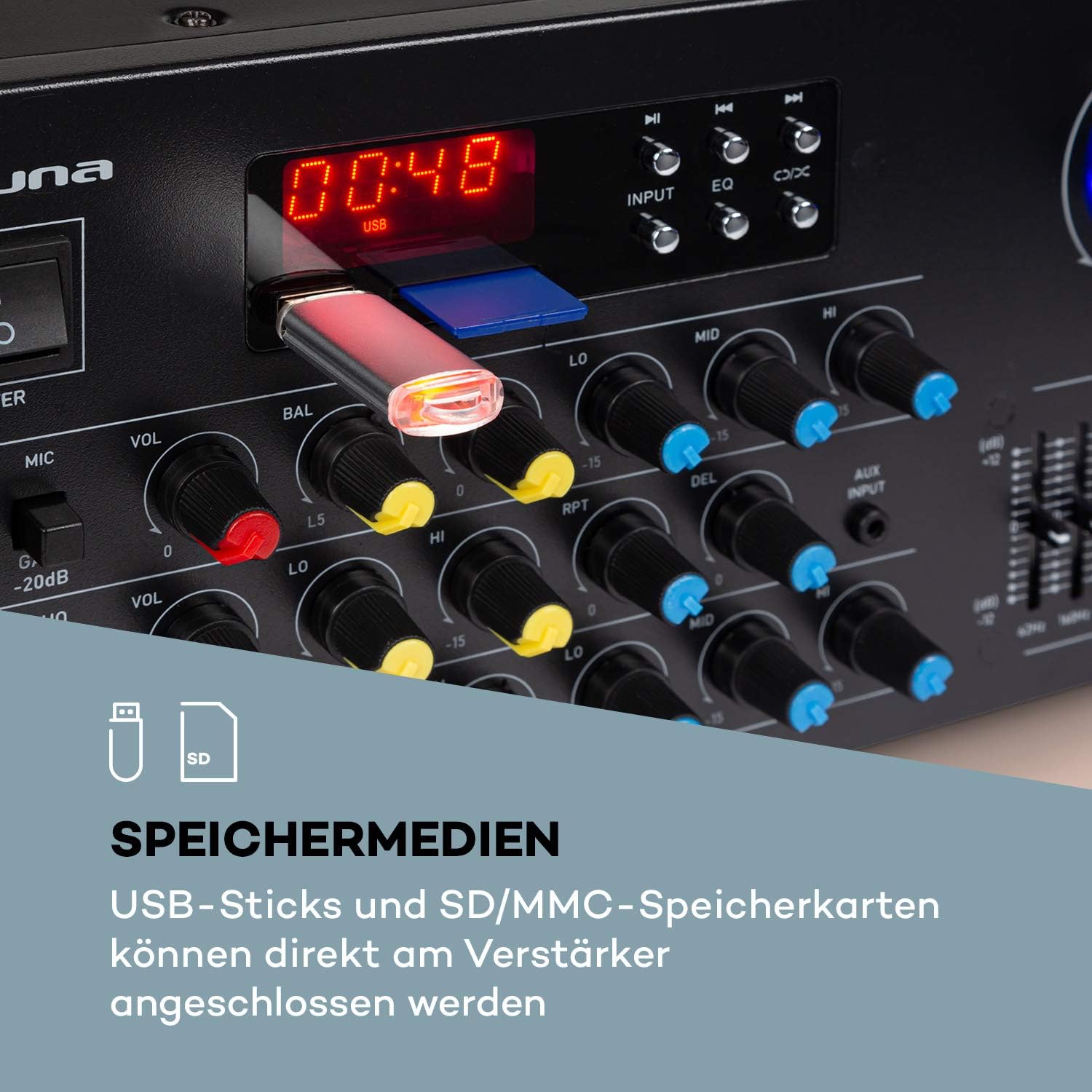
- USB/SD: Insert a USB stick or SD/MMC card into the respective slots on the front panel for direct media playback.
- Bluetooth: Для бездротової потокової передачі аудіо із сумісних пристроїв.
4.3 Підключення мікрофонів
Connect up to three 6.3 mm jack microphones to the dedicated inputs on the front panel.

4.4 Підключення живлення
Після того, як усі аудіопідключення та підключення динаміків будуть виконані, підключіть amplifier's power cord into a suitable 230 V, 50 Hz AC power outlet.
5. Інструкція з експлуатації
5.1 Увімкнення/вимкнення
Натисніть ПОТУЖНІСТЬ кнопку на передній панелі, щоб увімкнути ampувімкнення або вимкнення ліхтарика. Дисплей підсвічуватиметься, коли пристрій увімкнено.
5.2 Вибір джерела
Використовуйте ВХІД selector button on the front panel to cycle through available audio sources: Bluetooth, USB, SD, AUX, and RCA inputs.
5.3 Робота Bluetooth
- Select the Bluetooth input source using the ВХІД button. The display will show 'BLUE' or a similar indicator.
- Увімкніть Bluetooth на своєму смартфоні, планшеті або ноутбуці.
- шукати available devices and select 'AUNA Amp-Pro1 BT' (or similar) from the list.
- Після сполучення ви можете передавати аудіо бездротовим способом на ampліфірник.

5.4 Відтворення з USB/SD-карти
- Insert a USB stick or SD/MMC card into the corresponding slot on the front panel.
- Select the USB or SD input source using the ВХІД кнопку. The amplifier автоматично виявить та почне відтворювати сумісний аудіофайл files.
- Use the playback controls (Play/Pause, Next, Previous) on the front panel to manage your music.
5.5 Елементи керування мікрофоном
Each microphone input has individual volume, 3-band equalizer (treble, mid, bass), balance, and echo effect controls. The echo effect also has 2-band equalizer, repeat, delay, and volume controls.
- Відрегулюйте ГУЧНІСТЬ МІКРОФОНА knob for the overall microphone volume.
- Використовуйте індивідуальний VOL knobs for each microphone input.
- Відрегулюйте LO, MID, HI knobs for microphone equalization.
- Control the echo effect using the ЛУНА, RPT (Repeat), and DEL (Delay) knobs.
5.6 Налаштування еквалайзера
The amplifier features a 2-channel, 7-band equalizer to fine-tune your audio output. Adjust the sliders for each frequency band (62Hz, 160Hz, 400Hz, 1KHz, 3KHz, 8KHz, 16KHz) to shape your sound.

5.7 Головний регулятор гучності
Adjust the large ГОЛОВНИЙ ОБ'ЄМ knob to control the overall output level of the ampліфірник.
6. Технічне обслуговування
6.1 Очищення
Завжди відключайте amplifier before cleaning. Use a soft, dry cloth to wipe the exterior surfaces. Do not use abrasive cleaners, waxes, or solvents, as they may damage the finish.
6.2 Зберігання
Якщо amplifier will not be used for an extended period, unplug it from the power outlet and store it in a cool, dry place, away from direct sunlight and extreme temperatures.
6.3 Заміна запобіжника
The amplifier is equipped with a 2A fuse. If the unit fails to power on, the fuse may need replacement. This should only be performed by qualified service personnel to ensure safety and proper operation.
7. Вирішення проблем
Якщо у вас виникли проблеми з вашим ampрятувальник, зверніться до наступних поширених проблем та рішень:
| проблема | Можлива причина | Рішення |
|---|---|---|
| Немає живлення | Power cord unplugged; Power outlet faulty; Fuse blown | Перевірте підключення шнура живлення; спробуйте іншу розетку; зверніться до служби підтримки для заміни запобіжника. |
| Немає звуку | Incorrect input selected; Volume too low; Speakers not connected or faulty; Mute function active | Select correct input source; Increase Master Volume; Check speaker connections; Ensure no mute is active. |
| Bluetooth не підключається | Amplifier not in Bluetooth mode; Device not discoverable; Interference | Select Bluetooth input; Ensure Bluetooth is enabled on your device and in pairing mode; Move devices closer; Restart both devices. |
| Мікрофон не працює | Microphone not connected; Microphone volume too low; Microphone faulty | Check microphone connection; Increase individual MIC VOL; Test with another microphone. |
| Спотворений звук | Volume too high; Input signal too strong; Speaker impedance mismatch | Reduce Master Volume or input source volume; Check speaker impedance. |
Якщо проблема не зникає після спроби цих рішень, зверніться до служби підтримки клієнтів.
8. Технічні характеристики
Below are the technical specifications for the AUNA Pro Amp-Pro1 BT PA Ampліфтер:
| Особливість | Специфікація |
|---|---|
| Вихідна потужність | 2 x 50 W RMS at 4 ohms |
| АЧХ | 20 Гц - 20 кГц |
| Співвідношення сигнал-шум | > 76 дБ |
| Speaker Impedance (1 set) | 4 16 - XNUMX Ом |
| Speaker Impedance (2 sets synchronized) | 8 16 - XNUMX Ом |
| Мікрофонні входи | 3 x 6.3 mm jack (front) |
| Аудіо входи | 2 x stereo RCA, 1 x 3.5 mm AUX, USB, SD/MMC |
| Вхід для антени | 1 x antenna input |
| Виходи для динаміків | 2 x stereo (screw terminals/banana connector) |
| Джерело живлення | 230 V, 50 Гц |
| Запобіжник | 2 А |
| Розміри (Ш x В x Г) | Прибл. 43 x 16.3 x 32.5 см |
| вага | прибл. 3.0 кг |
| Технологія підключення | AUX, Bluetooth, USB |
| Сумісні пристрої | Ноутбук, Смартфон |

9. Інформація про утилізацію
Do not dispose of this product with normal household waste. This product should be handed over to an applicable collection point for the recycling of electrical and electronic equipment. By ensuring this product is disposed of correctly, you will help prevent potential negative consequences for the environment and human health, which could otherwise be caused by inappropriate waste handling of this product. For more detailed information about recycling of this product, please contact your local city office, your household waste disposal service or the shop where you purchased the product.
10. Гарантія та підтримка
For warranty information, technical support, or service inquiries, please refer to the documentation provided with your purchase or contact your retailer. You can also visit the official AUNA webсайт для подальшої допомоги.