
1. Вступ
Welcome to the user manual for your Google Pixel 4 XL smartphone. This guide provides essential information to help you get started, understand its features, and maintain your device. The Google Pixel 4 XL is designed to offer a seamless Android experience with advanced camera capabilities, intuitive gesture controls, and the integrated Google Assistant.

Figure 1.1: Google Pixel 4 XL (Oh So Orange)
2. Налаштування
2.1 Що в коробці
- Смартфон Google Pixel 4 XL
- Адаптер змінного струму
- USB-кабель (USB-C до USB-C)
- OTG Dongle (USB-A to USB-C adapter)
- Інструмент для вилучення лотка SIM-картки
- Короткий посібник
2.2 Встановлення SIM-картки
- Locate the SIM card tray on the side of your Pixel 4 XL.
- Вставте інструмент для вилучення лотка SIM-картки в маленький отвір поруч із ним і міцно натисніть, доки лоток не вискочить.
- Place your Nano SIM card into the tray with the gold contacts facing down. Ensure it fits securely.
- Обережно вставте лоток SIM-картки назад у телефон, доки він не зафіксується почувши клацання.

Рисунок 2.1: Розташування лотка для SIM-картки
2.3 Початкове увімкнення та налаштування
- Натисніть і утримуйте кнопку живлення (розташовану праворуч), доки не з’явиться логотип Google.
- Дотримуйтесь інструкцій на екрані, щоб вибрати мову, підключитися до Wi-Fi та за потреби перенести дані зі старого пристрою.
- Увійдіть, використовуючи свій обліковий запис Google, або створіть новий.
- Set up security features such as Face Unlock.
2.4 Зарядка пристрою
Connect the USB cable to the AC adapter and plug it into a power outlet. Connect the other end of the USB cable to the USB-C port at the bottom of your Pixel 4 XL. The device supports fast charging. For optimal battery health, avoid fully discharging the battery frequently.
3. Інструкція з експлуатації
3.1 Основна навігація
The Pixel 4 XL uses a touchscreen interface for navigation. Swipe up from the bottom to go to the home screen, swipe from the left or right edge to go back, and swipe up and hold to view останні програми.

Figure 3.1: Pixel 4 XL Front Display
3.2 Помічник Google
The new Google Assistant is integrated into the Pixel 4 XL. You can activate it by squeezing the sides of your phone or by saying "Hey Google." Use your voice to send texts, share photos, get directions, and more.
3.3 Функції камери
The Pixel 4 XL camera offers advanced photography capabilities:
- Point and Shoot: Capture brilliant color and control exposure balance.
- Нічний приціл: Take clear photos in low-light conditions, including astrophotography for capturing the Milky Way.
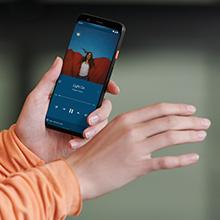
Figure 3.2: Using the Pixel 4 XL Camera
3.4 Motion Sense (Quick Gestures)
Utilize Quick Gestures to control your phone without touching it. Wave your hand above the screen to skip songs, silence calls, and more. Motion Sense functionality is available in specific regions including the US, Canada, Singapore, Australia, Taiwan, and most European countries.
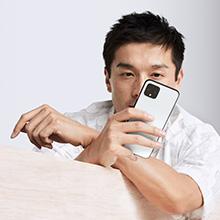
Figure 3.3: Motion Sense in Action
3.5 Call Screen
The Google Assistant's Call Screen feature helps filter out spam calls. It can proactively screen unknown callers and provide a transcript of the conversation, allowing you to decide whether to answer.
3.6 Офіційне відео продукту
Video 3.1: An official video from Google Inc showcasing the features of the Google Pixel 4, including Google Assistant and Motion Sense. This video provides a visual overview of key functionalities.
4. Технічне обслуговування
4.1 Очищення пристрою
To clean your Pixel 4 XL, use a soft, lint-free cloth. Avoid abrasive materials, solvents, or aerosol sprays. For stubborn marks, slightly dampзмочіть тканину водою. Не занурюйте пристрій у воду.
4.2 Оновлення програмного забезпечення
Google regularly releases software updates to improve performance, add features, and enhance security. Ensure your device is connected to Wi-Fi and has sufficient battery life before installing updates. You can check for updates in Settings > System > System update.
4.3 Догляд за акумулятором
Щоб продовжити термін служби акумулятора:
- Уникайте екстремальних температур.
- Use the provided charger or a compatible Qi-certified wireless charger.
- Enable Adaptive Battery in settings to optimize app usage.
- Disable features like Motion Sense and Always-on Display if not actively needed to conserve power.
4.4 Резервне копіювання даних
Regularly back up your data to your Google Account. This includes photos, videos, contacts, and app data. Go to Settings > System > Backup to manage your backup settings.
5. Вирішення проблем
5.1 Поширені проблеми та рішення
- Пристрій не відповідає: Натисніть і утримуйте кнопку живлення приблизно 30 секунд, щоб примусово перезапустити комп'ютер.
- Збої в роботі програм: Clear the cache and data for the problematic app in Settings > Apps & notifications > See all apps > [App Name] > Storage & cache.
- Проблеми з підключенням (Wi-Fi/Bluetooth): Try toggling Wi-Fi or Bluetooth off and on. If the issue persists, reset network settings in Settings > System > Reset options > Reset Wi-Fi, mobile & Bluetooth.
- Поганий час автономної роботи: Review battery usage in Settings > Battery to identify apps consuming excessive power. Adjust screen brightness and disable unnecessary features.
5.2 Скидання до заводських налаштувань
Скидання до заводських налаштувань видалить усі дані з вашого телефону та відновить його початкові заводські налаштування. Це може вирішити постійні проблеми з програмним забезпеченням. Warning: Back up all important data before proceeding.
- Перейдіть до Налаштування > Система > Параметри скидання.
- Натисніть «Стерти всі дані (скидання до заводських налаштувань)».
- Підтвердіть своє рішення та дотримуйтесь підказок на екрані.
6. Технічні характеристики
Key technical specifications for the Google Pixel 4 XL:
| Особливість | Специфікація |
|---|---|
| Бренд | |
| Назва моделі | Pixel 4 XL |
| Операційна система | Android |
| Ємність пам'яті | 64 ГБ |
| Розмір встановленої оперативної пам'яті | 6 ГБ |
| Розмір екрана | 6.3 дюймів |
| роздільна здатність | 1440 х 2960 |
| Частота оновлення | 120 Гц |
| Модель процесора | Snapdragon S3 |
| Швидкість ЦП | 2.84 ГГц |
| Колір | Oh So Orange |
| Кількість слотів для SIM-карт | Одна SIM-карта |
| Тип роз'єму | USB типу C |
| Біометрична функція безпеки | Розпізнавання обличчя |
| Рівень водонепроникності | Водостійкий |
| Гніздо для навушників | Немає роз'єму для навушників |
| Front Photo Sensor Resolution | 8 Мп |
| Роздільна здатність захоплення відео | 4k (30fps) |
| Тип дисплея | OLED |
| Постачальник бездротового зв'язку | Розблоковано |
| Середній термін служби батареї | 12 години |
7. Інформація про гарантію
Your Google Pixel 4 XL comes with a 2-річна гарантія виробника. This warranty covers defects in materials and workmanship under normal use. It does not cover damage caused by accidents, misuse, unauthorized repairs, or normal wear and tear.
For detailed terms and conditions, please refer to the warranty card included with your product or visit the official Google support webсайт.
8. Підтримка
If you require further assistance or encounter issues not covered in this manual, please utilize the following resources:
- Онлайн довідка: Visit the official Google Pixel Help Center for comprehensive articles, FAQs, and troubleshooting guides.
- Форуми спільноти: Engage with other Pixel users and experts in Google's official product forums.
- Звернутися в службу підтримки: Access direct support options (chat, phone, email) through the Google Pixel Help Center.
Always ensure you are referring to official Google support channels for accurate and up-to-date information.