
вступ
Thank you for choosing the Zelotes F-35 2.4GHz Vertical Wireless Rechargeable Gaming Mouse. This ergonomic mouse is designed to provide a comfortable and efficient user experience, reducing wrist strain during extended use. Featuring multiple connectivity options and customizable buttons, it is ideal for both productivity and gaming on various devices.
Особливості продукту
- Ергономічний вертикальний дизайн: Positions the hand in a natural handshake posture to minimize wrist and forearm strain.
- Багаторежимне підключення: Supports 2.4GHz wireless via USB dongle, Bluetooth 1, and Bluetooth 2 for versatile device pairing.
- Акумуляторна батарея: Built-in rechargeable battery for convenience.
- Регульований DPI: Up to 2400 DPI for precise cursor control, suitable for various tasks and gaming.
- 6 програмованих кнопок: Includes left/right click, scroll wheel, DPI button, and forward/backward buttons for enhanced functionality.
- Оптичний датчик: Reliable and accurate tracking on most surfaces.
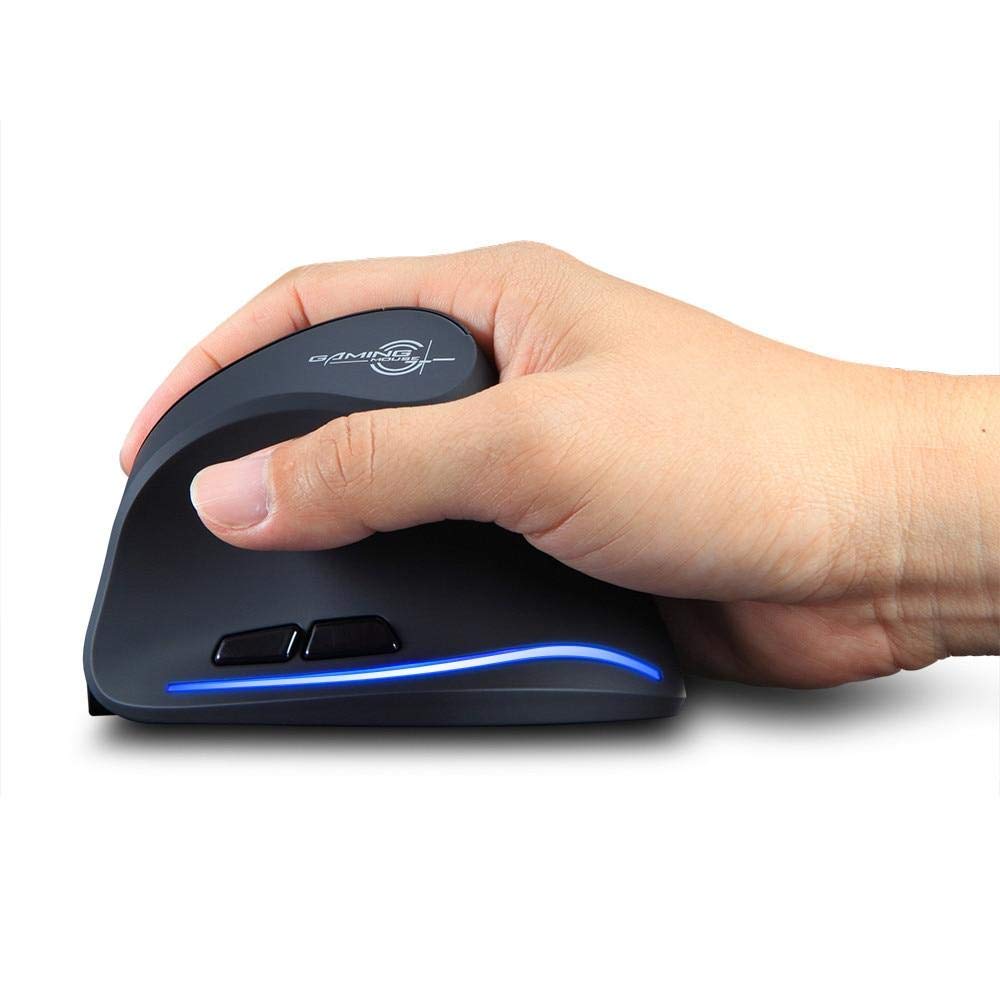
Image: The Zelotes F-35 Vertical Wireless Gaming Mouse, showcasing its unique ergonomic shape and illuminated accents.

Image: A visual comparison illustrating the natural hand position with a vertical mouse versus the twisted wrist position with a traditional horizontal mouse, highlighting the ergonomic benefits.
Інструкції з налаштування
- Увімкнення: Знайдіть перемикач УВІМК./ВИМК. на нижній частині миші та пересуньте його в положення «УВІМК.».
- Виберіть режим підключення: The mouse supports three connection modes: 2.4GHz wireless (via USB dongle), Bluetooth 1, and Bluetooth 2. Use the 'Mode Switch' button on the bottom of the mouse to cycle through these options. The corresponding indicator light will illuminate.
- Бездротове підключення 2.4 ГГц:
- Remove the USB receiver dongle from its storage slot on the bottom of the mouse.
- Підключіть USB-приймач до вільного USB-порту комп’ютера або ноутбука.
- Миша має підключитися автоматично.
- З’єднання Bluetooth (BT1/BT2):
- Switch the mouse to either Bluetooth 1 or Bluetooth 2 mode using the 'Mode Switch'.
- На комп’ютері або ноутбуці перейдіть до налаштувань Bluetooth та знайдіть нові пристрої.
- Select 'Zelotes F-35' from the list of available devices to pair.

Image: The underside of the Zelotes F-35 mouse, highlighting the ON/OFF switch, mode switch, and the integrated storage slot for the 2.4GHz USB receiver dongle.
Інструкція з експлуатації
The Zelotes F-35 mouse features 6 buttons designed for intuitive control and enhanced productivity:
- Ліва кнопка миші: Стандартна функція первинного клацання.
- Клацніть правою кнопкою миші: Стандартна функція вторинного клацання.
- Колесо прокрутки: Scroll up or down for navigation. Can also be pressed for a middle-click function.
- Кнопка регулювання DPI: Located near the scroll wheel, press to cycle through different DPI settings (e.g., 800/1200/1600/2400) to adjust cursor sensitivity.
- Кнопка вперед: Located on the thumb rest, typically navigates forward in web браузери або file дослідники.
- Кнопка "Назад": Located on the thumb rest, typically navigates backward in web браузери або file дослідники.
Зарядка та акумулятор
The Zelotes F-35 mouse is equipped with a rechargeable battery for continuous use.
- Порт зарядки: The mouse features a USB-C charging port, typically located at the front base of the mouse.
- Зарядка: Connect the provided USB-C cable to the mouse and the other end to a USB power source (e.g., computer USB port, wall adapter).
- Індикатор батареї: The mouse may have an indicator light to show charging status or low battery. Refer to the product packaging for specific indicator behavior.
- Термін служби батареї: The average battery life is approximately 12 months, depending on usage.
Технічне обслуговування
- Прибирання: Використовуйте м’яку суху тканину для очищення поверхні миші. Для стійкого бруду злегкаamp можна використовувати тканину, щоб уникнути потрапляння вологи до внутрішніх компонентів.
- Догляд за датчиком: Тримайте оптичний датчик на нижній частині миші чистим та без пилу чи сміття, щоб забезпечити точне відстеження.
- Зберігання: When not in use for extended periods, turn off the mouse to conserve battery life. Store the USB receiver in its designated slot to prevent loss.
Усунення несправностей
- Миша не реагує:
- Переконайтеся, що миша увімкнена.
- Перевірте рівень заряду акумулятора та за потреби зарядіть його.
- Для підключення 2.4 ГГц переконайтеся, що USB-приймач надійно підключено до комп’ютера.
- Для підключення Bluetooth переконайтеся, що Bluetooth увімкнено на вашому пристрої, а миша правильно сполучена. Якщо проблеми не зникають, спробуйте повторити сполучення.
- Неточне відстеження:
- Очистіть оптичний датчик на нижній частині миші.
- Переконайтеся, що ви використовуєте мишу на відповідній поверхні (неблискучій, не скляній).
- Налаштуйте роздільну здатність (DPI) на комфортний рівень.
- Перебої з’єднання:
- Ensure the mouse is within the effective range of your device (typically up to 10 meters for wireless).
- Мінімізуйте перешкоди від інших бездротових пристроїв.
Технічні характеристики
| Особливість | Деталь |
|---|---|
| Бренд | Zelotes |
| Модель | Ф-35 |
| Тип | Бездротовий зв'язок 2.4 ГГц, Bluetooth |
| Режим роботи | Оптико-електронні |
| Кількість кнопок | 6 |
| Кількість роликів | 1 |
| Орієнтація руки | правильно |
| Тип інтерфейсу | USB |
| DPI | 2400 |
| Особливість | Rechargeable, Wireless |
| Виявлення руху | Оптичний |
| Сумісні пристрої | Ноутбук, персональний комп'ютер |
| Операційна система | Linux, Windows 7 (і новіші версії) |
| Середній термін служби батареї | 12 місяці |
| Джерело живлення | Працює від батареї |
| Колір | чорний |
| Країна походження | Китай |
Гарантія та підтримка
For warranty information and technical support, please refer to the documentation included with your product or visit the official Zelotes webсайт. Ви також можете звернутися за допомогою до продавця, у якого ви придбали продукт.