
Amazon Basics MDUDP-35AEN1-BA8
Інструкція користувача великого осушувача повітря Amazon Basics
Model: MDUDP-35AEN1-BA8 (35 Pint Standard)
1. Вступ
Thank you for choosing the Amazon Basics Large Dehumidifier. This manual provides important information for the proper setup, operation, and maintenance of your dehumidifier. Please read this manual thoroughly before using the appliance to ensure safe and efficient operation. Keep this manual for future reference.
Важлива інформація з безпеки
- Завжди ставте осушувач повітря на рівну, стійку поверхню.
- Забезпечте належний простір навколо пристрою для належної циркуляції повітря.
- Не використовуйте пристрій з пошкодженим шнуром живлення або вилкою.
- Від’єднайте пристрій від мережі перед чищенням або будь-яким технічним обслуговуванням.
- Зберігати в недоступному для дітей та домашніх тварин місці.
2. Продукт закінчивсяview
The Amazon Basics Large Dehumidifier is designed to effectively reduce humidity in spaces up to 2,500 square feet, maintaining optimal indoor humidity between 45-55% for enhanced comfort and air quality.

Малюнок 2.1: Спереду view of the Amazon Basics Large Dehumidifier.
Ключові компоненти
- Панель керування: Located on the top of the unit for easy access to settings.
- Вхід повітря: Місце, де вологе повітря потрапляє в пристрій.
- Вихід повітря: Місце виходу осушеного повітря з пристрою.
- Бак для води: Collects condensed water. Features a visible water level indicator.
- Багаторазовий фільтр: Located behind the air inlet, designed for easy cleaning.
- Колеса: Для легкого переміщення агрегату.

Малюнок 2.2: Закінченоview of the dehumidifier's key features including the control panel, auto-defrost, overflow protection, and auto-restart functionality.
Панель керування
The intuitive control panel allows for effortless dehumidification. It includes buttons for power, fan speed, timer, and humidity settings, along with indicator lights for various functions.

Figure 2.3: Detail of the control panel and water tank full indicator (A).
3. Налаштування
Розпакування та розміщення
- Обережно вийміть осушувач повітря з упаковки.
- Place the unit upright on a firm, level surface in the desired location. Ensure there is at least 8 inches (20 cm) of space around the unit for proper air circulation.
- Залиште пристрій у вертикальному положенні принаймні на 24 години, перш ніж підключати його до мережі. Це дозволить холодоагенту осісти.
Підключення живлення
Plug the grounded power cord into a suitable electrical outlet. The unit is designed for standard household electrical supply.
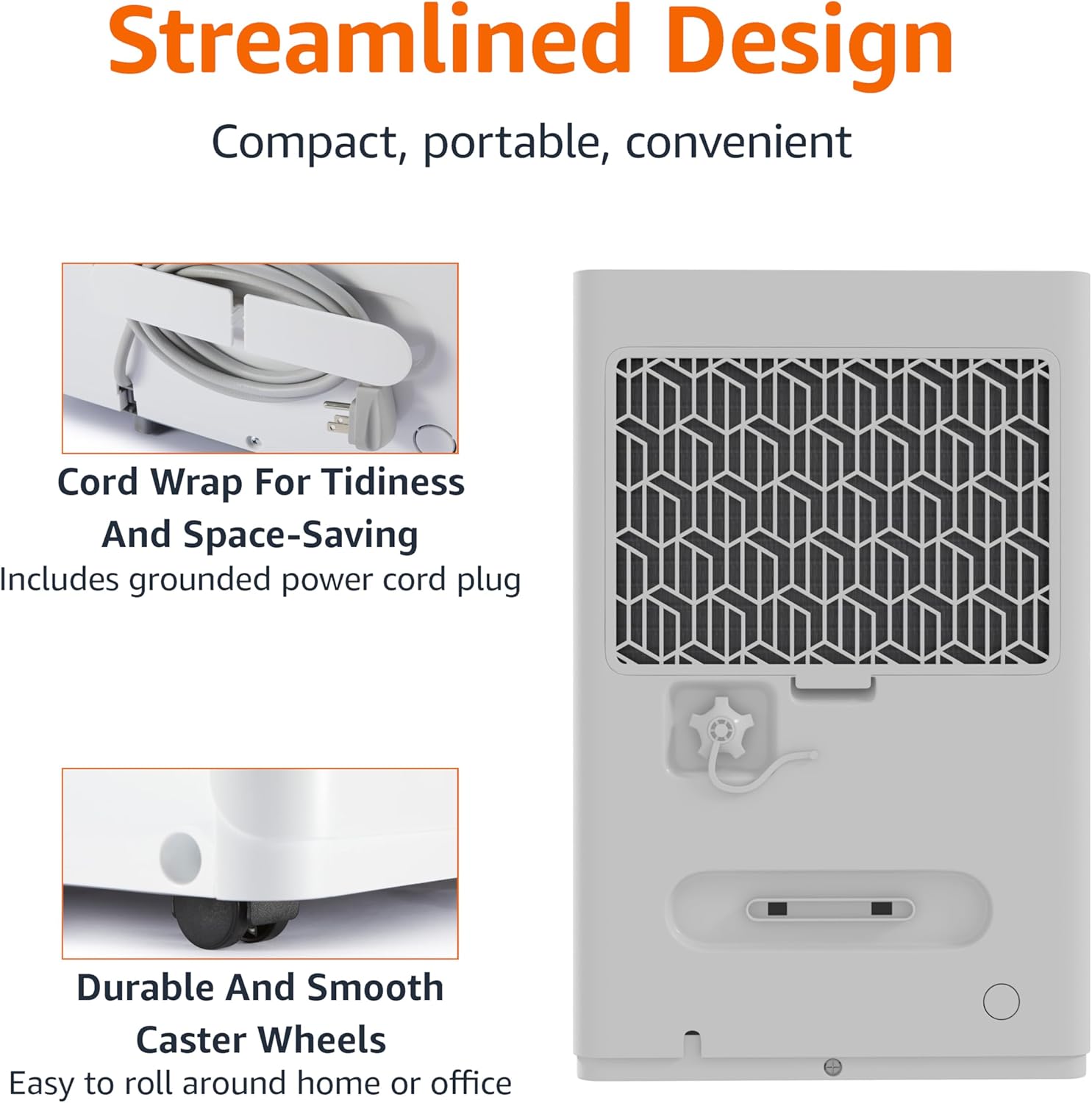
Figure 3.1: The dehumidifier features a cord wrap for tidiness and durable caster wheels for easy movement.
4. Інструкція з експлуатації
Увімкнення/вимкнення
- Натисніть потужність кнопку на панелі керування, щоб увімкнути або вимкнути пристрій.
Встановлення рівня вологості
The dehumidifier maintains optimal indoor humidity between 45-55%. You can adjust the target humidity using the control panel.
- Використовуйте Up і вниз arrow buttons to set your desired humidity level. The display will show the current humidity.
Функція таймера
The unit features a timer for scheduled operation.
- Натисніть Таймер button to set the desired operating time (from 0.5 to 24 hours). The unit will turn off or on after the set time.

Figure 4.1: The dehumidifier is ideal for standard 8 ft / 2.4 m ceilings and features a schedule on/off timer from 0.5 to 24 hours.
Auto-Defrost
The auto-defrost feature prevents frost build-up on the coils, ensuring continuous and efficient operation, especially in cooler environments.
Auto Re-start Function
У разі вимкнення живленняtage, the dehumidifier will automatically resume operation with your previous settings once power is restored, providing consistent humidity control without manual intervention.
5. Технічне обслуговування
Спорожнення резервуара для води
When the water tank is full, the unit will stop operating and an indicator light will illuminate. The water tank has a capacity of 1.59 gallons (6 liters).
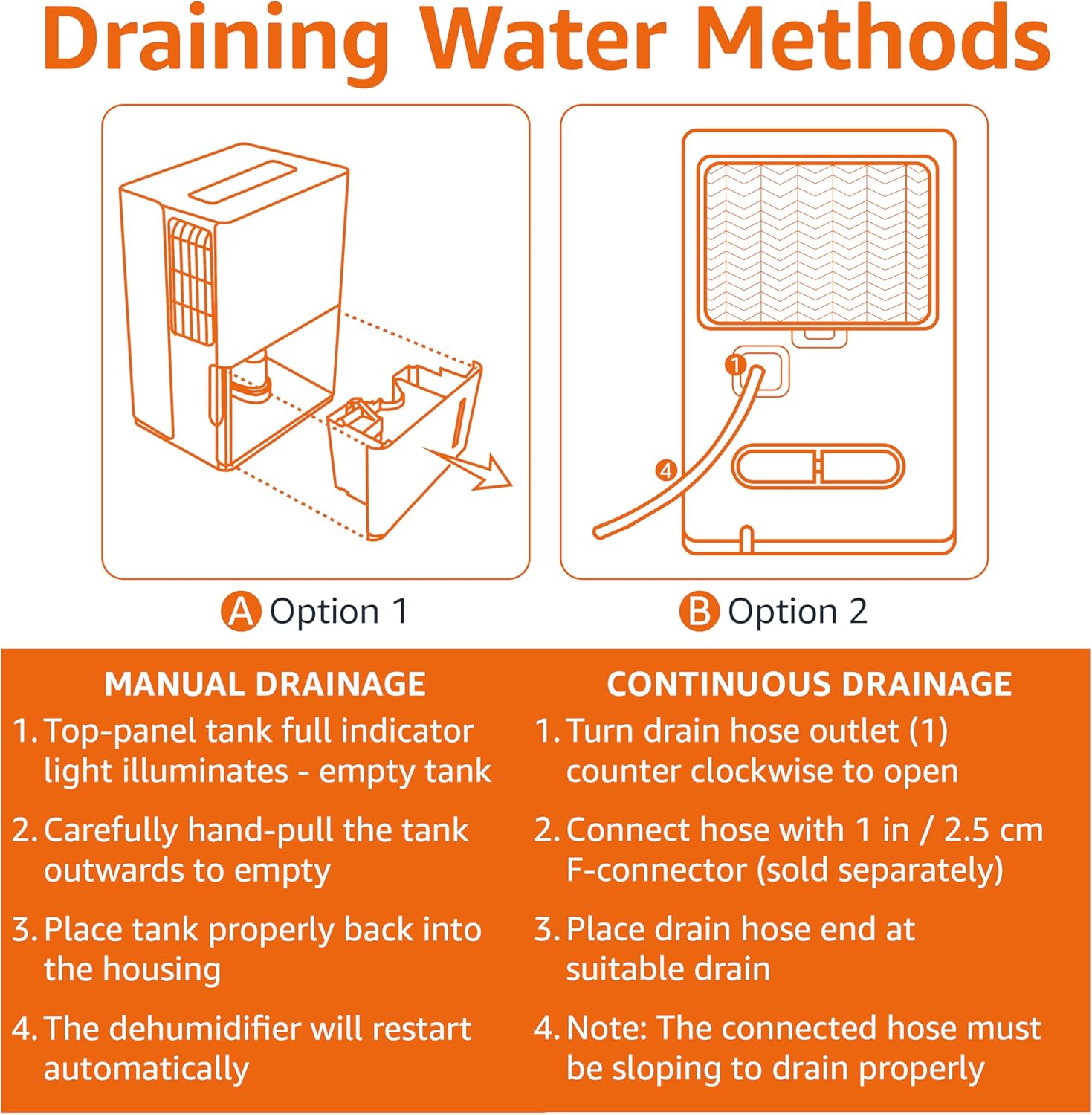
Figure 5.1: Manual and Continuous Drainage Methods.
Manual Drainage (Option 1)
- When the top-panel tank full indicator light illuminates, carefully pull the tank outwards to empty.
- Злийте зібрану воду.
- Place the tank properly back into the housing. The dehumidifier will restart automatically.
Continuous Drainage (Option 2)
- Turn the drain hose outlet counter-clockwise to open.
- Connect a standard garden hose (sold separately) with a 1 inch / 2.5 cm F-connector to the outlet.
- Place the drain hose end at a suitable drain (e.g., floor drain, sink).
- Примітка: The connected hose must be sloping downwards to drain properly.
Cleaning the Reusable Filter
The reusable filter is simple to clean, ensuring the unit performs at its best without frequent replacements.
- Від’єднайте осушувач повітря від розетки.
- Зніміть фільтр із задньої частини пристрою.
- Clean the filter with warm, soapy water. Rinse thoroughly.
- Дайте фільтру повністю висохнути на повітрі, перш ніж знову вставляти його в пристрій.
- Plug the dehumidifier back in.
6. Вирішення проблем
If you experience issues with your dehumidifier, please refer to the following common troubleshooting steps. For more detailed assistance, consult the full User Manual PDF or contact customer support.
| проблема | Можлива причина | Рішення |
|---|---|---|
| Осушувач повітря не вмикається. | Немає живлення; шнур живлення нещільно підключений. | Check power outlet and ensure cord is fully inserted. |
| Unit is not collecting water. | Water tank is full or not properly seated; Air filter is clogged; Room temperature is too low. | Empty and re-seat water tank; Clean air filter; Ensure room temperature is above 41°F (5°C). |
| Unit is running but humidity is not decreasing. | Room size exceeds unit capacity; Doors/windows are open; Air filter is clogged. | Ensure unit is appropriate for room size; Close all doors and windows; Clean air filter. |
| Пристрій шумить. | Unit is not on a level surface; Air filter is dirty. | Поставте пристрій на рівну поверхню; очистіть повітряний фільтр. |
7. Технічні характеристики
| Особливість | Деталь |
|---|---|
| Бренд | Основи Amazon |
| Назва моделі | MDUDP-35AEN1-BA8 |
| Ємність | 35 пінт на день |
| Покриття площі підлоги | До 2500 квадратних футів |
| Об'єм резервуара | 35 Pints (1.59 Gallons / 6 Liters) |
| Розміри продукту (Д x Ш x В) | 11.1" Г x 15.43" Ш x 24.25" В |
| Вага товару | 39.2 фунта |
| Колір | Білий |
| Енергетична сертифікація | Сертифіковано Energy Star |
| Режим роботи | Стандартний |
| Виробник | Amazon |
| UPC | 810004816732 |
8. Гарантія та підтримка
Обмежена гарантія
This Amazon Basics Dehumidifier comes with a 1-year limited warranty from the date of purchase. This warranty covers defects in materials and workmanship under normal use. For full warranty terms and conditions, please refer to the official User Manual PDF available online or contact Amazon Basics customer support.
Плани захисту
Extended protection plans are available for purchase to provide additional coverage beyond the standard manufacturer's warranty. These plans offer peace of mind for longer periods.
- 3-річний план захисту: Extends coverage for an additional 3 years.
- 4-річний план захисту: Extends coverage for an additional 4 years.
- Повний захист: Щомісячний план, що охоплює всі відповідні минулі та майбутні покупки.
Для отримання детальної інформації про покупкуasing these plans, please visit the product page on Amazon.com or contact Amazon customer service.
Підтримка клієнтів
For any questions, technical assistance, or warranty claims, please contact Amazon customer support through your Amazon account or visit the Amazon Basics Store online.
You can also access the official User Manual (PDF) for detailed instructions and diagrams: Завантажити посібник користувача (PDF)
Ask a question about this manual
Ask about setup, troubleshooting, compatibility, parts, safety, or missing instructions. Manuals+ will review the question and use this page’s manual context to help answer it.