
1. Вступ
This manual provides detailed instructions for the proper use and maintenance of your Zerone AYNEFY0oxm4abc37 USB Endoscope. This device is designed for visual inspection in hard-to-reach areas, offering compatibility with Android smartphones and various computer operating systems. Please read this manual thoroughly before operating the endoscope to ensure optimal performance and longevity.
2. Продукт закінчивсяview
2.1 Основні характеристики
- Компактний дизайн: Features a slim 5.5mm diameter lens for accessing narrow spaces.
- Рейтинг водонепроникності: IP67 waterproof-rated, suitable for moist or underwater inspections.
- Регульоване освітлення: Equipped with 6 adjustable LED lights to enhance visibility in dark environments.
- Зображення високої чіткості: 2.0MP CMOS HD camera provides clear and detailed images and videos.
- Міцна конструкція: Crafted from high-quality materials for reliability and extended use.
- Широка сумісність: 3-in-1 USB connector supports Android smartphones (with OTG function) and computers (Windows XP/W7/W8/VISTA/W10).
- Розширене охоплення: Includes a 5-meter USB cable for flexible inspection tasks.
2.2 Компоненти

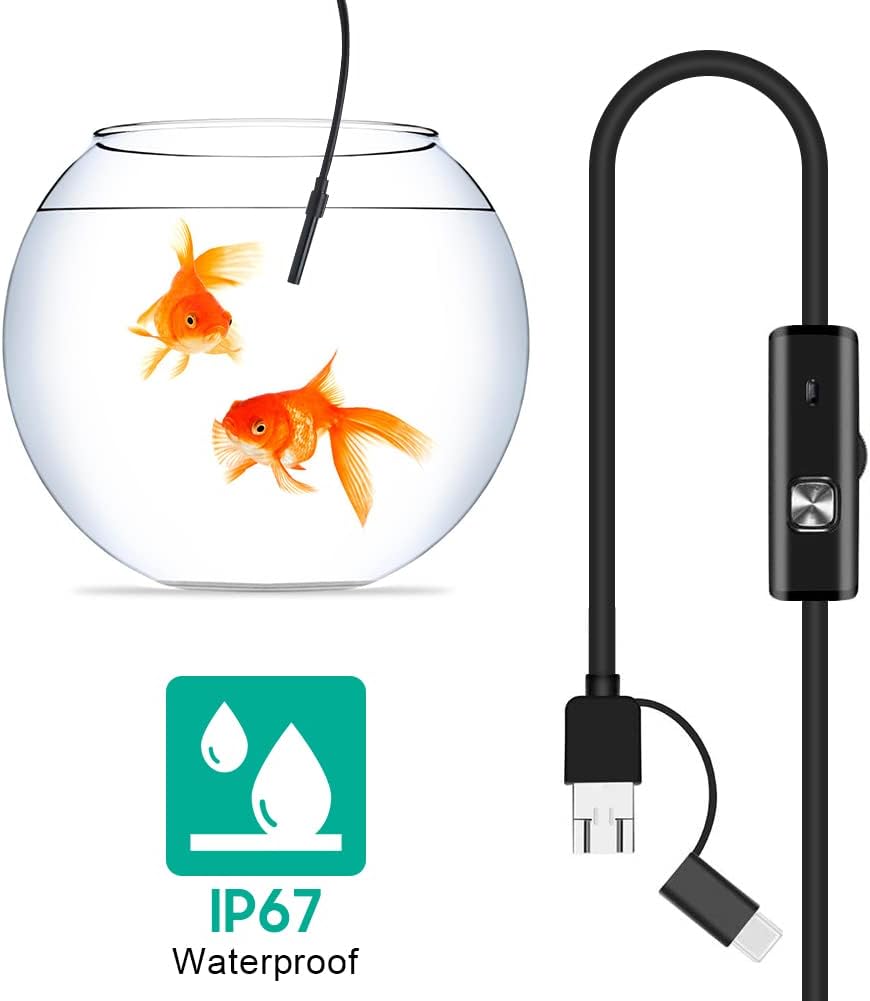


3. Налаштування
3.1 Системні вимоги
- Пристрої Android: Android 4.4 or higher with OTG (On-The-Go) and UVC (USB Video Class) support.
- комп'ютери: Windows XP, Windows 7, Windows 8, Windows Vista, Windows 10.
3.2 Встановлення програмного забезпечення
For Android devices, download and install a compatible camera application from the Google Play Store that supports USB OTG endoscopes. Recommended applications include 'USB Camera', 'AN98', or 'CameraFi'. For Windows computers, the device typically functions with the built-in 'Camera' application or other webcam software. Drivers are usually installed automatically upon connection.
3.3 Connecting the Endoscope
- Для Android: Connect the appropriate connector (Micro-USB or USB-C) of the endoscope cable to your smartphone. Ensure your phone's OTG function is enabled in settings if it doesn't automatically detect the device.
- Для ПК: Connect the standard USB-A connector of the endoscope cable to an available USB port on your computer.
- Open the installed camera application on your device. The endoscope feed should appear.
4. Інструкція з експлуатації
4.1 Регулювання яскравості світлодіодів
The control unit on the cable features a wheel or button to adjust the brightness of the 6 LED lights at the camera tip. Rotate the wheel or press the button to increase or decrease illumination as needed for clear viewing in various environments.
4.2 Використання аксесуарів
- Бічне дзеркало: Attach the side mirror to the camera tip to view objects at a 90-degree angle. This is useful for inspecting walls of pipes or tight corners.
- Магніт: Attach the magnet to the camera tip to retrieve small metallic objects from inaccessible areas.
- Гачок: Attach the hook to the camera tip to retrieve small non-metallic objects.
4.3 Захоплення зображень та відео
Use the functions within your chosen camera application to capture still images or record video footage from the endoscope. Refer to your application's specific instructions for these features.

5. Технічне обслуговування
5.1 Очищення
- After each use, gently wipe the camera lens and probe with a soft, dry cloth.
- Для стійкого бруду, злегкаamp cloth can be used, ensuring no liquid enters the control unit or connectors.
- Do not use abrasive cleaners or solvents, as these can damage the lens or casing.
5.2 Зберігання
- Store the endoscope in a cool, dry place, away from direct sunlight and extreme temperatures.
- Уникайте перегинів або різких згинів кабелю, щоб запобігти внутрішнім пошкодженням.
- Keep the lens cap on when not in use to protect the lens from dust and scratches.
6. Вирішення проблем
- No Image/Device Not Detected:
- Ensure the endoscope is securely connected to your device.
- For Android, verify that OTG function is enabled in your phone's settings.
- Спробуйте інший порт USB на комп’ютері.
- Ensure the correct camera application is open and selected (if multiple cameras are detected).
- Перезавантажте пристрій і повторіть спробу.
- Розмите зображення:
- The endoscope has a fixed focal length. Ensure the object being viewed is within the optimal focal range (typically a few centimeters from the lens).
- Очистіть об'єктив камери від будь-яких плям або сміття.
- Adjust the LED brightness to prevent overexposure or underexposure.
- Світлодіодні лампи не працюють:
- Check the LED brightness adjustment wheel/button on the control unit.
- Ensure the endoscope is properly connected and receiving power.
- Application Crashes/Freezes:
- Try a different compatible camera application.
- Переконайтеся, що операційна система вашого пристрою оновлена.
- Close other background applications to free up system resources.
7. Технічні характеристики
| Особливість | Специфікація |
|---|---|
| Номер моделі | AYNEFY0oxm4abc37 |
| Діаметр лінзи | 5.5 мм |
| Роздільна здатність камери | 2.0MP CMOS HD (Video Capture Resolution: 1080p) |
| Світлодіодні ліхтарі | 6 регульованих світлодіодів |
| Довжина кабелю | 5 метрів |
| Рейтинг водонепроникності | IP67 |
| Підключення | 3-in-1 USB (USB-A, Micro-USB, USB-C) |
| Сумісність | Android (OTG/UVC support), Windows XP/7/8/VISTA/10 |
| Розміри продукту | 4.72 x 4.72 x 1.38 дюймів |
| Вага товару | 4.6 унції |
| Колір | чорний |
| Виробник | Zerone |
8. Гарантія та підтримка
For warranty information or technical support, please refer to the product packaging or contact the retailer from whom the product was purchased. You may also visit the official Zerone webсайт для подальшої допомоги.