
1. Вступ
This manual provides essential instructions for the installation, operation, and maintenance of your Risco Panda Radio Keypad with Proximity Reader (Model RW332KPP800A). Please read this manual thoroughly before using the device to ensure proper functionality and safety. This device is designed to be an integral part of a security system, offering convenient control and access.
2. Продукт закінчивсяview
The Risco Panda Radio Keypad is a wireless input device for security systems, featuring an integrated proximity reader for easy arming and disarming. It communicates wirelessly via 868 MHz radio frequency, ensuring reliable connection to your main alarm panel.
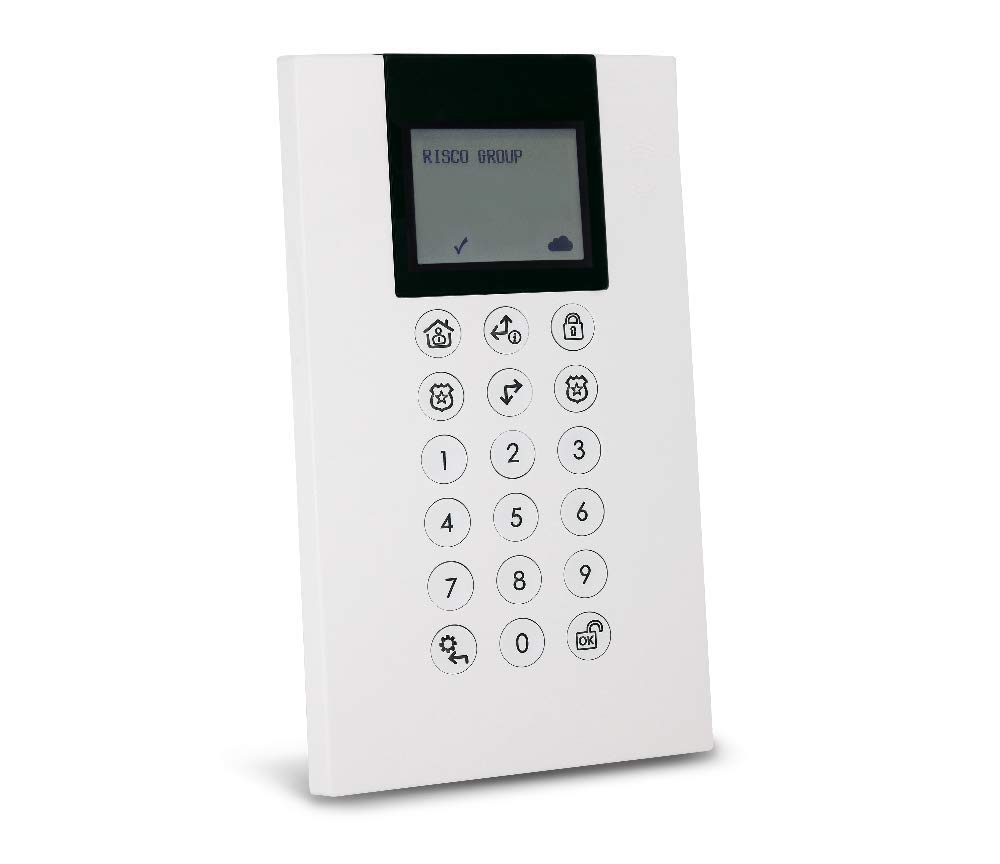
Image showing the Risco Panda Radio Keypad, featuring its white casing, numeric keypad, and integrated proximity reader.
Ключові характеристики:
- Integrated Proximity Reader
- 868 MHz Radio Communication
- Працює від акумуляторної батареї
- Membrane Keypad with QWERTY Layout
- 78 кнопок
- Міцний пластик
3. Налаштування
3.1 Розпакування та перевірка
Carefully remove the keypad from its packaging. Inspect for any signs of damage. Ensure all components are present.
3.2 Монтаж
Choose a suitable location for the keypad, typically near an entry/exit point. Ensure the mounting surface is flat and secure. Use appropriate screws and wall plugs (not included) to fix the keypad securely to the wall. Avoid mounting near large metal objects that could interfere with radio communication.
3.3 Powering the Keypad
The keypad is battery-powered and rechargeable. Connect the provided charging cable to the keypad and a suitable power source (e.g., USB adapter, not included) to fully charge the internal battery before first use. A full charge ensures optimal performance and battery life.
3.4 Pairing with the Alarm System
To integrate the keypad with your Risco alarm system, follow these steps:
- Put your main Risco alarm panel into 'Enrollment' or 'Programming' mode (refer to your alarm panel's manual for specific instructions).
- On the Panda Radio Keypad, enter the designated pairing sequence (e.g., a specific key combination or holding a button). This will transmit the keypad's unique identifier to the alarm panel via 868 MHz radio frequency.
- Confirm successful pairing on your alarm panel. The keypad should now be recognized as a zone or input device.
- Test the communication by sending a command from the keypad (e.g., arming the system) and verifying the response on the alarm panel.
4. Інструкція з експлуатації
4.1 Озброєння системи
To arm your security system using the keypad:
- Using Code: Enter your valid user code followed by the 'Arm' button (or equivalent).
- Using Proximity Reader: Present your authorized proximity tag or card to the integrated reader on the keypad. The system will provide an audible and/or visual confirmation of arming.
4.2 Зняття з озброєння системи
To disarm your security system:
- Using Code: Enter your valid user code followed by the 'Disarm' button (or equivalent).
- Using Proximity Reader: Present your authorized proximity tag or card to the integrated reader. The system will provide an audible and/or visual confirmation of disarming.
4.3 Keypad Input
The keypad features a QWERTY layout with 78 membrane buttons. Use the numeric keys for code entry and the function keys for specific system commands (e.g., panic, bypass, status check). Refer to your main alarm panel's manual for specific command codes and functions.
5. Технічне обслуговування
5.1 Очищення
To clean the keypad, use a soft, dry, or slightly damp cloth. Do not use abrasive cleaners, solvents, or excessive moisture, as these can damage the plastic material and electronic components.
5.2 Керування батареєю
The keypad is powered by a rechargeable battery. When the battery level is low, the keypad or your main alarm panel will indicate a low battery warning. Recharge the keypad promptly using the provided charging cable. Battery life varies depending on usage and environmental factors. If the battery no longer holds a charge, contact Risco support or a qualified technician for replacement.
6. Вирішення проблем
- Клавіатура не реагує:
Можлива причина: Низький заряд батареї або відсутність живлення.
рішення: Recharge the keypad's battery. Ensure the charging cable is properly connected.
Можлива причина: Communication loss with the alarm panel.
рішення: Verify the alarm panel is powered on and within range. Re-pair the keypad if necessary (refer to Section 3.4). - Proximity Reader Not Working:
Можлива причина: Несанкціонований tag/card.
рішення: Ensure you are using an authorized proximity tag or card that has been programmed into the system.
Можлива причина: Reader malfunction.
рішення: Test with another authorized tag. If the issue persists, contact support. - Система не вмикається/не вмикається з охорони:
Можлива причина: Неправильний код користувача.
рішення: Double-check the entered code. Ensure it is valid and active.
Можлива причина: System fault or open zone.
рішення: Check your main alarm panel for any fault indications (e.g., open doors/windows) preventing arming.
7. Технічні характеристики
| Бренд | Ріско |
| Номер моделі | RW332KPP800A |
| Довідка виробника | RISCO20 |
| Технологія підключення | РЧ (868 МГц) |
| Особливості | Перезаряджається |
| Сумісні пристрої | Laptop (for configuration/management), Risco Alarm Panels |
| Опис клавіатури | Мембрана |
| матеріал | пластик |
| Джерело живлення | Працює від батареї |
| Тип перемикача | Мембрана |
| Розкладка клавіатури | QWERTY |
| Кількість кнопок | 78 |
| Розміри | 102 x 178 x 37 мм |
8. Гарантія та підтримка
Information regarding specific warranty terms, spare parts availability, and guaranteed software updates for the Risco Panda Radio Keypad (RW332KPP800A) is not available in the provided product details. For detailed warranty information, technical support, or to inquire about spare parts, please contact your product retailer or the official Risco customer support directly. Keep your proof of purchase for any warranty claims.