
вступ
This manual provides comprehensive instructions for the setup, operation, and maintenance of your Zerone Universal Remote Control. This remote is designed to function with various Pioneer DVD player models, offering a convenient replacement or secondary control unit.
Сумісність
The Zerone Universal Remote Control is compatible with the following Pioneer DVD player models:
- Pioneer VXX2811
- Pioneer VXX2914
- Pioneer VXX3218
- Pioneer VXX2801
- Pioneer VXX2800
- Pioneer VXX2913
For optimal performance, ensure your DVD player model is listed above.
Налаштування
1. Встановлення батареї
- Знайдіть батарейний відсік на задній панелі пульта дистанційного керування.
- Посуньте кришку батарейного відсіку вниз або натисніть на засувку та підніміть, щоб відкрити.
- Insert two (2) AA 1.5V batteries, ensuring the positive (+) and negative (-) terminals align correctly with the markings inside the compartment.
- Встановіть кришку батарейного блоку, зсунувши її назад на місце до клацання.
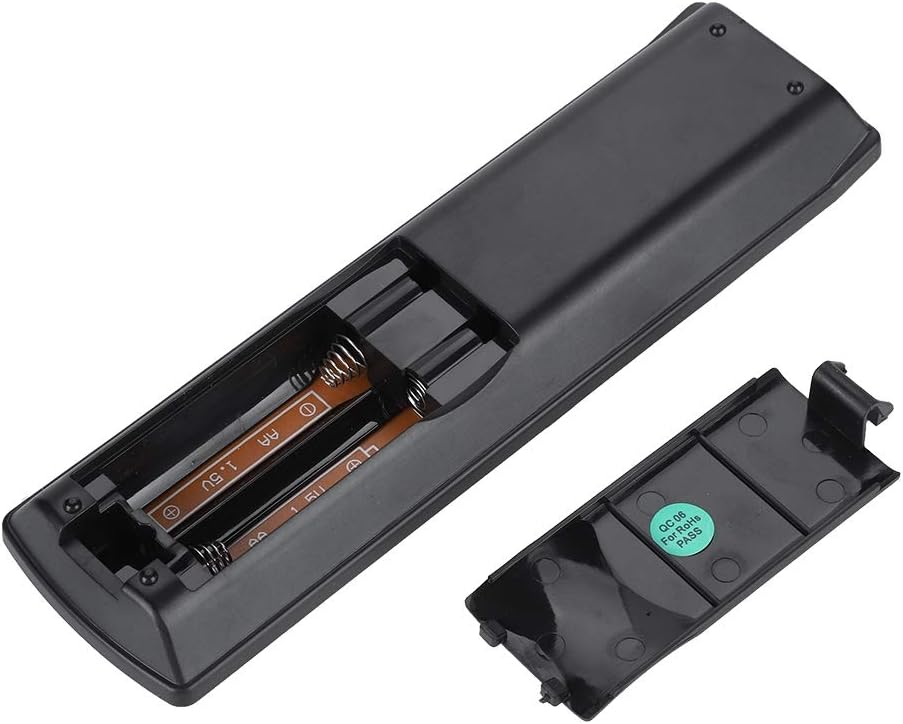
Зображення: Задня частина view of the Zerone remote control, showing the battery compartment cover.

Image: The battery compartment of the remote control with two AA batteries correctly inserted.
No programming or setup is required. Once batteries are installed, the remote is ready for use with compatible Pioneer DVD players.
Інструкція з експлуатації
Point the remote control directly at your Pioneer DVD player. The effective control distance is typically over 8 meters (approximately 26 feet), though this may vary based on environmental factors and the specific DVD player model.

Зображення: спереду view of the Zerone Universal Remote Control, displaying all buttons and their labels.
Ключові функції:
- РЕЖИМ ОЧІКУВАННЯ/УВІМК.: Powers the DVD player on or off.
- ВІДКРИТИ/ЗАКРИТИ: Відкриває або закриває лоток для дисків.
- АУДІО: Selects audio tracks or languages.
- ПІДЗВАГА: Toggles or selects subtitle options.
- КУТ: Змінює viewing angle if supported by the DVD.
- Цифрові кнопки (0-9): Direct track selection or input.
- ОЧИСТИТИ: Clears numerical input.
- Введіть: Підтверджує вибір.
- ТОП МЕНЮ: Accesses the main menu of the DVD.
- МЕНЮ: Accesses the disc menu.
- HOME MENU: Navigates to the home menu of the DVD player.
- ПОВЕРНЕННЯ: Повернення до попереднього екрана або меню.
- Directional Pad (Up, Down, Left, Right) & ENTER: Навігація по меню та підтвердження вибору.
- Playback Controls (Play, Pause, Stop, Fast Forward, Rewind, Skip Forward, Skip Backward): Standard media playback functions.
- РЕЖИМ ВІДТВОРЕННЯ: Selects playback modes (e.g., repeat, shuffle).
- ОБ'ЄМНИЙ ЗВУК: Adjusts surround sound settings.
- ЗООМ: Zooms in or out on the video.
- ДИСПЛЕЯ: Shows on-screen display information.

Image: A hand holding the Zerone remote control, demonstrating its ergonomic design and ease of use.

Image: The remote control positioned in front of a television displaying content, illustrating its intended use.

Image: A visual representation of the remote control's effective operating distance, indicating a range of over 8 meters.
Технічне обслуговування
- Прибирання: Протирайте пульт дистанційного керування м’якою сухою тканиною. Не використовуйте рідкі засоби для чищення або абразивні матеріали.
- Заміна батареї: Замініть батарейки, коли пульт дистанційного керування реагує повільно або перестає працювати. Завжди замінюйте обидві батарейки одночасно на нові.
- Зберігання: Зберігайте пульт дистанційного керування в прохолодному, сухому місці, подалі від прямих сонячних променів та екстремальних температур.
- Уникайте пошкоджень: Do not drop the remote or expose it to water.
Усунення несправностей
- Пульт не відповідає:
- Переконайтеся, що батарейки встановлені правильно з дотриманням полярності.
- Replace old batteries with new AA batteries.
- Check for any obstructions between the remote control and the DVD player's infrared sensor.
- Ensure you are within the effective operating range (typically within 8 meters).
- Певні функції не працюють:
- Verify that your Pioneer DVD player model is listed in the compatibility section.
- Some advanced functions may be specific to the original remote or not supported by all DVD player models.
Технічні характеристики
| Матеріал оболонки | High-grade ABS |
| Контрольна відстань | > 8 meters (316 inches) |
| Тип батареї | 2 x AA 1.5V Batteries (Not included) |
| Розміри | Приблизно 174 x 49 x 20 мм (6.85 x 1.93 x 0.79 дюйма) |
| вага | Приблизно 75 г (2.46 унції) |
| Номер моделі | 743562180017 |
Гарантія та підтримка
For warranty information or technical support, please refer to the documentation provided with your purchase or contact the manufacturer, Zerone, directly through their official channels. Keep your purchase receipt as proof of purchase.