
вступ
This manual provides instructions for the Extreme Networks Summit X460-24p, a high-performance, managed Layer 3 Ethernet switch designed for enterprise and data center environments. It features 24 Gigabit Ethernet ports with Power over Ethernet (PoE) capabilities, along with additional SFP and shared Gigabit SFP ports for flexible connectivity.
Інформація про безпеку
Правила безпеки
- Always disconnect all power supply inputs before removing any panel for servicing.
- This device contains a Class 1 Laser product. Avoid direct eye exposure to beam.
- Забезпечте належне заземлення під час встановлення.
- Refer to the installation manual for power cord selection and additional compliance markings.
Вміст упаковки
Що в коробці
- Extreme Networks Summit X460-24p Switch
- Шнур живлення (залежно від регіону)
- Набір для монтажу в стійку
- Документація (цей посібник)
Продукт закінченийview
The Summit X460-24p switch is designed for efficient network management and high-speed data transfer.
Задня панель

This image displays the rear panel of the Summit X460-24p switch, highlighting the power input, fan modules, and the SummitStack ports. The overall chassis is purple.

Детальний view of the SummitStack ports (Stack Port 1 and Stack Port 2) located on the rear of the switch, used for stacking multiple switches.
Етикетка продукту
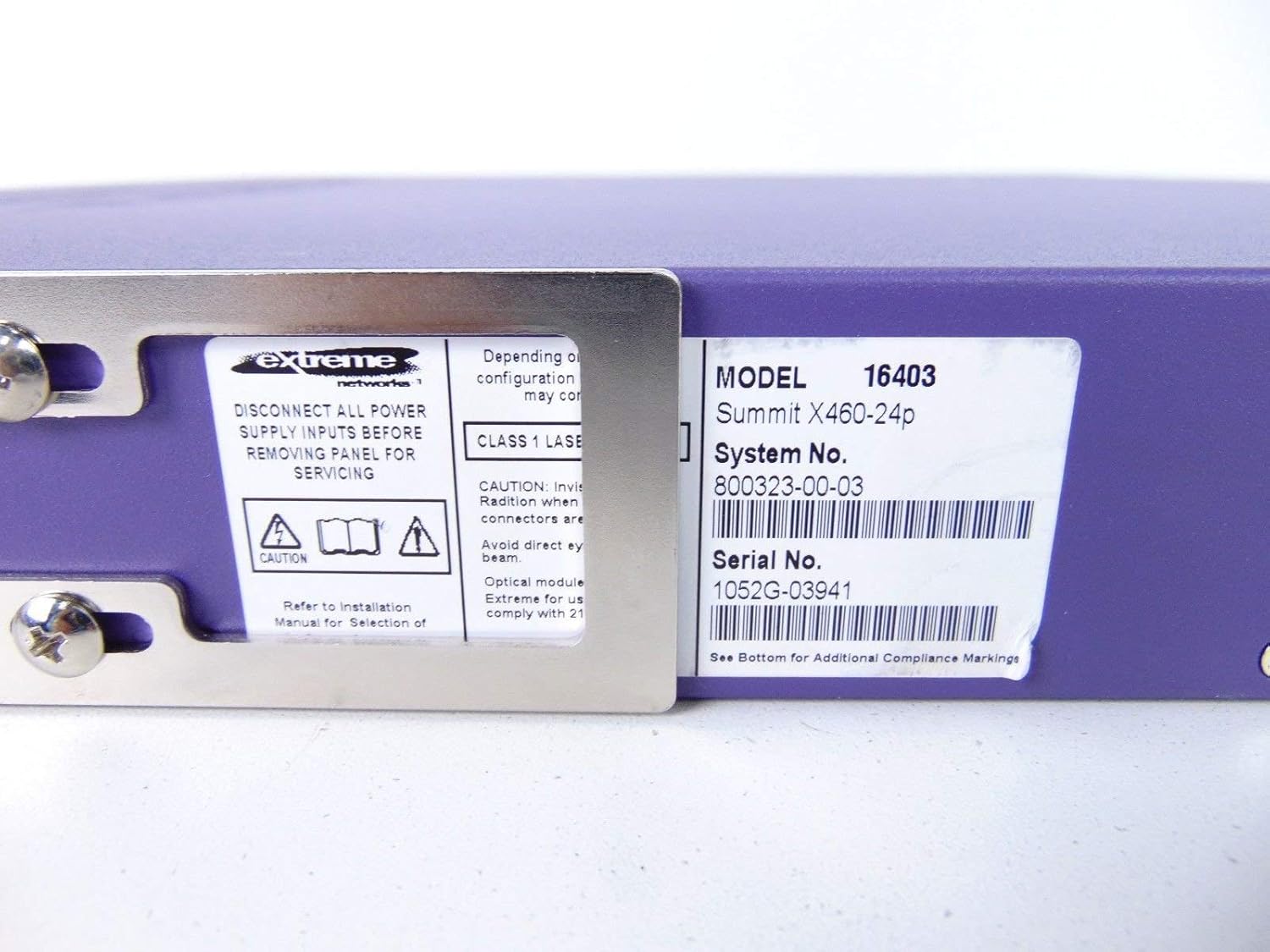
This label provides critical identification information for the switch, including Model: 16403, Summit X460-24p, System No.: 800323-00-03, and Serial No.: 1052G-03941.
Додаткові компоненти

This image shows the label for an optional Extreme Networks Summit 750W PoE AC Power Supply Unit (PSU), Model 10931, System No. 800382-00-03, Serial No. 1053A-41986.

This image displays the label for an optional Extreme Networks SummitStack Module, Model 16419, System No. 800384-00-01, Serial No. 1122G-02565.
Налаштування
Керівництво по установці
Кріплення в стійку
The Summit X460-24p is designed for standard 19-inch rack mounting. Use the provided rack-mounting kit to secure the switch in a server rack. Ensure adequate ventilation around the unit.
Підключення живлення
Connect the power cord to the AC power inlet on the rear of the switch and then to a grounded electrical outlet. The switch will power on automatically.
Підключення мережевих кабелів
- Connect Ethernet cables from your network devices to the 24 10/100/1000Base-T PoE ports on the front panel.
- For uplink or fiber connections, use the SFP or shared Gigabit SFP ports.
- For stacking, connect SummitStack ports on multiple switches using appropriate stacking cables.
Initial Configuration Access
Access the switch's management interface via a console cable connected to the console port, or through a web browser if the switch has a default IP address configured. Refer to the Extreme Networks documentation for detailed initial setup procedures.
Інструкція з експлуатації
Основна операція
Увімкнення/вимкнення живлення
The switch powers on automatically when connected to a power source. To power off, disconnect the power cord. For proper shutdown, it is recommended to use the software-based shutdown command if available.
Світлодіодні індикатори
Observe the LED indicators on the front panel for status information regarding power, system health, port activity, and PoE status. Consult the full product documentation for a detailed explanation of each LED's behavior.
Інтерфейс управління
Комутатором можна керувати через інтерфейс командного рядка (CLI), доступний через консольний порт або Telnet/SSH, або через webграфічний інтерфейс користувача (GUI) на основі.
Технічне обслуговування
Догляд та обслуговування
прибирання
Keep the switch clean and free of dust. Use a soft, dry cloth for external cleaning. Do not use liquid or aerosol cleaners.
Оновлення мікропрограми
Periodically check the Extreme Networks support website for firmware updates to ensure optimal performance and security. Follow the provided instructions for firmware upgrade procedures.
Модулі вентиляторів та блоків живлення
The switch may feature hot-swappable fan and power supply modules. Refer to the Extreme Networks documentation for instructions on replacement if necessary.
Усунення несправностей
Загальні питання
Немає живлення
- Переконайтеся, що шнур живлення надійно підключений як до комутатора, так і до розетки.
- Перевірте справність розетки.
Port Link Down
- Перевірте підключення кабелю Ethernet з обох кінців.
- Переконайтеся, що підключений пристрій увімкнено та працює належним чином.
- Перевірте стан порту через інтерфейс керування.
Проблеми з підключенням до мережі
- Verify IP configuration and network settings.
- Check for conflicting IP addresses.
- Consult network diagnostics tools.
Технічні характеристики
Технічні характеристики
| Особливість | опис |
|---|---|
| Модель | Summit X460-24p (Part Number: 16403) |
| Порти | 24 x 10/100/1000Base-T PoE+ ports, 4 x shared Gigabit SFP, 4 x SFP |
| Шар | Керований комутатор рівня 3 |
| Бренд | Екстремальні мережі |
| Тип інтерфейсу | PoE, SFP |
| Номер системи | 800323-00-03 |
| Серійний номер | 1052G-03941 |
| UPC | 683332278646 |
Гарантія та підтримка
Інформація про гарантію
This product typically comes with a 90-day limited warranty. For specific warranty terms and conditions, please refer to the official Extreme Networks warranty statement or contact your vendor.
Технічна підтримка
For technical assistance, visit the official Extreme Networks support webсайт або зверніться до служби підтримки клієнтів. Підготуйте модель вашого продукту та серійний номер, коли звертаєтесь за допомогою.