
1. Вступ
This manual provides detailed instructions for the installation, operation, and maintenance of your ESX VN715-E39-DAB In-Car Navigation and Multimedia System. Please read this manual thoroughly before using the device to ensure proper functionality and to prevent damage. Keep this manual for future reference.
2. Продукт закінчивсяview і особливості
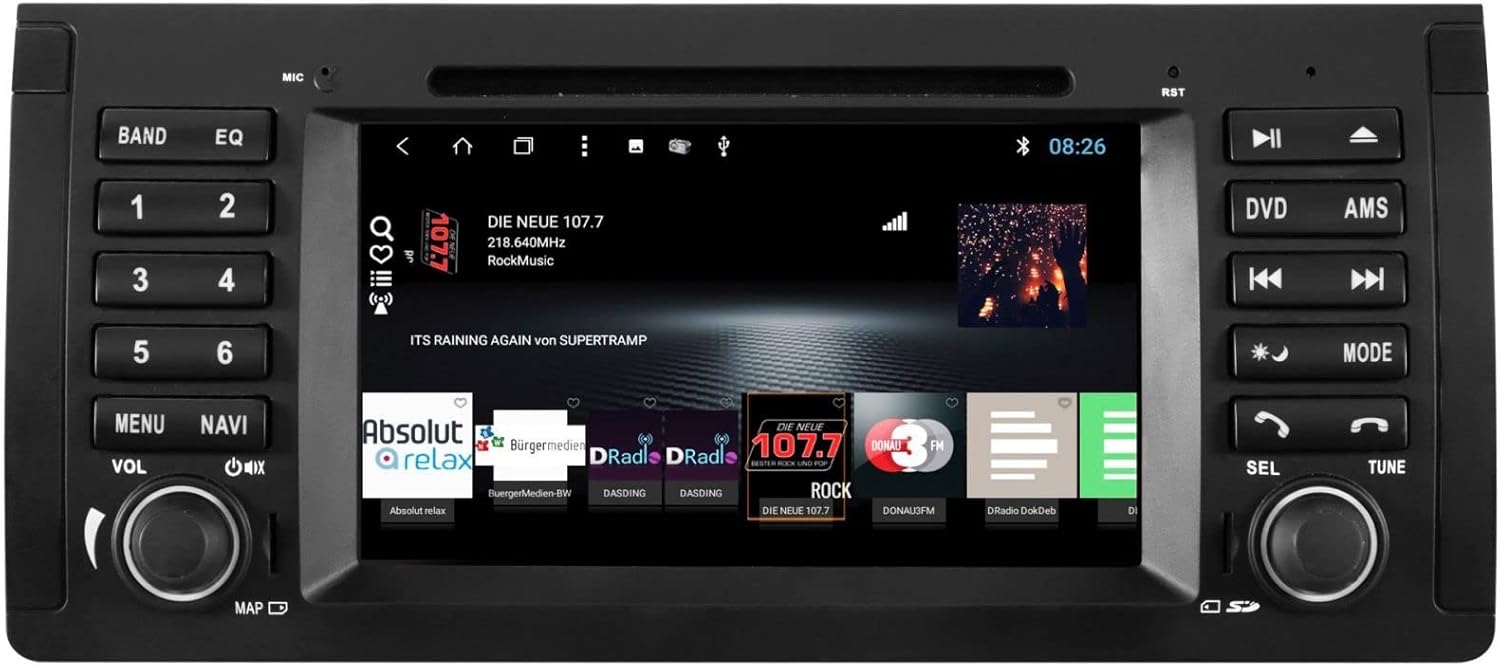
The ESX VN715-E39-DAB is an advanced in-car multimedia system designed to enhance your driving experience with navigation, entertainment, and connectivity features. It integrates seamlessly into compatible BMW vehicles.
Ключові характеристики:
- High-Resolution 8-inch Touchscreen: Provides clear visuals and intuitive control.
- Advanced Android i15 Operating System: Offers a familiar and customizable user interface.
- Google Maps Navigation: Supports both online and offline navigation for reliable route guidance.
- Mobile Internet Connectivity: Connects via Wi-Fi hotspot for online services.
- Цифрове радіо DAB+: Includes a DAB antenna for high-quality digital radio reception with station logos.
- AM/FM Radio with RDS: Standard analog radio reception with Radio Data System functionality.
- Multi-format DVD Player: Supports DVD, DVD-R/RW, DVD+R/RW, VCD, CD, CD Text, CD-R/RW, and MP3 formats.
- Bluetooth Hands-Free Kit: Enables safe phone calls and audio streaming with an internal microphone and optional external microphone connection.
- Інтеграція зі смартфоном: Connect iPhone or Android smartphones via USB for various functions.
- Голосове керування: Utilize voice commands through a connected smartphone.
- Аудіо виходи: доamplifier outputs for front, rear, subwoofer, and center channels.
- Вхід камери: One adjustable camera input for reverse cameras.
- Допоміжні входи/виходи: One AUX video input, two audio/video outputs, and one AUX audio input.
- Порти USB: Two USB ports for media and connectivity.
- Слот для карти Micro SD: Dedicated slot for navigation data and media files.
- Налаштування: Personalize with customizable logos and wallpapers.
- Authenticity Certificate: Included with the product.
3. Налаштування та встановлення
Installation of the ESX VN715-E39-DAB system requires technical knowledge and should ideally be performed by a qualified professional. Incorrect installation can lead to damage to the device or vehicle electrical system.
Сумісність:
This unit is compatible with specific BMW models and connector types:
- BMW 5 Series E39 (1996-2001) with 17-pin system connector.
- BMW 5 Series E39 (2002-2003) with 40-pin system connector.
- BMW X5 E53 (2000-2001) with 17-pin system connector.
- BMW X5 E53 (2002-2007) with 40-pin system connector.
- BMW M5 (1996-2003) with 17/40-pin system connector.
Загальні кроки встановлення (рекомендується професійне встановлення):
- Від'єднайте батарею: Завжди від'єднуйте акумулятор автомобіля перед початком будь-яких електромонтажних робіт.
- Видалити існуючий блок: Carefully remove the factory radio or navigation system from the dashboard.
- Підключіть джгут проводів: Connect the appropriate wiring harness (17-pin or 40-pin) to the vehicle's electrical system and the ESX unit. Ensure all connections are secure.
- Підключіть антени: Connect the GPS antenna, DAB antenna, and radio antenna to their respective ports on the unit. Position the antennas for optimal reception.
- Підключення периферійних пристроїв: Connect any optional accessories such as a reverse camera, external microphone, USB devices, or auxiliary inputs/outputs.
- Встановіть пристрій: Securely mount the ESX unit into the dashboard opening.
- Повторне підключення батареї: Знову підключіть акумулятор автомобіля та перевірте систему.

4. Інструкція з експлуатації
Familiarize yourself with the touchscreen interface and physical buttons for optimal use.
4.1 Основна операція
- Увімкнення/вимкнення живлення: Press and hold the power button (usually the VOL knob) to turn the unit on or off. A short press typically mutes or unmutes the audio.
- Регулювання гучності: Rotate the VOL knob to adjust the audio volume.
- Інтерфейс сенсорного екрану: Navigate through menus and applications by tapping, swiping, and pinching on the 8-inch touchscreen.

4.2 Навігація
Access the navigation application (e.g., Google Maps) from the home screen. Input your destination, and the system will provide turn-by-turn directions. Ensure GPS antenna is properly connected for accurate positioning.

4.3 Radio (DAB+/AM/FM)
- Виберіть режим: Tap the 'Radio' or 'DAB+' icon on the home screen or press the 'BAND' button.
- Станції сканування: Use the 'AMS' (Auto Memory Store) button or on-screen controls to scan and save available stations.
- мелодія: Manually tune using the 'TUNE' knob or on-screen frequency controls.
- Пресети: Save your favorite stations to preset buttons (1-6) for quick access.

4.4 Підключення Bluetooth
- Сполучення: Go to the Bluetooth settings on the unit and your smartphone. шукати available devices and select 'ESX VN715-E39-DAB'. Enter the PIN if prompted (usually '0000' or '1234').
- Дзвінки в режимі Hands-Free: Once paired, you can make and receive calls directly through the unit.
- Потокове аудіо: Play music from your smartphone via Bluetooth A2DP.
4.5 Media Playback (DVD/USB/SD)
- DVD: Insert a DVD into the disc slot. The system will automatically switch to DVD mode or prompt you to select it.
- USB/SD: Insert a USB drive into a USB port or an SD card into the Micro SD slot. Access media files through the 'Media' or 'File Explorer' application.
5. Технічне обслуговування
Regular maintenance ensures the longevity and optimal performance of your ESX VN715-E39-DAB system.
- Очищення екрану: Використовуйте м’яку тканину без ворсу, щоб обережно протерти сенсорний екран. Для стійких плям злегкаampПротріть тканину водою або засобом для чищення екранів. Уникайте агресивних хімікатів.
- Оновлення програмного забезпечення: Періодично перевіряйте наявність оновлень програмного забезпечення від офіційного виробника website or through the unit's system settings (if available) to ensure you have the latest features and bug fixes.
- Disc Drive Care: Keep the DVD slot free of dust and debris. Avoid inserting damaged or non-standard discs.
6. Вирішення проблем
If you encounter issues with your unit, refer to the following common troubleshooting steps:
| проблема | Можлива причина | Рішення |
|---|---|---|
| Немає живлення | Нещільне з'єднання живлення, перегорілий запобіжник, проблема з акумулятором автомобіля. | Check power cables and fuse. Ensure vehicle battery is charged. Consult a professional if issues persist. |
| Немає звуку | Volume muted, speaker wires disconnected, incorrect audio source. | Check volume level and mute status. Verify speaker connections. Select the correct audio source. |
| Втрачено сигнал GPS | GPS antenna improperly connected or obstructed, unit in an area with poor satellite reception. | Переконайтеся, що GPS-антена надійно підключена та має чіткий сигнал view неба. Перейдіть на відкриту місцевість. |
| Помилка сполучення Bluetooth | Bluetooth not enabled on device, incorrect PIN, device out of range. | Ensure Bluetooth is active on both devices. Re-enter PIN. Bring devices closer. Restart both devices. |
| Сенсорний екран не реагує | Зависання системи, бруд на екрані. | Perform a soft reset (refer to device settings or power cycle). Clean the screen. |
If these steps do not resolve the issue, please contact customer support or a qualified service technician.
7. Технічні характеристики
Detailed technical specifications for the ESX VN715-E39-DAB unit:
- Бренд: Розширення ESX
- модель: VN715-E39-DAB
- Розмір екрана: 8 дюймів
- Тип дисплея: ЖК
- Операційна система: Android i15
- Технологія підключення: Bluetooth, USB, Wi-Fi (via hotspot)
- Тип носія: DVD, DVD-R/RW, DVD+R/RW, VCD, CD, CD Text, CD-R/RW, MP3, USB, Micro SD
- Радіо тюнер: DAB+, AM/FM with RDS
- Навігація: Google Maps (online/offline)
- Сумісність: BMW 5 Series E39 (1996-2003), BMW X5 E53 (2000-2007), BMW M5 (1996-2003)
- Походження: Китай
8. Гарантія та підтримка
For warranty information, please refer to the documentation provided with your purchase or contact your retailer. For technical support, please visit the official ESX website or contact their customer service department. Ensure you have your model number (VN715-E39-DAB) and proof of purchase available when seeking support.


