
Продукт закінченийview
The lightmaXX CLS Nano RGBW is an LED lighting system featuring four spotlights, designed for use on theater and stage productions. Its compact size and low weight also make it suitable for mobile applications.
Each spotlight is equipped with three powerful 4W QCL LEDs, contributing to a total power consumption of 48 watts. The COB LEDs incorporate red, green, blue, and white primary colors, allowing for the creation of a wide spectrum of other colors through mixing. The beam angle is 25 degrees. Additionally, the QCL LEDs offer stepless dimming from 0-100% and can produce a powerful strobe effect. Control options include DMX and music control.

The lightmaXX CLS Nano RGBW LED Spot Set, showcasing its four individual spotlights mounted on a central bar, with the LEDs emitting green light.
Інструкції з техніки безпеки
Будь ласка, прочитайте та зрозумійте всі інструкції з техніки безпеки перед використанням пристрою. Недотримання цих інструкцій може призвести до травмування або пошкодження виробу.
- Завжди підключайте пристрій до заземленої розетки.
- Забезпечте належну вентиляцію навколо пристрою, щоб запобігти перегріванню.
- Не піддавайте пристрій впливу дощу або вологи.
- Уникайте прямого впливу на очі джерела світла.
- Only qualified personnel should perform service or repairs.
- Від’єднайте прилад від електромережі перед чищенням або технічним обслуговуванням.
Налаштування
Розпакування
Carefully remove the CLS Nano RGBW from its packaging. Inspect the unit for any signs of damage during transit. Retain the packaging for future storage or transport.
Монтаж
The CLS Nano RGBW is designed for secure mounting on a lighting stand or truss system. Use appropriate clamps and safety cables (not included) to ensure the unit is securely fastened and cannot fall. Ensure the mounting surface can support the weight of the fixture (7.13 kg).
Зв'язки
Підключіть пристрій наступним чином:
- Підключення живлення: Use the provided IEC power cable to connect the unit to a suitable mains power outlet.
- Підключення DMX (додатково): For DMX control, connect a 3-pin XLR DMX cable from your DMX controller's output to the unit's DMX IN port. If linking multiple units, connect from the first unit's DMX OUT to the next unit's DMX IN.

Деталізована задня частина view of the lightmaXX CLS Nano RGBW, highlighting the power input, DMX In/Out ports, and the digital control display with navigation buttons.
Інструкція з експлуатації
Панель управління завершенаview
The control panel on the rear of the unit features a digital display and four buttons:
- МЕНЮ: Навігація по головних опціях меню.
- ВГОРУ: Збільшує значення або переміщує вгору пункти меню.
- ВНИЗ: Зменшує значення або переміщує вниз по пунктах меню.
- Введіть: Підтверджує вибір або входить до підменю.
Режими роботи
The CLS Nano RGBW offers several operating modes:
- Режим DMX: For external control via a DMX controller.
- Автоматичний режим: Runs pre-programmed light shows automatically.
- Звуковий режим: Reacts to music or sound via a built-in microphone.
- Статичний колірний режим: Відображає один, постійний колір.
Управління DMX
To operate the unit via DMX, set the DMX address using the control panel. Refer to the DMX channel chart in the full manual for specific channel functions (e.g., Dimmer, Red, Green, Blue, White, Strobe, Programs).
Автопрограми
Navigate to the Auto mode setting using the MENU button. Use UP/DOWN to select different built-in programs. Press ENTER to confirm. Some programs may allow adjustment of speed or intensity.
Звуковий режим
Select the Sound-Activated mode from the menu. The unit will use its internal microphone to react to ambient sound. Adjust the microphone sensitivity if available in the menu to fine-tune the response.
Статичний колірний режим
In Static Color mode, you can manually select a desired color. Use the UP/DOWN buttons to adjust the intensity of Red, Green, Blue, and White LEDs to create custom colors.

The lightmaXX CLS Nano RGBW LED Spot Set displaying a vibrant red color output from its four spotlights.
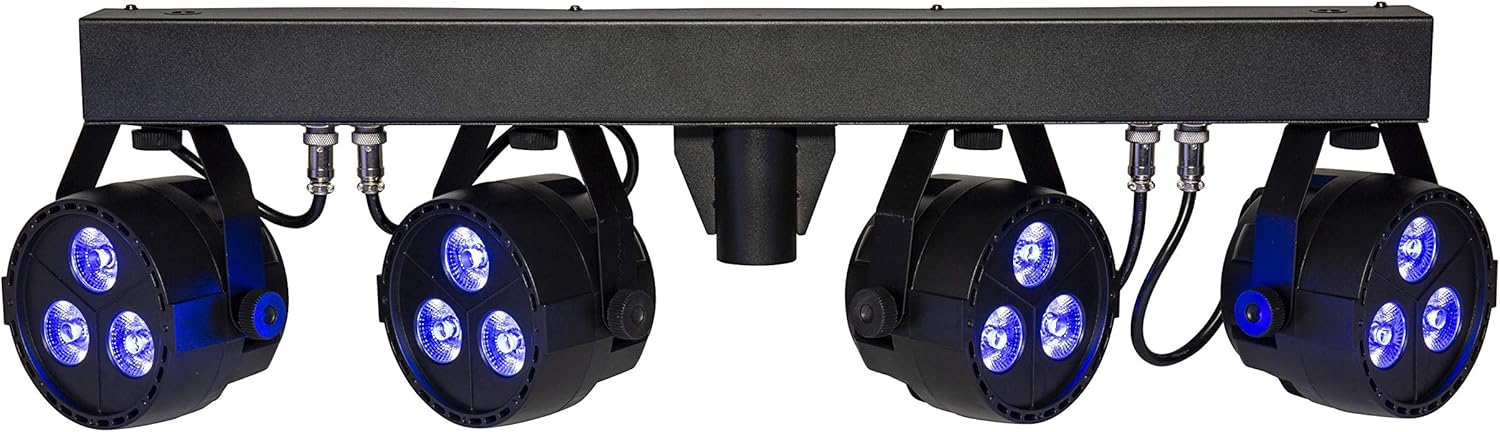
The lightmaXX CLS Nano RGBW LED Spot Set illuminating with a deep blue color.

The lightmaXX CLS Nano RGBW LED Spot Set producing a bright white light.

The lightmaXX CLS Nano RGBW LED Spot Set emitting a warm yellow light.

The lightmaXX CLS Nano RGBW LED Spot Set displaying a cool cyan light.

The lightmaXX CLS Nano RGBW LED Spot Set showcasing a rich purple illumination.

The lightmaXX CLS Nano RGBW LED Spot Set with its spotlights in an off state, showing the clear lenses.
Технічне обслуговування
прибирання
Regular cleaning helps maintain optimal performance and appearance. Disconnect the unit from power before cleaning.
- Використовуйте м’яку тканину без ворсу, щоб протерти зовнішню частину.
- For lenses, use a specialized lens cleaner and a soft cloth to avoid scratches.
- Не використовуйте абразивні засоби для чищення, розчинники або агресивні хімікати.
Зберігання
When not in use for extended periods, store the CLS Nano RGBW in its original packaging or a suitable flight case. Store in a cool, dry place away from direct sunlight and extreme temperatures.
Усунення несправностей
У цьому розділі розглядаються поширені проблеми, з якими ви можете зіткнутися. Якщо проблема не зникає, зверніться до служби підтримки клієнтів.
| проблема | Можлива причина | Рішення |
|---|---|---|
| Немає живлення | Power cable disconnected; Outlet not active; Fuse blown | Check power cable connection; Test outlet with another device; Replace fuse (if applicable and safe to do so) |
| Немає контролю DMX | Incorrect DMX address; Faulty DMX cable; DMX controller issue; Master/Slave conflict | Verify DMX address setting; Test/replace DMX cable; Check DMX controller output; Ensure correct Master/Slave configuration |
| Lights not responding in Auto/Sound mode | Incorrect mode selected; Microphone sensitivity too low (Sound mode) | Ensure correct operating mode is selected; Adjust microphone sensitivity in Sound mode |
| Пристрій перегрівається | Insufficient ventilation; Blocked cooling vents | Ensure adequate space around the unit; Clean any dust or debris from cooling vents |
Технічні характеристики
| Модель | LIG0015656-000 |
| Бренд | lightmaXX |
| Розміри (Д x Ш x В) | 88.6 х 38 х 18.8 см |
| вага | 7.13 кг |
| Тип LED | 4 x (3x 4W QCL RGBW LEDs) |
| Загальне споживання електроенергії | 48 Вт |
| Кут променя | 25° |
| Режими керування | DMX, Auto, Sound-activated, Static Color |
| особливості | Dimmable, Strobe Effect, DMX Control, Music Control, RGBW LED |
| Джерело живлення | Mains Power (IEC C14) |
| Виробник | lightmaXX |
| Країна походження | Німеччина |
| Перша доступна дата | 15 січня 2020 р |
Гарантія та підтримка
This lightmaXX product is covered by a manufacturer's warranty. For specific warranty terms and conditions, please refer to the documentation included with your purchase or contact the seller directly.
For technical support, troubleshooting assistance beyond this manual, or spare parts inquiries, please contact your authorized lightmaXX dealer or the manufacturer's customer service department. Keep your purchase receipt and model number (LIG0015656-000) ready when contacting support.