
Wavel GF-07
Wavel Ultra Mini GF-07 GPS Tracker User Manual
Модель: GF-07
1. Продукт закінчивсяview
The Wavel Ultra Mini GF-07 is a compact and lightweight GPS tracking device designed for tracking vehicles, individuals, or assets. It features a magnetic back for easy attachment and operates by inserting a working SIM card (not included) to enable real-time tracking and voice monitoring capabilities. Please note that this device primarily supports 2G GSM networks.
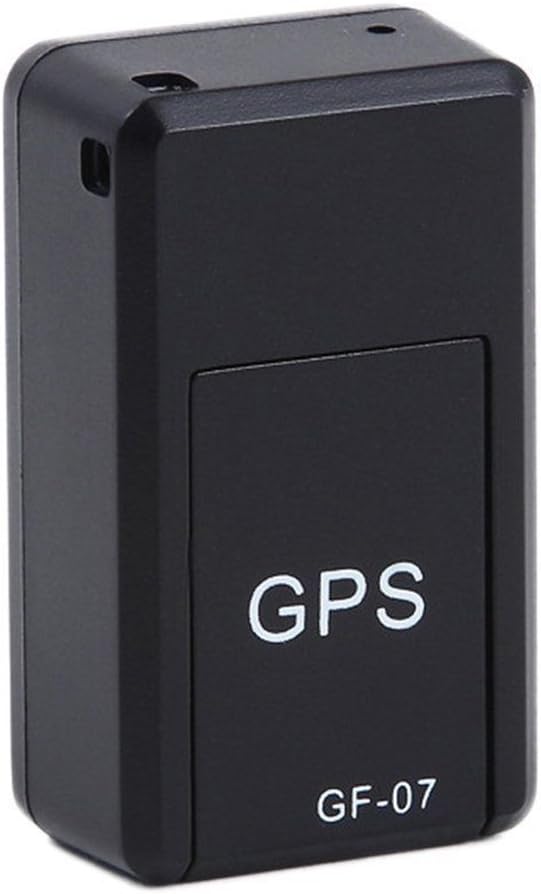
малюнок 1: Фронт view of the Wavel GF-07 GPS tracker, showing the 'GPS' and 'GF-07' labels.
Ключові характеристики:
- Компактний дизайн: Small size (approximately 42x25x20mm) and lightweight for discreet placement.
- Магнітне кріплення: Equipped with powerful magnets for secure installation on metallic surfaces.
- Відстеження в реальному часі: Utilizes a SIM card (not included) for location tracking via Google Maps over the internet.
- Voice Monitoring: Dialing the SIM card number allows for silent audio monitoring around the device.
- Запис голосу: Supports voice recording by sending a specific SMS command. Requires a TF card (not included).
- Тривалий режим очікування: Features a 3.7V 300mA lithium battery with approximately 100 hours of standby time.
2. Вміст упаковки
Переконайтеся, що всі предмети присутні в упаковці:
- 1 x Wavel Ultra Mini GF-07 GPS Tracker
- 1 x USB-кабель для зарядки
- 1 x Посібник користувача (цей документ)
Note: A working 2G GSM SIM card and a TF (microSD) card are required for full functionality and are NOT included.
3. Посібник із налаштування
3.1. Inserting SIM Card and TF Card
- Locate the SIM card slot and TF card slot on the device. These are typically found by sliding open a cover or removing a small panel.
- Insert a working SIM-картка 2G GSM into the SIM card slot. Ensure the SIM card is active and has sufficient balance for calls and SMS. (Important: This device primarily supports 2G GSM networks. Compatibility with 3G/4G/5G networks for data transmission may vary or be limited, and 2G networks are being phased out in some regions.)
- Insert a TF (microSD) card into the TF card slot for voice recording functionality.
- Надійно закрийте кришку.

малюнок 2: View of the GF-07 tracker with the cover removed, showing the SIM card and TF card slots.
3.2. Зарядка пристрою
Перед першим використанням повністю зарядіть пристрій.
- Connect the provided USB cable to the charging port on the GF-07 tracker.
- Connect the other end of the USB cable to a standard USB power adapter (e.g., phone charger, computer USB port).
- The device will indicate charging status (e.g., an indicator light). Charge until the light indicates full charge or turns off.

малюнок 3: сторона view of the GF-07 tracker, highlighting the micro USB charging port.
4. Інструкція з експлуатації
4.1. Увімкнення/вимкнення живлення
The device typically powers on automatically when a SIM card is inserted and it has power. There is no explicit power button.
- Увімкнення: Insert a charged battery and a SIM card. The device should power on automatically.
- Вимкнення живлення: Remove the SIM card and/or disconnect the battery.
4.2. Real-time Tracking (Google Maps)
To track the device's location:
- Ensure the SIM card in the device has an active data plan.
- From your mobile phone, send a specific SMS command to the SIM card number in the GF-07 tracker. The manual states "track and map (with Google Maps) in real-time over the Internet" but doesn't specify the SMS command for this. (Common commands for similar devices might be "URL" or "GPS", but refer to the original small manual for exact command if available. If not, this functionality might be app-based or require a specific platform.)
- The device should reply with a Google Maps link showing its current location. Click the link to view the location on Google Maps.
4.3. Voice Monitoring
To listen to the surroundings of the device:
- Dial the phone number of the SIM card inserted into the GF-07 tracker from your mobile phone.
- The device will automatically answer the call silently, allowing you to hear sounds around it. There will be no light or noise from the tracker during this process.
4.4. Функція запису голосу
To initiate voice recording:
- Ensure a TF (microSD) card is properly inserted into the device.
- Send the text message "555" to the SIM card number in the GF-07 tracker.
- The device will reply with a message "Snd" to confirm that recording has started.
- Recordings will be saved to the TF card. To stop recording, send "666" (common for similar devices, not specified in input, but logical). To retrieve recordings, you would typically need to remove the TF card and access it via a computer.
5. Технічне обслуговування та догляд
- Прибирання: Протирайте пристрій м’якою сухою тканиною. Не використовуйте рідкі засоби для чищення або аерозолі.
- температура: Уникайте впливу екстремальних температур (високих або низьких).
- Вплив води: Пристрій не є водонепроникним. Тримайте його подалі від води та високої вологості.
- Зберігання: Якщо акумулятор зберігатиметься протягом тривалого часу, переконайтеся, що він частково заряджений (близько 50%), і зберігайте його в прохолодному сухому місці.
- Термін служби батареї: Battery working time is approximately 100 hours on standby. Actual usage time will vary based on tracking frequency and network conditions.
6. Вирішення проблем
| проблема | Можлива причина | Рішення |
|---|---|---|
| Пристрій не включається. | Low battery; SIM card not inserted correctly; faulty device. | Charge the device fully. Re-insert the SIM card. If problem persists, contact support. |
| Cannot get location reply. | No network signal; SIM card has no data/balance; incorrect SMS command; device not powered on. | Check network coverage. Ensure SIM card is active and has data. Verify SMS command. Confirm device is powered on. |
| Voice monitoring not working. | SIM card has no call balance; device out of range; SIM card not inserted correctly. | Check SIM card balance. Ensure device is in an area with network coverage. Re-insert SIM card. |
| Запис голосу не працює. | TF card not inserted; TF card full; incorrect SMS command. | Insert a TF card. Check TF card storage. Verify SMS command "555". |
| Пристрій не заряджається. | Faulty cable/adapter; charging port damage. | Try a different USB cable and adapter. Inspect charging port for damage. |
| Inaccurate GPS location. | Weak GPS signal (indoors, dense areas); environmental interference. | Перемістіть пристрій на відкрите місце з ясним небом view. GPS accuracy is approximately 100m. |
7. Технічні характеристики
| Особливість | Деталь |
|---|---|
| Модель | GF-07 |
| Колір | чорний |
| Розміри (Д x Ш x В) | Приблизно 42 мм x 25 мм x 20 мм |
| матеріал | ABS (акрилонітрилбутадієнстирол) |
| Тип антени | GSM |
| Точність позиціонування GPS | Приблизно 100м |
| Акумулятор | Літієва батарея 3.7 В 300 мА |
| Battery Working Time (Standby) | Приблизно 100 годин |
| Підтримувані карти | SIM Card (2G GSM), TF (microSD) Card |
| Технологія підключення | Стільниковий |
| Особливість | Магнітне кріплення |

малюнок 4: Dimensions of the GF-07 tracker: 42mm length, 25mm width, 20mm height.
Ask a question about this manual
Ask about setup, troubleshooting, compatibility, parts, safety, or missing instructions. Manuals+ will review the question and use this page’s manual context to help answer it.